

 基础编程
基础编程

php中实现搜索框
 墨衍会员 · AI 创作全网分发 墨衍智能分发 通过墨衍一键同步至各平台 可同步平台 CSDN微信公众号微博知乎掘金百家号博客园抖音小红书 你的文章也可以这样分发 墨衍会员 ¥399起/年,写一次发全网
我也要 关注 + 加入社区
墨衍会员 · AI 创作全网分发 墨衍智能分发 通过墨衍一键同步至各平台 可同步平台 CSDN微信公众号微博知乎掘金百家号博客园抖音小红书 你的文章也可以这样分发 墨衍会员 ¥399起/年,写一次发全网
我也要 关注 + 加入社区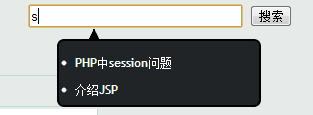
怎样才能更具搜索框中的关键字在第二个页面显示搜索结果呢?
我的代码如下:
这是html的代码:
 <form method="post" action="result.php" class="search">

<input type="text" size="30"  id="inputString" onkeyup="lookup(this.value);" onblur="fill();" />

<input type="submit" value="搜索" id="send" />

<div class="suggestionsBox" id="suggestions" style="display: none;">

				<img src="../images/upArrow.png" style="position: relative; top: -12px; left: 30px;" alt="upArrow" />

				<div class="suggestionList" id="autoSuggestionsList">


				</div>

</form>

<scripit>

function lookup(inputString) {

		if(inputString.length == 0) {

			// Hide the suggestion box.

			$('#suggestions').hide();

		} else {

			$.post("rpc.php", {queryString: ""+inputString+""}, function(data){

				if(data.length >0) {

					$('#suggestions').show();

					$('#autoSuggestionsList').html(data);

				}

			});

		}

	} // lookup


	function fill(thisValue) {

		$('#inputString').val(thisValue);

		setTimeout("$('#suggestions').hide();", 200);

	}

</script>
这是rpc.php的文件:
<?php

require_once 'db_fns.php';

header("Content-type: text/html; charset=gb2312");

$db = db_connect();

if(!$db) {

	// Show error if we cannot connect.

	echo 'ERROR: Could not connect to the database.';

} else {

	// Is there a posted query string?

	if(isset($_POST['queryString'])) {

		$queryString = $db->real_escape_string($_POST['queryString']);


		// Is the string length greater than 0?


		if(strlen($queryString) >0) {

			// Run the query: We use LIKE '$queryString%'

			// The percentage sign is a wild-card, in my example of countries it works like this...

			// $queryString = 'Uni';

			// Returned data = 'United States, United Kindom';


			// YOU NEED TO ALTER THE QUERY TO MATCH YOUR DATABASE.

			// eg: SELECT yourColumnName FROM yourTable WHERE yourColumnName LIKE '$queryString%' LIMIT 10


			$query = $db->query("SELECT * FROM bbstopic WHERE title LIKE '%$queryString%' LIMIT 10");

			if($query) {

				// While there are results loop through them - fetching an Object (i like PHP5 btw!).

				while ($result = $query ->fetch_object()) {

					// Format the results, im using <li> for the list, you can change it.

					// The onClick function fills the textbox with the result.


					// YOU MUST CHANGE: $result->value to $result->your_colum

					echo '<li onClick="fill(\''.$result->title.'\');">'.$result->title.'</li>';

				}

			} else {

				echo 'ERROR: There was a problem with the query.';

			}

		} else {

			// Dont do anything.

		} // There is a queryString.

	} else {

		echo 'There should be no direct access to this script!';

	}

}

?>
相关推荐
jquery+php实现搜索框自动提示
今天突然想给本站做个搜索页面,这样用户可以通过搜索来找到自己喜欢的内容,也避免了在海量信息中手动查找资源的麻烦,我的目标和百度首页的效果类似,当用户输入要搜索的文字时,我们在下方给出相关的十条信息,如果用户要找的就是这十条信息内的某一条,那么简单,直接点击就可在新页面中打开页面,主要就是想更人性化一点,让用户使用起来更方便。 先看一下效果图吧,这样更有动力,要不然大家还不知道我在讲什么,到底要达到什么样的效果! jquery+php实现搜索框自动提示 下面先主要讲解原理: 在search.html页面中,用户在搜索框内输入“j”时,使用javascript获取搜索框的文本内容,到数据库中查找相
PHP实现搜索框的自动反查提示
PHP关于MySQL反查搜索框显示提示,并实现搜索信息提示框
php实现按天数、星期、月份查询的搜索框
本文实例为大家分享了php实现按天数、星期、月份查询的搜索框,搜索时候展示数据的统计图,主要展示图形的效果,供大家参考,具体内容如下 1.ajax.php <?php $year = $_GET['y']; if(!isset($_GET['m'])){ $month=1; }else{ $month = $_GET['m']; } $week_arr = getMonthWeekArr($year, $month); echo json_encode($week_arr); die; /**
php 搜索框提示(自动完成)实例代码
百度的搜索大家都在用,当用户输入文字时,搜索框下面自动提示相关的信息,加强了用户体验,的确不错,那么这个效果是如何实现的呢 先看一下效果图吧,这样更有动力,要不然大家还不知道我在讲什么,到底要达到什么样的效果! 下面先主要讲解原理: 在search.html页面中,用户在搜索框内输入“j”时,使用javascript获取搜索框的文本内容,到数据库中查找相关的内容并返回,再使用javascript将服务器返回的结果显示在搜索框下面的提示框内,供用户参考选择。 具体的实现方法: 首先在页面中做好搜索框、搜索按钮、显示搜索提示的层,如下代码 <div id=”search”><in
ajax+php 谷歌搜索框自动填充功能 实例代码
应用Ajax技术 结合php语言写的简单的类谷歌搜索框自动填充功能。




