

 .NET社区

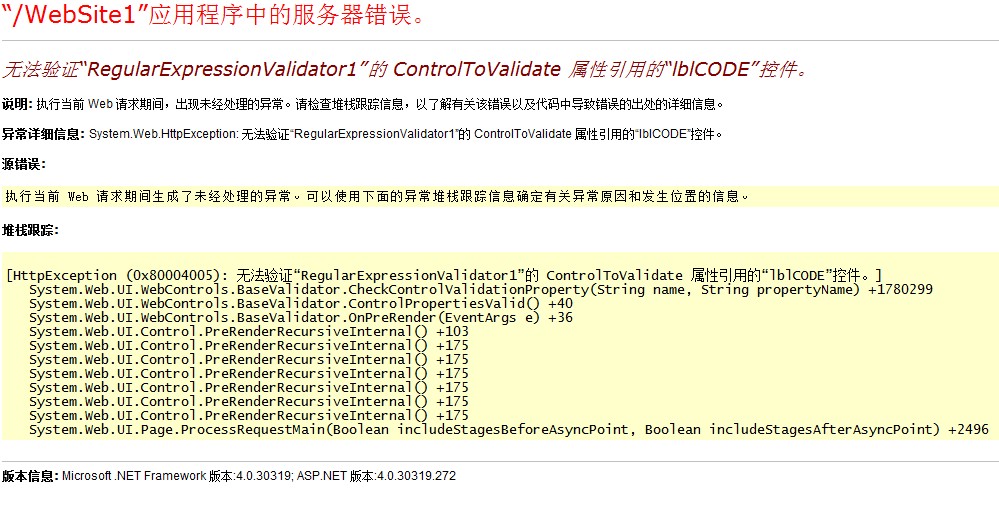
动态创建模板,验证数据问题,请问如何解决,谢谢!
 墨衍会员 · AI 创作全网分发 墨衍智能分发 通过墨衍一键同步至各平台 可同步平台 CSDN微信公众号微博知乎掘金百家号博客园抖音小红书 你的文章也可以这样分发 墨衍会员 ¥399起/年,写一次发全网
我也要 关注 + 加入社区
墨衍会员 · AI 创作全网分发 墨衍智能分发 通过墨衍一键同步至各平台 可同步平台 CSDN微信公众号微博知乎掘金百家号博客园抖音小红书 你的文章也可以这样分发 墨衍会员 ¥399起/年,写一次发全网
我也要 关注 + 加入社区页面:
<%@ Page Language="C#" AutoEventWireup="true" CodeFile="Default.aspx.cs" Inherits="_Default" %>
<!DOCTYPE html PUBLIC "-//W3C//DTD XHTML 1.0 Transitional//EN" "http://www.w3.org/TR/xhtml1/DTD/xhtml1-transitional.dtd">
<html xmlns="http://www.w3.org/1999/xhtml">
<head runat="server">
<title></title>
</head>
<body>
<form id="form1" runat="server">
<div>
<asp:GridView ID="GridView1" runat="server" AutoGenerateColumns="False"
onrowdatabound="GridView1_RowDataBound">
</asp:GridView>
</div>
</form>
</body>
</html>
代码:
public partial class _Default : System.Web.UI.Page
{
private DataTable getDateTable()
{
DataTable dt = new DataTable();
dt.Columns.Add(new DataColumn("CODE", typeof(Int32)));
dt.Columns.Add(new DataColumn("NAME", typeof(String)));
DataRow dr = dt.NewRow();
dr[0] = 1;
dr[1] = "01";
dt.Rows.Add(dr);
return dt;
}
protected override void OnInit(EventArgs e)
{
TemplateField customField = new TemplateField();
customField.ShowHeader = true;
customField.HeaderTemplate = new GridViewTemplate(DataControlRowType.Header, "CODE");
GridViewTemplate gvt = new GridViewTemplate(DataControlRowType.DataRow, "lblCODE", "CODE");
customField.ItemTemplate = gvt;
GridView1.Columns.Add(customField);
base.OnInit(e);
}
protected void Page_Load(object sender, EventArgs e)
{
if (!IsPostBack)
{
GridView1.DataSource = getDateTable();
GridView1.DataBind();
}
}
protected void GridView1_RowDataBound(object sender, GridViewRowEventArgs e)
{
if (e.Row.RowType == DataControlRowType.DataRow)
{
//Label tb = (Label)e.Row.FindControl("lblCODE");
RegularExpressionValidator regexpvalidator = new RegularExpressionValidator();
regexpvalidator.ID = "RegularExpressionValidator1";
regexpvalidator.ValidationExpression = "\\w+([-+.']\\w+)*@\\w+([-.]\\w+)*\\.\\w+([-.]\\w+)*";
regexpvalidator.ControlToValidate = "lblCODE";
regexpvalidator.ErrorMessage = "Invalid Email Id";
regexpvalidator.SetFocusOnError = true;
e.Row.Cells[0].Controls.Add(regexpvalidator);
}
}
}
public class GridViewTemplate : ITemplate
{
private DataControlRowType templateType;
private string columnName;
private string ID;
public GridViewTemplate(DataControlRowType type, string colname)
{
templateType = type;
columnName = colname;
}
public GridViewTemplate(DataControlRowType type, string controlID, string colname)
{
templateType = type;
ID = controlID;
columnName = colname;
}
public void InstantiateIn(System.Web.UI.Control container)
{
switch (templateType)
{
case DataControlRowType.Header:
Literal lc = new Literal();
lc.Text = columnName;
container.Controls.Add(lc);
break;
case DataControlRowType.DataRow:
Label lbl = new Label();
lbl.ID = ID;
lbl.DataBinding += new System.EventHandler(TextBox_DataBinding);
container.Controls.Add(lbl);
break;
default:
break;
}
}
private void TextBox_DataBinding(object sender, EventArgs e)
{
Label lbl = sender as Label;
if (lbl != null)
{
GridViewRow container = lbl.NamingContainer as GridViewRow;
if (container != null)
{
object dataValue = DataBinder.Eval(container.DataItem, columnName);
if (dataValue != DBNull.Value)
{
lbl.Text = dataValue.ToString();
}
}
}
}
}
<%@ Page Language="C#" AutoEventWireup="true" CodeFile="Default.aspx.cs" Inherits="_Default" %>
<!DOCTYPE html PUBLIC "-//W3C//DTD XHTML 1.0 Transitional//EN" "http://www.w3.org/TR/xhtml1/DTD/xhtml1-transitional.dtd">
<html xmlns="http://www.w3.org/1999/xhtml">
<head runat="server">
<title></title>
</head>
<body>
<form id="form1" runat="server">
<div>
<asp:GridView ID="GridView1" runat="server" AutoGenerateColumns="False"
onrowdatabound="GridView1_RowDataBound">
</asp:GridView>
</div>
</form>
</body>
</html>
代码:
public partial class _Default : System.Web.UI.Page
{
private DataTable getDateTable()
{
DataTable dt = new DataTable();
dt.Columns.Add(new DataColumn("CODE", typeof(Int32)));
dt.Columns.Add(new DataColumn("NAME", typeof(String)));
DataRow dr = dt.NewRow();
dr[0] = 1;
dr[1] = "01";
dt.Rows.Add(dr);
return dt;
}
protected override void OnInit(EventArgs e)
{
TemplateField customField = new TemplateField();
customField.ShowHeader = true;
customField.HeaderTemplate = new GridViewTemplate(DataControlRowType.Header, "CODE");
GridViewTemplate gvt = new GridViewTemplate(DataControlRowType.DataRow, "lblCODE", "CODE");
customField.ItemTemplate = gvt;
GridView1.Columns.Add(customField);
base.OnInit(e);
}
protected void Page_Load(object sender, EventArgs e)
{
if (!IsPostBack)
{
GridView1.DataSource = getDateTable();
GridView1.DataBind();
}
}
protected void GridView1_RowDataBound(object sender, GridViewRowEventArgs e)
{
if (e.Row.RowType == DataControlRowType.DataRow)
{
//Label tb = (Label)e.Row.FindControl("lblCODE");
RegularExpressionValidator regexpvalidator = new RegularExpressionValidator();
regexpvalidator.ID = "RegularExpressionValidator1";
regexpvalidator.ValidationExpression = "\\w+([-+.']\\w+)*@\\w+([-.]\\w+)*\\.\\w+([-.]\\w+)*";
regexpvalidator.ControlToValidate = "lblCODE";
regexpvalidator.ErrorMessage = "Invalid Email Id";
regexpvalidator.SetFocusOnError = true;
e.Row.Cells[0].Controls.Add(regexpvalidator);
}
}
}
public class GridViewTemplate : ITemplate
{
private DataControlRowType templateType;
private string columnName;
private string ID;
public GridViewTemplate(DataControlRowType type, string colname)
{
templateType = type;
columnName = colname;
}
public GridViewTemplate(DataControlRowType type, string controlID, string colname)
{
templateType = type;
ID = controlID;
columnName = colname;
}
public void InstantiateIn(System.Web.UI.Control container)
{
switch (templateType)
{
case DataControlRowType.Header:
Literal lc = new Literal();
lc.Text = columnName;
container.Controls.Add(lc);
break;
case DataControlRowType.DataRow:
Label lbl = new Label();
lbl.ID = ID;
lbl.DataBinding += new System.EventHandler(TextBox_DataBinding);
container.Controls.Add(lbl);
break;
default:
break;
}
}
private void TextBox_DataBinding(object sender, EventArgs e)
{
Label lbl = sender as Label;
if (lbl != null)
{
GridViewRow container = lbl.NamingContainer as GridViewRow;
if (container != null)
{
object dataValue = DataBinder.Eval(container.DataItem, columnName);
if (dataValue != DBNull.Value)
{
lbl.Text = dataValue.ToString();
}
}
}
}
}
...全文
相关推荐
解决vue+ element ui 表单验证有值但验证失败问题
主要介绍了vue+ element ui 表单验证有值但验证失败,本文通过实例代码给大家分享解决方案,非常不错,具有一定的参考借鉴价值,需要的朋友可以参考下
掌握Angular表单管理:动态创建与自定义验证
本文深入探讨了Angular响应式表单API的高级使用,包括如何动态创建表单组件、验证动态表单控件以及创建自定义验证器。文章通过代码示例和详细解释,展示了Angular表单API在实际开发中的强大功能和灵活性。
✈️ 动态创建 JavaScript 函数
在这篇博客中,我将尝试向您解释一些非常酷的事情。不仅仅是静态编写函数,而是在函数构造函数的帮助下动态创建函数。
解决OFFICE文件模板错误问题
对办公软件出现的安全模板问题 用以下方法 选择“文件夹选项,打开隐藏文件
解决layui的form里的元素进行动态生成,验证失效的问题
今天小编就为大家分享一篇解决layui的form里的元素进行动态生成,验证失效的问题,具有很好的参考价值,希望对大家有所帮助。一起跟随小编过来看看吧




