社区
VFP
帖子详情
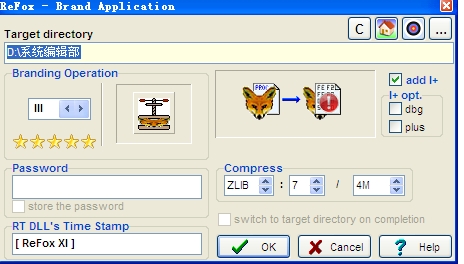
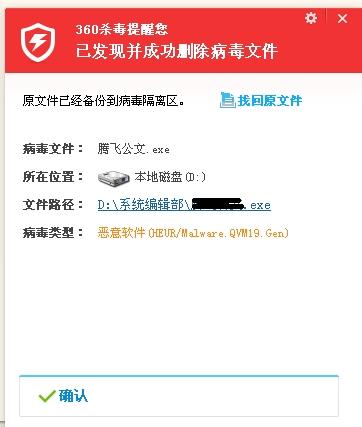
用ReFox XI+压缩exe存储时有时提示是病毒文件,是怎么回事?
发现代码
2013-09-23 05:55:47
用ReFox XI+压缩exe存储时有时提示是病毒文件,是怎么回事?
...全文
251
4
打赏
收藏
用ReFox XI+压缩exe存储时有时提示是病毒文件,是怎么回事?
用ReFox XI+压缩exe存储时有时提示是病毒文件,是怎么回事?
复制链接
扫一扫
分享
转发到动态
举报
写回复
配置赞助广告
用AI写文章
4 条
回复
切换为时间正序
请发表友善的回复…
发表回复
打赏红包
十豆三
2013-09-24
打赏
举报
回复
没有病毒,是误报。 一般加密、解密、破解等用到的技术,对杀毒软件来说都是敏感的。
tlliqi
2013-09-23
打赏
举报
回复
应该是没毒。。。
发现代码
2013-09-23
打赏
举报
回复
发现代码
2013-09-23
打赏
举报
回复
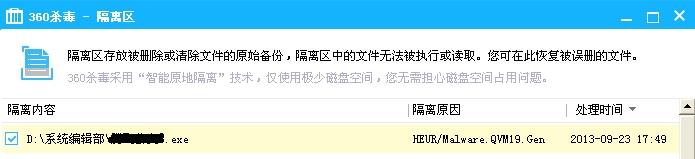
恢复被隔离的压缩exe文件后,用360扫描却没发现问题。
ReF
ox
XI
+ With Crack
ReF
ox
XI
+ 為 Windows Vista的版本,發佈于 2007.05.22 支持 Visual F
ox
Pro 6、7、8、9版本的
EXE
、 DLL、 COM Servers(無論是
exe
形式,還是dll形式)的反編譯
ReF
ox
.
XI
.Plus.v11.54.2008.522 VFP反编工具
非常好用的VFP6、7、8、9反编工具,是英文的,但非常好用,带注册机和中文注册说明(他自己修改的,请多指教哦) 之前下载后评论
时
,提到的安装
文件
和新生成的副本的事,没表述清楚,说反了,这里重新说明一下:要执行的安装
文件
名是
ReF
ox
.set.
exe
,第二次重新安装
时
还是执行
ReF
ox
.set.
exe
。(第一遍执行后会生成的副本,其实就是安装好后的主程序
文件
啦,只是图标一样,
文件
名相似呀。)
ReF
ox
使用说明及安装包
ReF
ox
使用说明及安装包,对于无法查看代码
时
需要进行反编译的工具
ReF
ox
.
XI
I.Plus
ref
ox
.
xi
是一个非常好用的f
ox
pro加密和反编译工具。此版本为最新版本
rdf
ox
-
xi
反编译vfp9
ReF
ox
XI
+ for VFP9 and all older versions ComPro (CZ) Jan Brebera info@
ref
ox
.net jan.brebera@email.cz Seven steps to install
ReF
ox
XI
+ 1. download
ReF
ox
XI
+ files •
ReF
ox
_INST - download and save the .zip archive to your local disk - do not unpack it directly from the browser 2. create new folder for
ReF
ox
(e.g. "C:\
ReF
ox
XI
+") and unpack the archive. Attention: Some zip-extractors (incl. the WinXP internal one) do not set the time of created file correctly and running
ReF
ox
.
exe
fails with error message: xxxxxxxx – Program violation In this case please use another extractor e.g. WinZip, pkunzip or Total Commander internal unzip 3. run
ReF
ox
.setup.
exe
to install
ReF
ox
4. fill out your details in the form fill out the field 'Serial Number' do not change the fields 'Activation Key', modify the fields 'User name' and 'Company' if necessary after clicking 'OK'
ReF
ox
prepares data for generating the full activation key: created data sample: see
ReF
ox
.~~~ and
ReF
ox
~~~.zip files in your
ReF
ox
folder 5. send the data for generating activation key please create and send the e-mail message now (this version can send the data automatically) copy the text of
ReF
ox
.~~~ to the e-mail message body and the file
ReF
ox
~~~.zip send as an attachement 6. wait for sending the activation key back this can take several hours depending on daytime 7. copy the new activation key to
ReF
ox
folder and run
ReF
ox
.
exe
again Copyright © 1992-2007 by Jan Brebera, ComPro (CZ)
ReF
ox
is a property of its author - Jan Brebera Jan Brebera is holder of all rights regarding
ReF
ox
VFP
2,749
社区成员
29,142
社区内容
发帖
与我相关
我的任务
VFP
VFP,是Microsoft公司推出的数据库开发软件,用它来开发数据库,既简单又方便。
复制链接
扫一扫
分享
社区描述
VFP,是Microsoft公司推出的数据库开发软件,用它来开发数据库,既简单又方便。
社区管理员
加入社区
获取链接或二维码
近7日
近30日
至今
加载中
查看更多榜单
社区公告
暂无公告
试试用AI创作助手写篇文章吧
+ 用AI写文章






 发帖
发帖 与我相关
与我相关 我的任务
我的任务
 分享
分享