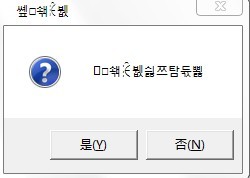
MessageBox窗口乱码

一粒米_2013 2013-10-17 12:02:24
运行环境VS2010
代码:
#include<windows.h>
int main()
{
MessageBox(NULL,(LPCWSTR)"你想在全屏模式下运行么?", (LPCWSTR)"设置全屏模式",MB_YESNO|MB_ICONQUESTION);
return 0;
}

为什么生成的窗口出现乱码?

...全文
2748 10 打赏 收藏 转发到动态 举报
写回复
用AI写文章
10 条回复
切换为时间正序
请发表友善的回复…
发表回复
Devin_la 2016-01-18
  • 打赏
  • 举报
回复
MessageBox()分两个版本:MessageBoxA() 和 MessageBoxW() 版本。如果使用 char,那么应该用MessageBoxA();如果用 WCHAR,那么用MessageBoxW();如果用模板TCHAR,那么MessageBox()。
Devin_la 2016-01-18
  • 打赏
  • 举报
回复
MessageBoxA(NULL,str,str1,MB_OK);
SKATE11 2013-10-17
  • 打赏
  • 举报
回复
引用 1 楼 onlyhuiyi 的回复:
个人觉得是否是unicode环境下的原因
++
davidyu720 2013-10-17
  • 打赏
  • 举报
回复
从 MessageBox(NULL,(LPCWSTR)... 编译不报错,推论工程语言选项应该是UNICODE。 你的工程语言设置成了UNICODE吗?
onlyhuiyi 2013-10-17
  • 打赏
  • 举报
回复
个人觉得是否是unicode环境下的原因
davidyu720 2013-10-17
  • 打赏
  • 举报
回复
引用 7 楼 u012142200 的回复:
问题解决了~~ 用(LPCWSTR)L就可以 谢谢大家
别用(LPCWSTR)L 用 _T or _TEXT
一粒米_2013 2013-10-17
  • 打赏
  • 举报
回复
问题解决了~~ 用(LPCWSTR)L就可以 谢谢大家
赵4老师 2013-10-17
  • 打赏
  • 举报
回复
#include <windows.h>
#include <tchar.h>
int main()
{
    MessageBox(NULL,_T("你想在全屏模式下运行么?"), _T("设置全屏模式"),MB_YESNO|MB_ICONQUESTION);
    return 0;
}
如果还是不对,参考下面: MessageBoxEx The MessageBoxEx function creates, displays, and operates a message box. The message box contains an application-defined message and title, plus any combination of predefined icons and push buttons. The wLanguageId parameter specifies which set of language resources is used for the predefined push buttons. For full descriptions of the other parameters of MessageBoxEx, see MessageBox. int MessageBoxEx( HWND hWnd, // handle of owner window LPCTSTR lpText, // address of text in message box LPCTSTR lpCaption, // address of title of message box UINT uType, // style of message box WORD wLanguageId // language identifier ); Parameters hWnd Identifies the owner window of the message box to be created. If this parameter is NULL, the message box has no owner window. lpCaption Pointer to a null-terminated string containing the message to be displayed. lpszTitle Pointer to a null-terminated string used for the dialog box title. If this parameter is NULL, the default title Error is used. uType Specifies a set of bit flags that determine the contents and behavior of the dialog box. This parameter can be a combination of flags from the following groups of flags. Specify one of the following flags to indicate the buttons contained in the message box: Flag Meaning MB_ABORTRETRYIGNORE The message box contains three push buttons: Abort, Retry, and Ignore. MB_OK The message box contains one push button: OK. This is the default. MB_OKCANCEL The message box contains two push buttons: OK and Cancel. MB_RETRYCANCEL The message box contains two push buttons: Retry and Cancel. MB_YESNO The message box contains two push buttons: Yes and No. MB_YESNOCANCEL The message box contains three push buttons: Yes, No, and Cancel. Specify one of the following flags to display an icon in the message box: Flag Meaning MB_ICONEXCLAMATION, MB_ICONWARNING An exclamation-point icon appears in the message box. MB_ICONINFORMATION, MB_ICONASTERISK An icon consisting of a lowercase letter i in a circle appears in the message box. MB_ICONQUESTION A question-mark icon appears in the message box. MB_ICONSTOP, MB_ICONERROR, MB_ICONHAND A stop-sign icon appears in the message box. Specify one of the following flags to indicate the default button: Flag Meaning MB_DEFBUTTON1 The first button is the default button. MB_DEFBUTTON1 is the default unless MB_DEFBUTTON2, MB_DEFBUTTON3, or MB_DEFBUTTON4 is specified. MB_DEFBUTTON2 The second button is the default button. MB_DEFBUTTON3 The third button is the default button. MB_DEFBUTTON4 The fourth button is the default button. Specify one of the following flags to indicate the modality of the dialog box: Flag Meaning MB_APPLMODAL The user must respond to the message box before continuing work in the window identified by the hWnd parameter. However, the user can move to the windows of other threads and work in those windows. Depending on the hierarchy of windows in the application, the user may be able to move to other windows within the thread. All child windows of the parent of the message box are automatically disabled, but popup windows are not. MB_APPLMODAL is the default if neither MB_SYSTEMMODAL nor MB_TASKMODAL is specified. MB_SYSTEMMODAL Same as MB_APPLMODAL except that the message box has the WS_EX_TOPMOST style. Use system-modal message boxes to notify the user of serious, potentially damaging errors that require immediate attention (for example, running out of memory). This flag has no effect on the user's ability to interact with windows other than those associated with hWnd. MB_TASKMODAL Same as MB_APPLMODAL except that all the top-level windows belonging to the current thread are disabled if the hWnd parameter is NULL. Use this flag when the calling application or library does not have a window handle available but still needs to prevent input to other windows in the calling thread without suspending other threads. In addition, you can specify the following flags: MB_DEFAULT_DESKTOP_ONLY The desktop currently receiving input must be a default desktop; otherwise, the function fails. A default desktop is one an application runs on after the user has logged on. MB_HELP Adds a Help button to the message box. Choosing the Help button or pressing F1 generates a Help event. MB_RIGHT The text is right-justified. MB_RTLREADING Displays message and caption text using right-to-left reading order on Hebrew and Arabic systems. MB_SETFOREGROUND The message box becomes the foreground window. Internally, the system calls the SetForegroundWindow function for the message box. MB_TOPMOST The message box is created with the WS_EX_TOPMOST window style. MB_SERVICE_NOTIFICATION Windows NT: The caller is a service notifying the user of an event. The function displays a message box on the current active desktop, even if there is no user logged on to the computer. If this flag is set, the hWnd parameter must be NULL. This is so the message box can appear on a desktop other than the desktop corresponding to the hWnd. For Windows NT version 4.0, the value of MB_SERVICE_NOTIFICATION has changed. See WINUSER.H for the old and new values. Windows NT 4.0 provides backward compatibility for pre-existing services by mapping the old value to the new value in the implementation of MessageBox and MessageBoxEx. This mapping is only done for executables that have a version number, as set by the linker, less than 4.0. To build a service that uses MB_SERVICE_NOTIFICATION, and can run on both Windows NT 3.x and Windows NT 4.0, you have two choices. At link-time, specify a version number less than 4.0; or 2. At link-time, specify version 4.0. At run-time, use the GetVersionEx function to check the system version. Then when running on Windows NT 3.x, use MB_SERVICE_NOTIFICATION_NT3X; and on Windows NT 4.0, use MB_SERVICE_NOTIFICATION. MB_SERVICE_NOTIFICATION_NT3X Windows NT: This value corresponds to the value defined for MB_SERVICE_NOTIFICATION for Windows NT version 3.51. wLanguageId Specifies the language in which to display the text contained in the predefined push buttons. This value must be in the form returned by theMAKELANGID macro. For a list of the language identifiers supported by Win32, seeLanguage Identifiers. Note that each localized release of Windows and Windows NT typically contains resources only for a limited set of languages. Thus, for example, the U.S. version offers LANG_ENGLISH, the French version offers LANG_FRENCH, the German version offers LANG_GERMAN, and the Japanese version offers LANG_JAPANESE. Each version offers LANG_NEUTRAL. This limits the set of values that can be used with the wLanguageId parameter. Before specifying a language identifier, you should enumerate the locales that are installed on a system. Return Values If the function succeeds, the return value is a nonzero menu-item value returned by the dialog box. Value Meaning IDABORT Abort button was selected. IDCANCEL Cancel button was selected. IDIGNORE Ignore button was selected. IDNO No button was selected. IDOK OK button was selected. IDRETRY Retry button was selected. IDYES Yes button was selected. If a message box has a Cancel button, the function returns the IDCANCEL value when either the esc key or Cancel button is pressed. If the message box has no Cancel button, pressing the esc key has no effect. If the function fails, the return value is zero. To get extended error information, callGetLastError. Remarks When you create a system-modal message box to indicate that the system is low on memory, the strings passed as the lpText and lpCaption parameters should not be taken from a resource file, because an attempt to load the resource may fail. When an application calls the MessageBoxEx function and specifies the MB_ICONHAND and MB_SYSTEMMODAL flags for the uType parameter, the Win32 API displays the resulting message box regardless of available memory. When you specify these flags, the system limits the length of the message-box text to one line. If you create a message box while a dialog box is present, use the handle of the dialog box as the hWnd parameter. The hWnd parameter should not identify a child window, such as a dialog box. Windows 95: The system can support a maximum of 16,364 window handles. QuickInfo Windows NT: Requires version 3.1 or later. Windows: Requires Windows 95 or later. Windows CE: Unsupported. Header: Declared in winuser.h. Import Library: Use user32.lib. Unicode: Implemented as Unicode and ANSI versions on Windows and Windows NT. See Also Dialog Boxes Overview, Dialog Box Functions,MAKELANGID,MessageBeep, MessageBox, MessageBoxIndirect, SetForegroundWindow
baichi4141 2013-10-17
  • 打赏
  • 举报
回复
(LPCWSTR)"你想在全屏模式下运行么?" 改成 _T( "你想在全屏模式下运行么?" )
穿跑鞋不跑步 2013-10-17
  • 打赏
  • 举报
回复
项目->属性->配置属性->字符集

65,210

社区成员

发帖
与我相关
我的任务
社区描述
C++ 语言相关问题讨论,技术干货分享,前沿动态等
c++ 技术论坛(原bbs)
社区管理员
  • C++ 语言社区
  • encoderlee
  • paschen
加入社区
  • 近7日
  • 近30日
  • 至今
社区公告
  1. 请不要发布与C++技术无关的贴子
  2. 请不要发布与技术无关的招聘、广告的帖子
  3. 请尽可能的描述清楚你的问题,如果涉及到代码请尽可能的格式化一下

试试用AI创作助手写篇文章吧