

111,130
社区成员
 发帖
发帖 与我相关
与我相关 我的任务
我的任务
 分享
分享ReportDocument rd = new ReportDocument();

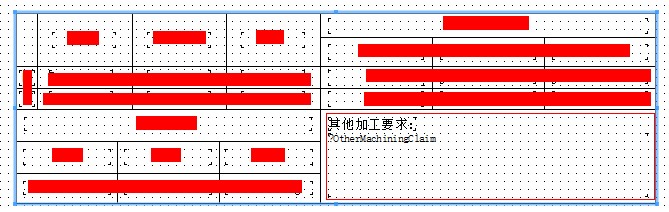 如图,这个 其他加工要求 这栏有可能很多数据,那么如果不设置可以增大就会超过的不显示,如果设置了可以增大,那么超过的数据就会突出来.. 好难看,这个框框能不能也设置成可以增大.?[/quote]
你把那个字段设置成可以换行显示就行了
如图,这个 其他加工要求 这栏有可能很多数据,那么如果不设置可以增大就会超过的不显示,如果设置了可以增大,那么超过的数据就会突出来.. 好难看,这个框框能不能也设置成可以增大.?[/quote]
你把那个字段设置成可以换行显示就行了
 我以为是要我们来帮你攻击小喇叭呢

 只会FastReport任意什么样的报表都搞出来了,主从表更不用说了,还有奇葩的行列合并什么的,无规则的表格。。
只能说帮顶。
只会FastReport任意什么样的报表都搞出来了,主从表更不用说了,还有奇葩的行列合并什么的,无规则的表格。。
只能说帮顶。
//create the relation of main report and the child report

            ISCDReportClientDocument rptClientDoc = _rptContainerDoc.ReportClientDocument;

            //Section define the character of this Section.

            // it contains type, name, width, height and so on.

            CrystalDecisions.ReportAppServer.ReportDefModel.Section xSection = new CrystalDecisions.ReportAppServer.ReportDefModel.Section();

            xSection.Kind = CrystalDecisions.ReportAppServer.ReportDefModel.CrAreaSectionKindEnum.crAreaSectionKindReportFooter;

            xSection.Name = "xxx";

            xSection.Width = 567 * 10;

            xSection.Height = 567 * 20;


            //position and import report file

            CrystalDecisions.ReportAppServer.ReportDefModel.ISCRArea xArea = rptClientDoc.ReportDefController.ReportDefinition.ReportFooterArea;

            rptClientDoc.ReportDefController.ReportSectionController.Add(xSection, xArea, -1);

            SubreportClientDocument subRptClientDoc = rptClientDoc.SubreportController.ImportSubreport("test", strPath, xSection);


            //Section define the character of this Section.

            CrystalDecisions.ReportAppServer.ReportDefModel.Section xSection2 = new CrystalDecisions.ReportAppServer.ReportDefModel.Section();

            xSection2.Kind = CrystalDecisions.ReportAppServer.ReportDefModel.CrAreaSectionKindEnum.crAreaSectionKindReportFooter;

            xSection2.Name = "xxxg";

            xSection2.Width = 567 * 10;

            xSection2.Height = 567 * 20;


            //position and import report file

            rptClientDoc.ReportDefController.ReportSectionController.Add(xSection2, xArea, -1);

            subRptClientDoc = rptClientDoc.SubreportController.ImportSubreport("test22", strPath, xSection2);


            DataSetSingle dsSingle = new DataSetSingle();

            dsSingle.tblSingle.AddtblSingleRow("1", "111");

            dsSingle.tblSingle.AddtblSingleRow("2", "222");

            dsSingle.tblSingle.AddtblSingleRow("3", "333");

            dsSingle.tblSingle.AddtblSingleRow("4", "444");

            //subRptClientDoc.DatabaseController.AddDataSource(DataSetConverter.Convert(dsSingle));

            //visit child reports and databind

            _rptContainerDoc.Subreports[0].SetDataSource(dsSingle);


            dsSingle.tblSingle.AddtblSingleRow("1", "111");

            dsSingle.tblSingle.AddtblSingleRow("2", "222");

            dsSingle.tblSingle.AddtblSingleRow("3", "333");

            dsSingle.tblSingle.AddtblSingleRow("4", "444");

            ////visit child reports and databind

            _rptContainerDoc.Subreports[1].SetDataSource(dsSingle);


