62,620
社区成员
 发帖
发帖 与我相关
与我相关 我的任务
我的任务
 分享
分享<%@ page language="java" import="java.util.*" pageEncoding="utf-8"%>
<%@ page import="java.sql.*"%>
<jsp:useBean id="sqlutil" class="com.lh.model.ConnBean" scope="page" />
<!DOCTYPE HTML PUBLIC "-//W3C//DTD HTML 4.01 Transitional//EN">
<html>
<head>
<title></title>
<link href="css/table.css" rel="stylesheet" type="text/css"/>
</head>
<body>
<h3 align="center">新闻内容显示</h3>
<div align="center">
<table id="mytable" cellspacing="0">
<tr>
<th scope="row" >id</th>
<th scope="row" >title</th>
<th scope="row" >newstype</th>
<th scope="row" >author</th>
<th scope="row" >date</th>
</tr>
<%
ResultSet rs = null;
String sql = "select * from news";
int index = 0; //用于表格交替颜色显示
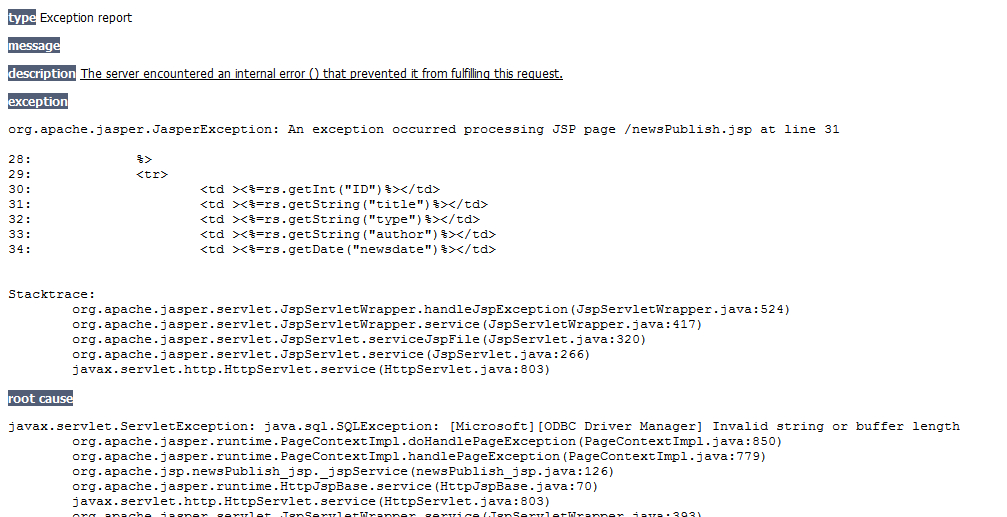
rs = sqlutil.executeQuery(sql);
while (rs.next()) {
%>
<tr>
<td class=<%=index%2==0?"alt":"none" %>><%=rs.getInt("ID")%></td>
<td class=<%=index%2==0?"alt":"none" %>><%=rs.getString("title")%></td>
<td class=<%=index%2==0?"alt":"none" %>><%=rs.getString("type")%></td>
<td class=<%=index%2==0?"alt":"none" %>><%=rs.getString("author")%></td>
<td class=<%=index%2==0?"alt":"none" %>><%=rs.getDate("newsdate")%></td>
</tr>
<%
index++;
}
sqlutil.close();
%>
</table>
</div>
</body>
</html>
package com.lh.model;


import java.sql.Connection;

import java.sql.DriverManager;

import java.sql.ResultSet;

import java.sql.SQLException;

import java.sql.Statement;

import java.util.Properties;


public class ConnBean {

	private static String DRIVERNAME = "sun.jdbc.odbc.JdbcOdbcDriver";

	private static String URL = "jdbc:odbc:news";

	private static Properties pro = new Properties();

	Connection conn = null;

	ResultSet rs = null;

	Statement stmt;

	static {

		try {

			Class.forName(DRIVERNAME);

			pro.setProperty("charSet","GB2312");

		} catch (java.lang.ClassNotFoundException e) {

			System.out.println("infoBean():" + e.getMessage());

		}


	}


	public ResultSet executeQuery(String sql) { //查询

		rs = null;

		try {

			conn = DriverManager.getConnection(URL,pro);

			stmt = conn.createStatement();

			rs = stmt.executeQuery(sql);

		} catch (SQLException ex) {

			System.err.println("aq.executeQuery:" + ex.getMessage());

		}

		return rs;

	}


	public void executeUpdate(String sql) { //更新或者添加

		stmt = null;

		rs = null;

		try {

			conn = DriverManager.getConnection(URL,pro);

			stmt = conn.createStatement();

			stmt.executeUpdate(sql);

		} catch (SQLException e1) {

			System.err.println("executeUpdate:" + e1.getMessage());

		}

	}


	public void close() {

		try {

			if(rs!=null){

				rs.close();

			}

		} catch (SQLException e) {

			e.printStackTrace();

		}finally{

			try {

				if(stmt!=null){

				stmt.close();

				}

			} catch (SQLException e) {

				e.printStackTrace();

			}finally{

				try {

					if(conn!=null){

					conn.close();

					}

				} catch (SQLException e) {

					e.printStackTrace();

				}

			}

		}

	}

}