

 C++ 语言

如何利用C++提取压缩文件中的某一个文件,高手进来帮我解答一下。
 墨衍会员 · AI 创作全网分发 墨衍智能分发 通过墨衍一键同步至各平台 可同步平台 CSDN微信公众号微博知乎掘金百家号博客园抖音小红书 你的文章也可以这样分发 墨衍会员 ¥399起/年,写一次发全网
我也要 关注 + 加入社区
墨衍会员 · AI 创作全网分发 墨衍智能分发 通过墨衍一键同步至各平台 可同步平台 CSDN微信公众号微博知乎掘金百家号博客园抖音小红书 你的文章也可以这样分发 墨衍会员 ¥399起/年,写一次发全网
我也要 关注 + 加入社区因为我才疏学浅,所以不知道怎么改,求高手帮我解答一下,问题如下:
首先是一个MPQ文件,MPQ 是 Blizzard 公司将游戏数据包装在一起的一种档案格式,详见:http://blog.csdn.net/zhyjunFov/article/details/25376595
目前我有个MPQ文件,里面有两个文件,一个是文件名是1.a另一个的文件名是2.a
但是2.a这个文件名在文件名的前面和后面多了一个回车,但是平常的方法根本解压不出来2.a这个文件名,
1是由于windows系统本身的限制就是文件名不能含有回车等字符,
2是普通的MPQ解压文件能看到这个文件但是不能解压,
求个高手帮我改改这一段源码,能将2.a这个文件解压出来,因为魔兽争霸的读取机制能忽略回车读取这个文件
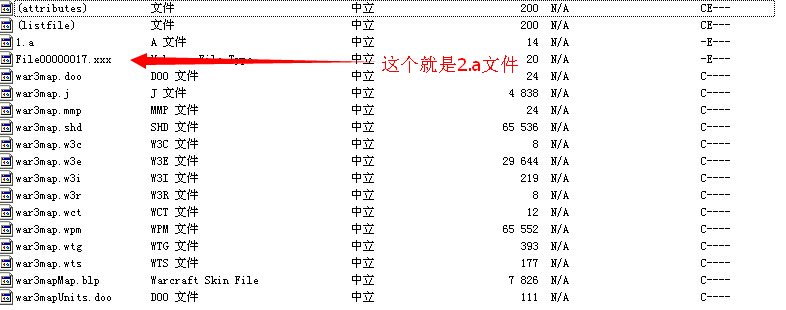
我所使用的工具是:MpqEditor
Storm.dll文件 http://download.csdn.net/detail/jingqiyixian/5074943
 ←←←←←
←←←←←
↑↑↑↑↑这个图片就是1.w3m,存在电脑上格式改为mpq或者w3m就可以用软件分析了↑↑↑↑↑
首先是一个MPQ文件,MPQ 是 Blizzard 公司将游戏数据包装在一起的一种档案格式,详见:http://blog.csdn.net/zhyjunFov/article/details/25376595
目前我有个MPQ文件,里面有两个文件,一个是文件名是1.a另一个的文件名是2.a
但是2.a这个文件名在文件名的前面和后面多了一个回车,但是平常的方法根本解压不出来2.a这个文件名,
1是由于windows系统本身的限制就是文件名不能含有回车等字符,
2是普通的MPQ解压文件能看到这个文件但是不能解压,
求个高手帮我改改这一段源码,能将2.a这个文件解压出来,因为魔兽争霸的读取机制能忽略回车读取这个文件
program Mpq;


{$APPTYPE CONSOLE}


uses

  SysUtils,

  Classes

  ,windows

  ;


//Storm API

Const Storm='Storm.dll';


function SFileDestroy:LongBool;stdcall;external Storm Index 262;


function SFileOpenArchive(lpFileName: Pchar;

                          dwPriority: LongInt;

                          dwFlags: LongInt;

                          var hMPQ: LongWord):LongBool;stdcall;external Storm Index 266;


function SFileCloseArchive(hMPQ: LongWord):LongBool;stdcall;external Storm Index 252;


function SFileOpenFileEx(hMPQ: LongWord;

                         lpFileName: Pchar;

                         dwSearchScope: LongInt;

                         var hFile: LongWord): LongBool;stdcall;external Storm Index 268;


function SFileOpenFile(lpFileName: Pchar;

                         var hFile: LongWord): LongBool;stdcall;external Storm Index 267;


function SFileCloseFile(hFile: LongWord): LongBool;stdcall;external Storm Index 253;


function SFileGetFileSize(hFile: LongWord;

                           lpFileSizeHigh: LongInt{point dw null}): LongInt ;stdcall;external Storm Index 265;


function SFileReadFile(hFile: LongWord;

                       lpBuffe:pointer;

                       nNumberOfBytesToRead: LongInt;

                       lpNumberOfBytesRead:pointer;

                       lpOverlapped:pointer

                       ): LongBool;stdcall;external Storm Index 269;


function SFileSetLocale(nNewLocale: LongWord): LongWord;stdcall;external Storm Index 272;


//主程序区

var

  MyPath:string;

  hmpq, //保存MPQ句柄

  hf, //文件句柄

  FileSize//文件大小

  :LongWord;

  Mem:TMemoryStream; //内存流

begin

  Writeln('========================================================');

  Writeln('You must type in like this:Mpq.exe MpqFileName FileName');

  Writeln('For example:c:\>Mpq demo.w3m war3map.j');

  Writeln('then you can extract war3map.j from demo.w3m');

  Writeln('========================================================');

  Writeln;


  MyPath:=ExtractFilePath(ParamStr(0)); //获得自己的路径

  if ((ParamStr(1)<>'')and(ParamStr(2)<>''))then  //2个参数都不为空

    begin

      SFileDestroy; //初始化MPQ内部函数结构

      SFileSetLocale($409);//设置MPQ语言

      //以上2个不设置一般也没事 但是某些文件会无法读取

    if SFileOpenArchive(Pchar(MyPath+(ParamStr(1))),0,0,hMPQ)then //打开Mpq文件镜像

        begin

          if(SFileOpenFileEx(hMPQ,Pchar(ParamStr(2)),0,hF))then //打开Mpq内部文件句柄

            begin

              FileSize:=SFileGetFileSize(hF,0);//获得文件大小

              Mem:=TMemoryStream.Create; //创建内存流

              Mem.SetSize(FileSize); //设置大小

              Mem.Position:=0;  //指针移动到流顶部

              if  SFileReadFile(hf,Mem.Memory,FileSize,nil,nil) then //读取数据到内存

                begin

                  Mem.Position:=0; //指针移动到流顶部

                  Mem.SaveToFile(MyPath+"5"); //保存到文件

                  Writeln('File has been extract!');

                end

              else

                begin

                  Writeln('Could not Read Data!');

                end;

              Mem.Free;

              SFileCloseFile(hF);//关闭文件句柄

            end

          else

            begin

              Writeln('Could not open file in Mpq Archive!');

            end;

        end

      else //打开失败

        begin

          Writeln('Could not open Mpq Archive!');

        end;

      SFileCloseArchive(hMPQ);//关闭MPQ句柄

    end

  else

    begin

      Writeln('You should type in command!');

    end;

end.
我所使用的工具是:MpqEditor
Storm.dll文件 http://download.csdn.net/detail/jingqiyixian/5074943
←←←←←↑↑↑↑↑这个图片就是1.w3m,存在电脑上格式改为mpq或者w3m就可以用软件分析了↑↑↑↑↑
...全文
相关推荐
cpp课件1.rar
【标题】:“cpp课件1.rar”通常是指一个包含了与C++编程语言相关的教学材料的压缩文件。
计算机二级202112月编程题参考解答集
在图像处理领域,存在许多强大的开源库,它们为开发者提供了丰富的工具和函数,以加速开发过程并提高图像处理项目的质量。其中最著名的包括:OpenCV(Open Source Computer Vision Library):一个跨平台的计算机视觉库,提供大量的图像处理和计算机视觉算法。Pillow:Python语言的一个图像处理库,是PIL(Python Imaging Library)的分支,支持图像格式广泛,且易于使用。
殷人昆数据结构课后习题详细解答
这份题为"殷人昆数据结构课后习题详细解答"的压缩文件,为有志于深入学习数据结构的读者提供了极大的帮助。
lp.rar_LP
也可能是其他含义,比如编程语言中的"Local Procedure"(局部过程)或者某个项目的代号。压缩文件内的"lp.cpp"可能是一个C++源代码文件。
zju.rar_ZJU_zju.rar_zju2104.cpp
zju2104.cpp" 文件名暗示这可能是针对浙大某次课程或竞赛的C++代码,编号可能是课程或比赛的标识。




