

 JavaScript

请问jquery easyui datagrid detailview获取datagrid 的index
 墨衍会员 · AI 创作全网分发 墨衍智能分发 通过墨衍一键同步至各平台 可同步平台 CSDN微信公众号微博知乎掘金百家号博客园抖音小红书 你的文章也可以这样分发 墨衍会员 ¥399起/年,写一次发全网
我也要 关注 + 加入社区
墨衍会员 · AI 创作全网分发 墨衍智能分发 通过墨衍一键同步至各平台 可同步平台 CSDN微信公众号微博知乎掘金百家号博客园抖音小红书 你的文章也可以这样分发 墨衍会员 ¥399起/年,写一次发全网
我也要 关注 + 加入社区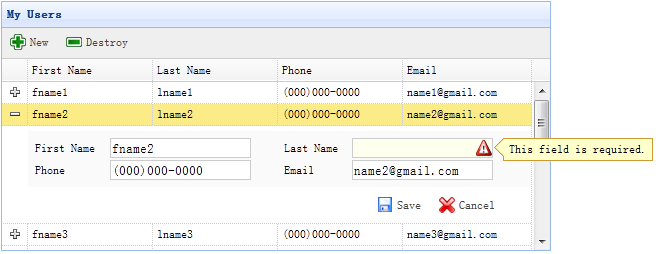
我的问题是 如何在save的时候 得到表格的index,
因为在save的时候 需要知道detailview是属于datagrid的哪一行,easyui官网的例子用的是php
网站上的例子使用的是这个方法 saveItem(<?php echo $_REQUEST['index'];?>)
请问用java实现 saveItem(<?php echo $_REQUEST['index'];?>)这句的功能,怎么搞,或者有没有别的方法去获取表格的index
下面是easyui网站上的例子
地址是 http://www.jeasyui.com/tutorial/app/crud3.php
<table id="dg" title="My Users" style="width:550px;height:250px"

        url="get_users.php"

        toolbar="#toolbar"

        fitColumns="true" singleSelect="true">

    <thead>

        <tr>

            <th field="firstname" width="50">First Name</th>

            <th field="lastname" width="50">Last Name</th>

            <th field="phone" width="50">Phone</th>

            <th field="email" width="50">Email</th>

        </tr>

    </thead>

</table>

<div id="toolbar">

    <a href="#" class="easyui-linkbutton" iconCls="icon-add" plain="true" onclick="newItem()">New</a>

    <a href="#" class="easyui-linkbutton" iconCls="icon-remove" plain="true" onclick="destroyItem()">Destroy</a>

</div>
$('#dg').datagrid({
view: detailview,
detailFormatter:function(index,row){
return '<div class="ddv"></div>';
},
onExpandRow: function(index,row){
var ddv = $(this).datagrid('getRowDetail',index).find('div.ddv');
ddv.panel({
border:false,
cache:true,
href:'show_form.php?index='+index,
onLoad:function(){
$('#dg').datagrid('fixDetailRowHeight',index);
$('#dg').datagrid('selectRow',index);
$('#dg').datagrid('getRowDetail',index).find('form').form('load',row);
}
});
$('#dg').datagrid('fixDetailRowHeight',index);
}
});<form method="post">
<table class="dv-table" style="width:100%;background:#fafafa;padding:5px;margin-top:5px;">
<tr>
<td>First Name</td>
<td><input name="firstname" class="easyui-validatebox" required="true"></input></td>
<td>Last Name</td>
<td><input name="lastname" class="easyui-validatebox" required="true"></input></td>
</tr>
<tr>
<td>Phone</td>
<td><input name="phone"></input></td>
<td>Email</td>
<td><input name="email" class="easyui-validatebox" validType="email"></input></td>
</tr>
</table>
<div style="padding:5px 0;text-align:right;padding-right:30px">
<a href="#" class="easyui-linkbutton" iconCls="icon-save" plain="true" onclick="saveItem(<?php echo $_REQUEST['index'];?>)">Save</a>
<a href="#" class="easyui-linkbutton" iconCls="icon-cancel" plain="true" onclick="cancelItem(<?php echo $_REQUEST['index'];?>)">Cancel</a>
</div>
</form>
...全文
相关推荐
EasyUI折叠表格层次显示detailview详解及实例
```javascript$('#dg').datagrid({ view: detailview, detailFormatter: function(index, row) {...}, onExpandRow
jQuery插件EasyUI设置datagrid的checkbox为禁用状态的方法
// 获取该行中checkbox的元素并禁用 $(".datagrid-row[datagrid-row-index="+i+"] input[type='checkbox']")[0].disabled
easyui datagrid 增加鼠标悬停弹窗事件
在IT领域,EasyUI是一个基于JavaScript和jQuery的前端框架,它为开发者提供了丰富的组件和样式,使得构建用户界面变得更加便捷。
easyui datagrid实现实现上下左右和回车切换单元格
准备环境确保项目中已经包含了 jQuery 和 EasyUI 的相关库文件。
EasyUI的DataGrid每行数据添加操作按钮的实现代码
首先,我们需要在HTML页面中引入EasyUI的相关库文件,包括jQuery、EasyUI CSS和JavaScript文件。




