

 Java EE

HttpUrlConnection乱码问题(求高手)
 墨衍会员 · AI 创作全网分发 墨衍智能分发 通过墨衍一键同步至各平台 可同步平台 CSDN微信公众号微博知乎掘金百家号博客园抖音小红书 你的文章也可以这样分发 墨衍会员 ¥399起/年,写一次发全网
我也要 关注 + 加入社区
墨衍会员 · AI 创作全网分发 墨衍智能分发 通过墨衍一键同步至各平台 可同步平台 CSDN微信公众号微博知乎掘金百家号博客园抖音小红书 你的文章也可以这样分发 墨衍会员 ¥399起/年,写一次发全网
我也要 关注 + 加入社区下面方法是在Java里面请求微信公众平台的一个主动发送消息的接口,但是里面有汉字,我在微信客户端查看消息时,是乱码
下面是微信公众平台网页版测试接口,测试不是乱码,

下面是微信客户端的效果图
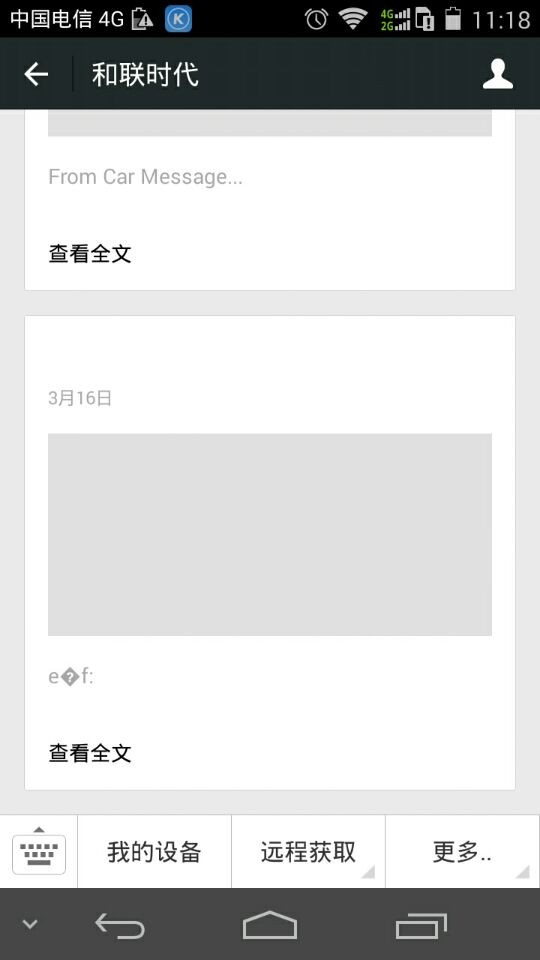
本来打算用HttpClient,但是貌似构造不出这种JSON多层次的参数,所以就没用。
private static void readContentFromPost(String openId) throws IOException {
// Post请求的url,与get不同的是不需要带参数
String url = "https://api.weixin.qq.com/cgi-bin/message/custom/send?access_token=......";
// String url = "http://localhost:8080/WXGZPOT/MainServlet";
URL postUrl = new URL(url);
// 打开连接
HttpURLConnection connection = (HttpURLConnection) postUrl
.openConnection();
// 打开读写属性,默认均为false
connection.setDoOutput(true);
connection.setDoInput(true);
// 设置请求方式,默认为GET
connection.setRequestMethod("POST");
// Post 请求不能使用缓存
connection.setUseCaches(false);
connection.setInstanceFollowRedirects(true);
connection.addRequestProperty("Content-Type",
"application/x-www-form-urlencoded; encoding=utf-8");
DataOutputStream out = new DataOutputStream(
connection.getOutputStream());
// 正文内容其实跟get的URL中'?'后的参数字符串一致
JSONObject json = new JSONObject();
JSONObject json1 = new JSONObject();
JSONObject json2 = new JSONObject();
json2.put("title", "视频消息");
json2.put("description", "来自车机的实时状态视频");
json2.put("url", "ddds");
json2.put("picurl", "sdsd");
JSONArray array = new JSONArray();
array.add(json2);
json1.put("articles", array);
json.put("touser", openId);
json.put("msgtype", "news");
json.put("news", json1);
String content = json.toString();
System.out.println(content);
out.writeBytes(content);
out.flush();
out.close(); // flush and close
BufferedReader reader = new BufferedReader(new InputStreamReader(
connection.getInputStream()));
String line;
while ((line = reader.readLine()) != null) {
System.out.println(line);
}
reader.close();
}
public static void main(String[] args) {
try {
readContentFromPost("orb0ot7iX6Mq_Scr0wh0vb8ExIfY");
} catch (IOException e) {
e.printStackTrace();
}
}
下面是微信公众平台网页版测试接口,测试不是乱码,
下面是微信客户端的效果图
本来打算用HttpClient,但是貌似构造不出这种JSON多层次的参数,所以就没用。
private static void readContentFromPost(String openId) throws IOException {
// Post请求的url,与get不同的是不需要带参数
String url = "https://api.weixin.qq.com/cgi-bin/message/custom/send?access_token=......";
// String url = "http://localhost:8080/WXGZPOT/MainServlet";
URL postUrl = new URL(url);
// 打开连接
HttpURLConnection connection = (HttpURLConnection) postUrl
.openConnection();
// 打开读写属性,默认均为false
connection.setDoOutput(true);
connection.setDoInput(true);
// 设置请求方式,默认为GET
connection.setRequestMethod("POST");
// Post 请求不能使用缓存
connection.setUseCaches(false);
connection.setInstanceFollowRedirects(true);
connection.addRequestProperty("Content-Type",
"application/x-www-form-urlencoded; encoding=utf-8");
DataOutputStream out = new DataOutputStream(
connection.getOutputStream());
// 正文内容其实跟get的URL中'?'后的参数字符串一致
JSONObject json = new JSONObject();
JSONObject json1 = new JSONObject();
JSONObject json2 = new JSONObject();
json2.put("title", "视频消息");
json2.put("description", "来自车机的实时状态视频");
json2.put("url", "ddds");
json2.put("picurl", "sdsd");
JSONArray array = new JSONArray();
array.add(json2);
json1.put("articles", array);
json.put("touser", openId);
json.put("msgtype", "news");
json.put("news", json1);
String content = json.toString();
System.out.println(content);
out.writeBytes(content);
out.flush();
out.close(); // flush and close
BufferedReader reader = new BufferedReader(new InputStreamReader(
connection.getInputStream()));
String line;
while ((line = reader.readLine()) != null) {
System.out.println(line);
}
reader.close();
}
public static void main(String[] args) {
try {
readContentFromPost("orb0ot7iX6Mq_Scr0wh0vb8ExIfY");
} catch (IOException e) {
e.printStackTrace();
}
}
...全文
相关推荐
android客户端上传数据中文乱码3中解决方案
android客户端上传数据中文乱码3中解决方案 一种HttpPost两种HTTPURLCONNECTION
解决了中文乱码的http的get和post请求demo
参看文档:http://blog.csdn.net/sinat_29398599/article/details/52880036
java中文乱码解决之道(8)解决URL中文乱码问题Jav
java中文乱码解决之道(8)解决URL中文乱码问题Java开发Java经验技巧共7页.pdf.zip
java HttpURLConnection 使用示例
本例子是 java 的 HttpURLConnection 使用方法,比较简单,但是涵盖了post和get两种方法,而且处理了乱码。
Java通过HttpURLConnection与servlet通信
研究了才搞清楚,其实挺简单的,在这里记录下,以便以后参考。 一、创建一个servlet项目 主要包括(WEB-INF)里面有classes文件夹、lib文件夹、web.xml文件。 将写好的servlet类编译成的.class放到项目中的classes文件夹下(我的是helloServlet.class) 1、在web.xml中配置 <?xml version="1.0" encoding="ISO-8859-1"?> <web-app xmlns="http://java.sun.com/xml/ns/javaee" xmlns:xsi="http://www.




