.NET社区

高手赐教:GridView中链接打开模态框(Modal)问题!急!bootstrap的模态框
 墨衍会员 · AI 创作全网分发 墨衍智能分发 通过墨衍一键同步至各平台 可同步平台 CSDN微信公众号微博知乎掘金百家号博客园抖音小红书 你的文章也可以这样分发 墨衍会员 ¥399起/年,写一次发全网
我也要 关注 + 加入社区
在开发项目时用bootstrap效果不错,效率也挺高。现在碰到一个比较烦人的问题,始终不得其解,望坛子的朋友一起研究帮忙解决,我觉得也很实用。
目标:bootstrap提供了一个非常方便的模态框效果,调用也非常方便,只要在<a>标签内加 href="#myModal"即可,我想实现的就是在GridView中链接打开模态框,显示具体内容,这样可以在一个页面中实现了。
问题:在GridView中创建了<a>链接,但id 的值传不出去了,考虑用 href 和 onclick 同时使用,也就是说 href="#myModal"让模态框显示,onclick将显示具体内容的Repeater重新绑定数据,但onclick事件后台没有处理。希望高手能帮忙解决指导,万分感谢!
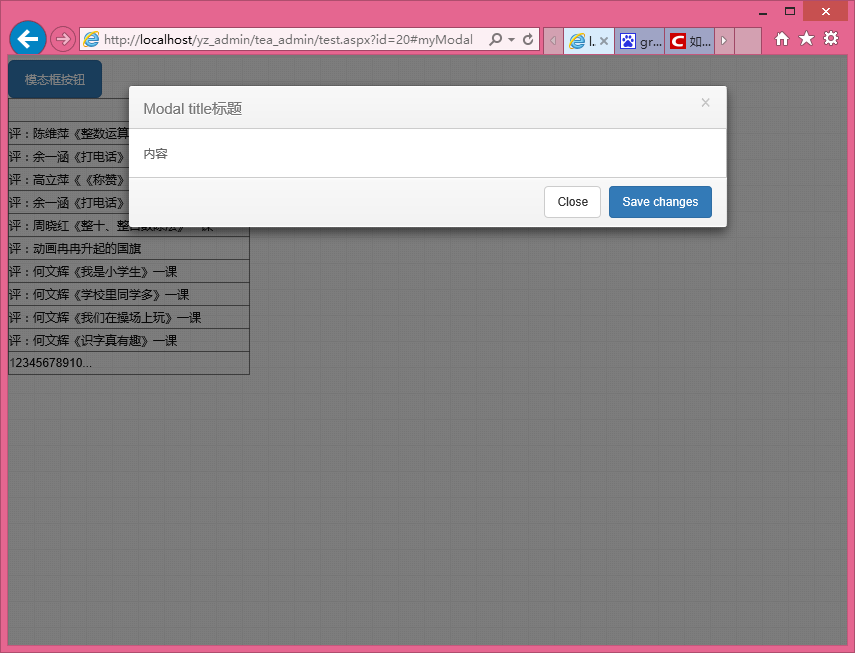
效果地址:
http://www.psjying.pudong-edu.sh.cn/yz_admin/tea_admin/test.aspx
目标:bootstrap提供了一个非常方便的模态框效果,调用也非常方便,只要在<a>标签内加 href="#myModal"即可,我想实现的就是在GridView中链接打开模态框,显示具体内容,这样可以在一个页面中实现了。
问题:在GridView中创建了<a>链接,但id 的值传不出去了,考虑用 href 和 onclick 同时使用,也就是说 href="#myModal"让模态框显示,onclick将显示具体内容的Repeater重新绑定数据,但onclick事件后台没有处理。希望高手能帮忙解决指导,万分感谢!
<html xmlns="http://www.w3.org/1999/xhtml">

<head runat="server">

<meta http-equiv="Content-Type" content="text/html; charset=utf-8"/>

    <title></title>

    <link rel="stylesheet" href="../css/bootstrap.css">

    <link rel="stylesheet" href="../css/font-awesome.css">

    <link rel="stylesheet" href="../css/new_style.css">

    <link rel="stylesheet" href="../css/buttons.css" />

    <link href="../ueditor/themes/default/ueditor.css" rel="stylesheet" type="text/css" />

    <script type="text/javascript" charset="utf-8" src="/ueditor/ueditor.config.js"></script>

    <script type="text/javascript" charset="utf-8" src="/ueditor/ueditor.all.min.js"> </script>

    <!--建议手动加在语言,避免在ie下有时因为加载语言失败导致编辑器加载失败-->

    <!--这里加载的语言文件会覆盖你在配置项目里添加的语言类型,比如你在配置项目里配置的是英文,这里加载的中文,那最后就是中文-->

    <script type="text/javascript" charset="utf-8" src="/ueditor/lang/zh-cn/zh-cn.js"></script>

</head>

<body>

    <form id="form1" runat="server">


 <button type="button" class="btn btn-primary btn-lg" data-toggle="modal" data-target="#myModal">

  模态框按钮

</button>


<!-- Modal -->

<div class="modal fade" id="myModal" tabindex="-1" role="dialog" aria-labelledby="myModalLabel" aria-hidden="true">

  <div class="modal-dialog">

    <div class="modal-content">

      <div class="modal-header">

        <button type="button" class="close" data-dismiss="modal" aria-label="Close"><span aria-hidden="true">×</span></button>

        <h4 class="modal-title" id="myModalLabel">Modal title标题</h4>

      </div>

      <div class="modal-body">

          内容

        <asp:Repeater ID="Repeater1" runat="server" >

          <ItemTemplate>


              <%#Eval("title") %><br />

              <%#Eval("pk_content") %>

          </ItemTemplate>


        </asp:Repeater>


      </div>

      <div class="modal-footer">

        <button type="button" class="btn btn-default" data-dismiss="modal">Close</button>

        <button type="button" class="btn btn-primary">Save changes</button>

      </div>

    </div>

  </div>

</div>

<!--END Modal -->


    <div>


         <asp:GridView ID="GridView1"  runat="server" AllowPaging="True" AutoGenerateColumns="False" DataKeyNames="id" DataSourceID="SqlDataSource1" EnableModelValidation="True">

            <Columns>

                <asp:TemplateField>

                <ItemTemplate>

                     <a  data-toggle="modal" href='test.aspx?id=<%# Eval("id") %>#myModal'><%# Eval("title") %></a>

                </ItemTemplate>

                    </asp:TemplateField>

            </Columns>

        </asp:GridView>


    </div>

     </form>

          <script src="../js/jquery.min.js"></script>

    <script src="../js/bootstrap.min.js"></script>

</body>

</html>
效果地址:
http://www.psjying.pudong-edu.sh.cn/yz_admin/tea_admin/test.aspx
...全文
相关推荐
浅析BootStrap中Modal(模态框)使用心得
BootStrap中Modal(模态框)描述 Bootstrap Modals(模态框)是使用定制的 Jquery 插件创建的。它可以用来创建模态窗口丰富用户体验,或者为用户添加实用功能。您可以在 Modals(模态框)中使用 Popover(弹出框)和 Tooltip(工具提示插件)。 一、modal使用: 1.1、登录bootstrap官网,点击下载Bootstrap 1.2、导入对应的样式文件css 1.3、导入对应的js,需要导入bootstrap.js或者bootstrap.min.js文件,bootstrap的前提是jQuery,所以我们要在导入bootstrap.js前面导入j
bootstrap 模态框(modal)实现水平垂直居中显示
主要为大家详细介绍了bootstrap 模态框modal实现水平垂直居中显示,具有一定的参考价值,感兴趣的小伙伴们可以参考一下
Bootstrap 模态框(Modal)带参数传值实例
模态框(Modal)是覆盖在父窗体上的子窗体。下面通过本文给大家介绍Bootstrap 模态框(Modal)带参数传值实例代码,需要的朋友参考下吧
BootStrap中的模态框(modal,弹出层)功能示例代码
bootstrap中的模态框(modal),不同于Tooltips,模态框以弹出对话框的形式出现,具有最小和最实用的功能集。这篇文章主要介绍了BootStrap中的模态框(modal,弹出层),需要的朋友可以参考下
Bootstrap模态框(Modal)实现过渡效果
主要为大家详细介绍了Bootstrap模态框(Modal)实现过渡效果的相关资料,具有一定的参考价值,感兴趣的小伙伴们可以参考一下