

 界面
界面

vs2010单文档创建带有图标的自定义工具栏,工具栏没法显示按钮和图片
 墨衍会员 · AI 创作全网分发 墨衍智能分发 通过墨衍一键同步至各平台 可同步平台 CSDN微信公众号微博知乎掘金百家号博客园抖音小红书 你的文章也可以这样分发 墨衍会员 ¥399起/年,写一次发全网
我也要 关注 + 加入社区
墨衍会员 · AI 创作全网分发 墨衍智能分发 通过墨衍一键同步至各平台 可同步平台 CSDN微信公众号微博知乎掘金百家号博客园抖音小红书 你的文章也可以这样分发 墨衍会员 ¥399起/年,写一次发全网
我也要 关注 + 加入社区在vs2010的MFC单文档中,创建带有图标的自定义工具栏,按钮和图片都没法显示。操作步骤如下:
1、头文件新增定义:
(1)
CMFCToolBarImages m_myImages; //图片列表
CMFCToolBar m_mywndToolBar;//自定义工具栏
(2)
afx_msg void OnToolBarButton(UINT nID);
2、源文件新增内容:
(1)
enum {
ID_LOGIN = 5000,
ID_LOGOUT,
ID_VIEW,
};
typedef struct SCustomizeButton
{
unsigned int id;
char name[64];
char tip[64];
}SCustomizeButton;
static SCustomizeButton CustomizeButton[]=
{
{ID_LOGIN, "login.bmp", "登陆"},
{ID_LOGOUT, "logout.bmp", "退出"},
{ID_VIEW, "view.bmp", "视图"}
};
(2)
ON_COMMAND_RANGE(ID_LOGIN, ID_VIEW, &CMainFrame::OnToolBarButton)
(3)将OnCreate修改如下:
int CMainFrame::OnCreate(LPCREATESTRUCT lpCreateStruct)
{
if (CFrameWndEx::OnCreate(lpCreateStruct) == -1)
return -1;
if (!m_wndStatusBar.Create(this))
{
TRACE0("Failed to create status bar\n");
return -1; // fail to create
}
m_wndStatusBar.SetIndicators(indicators, sizeof(indicators)/sizeof(UINT));
if (!m_mywndToolBar.CreateEx(this))
{
TRACE0("Failed to create tool bar\n");
return -1; // fail to create
}
m_mywndToolBar.SetSizes(CSize(31,30),CSize(24,24));
m_mywndToolBar.SetWindowText("mytoolbar");
m_wndToolBar.EnableDocking(CBRS_ALIGN_ANY);
DockPane(&m_mywndToolBar);
//设置图像大小
m_myImages.SetImageSize(CSize(24,24),FALSE);
int i = 0;
char tmp[32] = {0};
char strPath[MAX_PATH] = {0}, strFull[MAX_PATH] = {0};
int buttonNum = sizeof(CustomizeButton) / sizeof(CustomizeButton[0]);
HBITMAP hBitmap = NULL;
//获取文件路径并加载
GetModuleFileName(NULL, strPath, MAX_PATH);
(_tcsrchr(strPath,'\\'))[1] = 0;
for (i = 0; i < buttonNum; i++)
{
memset(strFull, 0, sizeof(strFull));
StrCpy(strFull, strPath);
StrCat(strFull, "\\");
StrCat(strFull, CustomizeButton[i].name);
hBitmap = (HBITMAP)LoadImage(AfxGetResourceHandle(), strFull, IMAGE_BITMAP, 0, 0, LR_DEFAULTCOLOR|LR_LOADFROMFILE);
m_myImages.AddImage(hBitmap);
}
//加载位图
m_mywndToolBar.SetUserImages(&m_myImages);
//创建工具条按钮及提示
for (i = 0; i < buttonNum; i++)
{
int index = 0;
//创建工具条按钮
m_mywndToolBar.InsertButton(CMFCToolBarButton(CustomizeButton[i].id, i, NULL, TRUE, 0));
//设置按钮提示
m_mywndToolBar.SetButtonText(i, CustomizeButton[i].tip);
}
return 0;
}
(4)
void CMainFrame::OnToolBarButton(UINT nID)
{
switch (nID)
{
case ID_LOGIN:
AfxMessageBox("login");
break;
case ID_LOGOUT:
AfxMessageBox("logout");
break;
case ID_VIEW:
AfxMessageBox("view");
break;
default:
AfxMessageBox("other");
break;
}
}
运行结果如下:
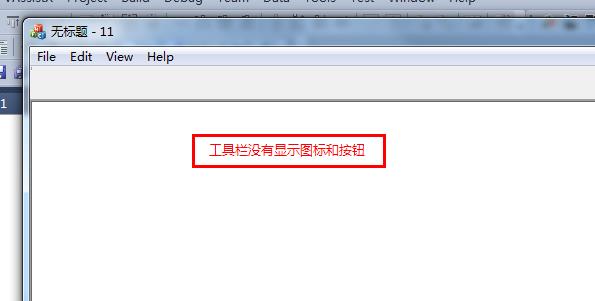
请各路大神帮忙指定啊。
1、头文件新增定义:
(1)
CMFCToolBarImages m_myImages; //图片列表
CMFCToolBar m_mywndToolBar;//自定义工具栏
(2)
afx_msg void OnToolBarButton(UINT nID);
2、源文件新增内容:
(1)
enum {
ID_LOGIN = 5000,
ID_LOGOUT,
ID_VIEW,
};
typedef struct SCustomizeButton
{
unsigned int id;
char name[64];
char tip[64];
}SCustomizeButton;
static SCustomizeButton CustomizeButton[]=
{
{ID_LOGIN, "login.bmp", "登陆"},
{ID_LOGOUT, "logout.bmp", "退出"},
{ID_VIEW, "view.bmp", "视图"}
};
(2)
ON_COMMAND_RANGE(ID_LOGIN, ID_VIEW, &CMainFrame::OnToolBarButton)
(3)将OnCreate修改如下:
int CMainFrame::OnCreate(LPCREATESTRUCT lpCreateStruct)
{
if (CFrameWndEx::OnCreate(lpCreateStruct) == -1)
return -1;
if (!m_wndStatusBar.Create(this))
{
TRACE0("Failed to create status bar\n");
return -1; // fail to create
}
m_wndStatusBar.SetIndicators(indicators, sizeof(indicators)/sizeof(UINT));
if (!m_mywndToolBar.CreateEx(this))
{
TRACE0("Failed to create tool bar\n");
return -1; // fail to create
}
m_mywndToolBar.SetSizes(CSize(31,30),CSize(24,24));
m_mywndToolBar.SetWindowText("mytoolbar");
m_wndToolBar.EnableDocking(CBRS_ALIGN_ANY);
DockPane(&m_mywndToolBar);
//设置图像大小
m_myImages.SetImageSize(CSize(24,24),FALSE);
int i = 0;
char tmp[32] = {0};
char strPath[MAX_PATH] = {0}, strFull[MAX_PATH] = {0};
int buttonNum = sizeof(CustomizeButton) / sizeof(CustomizeButton[0]);
HBITMAP hBitmap = NULL;
//获取文件路径并加载
GetModuleFileName(NULL, strPath, MAX_PATH);
(_tcsrchr(strPath,'\\'))[1] = 0;
for (i = 0; i < buttonNum; i++)
{
memset(strFull, 0, sizeof(strFull));
StrCpy(strFull, strPath);
StrCat(strFull, "\\");
StrCat(strFull, CustomizeButton[i].name);
hBitmap = (HBITMAP)LoadImage(AfxGetResourceHandle(), strFull, IMAGE_BITMAP, 0, 0, LR_DEFAULTCOLOR|LR_LOADFROMFILE);
m_myImages.AddImage(hBitmap);
}
//加载位图
m_mywndToolBar.SetUserImages(&m_myImages);
//创建工具条按钮及提示
for (i = 0; i < buttonNum; i++)
{
int index = 0;
//创建工具条按钮
m_mywndToolBar.InsertButton(CMFCToolBarButton(CustomizeButton[i].id, i, NULL, TRUE, 0));
//设置按钮提示
m_mywndToolBar.SetButtonText(i, CustomizeButton[i].tip);
}
return 0;
}
(4)
void CMainFrame::OnToolBarButton(UINT nID)
{
switch (nID)
{
case ID_LOGIN:
AfxMessageBox("login");
break;
case ID_LOGOUT:
AfxMessageBox("logout");
break;
case ID_VIEW:
AfxMessageBox("view");
break;
default:
AfxMessageBox("other");
break;
}
}
运行结果如下:
请各路大神帮忙指定啊。
...全文
相关推荐
VS2010自带的图片库,包含许多按钮的图标
VS2010自带的图片库,包含许多按钮的图标
Visual Studio 2010图片库:丰富UI设计的按钮图标资源
Visual Studio 2010图片库是一个包含丰富资源的开发工具,它为开发者提供了诸多预设的图标、图像和视觉元素。开发者可以利用这些资源,快速搭建和美化应用程序界面,从而提高开发效率和产品质量。本章将介绍图片库的基本概念、其包含的主要资源类型及其如何在不同的开发场景中发挥作用。自定义图标在软件开发中的重要性不言而喻,它可以帮助构建出更加独特且符合品牌形象的应用程序界面。然而,创建和管理这些图标资源并不是件容易的事,特别是在一个大型项目中。
VS2010可执行程序如何修改图标
VS2010可执行程序如何修改图标 F5启动调试后,进入下面路径查找: 我的文档\Visual Studio 2010\Projects\项目名称\项目名称\bin\Debug 如何更改EXE程序图标
VS2010基于对话框的MFC 工具栏和状态栏(有源码)
VS2010基于对话框的MFC 工具栏和状态栏(有源码)
VC自定义工具栏按钮图标,并且显示悬浮提示
实现了在工具栏按钮上显示加入的ICON图标,并实现了鼠标悬浮在工具栏按钮上时显示提示信息。




