

 版本控制
版本控制

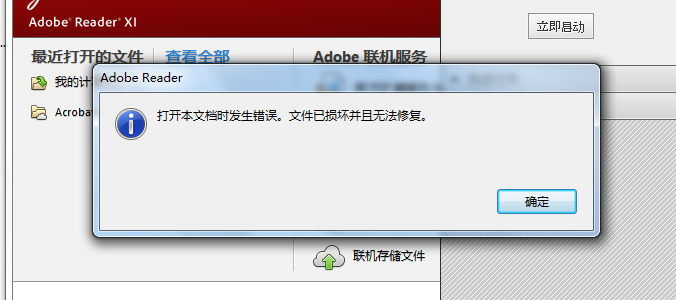
在利用pdflib生成PDF中,加载完图像后,打开PDF文件显示打开文档过程中发生错误,文件已损坏且无法修复
 墨衍会员 · AI 创作全网分发 墨衍智能分发 通过墨衍一键同步至各平台 可同步平台 CSDN微信公众号微博知乎掘金百家号博客园抖音小红书 你的文章也可以这样分发 墨衍会员 ¥399起/年,写一次发全网
我也要 关注 + 加入社区
墨衍会员 · AI 创作全网分发 墨衍智能分发 通过墨衍一键同步至各平台 可同步平台 CSDN微信公众号微博知乎掘金百家号博客园抖音小红书 你的文章也可以这样分发 墨衍会员 ¥399起/年,写一次发全网
我也要 关注 + 加入社区#include <iostream>
#include "pdflib.hpp"
using namespace std;
using namespace pdflib;
int
main(void)
{
try {
/* This is where the data files are. Adjust as necessary. */
const wstring searchpath = L"../data";
PDFlib p;
const wstring imagefile = L"nesrin.jpg";
int image;
wostringstream optlist;
// This means we must check return values of load_font() etc.
p.set_option(L"errorpolicy=return");
// Set the search path for fonts and PDF files
optlist.str(L"");
optlist << L"searchpath={{" << searchpath << L"}}";
p.set_option(optlist.str());
if (p.begin_document(L"starter_basic.pdf", L"") == -1) {
wcerr << L"Error: " << p.get_errmsg() << endl;
return 2;
}
p.set_info(L"Creator", L"PDFlib starter sample");
p.set_info(L"Title", L"starter_basic");
image = p.load_image(L"auto", imagefile, L"");
if (image == -1) {
wcerr << L"Error: " << p.get_errmsg() << endl;
return 2;
}
p.begin_page_ext(595, 842, L"");
optlist.str(L"");
optlist.str(L"fontname={LinLibertine_R} encoding=unicode embedding fontsize=24");
p.fit_textline(L"en: Hello!", 50, 700, optlist.str());
p.fit_image(image, 0.0, 0.0, L"scale=0.25");
p.end_page_ext(L"");
/* Page 2 */
p.begin_page_ext(595, 842, L"");
/* red rectangle */
p.setcolor(L"fill", L"rgb", 1.0, 0.0, 0.0, 0.0);
p.rect(200, 200, 250, 150);
p.fill();
/* blue circle */
p.setcolor(L"fill", L"rgb", 0.0, 0.0, 1.0, 0.0);
p.arc(400, 600, 100, 0, 360);
p.fill();
/* thick gray line */
p.setcolor(L"stroke", L"gray", 0.5, 0.0, 0.0, 0.0);
p.setlinewidth(10);
p.moveto(100, 500);
p.lineto(300, 700);
p.stroke();
p.fit_image(image, 150.0, 25.0, L"scale=0.25");
p.end_page_ext(L"");
catch (PDFlib::Exception &ex) {
wcerr << L"PDFlib exception occurred:" << endl
<< L"[" << ex.get_errnum() << L"] " << ex.get_apiname()
<< L": " << ex.get_errmsg() << endl;
return 2;
}
return 0;
}
#include "pdflib.hpp"
using namespace std;
using namespace pdflib;
int
main(void)
{
try {
/* This is where the data files are. Adjust as necessary. */
const wstring searchpath = L"../data";
PDFlib p;
const wstring imagefile = L"nesrin.jpg";
int image;
wostringstream optlist;
// This means we must check return values of load_font() etc.
p.set_option(L"errorpolicy=return");
// Set the search path for fonts and PDF files
optlist.str(L"");
optlist << L"searchpath={{" << searchpath << L"}}";
p.set_option(optlist.str());
if (p.begin_document(L"starter_basic.pdf", L"") == -1) {
wcerr << L"Error: " << p.get_errmsg() << endl;
return 2;
}
p.set_info(L"Creator", L"PDFlib starter sample");
p.set_info(L"Title", L"starter_basic");
image = p.load_image(L"auto", imagefile, L"");
if (image == -1) {
wcerr << L"Error: " << p.get_errmsg() << endl;
return 2;
}
p.begin_page_ext(595, 842, L"");
optlist.str(L"");
optlist.str(L"fontname={LinLibertine_R} encoding=unicode embedding fontsize=24");
p.fit_textline(L"en: Hello!", 50, 700, optlist.str());
p.fit_image(image, 0.0, 0.0, L"scale=0.25");
p.end_page_ext(L"");
/* Page 2 */
p.begin_page_ext(595, 842, L"");
/* red rectangle */
p.setcolor(L"fill", L"rgb", 1.0, 0.0, 0.0, 0.0);
p.rect(200, 200, 250, 150);
p.fill();
/* blue circle */
p.setcolor(L"fill", L"rgb", 0.0, 0.0, 1.0, 0.0);
p.arc(400, 600, 100, 0, 360);
p.fill();
/* thick gray line */
p.setcolor(L"stroke", L"gray", 0.5, 0.0, 0.0, 0.0);
p.setlinewidth(10);
p.moveto(100, 500);
p.lineto(300, 700);
p.stroke();
p.fit_image(image, 150.0, 25.0, L"scale=0.25");
p.end_page_ext(L"");
catch (PDFlib::Exception &ex) {
wcerr << L"PDFlib exception occurred:" << endl
<< L"[" << ex.get_errnum() << L"] " << ex.get_apiname()
<< L": " << ex.get_errmsg() << endl;
return 2;
}
return 0;
}
...全文
相关推荐
PDFLib v4.0.2.0珍藏版
PDFLib是用于创建PDF文档的开发库,提供了简单易用的API,隐藏了创建PDF的复杂细节且不需要第3方软件的支持。PDFLib库对于个人是免费的,对于商业产品需要购买许可。
使用PDFLib库实现对PDF文件的读取:原理、实操与避坑指南
PDF解析是文档处理中的常见需求,但很多开发者对PDFLib的能力边界存在误解。本文从PDF内部结构出发,介绍对象、流、xref表等核心概念,说明PDFLib在读取页面元数据、修复损坏文件方面的独特价值。通过PHP脚本演示如何批量提取页面尺寸、字体、加密状态等信息,并结合PLOP工具处理异常文档。针对文本提取和扫描件OCR场景,给出与pypdf、Tesseract等工具配合的混合方案,帮助读者建立完整的PDF读取技术栈。
VB6调用免费命令行工具实现PDF生成、预览与解析指南
PDF作为一种跨平台文档格式,在企业报表归档、合同存储和批量处理中扮演着关键角色。面对遗留系统,尤其是基于VB6开发的进销存、MIS等老程序,如何低成本实现PDF生成、解析与预览成为现实挑战。通过引入wkhtmltopdf、pdftk、Poppler等免费命令行工具,结合Shell调度,可以让VB6专注业务逻辑,将PDF底层操作隔离在系统边界之外。这种技术路线既规避了商业控件的高昂授权,也解决了Word转PDF时Office COM组件容易“未响应”的典型问题。在制造业、物流仓储等仍依赖VB6的行业场景中,
PDFlib+v6.0.2可以使用代码转转pdf的api
PDFlib+v6.0.2可以使用代码转转pdf的api.rar
PDFlib 9.0.6
PDFlib 9.0.6




