

 Android

RecyclerView使用问题
 墨衍会员 · AI 创作全网分发 墨衍智能分发 通过墨衍一键同步至各平台 可同步平台 CSDN微信公众号微博知乎掘金百家号博客园抖音小红书 你的文章也可以这样分发 墨衍会员 ¥399起/年,写一次发全网
我也要 关注 + 加入社区
墨衍会员 · AI 创作全网分发 墨衍智能分发 通过墨衍一键同步至各平台 可同步平台 CSDN微信公众号微博知乎掘金百家号博客园抖音小红书 你的文章也可以这样分发 墨衍会员 ¥399起/年,写一次发全网
我也要 关注 + 加入社区我在界面上使用了RecyclerView
在Fragment中的布局是
item 的布局文件是
本来我以为RecyclerView里面的数据应该是平均的展示数据。但是实际上是这样的
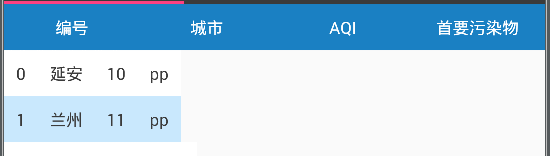
怎样才能让他平均的展示数据?
在Fragment中的布局是
<?xml version="1.0" encoding="utf-8"?>

<LinearLayout xmlns:android="http://schemas.android.com/apk/res/android"

              android:layout_width="match_parent"

              android:layout_height="match_parent"

              android:orientation="vertical">


    <LinearLayout

        android:layout_width="match_parent"

        android:layout_height="wrap_content"

        android:background="@color/blue_18"

        android:orientation="horizontal">


        <TextView

            style="@style/TextBlack22"

            android:layout_width="0dp"

            android:layout_height="wrap_content"

            android:layout_weight="1"

            android:gravity="center"

            android:padding="@dimen/padding_def"

            android:text="编号"

            android:textColor="@color/white"/>


        <TextView

            style="@style/TextBlack22"

            android:layout_width="0dp"

            android:layout_height="wrap_content"

            android:layout_weight="1"

            android:gravity="center"

            android:padding="@dimen/padding_def"

            android:text="城市"

            android:textColor="@color/white"/>


        <TextView

            style="@style/TextBlack22"

            android:layout_width="0dp"

            android:layout_height="wrap_content"

            android:layout_weight="1"

            android:gravity="center"

            android:padding="@dimen/padding_def"

            android:text="AQI"

            android:textColor="@color/white"/>


        <TextView

            style="@style/TextBlack22"

            android:layout_width="0dp"

            android:layout_height="wrap_content"

            android:layout_weight="1"

            android:gravity="center"

            android:padding="@dimen/padding_def"

            android:text="首要污染物"

            android:textColor="@color/white"/>

    </LinearLayout>


    <android.support.v7.widget.RecyclerView

        android:id="@id/rvCity"

        android:layout_width="match_parent"

        android:layout_height="match_parent"/>

</LinearLayout>
item 的布局文件是
<?xml version="1.0" encoding="utf-8"?>

<LinearLayout xmlns:android="http://schemas.android.com/apk/res/android"

              android:layout_width="match_parent"

              android:layout_height="match_parent"

              android:orientation="horizontal">


    <TextView

        android:id="@id/tvCityCode"

        style="@style/TextBlack22"

        android:layout_width="0dp"

        android:layout_height="wrap_content"

        android:layout_weight="1"

        android:gravity="center"

        android:padding="@dimen/padding_def"/>


    <TextView

        android:id="@id/tvCityName"

        style="@style/TextBlack22"

        android:layout_width="0dp"

        android:layout_height="wrap_content"

        android:layout_weight="1"

        android:gravity="center"

        android:padding="@dimen/padding_def"/>


    <TextView

        android:id="@id/tvCityAQI"

        style="@style/TextBlack22"

        android:layout_width="0dp"

        android:layout_height="wrap_content"

        android:layout_weight="1"

        android:gravity="center"

        android:padding="@dimen/padding_def"/>


    <TextView

        android:id="@id/tvCityPrimaryPollutant"

        style="@style/TextBlack22"

        android:layout_width="0dp"

        android:layout_height="wrap_content"

        android:layout_weight="1"

        android:gravity="center"

        android:padding="@dimen/padding_def"/>


</LinearLayout>
本来我以为RecyclerView里面的数据应该是平均的展示数据。但是实际上是这样的
怎样才能让他平均的展示数据?
...全文
相关推荐
RecyclerView中item焦点问题
本篇文章将深入探讨RecyclerView中item焦点问题及其解决方案。1. RecyclerView与焦点系统 Android系统的焦点管理主要基于ViewGroup和View。
Recyclerview由于ViewHolder的复用显示错乱问题解决
使用DiffUtil:这个工具可以帮助计算数据集的变化,从而更加高效且准确地更新RecyclerView。四、实战案例分析在`RecyclerviewDemo`项目中,可以通过以下步骤排查问题:1.
使用Android Studio 练习RecyclerView 异步加载图片,解决图片乱序问题。
为了解决这个问题,我们可以采用以下几种策略:1. **使用图片加载库**:诸如Picasso、Glide或 Fresco 这样的库已经考虑到了图片加载的顺序问题。
有问题的RecyclerView的代码
1.2.1' // 或者使用最新的版本号```然后,确保你正确地在布局XML文件中添加了RecyclerView。
Android RecyclerView的卡顿问题的解决方法
以下是一些解决RecyclerView卡顿问题的关键点:1.




