社区
Android
帖子详情
程序显示界面怎样设置成从标题栏底下开始
zsrdfgsaef
2015-12-31 02:54:37
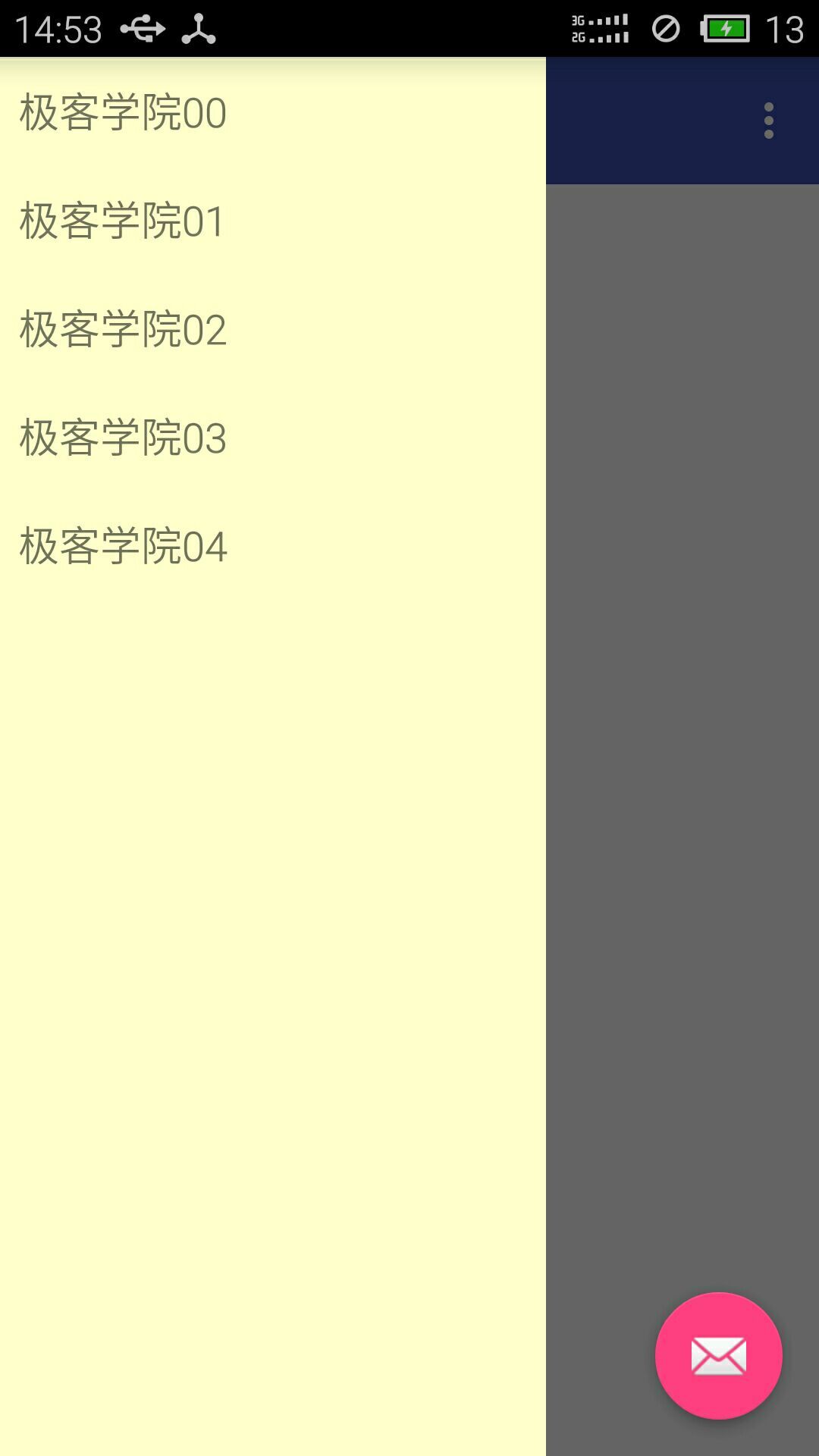
如题 ,我的界面总是会被标题栏遮挡
这个是用侧滑栏DrawerLayout,它的显示遮住了标题栏
而底下呈现出来的内容又被标题栏遮挡住了
...全文
146
4
打赏
收藏
程序显示界面怎样设置成从标题栏底下开始
如题 ,我的界面总是会被标题栏遮挡 这个是用侧滑栏DrawerLayout,它的显示遮住了标题栏 而底下呈现出来的内容又被标题栏遮挡住了
复制链接
扫一扫
分享
举报
写回复
配置赞助广告
用AI写文章
4 条
回复
切换为时间正序
请发表友善的回复…
发表回复
打赏红包
MoneyCitys
2015-12-31
打赏
举报
回复
那你這蠻奇特的, 沒用toolbar就是actionbar了吧 是不是開啟了Overlay Mode 能看一下你的Theme嗎 另外就是主佈局的content_frame有內容嗎?
zsrdfgsaef
2015-12-31
打赏
举报
回复
引用 2 楼 MoneyCitys 的回复:
在xml下將ToolBar的位置宣告在drawerlayout外層就好
这是主布局的Xml ,没有用到toolbar,麻烦您帮我看一下 <?xml version="1.0" encoding="utf-8"?> <android.support.v4.widget.DrawerLayout xmlns:android="http://schemas.android.com/apk/res/android" android:id="@+id/drawer_layout" android:layout_width="match_parent" android:layout_height="match_parent"> <FrameLayout android:id="@+id/content_frame" android:layout_width="match_parent" android:layout_height="match_parent"> </FrameLayout> <ListView android:id="@+id/left_drawer" android:layout_width="240dp" android:layout_height="match_parent" android:layout_gravity="start" android:background="#ffffcc" android:choiceMode="singleChoice" android:divider="@android:color/transparent" android:dividerHeight="0dp"> </ListView> </android.support.v4.widget.DrawerLayout>
MoneyCitys
2015-12-31
打赏
举报
回复
在xml下將ToolBar的位置宣告在drawerlayout外層就好
zsrdfgsaef
2015-12-31
打赏
举报
回复
该怎么设置呢???
隐藏和
显示
标题栏
在设计窗体时,有时需要动态的
显示
或者隐藏窗体
标题栏
,可以通过API函数GetWindowLong、SetWindowLong和SetWindowPos来实现。 GetWindowLong函数能够获得指定窗口的信息,其语法结构为: LONG WINAPI GetWindowLong( _In_ HWND hWnd, _In_
QML之不
显示
标题栏
、边框
我使用的Qt版本是Qt 5.3.0,Qt Creator 是3.1.1. QML做
界面
实在太方便了,动画效果很不错。 创建一个Qt Quick应用
程序
: .pro是工程文件,.pri用来保存头文件,main.qml就是QML文件了,main.cpp就不用说了。 看一下自动产生的main.cpp文件: #include #include int main(int ar
qdockwidget
显示
问题,图标问题,
标题栏
问题,拖动、分隔线问题
总之这个东西也是真的恶心。 1.图标是系统图标不能换颜色,只能在qss里设置。 QDockWidget { border: 1px solid lightgray; titlebar-close-icon: url(close.png); titlebar-normal-icon: url(undock.png); } QDockWidget::title { text-align: left; /* align the text to t
html
标题栏
显示
文字居中,让
标题栏
文字居中
下载本文示例代码p>|添加以下模块:PublicSubCenterC(frmAsForm)DimSpcFAsIntegerHowmanyspacescanfitDimclenAsIntegercaptionlengthDimoldcAsStringoldcaptionDimiAsIntegernotimportantremoveanyspacesattheendsofthecaptionve...
vc中如何隐藏
标题栏
、
显示
标题栏
?
voidCDlg::ShowCaption()//
显示
标题{LONGstyle=GetWindowLong(m_hWnd,GWL_STYLE);style|=WS_CAPTION;SetWindowLong(m_hWnd,GWL_STYLE,style);RECTr;GetWind...
Android
80,490
社区成员
91,375
社区内容
发帖
与我相关
我的任务
Android
移动平台 Android
复制链接
扫一扫
分享
社区描述
移动平台 Android
android
android-studio
androidx
技术论坛(原bbs)
社区管理员
加入社区
获取链接或二维码
近7日
近30日
至今
加载中
查看更多榜单
社区公告
暂无公告
试试用AI创作助手写篇文章吧
+ 用AI写文章


 发帖
发帖 与我相关
与我相关 我的任务
我的任务
 分享
分享