

 Android

fragment跳转 替换的位置不对
 墨衍会员 · AI 创作全网分发 墨衍智能分发 通过墨衍一键同步至各平台 可同步平台 CSDN微信公众号微博知乎掘金百家号博客园抖音小红书 你的文章也可以这样分发 墨衍会员 ¥399起/年,写一次发全网
我也要 关注 + 加入社区
墨衍会员 · AI 创作全网分发 墨衍智能分发 通过墨衍一键同步至各平台 可同步平台 CSDN微信公众号微博知乎掘金百家号博客园抖音小红书 你的文章也可以这样分发 墨衍会员 ¥399起/年,写一次发全网
我也要 关注 + 加入社区我想做的效果:
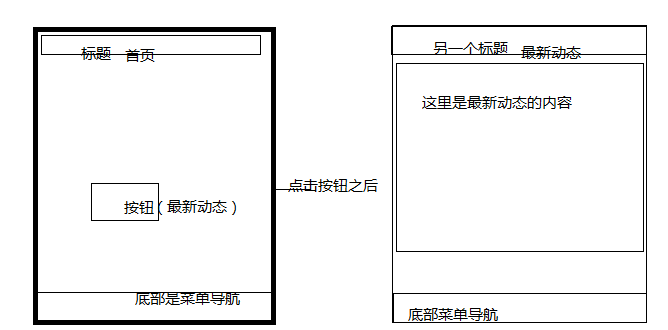
MyFragment1类代码如下:
public class MyFragment1 extends Fragment implements View.OnClickListener{
ImageButton ib_update;
public MyFragment1() {
}
@Override
public View onCreateView(LayoutInflater inflater, ViewGroup container, Bundle savedInstanceState) {
View view = inflater.inflate(R.layout.main_tab_home,container,false);
ib_update=(ImageButton) view.findViewById(R.id.ib_update);
ib_update.setOnClickListener(this);
return view;
}
@Override
public void onClick(View v) {
FragmentManager fm = getFragmentManager();
FragmentTransaction ft = fm.beginTransaction();
switch (v.getId()) {
case R.id.ib_update:
ft.replace(R.id.ll_mainhome,new TheLatestFragment());
ft.commit();
break;
default:
break;
}
}
}
MyFragment1类的布局文件代码如下:
<?xml version="1.0" encoding="utf-8"?>
<LinearLayout xmlns:android="http://schemas.android.com/apk/res/android"
android:layout_width="match_parent"
android:layout_height="match_parent"
android:orientation="vertical" >
<LinearLayout
android:id="@+id/ll_mainhome"
android:layout_width="match_parent"
android:layout_height="wrap_content"
android:orientation="vertical">
<LinearLayout
android:layout_width="match_parent"
android:layout_height="wrap_content">
<TextView
android:layout_width="match_parent"
android:layout_height="40dp"
android:background="#FF0000"
android:gravity="center"
android:text="@string/tab_menu_home"
android:textSize="20sp" />
</LinearLayout>
<LinearLayout
android:layout_width="match_parent"
android:layout_height="74dp"
android:gravity="center_horizontal"
android:orientation="horizontal" >
<RadioGroup
android:id="@+id/rg_home"
android:layout_width="wrap_content"
android:layout_height="wrap_content"
android:orientation="horizontal">
<ImageButton
android:id="@+id/ib_update"
android:layout_width="wrap_content"
android:layout_height="wrap_content"
android:layout_margin="10dp"
android:background="@drawable/button_culture"/>
</RadioGroup>
</LinearLayout>
</LinearLayout>
</LinearLayout>
问题:点击按钮时,最新动态出现在按钮组的下面,不知道怎么才可以实现我想要的效果?
跪求大神!!!
MyFragment1类代码如下:
public class MyFragment1 extends Fragment implements View.OnClickListener{
ImageButton ib_update;
public MyFragment1() {
}
@Override
public View onCreateView(LayoutInflater inflater, ViewGroup container, Bundle savedInstanceState) {
View view = inflater.inflate(R.layout.main_tab_home,container,false);
ib_update=(ImageButton) view.findViewById(R.id.ib_update);
ib_update.setOnClickListener(this);
return view;
}
@Override
public void onClick(View v) {
FragmentManager fm = getFragmentManager();
FragmentTransaction ft = fm.beginTransaction();
switch (v.getId()) {
case R.id.ib_update:
ft.replace(R.id.ll_mainhome,new TheLatestFragment());
ft.commit();
break;
default:
break;
}
}
}
MyFragment1类的布局文件代码如下:
<?xml version="1.0" encoding="utf-8"?>
<LinearLayout xmlns:android="http://schemas.android.com/apk/res/android"
android:layout_width="match_parent"
android:layout_height="match_parent"
android:orientation="vertical" >
<LinearLayout
android:id="@+id/ll_mainhome"
android:layout_width="match_parent"
android:layout_height="wrap_content"
android:orientation="vertical">
<LinearLayout
android:layout_width="match_parent"
android:layout_height="wrap_content">
<TextView
android:layout_width="match_parent"
android:layout_height="40dp"
android:background="#FF0000"
android:gravity="center"
android:text="@string/tab_menu_home"
android:textSize="20sp" />
</LinearLayout>
<LinearLayout
android:layout_width="match_parent"
android:layout_height="74dp"
android:gravity="center_horizontal"
android:orientation="horizontal" >
<RadioGroup
android:id="@+id/rg_home"
android:layout_width="wrap_content"
android:layout_height="wrap_content"
android:orientation="horizontal">
<ImageButton
android:id="@+id/ib_update"
android:layout_width="wrap_content"
android:layout_height="wrap_content"
android:layout_margin="10dp"
android:background="@drawable/button_culture"/>
</RadioGroup>
</LinearLayout>
</LinearLayout>
</LinearLayout>
问题:点击按钮时,最新动态出现在按钮组的下面,不知道怎么才可以实现我想要的效果?
跪求大神!!!
...全文
相关推荐
android的关于fragment,实现Activity之间的跳转
android的关于fragment的demo,很适合初学者,可以运行,页面效果也不错,可以实现各个Activity之间的跳转,可以取代tabhost
android+Fragment实现页面的局部跳转
android平板电脑开发,使用Fragment实现页面的局部跳转,像管理系统一样,点击左边的连接实现右边页面的跳转
Android开发fragment界面上点击按钮跳转
Android应用中的fragement跳转demo,跳转是从一个子fragement上的按钮跳转到其他子fragement上,不是通过导航栏上的按钮
fragment activity与fragment相互传值 fragment与fragment跳转
自己项目中用到fragment搭建框架,从网上找得一个demo,实现activity与fragment相互传值;fragment与fragment跳转。跟大家分享
Android Activity与Fragment之间的跳转实例详解
主要介绍了Android Activity与Fragment之间的跳转实例详解的相关资料,需要的朋友可以参考下




