

 .NET社区

gridview合计问题
 墨衍会员 · AI 创作全网分发 墨衍智能分发 通过墨衍一键同步至各平台 可同步平台 CSDN微信公众号微博知乎掘金百家号博客园抖音小红书 你的文章也可以这样分发 墨衍会员 ¥399起/年,写一次发全网
我也要 关注 + 加入社区
墨衍会员 · AI 创作全网分发 墨衍智能分发 通过墨衍一键同步至各平台 可同步平台 CSDN微信公众号微博知乎掘金百家号博客园抖音小红书 你的文章也可以这样分发 墨衍会员 ¥399起/年,写一次发全网
我也要 关注 + 加入社区 <asp:GridView ID="gdvIn" CellSpacing="0" CellPadding="0" BorderStyle="None"
CssClass="Contenttable" runat="server" AutoGenerateColumns="False"
ShowHeader="False" Width="100%" EnableTheming="false" GridLines="None">
<Columns>
<asp:BoundField DataField="categoryname" HeaderText="收支项目">
<ItemStyle CssClass="viewcateName"/></asp:BoundField>
<asp:TemplateField HeaderText="第1月">
<ItemTemplate>
<asp:Label ID="Label1" runat="server" Text='<%# Bind("month1") %>' ForeColor='<%# returnColor(decimal.Parse(Eval("month1").ToString())) %>'></asp:Label>
</ItemTemplate>
<ItemStyle CssClass="gridwidth"/>
</asp:TemplateField>
<asp:TemplateField HeaderText="第2月">
<ItemTemplate>
<asp:Label ID="Label2" runat="server" Text='<%# Bind("month2") %>' ForeColor='<%# returnColor(decimal.Parse(Eval("month2").ToString())) %>'></asp:Label>
</ItemTemplate>
<ItemStyle CssClass="gridwidth"/>
</asp:TemplateField>
---------------------------------------------分割线--------gdvIn和gdvOut是分别独立而非嵌套的Gridview--------------------------------------------
<asp:GridView ID="gdvOut" CellSpacing="0" CssClass="Contenttable"
runat="server" AutoGenerateColumns="False"
ShowHeader="False" Width="100%" EnableTheming="false" GridLines="None">
<Columns>
<asp:BoundField DataField="categoryname" HeaderText="收支项目">
<ItemStyle CssClass="viewcateName"/></asp:BoundField>
<asp:TemplateField HeaderText="第1月">
<ItemTemplate>
<asp:Label ID="Label1" runat="server" Text='<%# Bind("month1") %>' ForeColor='<%# returnColor(decimal.Parse(Eval("month1").ToString())) %>'></asp:Label>
</ItemTemplate>
<ItemStyle CssClass="gridwidth"/>
</asp:TemplateField>
<asp:TemplateField HeaderText="第2月">
<ItemTemplate>
<asp:Label ID="Label2" runat="server" Text='<%# Bind("month2") %>' ForeColor='<%# returnColor(decimal.Parse(Eval("month2").ToString())) %>'></asp:Label>
</ItemTemplate>
<ItemStyle CssClass="gridwidth"/>
</asp:TemplateField>
<asp:TemplateField HeaderText="第3月">
<ItemTemplate>
<asp:Label ID="Label3" runat="server" Text='<%# Bind("month3") %>' ForeColor='<%# returnColor(decimal.Parse(Eval("month3").ToString())) %>'></asp:Label>
</ItemTemplate>
图1
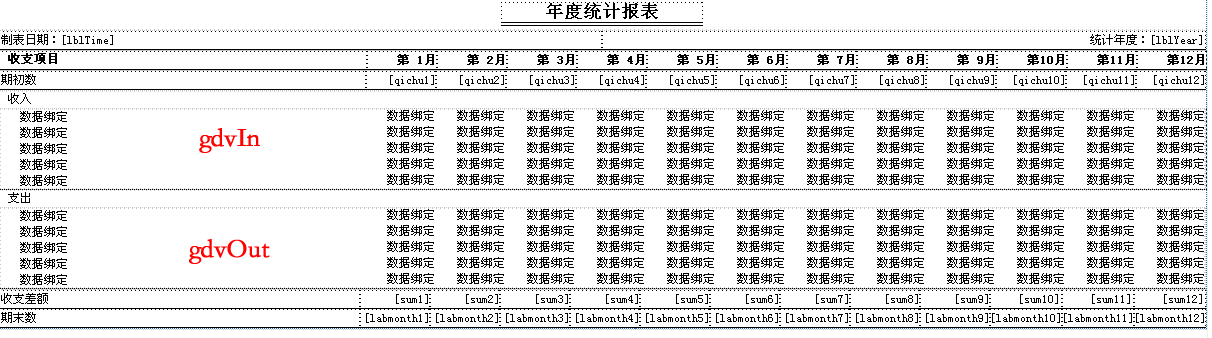
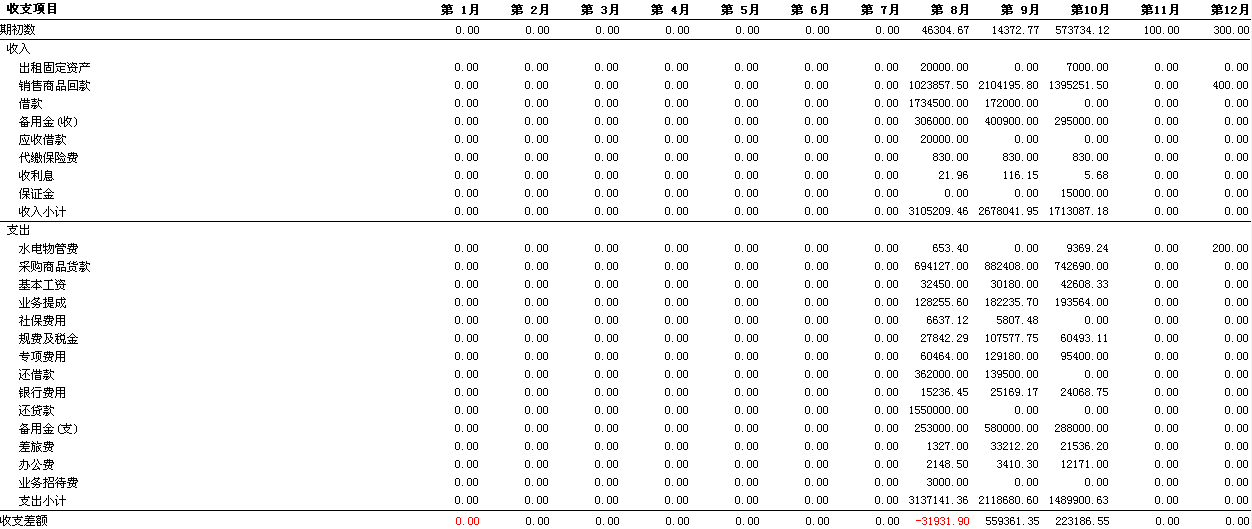
图2
 //显示合计

        int inCount = gdvIn.Rows.Count - 1;

        int outCount = gdvOut.Rows.Count - 1;

        for (int i = 1; i < gdvIn.Columns.Count;i++ )

        {

            Label lblIn = (Label)gdvIn.Rows[inCount].FindControl("Label"+i.ToString());

            Label lblOut = (Label)gdvOut.Rows[outCount].FindControl("Label" + i.ToString());

            Label lblSum = (Label)Page.FindControl("sum"+i.ToString());

            decimal sum = decimal.Parse(lblIn.Text) - decimal.Parse(lblOut.Text);

            lblSum.Text = sum.ToString("F2");

            if(sum<0)

            {

                lblSum.ForeColor = System.Drawing.Color.Red;

            }
问题是:1-11月都是收入小计和支出小计都是正确的,但12月不显示各自合计这是错误呢?思维定势了,求大侠们指点迷津。
...全文
相关推荐
GridView添加合计行的实现方案
提供代码案例实现动态给GridView添加合计行
GridView增强控件,在.netGridview 基础上增加了合计,合并表头等功能.zip
GridView增强控件,在.netGridview 基础上增加了合计,合并表头等功能.zip
GridView合计列
通过代码GridView控件计算列的合计
winform gridview最下面的合计
winform gridview最下面的合计行
GridView合并表头并且有合计
大家都知道Gridview的合并是比较难的,此实例中把Gridview的单元格轻松合并,多行合并,特别是对于那些要合计的表单有灰常大的作用,代码都在后台控制,没有用前台代码控制表头合并。




