

 JavaScript

jsTree ajax 怎么初始化数据的
 墨衍会员 · AI 创作全网分发 墨衍智能分发 通过墨衍一键同步至各平台 可同步平台 CSDN微信公众号微博知乎掘金百家号博客园抖音小红书 你的文章也可以这样分发 墨衍会员 ¥399起/年,写一次发全网
我也要 关注 + 加入社区
墨衍会员 · AI 创作全网分发 墨衍智能分发 通过墨衍一键同步至各平台 可同步平台 CSDN微信公众号微博知乎掘金百家号博客园抖音小红书 你的文章也可以这样分发 墨衍会员 ¥399起/年,写一次发全网
我也要 关注 + 加入社区我现在需要写一个jsTree树 于是通过找资料写了如下代码:
$(function() {
$("#mechanismtree").jstree(
{
"json_data" : {
"ajax" : {
"url" :${pageContext.request.contextPath }+"/manage/mechanism/selsetMechanismtree", ///${pageContext.request.contextPath }/manage/user/mechanism_manage.jsp
"data" : function(n) { //http://localhost:8080/trainexam/manage/mechanism/selsetMechanismtree
// the result is fed to the AJAX request `data` option
return {
"operation" : "get_children",
"id" : n.attr ? n.attr(
"id")
.replace(
"node_",
"")
: 1
};
}
}
},
"plugins" : [
"themes",
"json_data",
"ui",
"crrm",
"contextmenu",
"checkbox",
"search" ],
})
.bind("loaded.jstree",
function(event, data) {
})
.bind(
"select_node.jstree",
function(event, data) {
if (data.rslt.obj
.attr("id") != undefined) {
}
})
.bind(
"remove.jstree",
function(e, data) {
data.rslt.obj.each(function() {
$.ajax({
async : false,
type : 'POST',
url : "http://localhost:8080/MemberManager/CreateNodeForDepartment",
data : {
"operation" : "remove_node",
"id" : this.id.replace("node_", "")
},
success : function(r) {
if (!r.status) {
data.inst.refresh();
}
}
});
});
})
.bind(
"create.jstree",
function(e, data) {
$.post(
"http://localhost:8080/MemberManager/CreateNodeForDepartment",
{
"operation" : "create_node",
"id" : data.rslt.parent
.attr(
"id")
.replace(
"node_",
""),
"position" : data.rslt.position,
"title" : data.rslt.name,
"type" : data.rslt.obj
.attr("rel")
},
function(r) {
if (r.status) {
$(data.rslt.obj).attr("id", "node_" + r.id);
} else {
data.inst.refresh();
$.jstree.rollback(data.rlbk);
}
});
})
.bind(
"rename.jstree",
function(e, data) {
$.post(
"http://localhost:8080/MemberManager/CreateNodeForDepartment",
{
"operation" : "rename_node",
"id" : data.rslt.obj
.attr(
"id")
.replace(
"node_",
""),
"title" : data.rslt.new_name
},
function(r) {
if (!r.status) {
data.inst.refresh();
$.jstree.rollback(data.rlbk);
}
});
})
// 1) the loaded event fires as soon as data is parsed and inserted
// 2) but if you are using the cookie plugin or the core `initially_open` option:
.one("reopen.jstree",
function(event, data) {
})
// 3) but if you are using the cookie plugin or the UI `initially_select` option:
.one("reselect.jstree",
function(event, data) {
});
});
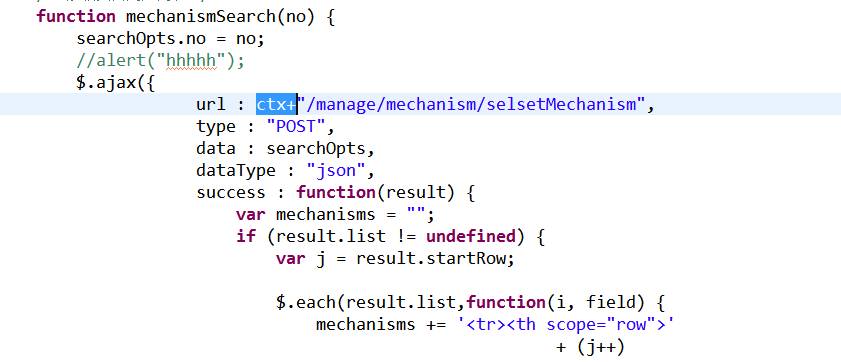
1我想问问ajax怎么会写成json的格式?一般写ajax不是都类似于下面的写法么?
$.ajax({
url :${pageContext.request.contextPath }+"/manage/mechanism/selsetMechanism",
type : "POST",
data : searchOpts,
dataType : "json",
success : function(result) {
.................................................................}
....
如果写成json它是怎么向后台发的数据啊??
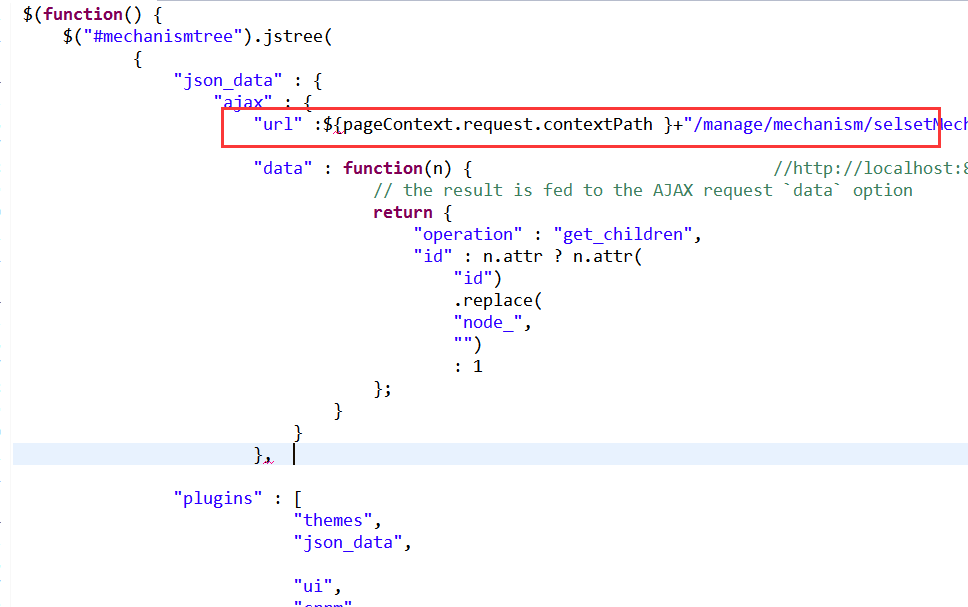
2.第二个问题是ajax在这里路径应该怎么写啊?就是怎么获得项目的路径?如图二,会报错啊!
$(function() {
$("#mechanismtree").jstree(
{
"json_data" : {
"ajax" : {
"url" :${pageContext.request.contextPath }+"/manage/mechanism/selsetMechanismtree", ///${pageContext.request.contextPath }/manage/user/mechanism_manage.jsp
"data" : function(n) { //http://localhost:8080/trainexam/manage/mechanism/selsetMechanismtree
// the result is fed to the AJAX request `data` option
return {
"operation" : "get_children",
"id" : n.attr ? n.attr(
"id")
.replace(
"node_",
"")
: 1
};
}
}
},
"plugins" : [
"themes",
"json_data",
"ui",
"crrm",
"contextmenu",
"checkbox",
"search" ],
})
.bind("loaded.jstree",
function(event, data) {
})
.bind(
"select_node.jstree",
function(event, data) {
if (data.rslt.obj
.attr("id") != undefined) {
}
})
.bind(
"remove.jstree",
function(e, data) {
data.rslt.obj.each(function() {
$.ajax({
async : false,
type : 'POST',
url : "http://localhost:8080/MemberManager/CreateNodeForDepartment",
data : {
"operation" : "remove_node",
"id" : this.id.replace("node_", "")
},
success : function(r) {
if (!r.status) {
data.inst.refresh();
}
}
});
});
})
.bind(
"create.jstree",
function(e, data) {
$.post(
"http://localhost:8080/MemberManager/CreateNodeForDepartment",
{
"operation" : "create_node",
"id" : data.rslt.parent
.attr(
"id")
.replace(
"node_",
""),
"position" : data.rslt.position,
"title" : data.rslt.name,
"type" : data.rslt.obj
.attr("rel")
},
function(r) {
if (r.status) {
$(data.rslt.obj).attr("id", "node_" + r.id);
} else {
data.inst.refresh();
$.jstree.rollback(data.rlbk);
}
});
})
.bind(
"rename.jstree",
function(e, data) {
$.post(
"http://localhost:8080/MemberManager/CreateNodeForDepartment",
{
"operation" : "rename_node",
"id" : data.rslt.obj
.attr(
"id")
.replace(
"node_",
""),
"title" : data.rslt.new_name
},
function(r) {
if (!r.status) {
data.inst.refresh();
$.jstree.rollback(data.rlbk);
}
});
})
// 1) the loaded event fires as soon as data is parsed and inserted
// 2) but if you are using the cookie plugin or the core `initially_open` option:
.one("reopen.jstree",
function(event, data) {
})
// 3) but if you are using the cookie plugin or the UI `initially_select` option:
.one("reselect.jstree",
function(event, data) {
});
});
1我想问问ajax怎么会写成json的格式?一般写ajax不是都类似于下面的写法么?
$.ajax({
url :${pageContext.request.contextPath }+"/manage/mechanism/selsetMechanism",
type : "POST",
data : searchOpts,
dataType : "json",
success : function(result) {
.................................................................}
....
如果写成json它是怎么向后台发的数据啊??
2.第二个问题是ajax在这里路径应该怎么写啊?就是怎么获得项目的路径?如图二,会报错啊!
...全文
相关推荐
基于jstree使用AJAX请求获取数据形成树
概述: 一般情况下都是通过ajax进行请求获取数据。boostrap+ajax 1、代码 //权限分配 $('#authority').click(function() { $("#jstree").jstree({ "core" : { "themes" : { "responsive": false }, // so that create works "check_callback" : true, 'data' : function (obj, callback) {
BootStrap Jstree 树形菜单的增删改查的实现
主要介绍了BootStrap Jstree 树形菜单的增删改查的实现源码,非常不错,具有参考借鉴价值,需要的朋友可以参考下
JStree(最全)
JStree(最全),里面包含了多种的JS树,还有AJAX树,觉得好的,评论一下就行
使用jsTree实现js树形结构
例程可正常使用,非常的简单,基本上学过几天代码的人都能够正常使用。采用纯js编写,不复杂
jstree jquery
很好用的jquery树,里面有demo,支持复选框、多选等




