

 Web 开发

SoapUI 脚本
 墨衍会员 · AI 创作全网分发 墨衍智能分发 通过墨衍一键同步至各平台 可同步平台 CSDN微信公众号微博知乎掘金百家号博客园抖音小红书 你的文章也可以这样分发 墨衍会员 ¥399起/年,写一次发全网
我也要 关注 + 加入社区
墨衍会员 · AI 创作全网分发 墨衍智能分发 通过墨衍一键同步至各平台 可同步平台 CSDN微信公众号微博知乎掘金百家号博客园抖音小红书 你的文章也可以这样分发 墨衍会员 ¥399起/年,写一次发全网
我也要 关注 + 加入社区我想使用SoapUI来实现一个模拟webService的功能,其中用到根据Request报文的内容,填写Response报文的内容。其他地方都搞定了,但是脚本该怎么写一直搞不定。请诸位帮忙看一下。
首先,我的项目目录很简单,如下
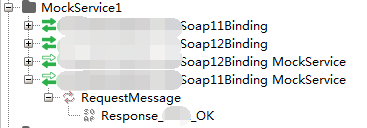
其中只有一个Response报文,内容如下:
<soapenv:Envelope xmlns:soapenv="http://schemas.xmlsoap.org/soap/envelope/" xmlns:axis="http://axis2.iis.xxxx.com">
<soapenv:Header/>
<soapenv:Body>
<axis:RequestMessageResponse>
<!--Optional:-->
<axis:return>
<![CDATA[
<?xml version="1.0" encoding="UTF-8"?>
<root xmlns:xsi="http://www.w3.org/2001/XMLSchema-instance" xmlns:xsd="http://www.w3.org/2001/XMLSchema">
<header>
<msgType>A</msgType>
<clientID>${CLIENTID}</clientID>
<sendDateTime>${SENDTIME}</sendDateTime>
<IP>${IP}</IP>
<errorCode>0</errorCode>
</header>
<body>
<status>OK</status>
<errInfo></errInfo>
</body>
</root>
]]>
</axis:return>
</axis:RequestMessageResponse>
</soapenv:Body>
</soapenv:Envelope>
其中红色部分是我的业务报文。
如果应答报文中的“CLIENTID”值取请求报文中的“CLIENTID”值,“SENDTIME”值取当前时间戳,“IP”值取请求报文中的“IP”值,那么请问脚本该怎么写呢?
首先,我的项目目录很简单,如下
其中只有一个Response报文,内容如下:
<soapenv:Envelope xmlns:soapenv="http://schemas.xmlsoap.org/soap/envelope/" xmlns:axis="http://axis2.iis.xxxx.com">
<soapenv:Header/>
<soapenv:Body>
<axis:RequestMessageResponse>
<!--Optional:-->
<axis:return>
<![CDATA[
<?xml version="1.0" encoding="UTF-8"?>
<root xmlns:xsi="http://www.w3.org/2001/XMLSchema-instance" xmlns:xsd="http://www.w3.org/2001/XMLSchema">
<header>
<msgType>A</msgType>
<clientID>${CLIENTID}</clientID>
<sendDateTime>${SENDTIME}</sendDateTime>
<IP>${IP}</IP>
<errorCode>0</errorCode>
</header>
<body>
<status>OK</status>
<errInfo></errInfo>
</body>
</root>
]]>
</axis:return>
</axis:RequestMessageResponse>
</soapenv:Body>
</soapenv:Envelope>
其中红色部分是我的业务报文。
如果应答报文中的“CLIENTID”值取请求报文中的“CLIENTID”值,“SENDTIME”值取当前时间戳,“IP”值取请求报文中的“IP”值,那么请问脚本该怎么写呢?
...全文
相关推荐
soapui 自动化教程代码
脚本测试步骤断言:在SOAPUI中,可以添加Groovy脚本测试步骤来执行复杂的逻辑,如验证数据、计算值或与其他服务交互。3.
soapui工具下载
**高级用法** - **脚本测试**:SOAPUI支持Groovy脚本,可以在测试步骤中添加自定义逻辑,增强测试能力。
soapUI LoadTest
**测试脚本**:LoadTest可能涉及使用groovy脚本来定制测试逻辑,例如,根据响应时间或错误率动态调整负载。4.
soapui手册
Groovy脚本集成**- SOAPUI支持通过Groovy脚本访问其内部对象。- 用户可以在运行时修改REST请求和响应,从而实现高度灵活的测试场景。**2.
SoapUI英文版
脚本测试则支持Groovy脚本编写,可以自定义复杂的测试逻辑。性能测试模块(LoadUI)可以模拟多个并发用户,测试系统的负载和压力承受能力。此外,SoapUI还具有以下特性:1.




