

 Android

ViewPager在CoordinatorLayout显示不全
 墨衍会员 · AI 创作全网分发 墨衍智能分发 通过墨衍一键同步至各平台 可同步平台 CSDN微信公众号微博知乎掘金百家号博客园抖音小红书 你的文章也可以这样分发 墨衍会员 ¥399起/年,写一次发全网
我也要 关注 + 加入社区
墨衍会员 · AI 创作全网分发 墨衍智能分发 通过墨衍一键同步至各平台 可同步平台 CSDN微信公众号微博知乎掘金百家号博客园抖音小红书 你的文章也可以这样分发 墨衍会员 ¥399起/年,写一次发全网
我也要 关注 + 加入社区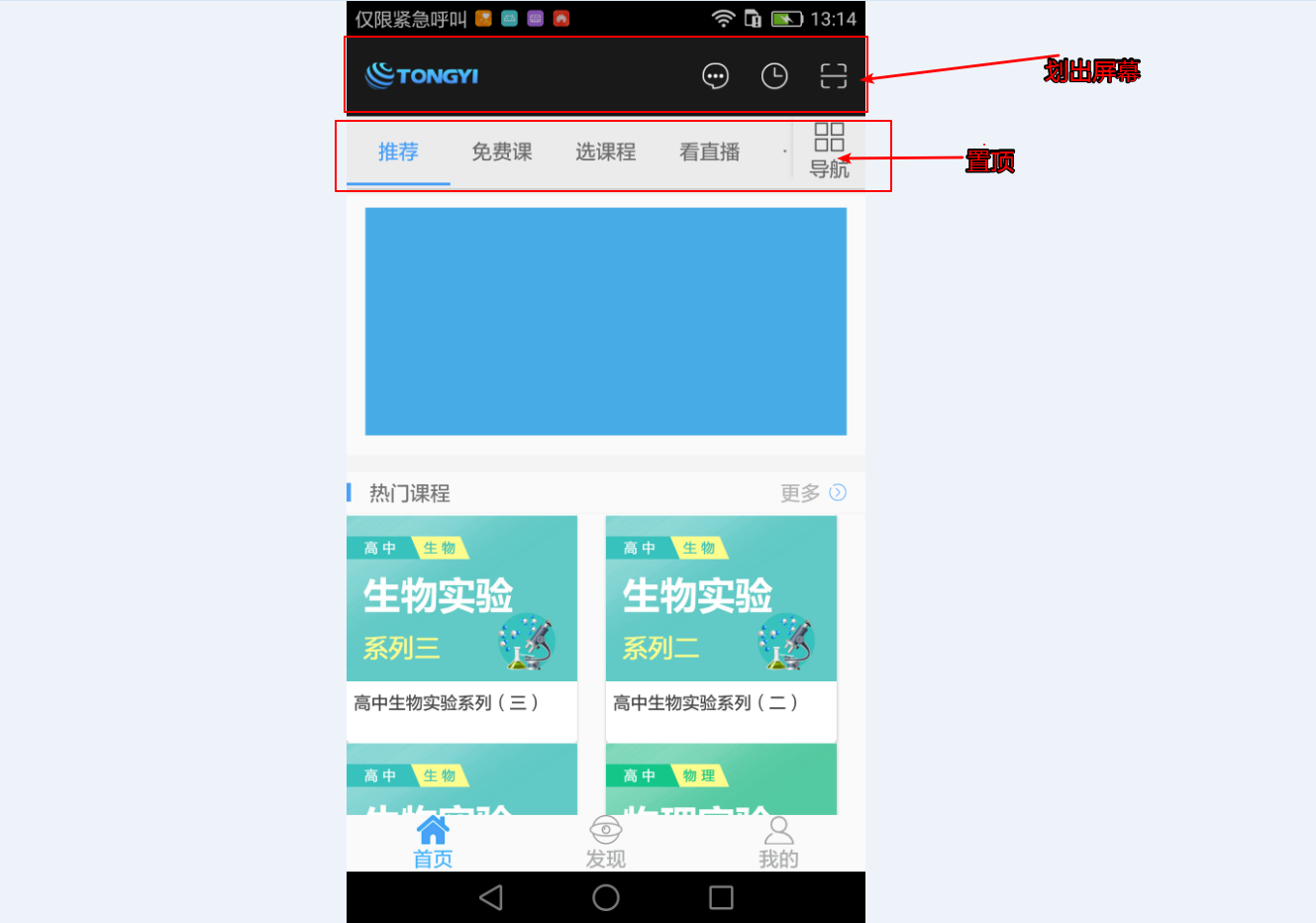
<android.support.design.widget.CoordinatorLayout xmlns:android="http://schemas.android.com/apk/res/android"

    xmlns:app="http://schemas.android.com/apk/res-auto"

    xmlns:tools="http://schemas.android.com/tools"

    android:id="@+id/fragment_firstpager_scrollview"

    android:layout_width="match_parent"

    android:layout_height="match_parent">


    <android.support.design.widget.AppBarLayout

        android:layout_width="match_parent"

        android:layout_height="wrap_content"

        android:orientation="vertical">


        <!--标题界面-->

        <LinearLayout

            android:id="@+id/fragment_firstpager_title"

            android:layout_width="match_parent"

            android:layout_height="?attr/actionBarSize"

            android:background="@color/title_bg"

            android:gravity="center_vertical"

            android:orientation="horizontal"

            app:layout_scrollFlags="scroll|enterAlways">


            <ImageView

                android:layout_width="wrap_content"

                android:layout_height="wrap_content"

                android:layout_marginLeft="13dp"

                android:src="@drawable/logo" />


            <View

                android:layout_width="0dp"

                android:layout_height="match_parent"

                android:layout_weight="1" />


            <ImageView

                android:id="@+id/fragment_firstpager_message"

                android:layout_width="wrap_content"

                android:layout_height="wrap_content"

                android:src="@drawable/xiaoxi" />


            <View

                android:layout_width="23dp"

                android:layout_height="match_parent" />


            <ImageView

                android:id="@+id/fragment_firstpager_record"

                android:layout_width="wrap_content"

                android:layout_height="wrap_content"

                android:src="@drawable/jilu" />


            <View

                android:layout_width="23dp"

                android:layout_height="match_parent" />


            <ImageView

                android:id="@+id/fragment_firstpager_scan"

                android:layout_width="wrap_content"

                android:layout_height="wrap_content"

                android:src="@drawable/saoyisao" />


            <View

                android:layout_width="13dp"

                android:layout_height="match_parent" />


        </LinearLayout>


        <!--tab和导航-->

        <LinearLayout

            android:layout_width="match_parent"

            android:layout_height="wrap_content"

            android:background="#EBEBEB">


            <android.support.design.widget.TabLayout

                android:id="@+id/fragment_firstpager_tablayout"

                android:layout_width="0dp"

                android:layout_height="wrap_content"

                android:layout_weight="1"

                app:tabGravity="center"

                app:tabIndicatorColor="@color/tab_select"

                app:tabMode="scrollable"

                app:tabSelectedTextColor="@color/tab_select">


            </android.support.design.widget.TabLayout>


            <ImageView

                android:layout_width="wrap_content"

                android:layout_height="wrap_content"

                android:src="@drawable/elevation" />

            <!--导航-->

            <LinearLayout

                android:id="@+id/fragment_firstpager_guide"

                android:layout_width="50dp"

                android:layout_height="50dp"

                android:gravity="center"

                android:orientation="vertical">


                <ImageView

                    android:layout_width="wrap_content"

                    android:layout_height="wrap_content"

                    android:src="@drawable/daohang" />


                <TextView

                    android:layout_width="wrap_content"

                    android:layout_height="wrap_content"

                    android:layout_marginTop="2dp"

                    android:text="导航" />


            </LinearLayout>

        </LinearLayout>

    </android.support.design.widget.AppBarLayout>

    <android.support.v4.view.ViewPager

        android:id="@+id/fragment_firstpager_viewpager"

        android:layout_width="match_parent"

        android:layout_height="3000dp"

        app:layout_behavior="@string/appbar_scrolling_view_behavior">


    </android.support.v4.view.ViewPager>

</android.support.design.widget.CoordinatorLayout>
  @Override

    public View initView(Activity activity) {

        View view = LayoutInflater.from(activity).inflate(R.layout.fragment_firstpager2,container,false);

        fragment_firstpager_message = (ImageView) view.findViewById(R.id.fragment_firstpager_message);

        fragment_firstpager_record = (ImageView) view.findViewById(R.id.fragment_firstpager_record);

        fragment_firstpager_scan = (ImageView) view.findViewById(R.id.fragment_firstpager_scan);

        fragment_firstpager_tablayout = (TabLayout) view.findViewById(R.id.fragment_firstpager_tablayout);

        fragment_firstpager_guide = (LinearLayout) view.findViewById(R.id.fragment_firstpager_guide);

        fragment_firstpager_viewpager = (ViewPager) view.findViewById(R.id.fragment_firstpager_viewpager);

        haveStateScrollView = (CoordinatorLayout) view.findViewById(R.id.fragment_firstpager_scrollview);

        fragment_firstpager_title = (LinearLayout) view.findViewById(R.id.fragment_firstpager_title);

        return view;

    }


    @Override

    protected void initListener(Activity activity) {


    }


    @Override

    public void initDate(Activity activity) {

        BaseActivityPagerAdapter pagerAdapter = new BaseActivityPagerAdapter(((MainActivity) activity).getSupportFragmentManager());

        Bundle bundle = new Bundle();


        pagerAdapter.addData(activity, pagerAdapter.new FragmentInfo(RecommandFragment.class, bundle), "推荐");

        pagerAdapter.addData(activity, pagerAdapter.new FragmentInfo(FreeClassFragment.class, bundle), "免费课");

        pagerAdapter.addData(activity, pagerAdapter.new FragmentInfo(ChooseClassFragment.class, bundle), "选课程");

        pagerAdapter.addData(activity, pagerAdapter.new FragmentInfo(SeeLiveFragment.class, bundle), "看直播");

        pagerAdapter.addData(activity, pagerAdapter.new FragmentInfo(OneMoneyFragment.class, bundle), "一元课");

        pagerAdapter.addData(activity, pagerAdapter.new FragmentInfo(SubjectFragment.class, bundle), "专题");


        fragment_firstpager_viewpager.setAdapter(pagerAdapter);

        fragment_firstpager_tablayout.setupWithViewPager(fragment_firstpager_viewpager);


    }
相关推荐
CoordinatorLayout+AppBarLayout+Toolbar+TabLayout+ViewPager+RecyclerView+CardView
CoordinatorLayout+AppBarLayout+Toolbar+TabLayout+ViewPager+RecyclerView+CardView的使用,详细说明 http://blog.csdn.net/amazing7/article/details/51918623
CoordinatorLayout+AppBarLayout+TabLayout+viewpager实现跟随隐藏tablayout功能
一个demo,将CoordinatorLayout+AppBarLayout+TabLayout+viewpager实现跟随隐藏tablayout功能,能够很顺畅的实现材料设计
Android 中 CoordinatorLayout + AppBarLayout 实现滑动头部悬停效果(页面附带TabLayout + ViewPager + RecyclerView结构)
序 昨晚经历了美股本月的第三次熔断 ,有史以来的第四次熔断 。 突 。 突突 。。突突突 。。。 很尴尬 ,找不到做 gif 的东西 。怎么办呢 。(找了好久 ,在手机上下载了一个 GIF 动图制作) AppbarLayout 回顾 我记得 16 、17年的时候这个效果在很多 APP 上都有出现 。之前写过demo ,然后一直也没机会在项目中使用 。 实现类似的效果 ,主要是使用三个控件相结合 CoordinatorLayout 、AppbarLayout 、NestedScrollView 。 AppbarLayout 是一种支持响应滚动手势的 app bar 布局 , Collapsi
CoordinatorLayout+viewpager+RecycleView刷新
CoordinatorLayout+viewpager+RecycleView刷新
ViewPager基本使用
viewPager基本使用,coordinatorlayout的一种使用方法




