win10系统安装软件时提示需要.NET Framework 1.1.4322,请问哪里可以下载安装到这个版本到win10系统?

C罗子 2016-11-22 09:43:37
win10系统安装软件时提示需要.NET Framework 1.1.4322,请问哪里可以下载安装到这个版本到win10系统?
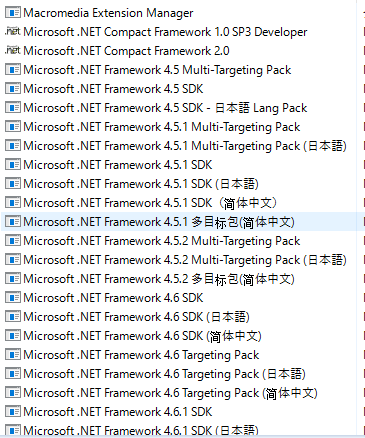
我本身的系统中有多个其他版本的.NET Framework,如图所示:


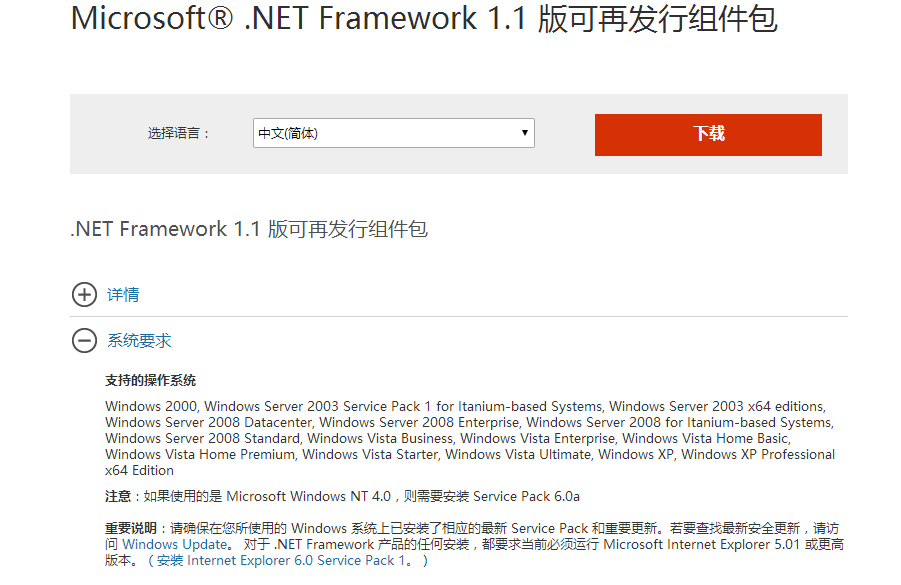
我在这个链接https://www.microsoft.com/zh-cn/download/details.aspx?id=26能看到这个版本,但是不支持win10,如图所示:


...全文
5281 15 打赏 收藏 转发到动态 举报
写回复
用AI写文章
15 条回复
切换为时间正序
请发表友善的回复…
发表回复
C罗子 2016-11-22
  • 打赏
  • 举报
回复
引用 6 楼 xianying7509 的回复:
[quote=引用 4 楼 Chinajiyong 的回复:]
Win10不支持安装.net fx1.1,如果运行程序需要.net fx1.1支持,可以安装.net fx3.5sp1(包含了fx1.1)。
MSDN这样说的
The .NET Framework 1.1 is not supported on the Windows 8, Windows 8.1, Windows Server 2012, Windows Server 2012 R2 or the Windows 10 operating systems. In some cases, the .NET Framework 1.1 is specifically identified as required for an application to run. In those cases, you should contact your independent software vendor (ISV) to have the application upgraded to run on the .NET Framework 3.5 SP1 or later version. For additional information, see Migrating from the .NET Framework 1.1.

MSDN链接:https://msdn.microsoft.com/en-us/library/hh925570(v=vs.110).aspx

另外我发现控制面板里有win10自带的NET Framework3.5版本,我勾选了前面的对勾,再运行

依然是一闪而过,没有下一步下一步这样的提示。
[/quote]
C罗子 2016-11-22
  • 打赏
  • 举报
回复
引用 4 楼 Chinajiyong 的回复:
Win10不支持安装.net fx1.1,如果运行程序需要.net fx1.1支持,可以安装.net fx3.5sp1(包含了fx1.1)。
MSDN这样说的
The .NET Framework 1.1 is not supported on the Windows 8, Windows 8.1, Windows Server 2012, Windows Server 2012 R2 or the Windows 10 operating systems. In some cases, the .NET Framework 1.1 is specifically identified as required for an application to run. In those cases, you should contact your independent software vendor (ISV) to have the application upgraded to run on the .NET Framework 3.5 SP1 or later version. For additional information, see Migrating from the .NET Framework 1.1.

MSDN链接:https://msdn.microsoft.com/en-us/library/hh925570(v=vs.110).aspx

另外我发现控制面板里有win10自带的NET Framework3.5版本,我勾选了前面的对勾,再运行

依然是一闪而过,没有下一步下一步这样的提示。
C罗子 2016-11-22
  • 打赏
  • 举报
回复
引用 4 楼 Chinajiyong 的回复:
Win10不支持安装.net fx1.1,如果运行程序需要.net fx1.1支持,可以安装.net fx3.5sp1(包含了fx1.1)。
MSDN这样说的
The .NET Framework 1.1 is not supported on the Windows 8, Windows 8.1, Windows Server 2012, Windows Server 2012 R2 or the Windows 10 operating systems. In some cases, the .NET Framework 1.1 is specifically identified as required for an application to run. In those cases, you should contact your independent software vendor (ISV) to have the application upgraded to run on the .NET Framework 3.5 SP1 or later version. For additional information, see Migrating from the .NET Framework 1.1.

MSDN链接:https://msdn.microsoft.com/en-us/library/hh925570(v=vs.110).aspx

您好,我下载完之后,是这样的。

双击这个进行安装,但是一闪而过了,不知道咋回事,请指教!
EnForGrass 2016-11-22
  • 打赏
  • 举报
回复
Win10不支持安装.net fx1.1,如果运行程序需要.net fx1.1支持,可以安装.net fx3.5sp1(包含了fx1.1)。 MSDN这样说的 The .NET Framework 1.1 is not supported on the Windows 8, Windows 8.1, Windows Server 2012, Windows Server 2012 R2 or the Windows 10 operating systems. In some cases, the .NET Framework 1.1 is specifically identified as required for an application to run. In those cases, you should contact your independent software vendor (ISV) to have the application upgraded to run on the .NET Framework 3.5 SP1 or later version. For additional information, see Migrating from the .NET Framework 1.1. MSDN链接:https://msdn.microsoft.com/en-us/library/hh925570(v=vs.110).aspx
C罗子 2016-11-22
  • 打赏
  • 举报
回复
引用 2 楼 From_TaiWan 的回复:
哦,你这是不是从win7升级? 很少出现这种情况啊,你试着将原来的.NET卸载掉,当然相关应用软件也得卸载。先让操作系统升级,然后再安装载掉的应用软件
安装一个软件就要卸载其他版本的.NET Framework,这个我真做不到。
秋的红果实 2016-11-22
  • 打赏
  • 举报
回复
哦,你这是不是从win7升级? 很少出现这种情况啊,你试着将原来的.NET卸载掉,当然相关应用软件也得卸载。先让操作系统升级,然后再安装载掉的应用软件
秋的红果实 2016-11-22
  • 打赏
  • 举报
回复
你还是换win10安装包吧
EnForGrass 2016-11-22
  • 打赏
  • 举报
回复
这个地址呢https://www.microsoft.com/zh-CN/download/details.aspx?id=22 3.5的安装方法也有:https://msdn.microsoft.com/en-us/library/hh506443(v=vs.110).aspx 再不行看看我上面给的链接还有一种方法。
C罗子 2016-11-22
  • 打赏
  • 举报
回复
引用 13 楼 Chinajiyong 的回复:
[quote=引用 12 楼 xianying7509 的回复:] [quote=引用 11 楼 Chinajiyong 的回复:] [quote=引用 7 楼 xianying7509 的回复:] [quote=引用 6 楼 xianying7509 的回复:] [quote=引用 4 楼 Chinajiyong 的回复:] 你那个是NET Framework 3.5 SP1么?自己在微软官方找找
我在这个地址:https://www.microsoft.com/zh-CN/download/confirmation.aspx?id=25150下载了sp13.5, 双击运行的时候还是一闪而过。[/quote] 用管理员身份运行[/quote] 试过了,不行。
EnForGrass 2016-11-22
  • 打赏
  • 举报
回复
引用 12 楼 xianying7509 的回复:
[quote=引用 11 楼 Chinajiyong 的回复:] [quote=引用 7 楼 xianying7509 的回复:] [quote=引用 6 楼 xianying7509 的回复:] [quote=引用 4 楼 Chinajiyong 的回复:] 你那个是NET Framework 3.5 SP1么?自己在微软官方找找
我在这个地址:https://www.microsoft.com/zh-CN/download/confirmation.aspx?id=25150下载了sp13.5, 双击运行的时候还是一闪而过。[/quote] 用管理员身份运行
C罗子 2016-11-22
  • 打赏
  • 举报
回复
引用 11 楼 Chinajiyong 的回复:
[quote=引用 7 楼 xianying7509 的回复:]
[quote=引用 6 楼 xianying7509 的回复:]
[quote=引用 4 楼 Chinajiyong 的回复:]

你那个是NET Framework 3.5 SP1么?自己在微软官方找找

我在这个地址:https://www.microsoft.com/zh-CN/download/confirmation.aspx?id=25150下载了sp13.5,
双击运行的时候还是一闪而过。
EnForGrass 2016-11-22
  • 打赏
  • 举报
回复
引用 7 楼 xianying7509 的回复:
[quote=引用 6 楼 xianying7509 的回复:] [quote=引用 4 楼 Chinajiyong 的回复:] Win10不支持安装.net fx1.1,如果运行程序需要.net fx1.1支持,可以安装.net fx3.5sp1(包含了fx1.1)。 MSDN这样说的 The .NET Framework 1.1 is not supported on the Windows 8, Windows 8.1, Windows Server 2012, Windows Server 2012 R2 or the Windows 10 operating systems. In some cases, the .NET Framework 1.1 is specifically identified as required for an application to run. In those cases, you should contact your independent software vendor (ISV) to have the application upgraded to run on the .NET Framework 3.5 SP1 or later version. For additional information, see Migrating from the .NET Framework 1.1. MSDN链接:https://msdn.microsoft.com/en-us/library/hh925570(v=vs.110).aspx
另外我发现控制面板里有win10自带的NET Framework3.5版本,我勾选了前面的对勾,再运行 依然是一闪而过,没有下一步下一步这样的提示。 [/quote] [/quote] 你那个是NET Framework 3.5 SP1么?自己在微软官方找找
拜一刀 2016-11-22
  • 打赏
  • 举报
回复
在 Windows 8、Windows 8.1 或 Windows 10 上运行 .NET Framework 1.1 应用 Windows 8、Windows 8.1、Windows Server 2012、Windows Server 2012 R2 或 Windows 10 操作系统上不支持 .NET Framework 1.1。 在某些情况下,.NET Framework 1.1 专门标识为是运行应用程序所必需的。 在这些情况下,应联系您的独立软件供应商 (ISV) 以升级该应用程序,使其可在 .NET Framework 3.5 SP1 或更高版本上运行。 有关其他信息,请参阅从 .NET Framework 1.1 迁移。 从 CD 或下载中心安装 .NET Framework 1.1。 在 Windows 8、Windows 8.1、Windows Server 2012Windows Server 2012 R2 或 Windows 10 上无法手动安装 .NET Framework 1.1。 它不再受支持。 如果尝试安装此包,将显示以下错误消息:“安装程序无法继续,因为该版本的 .NET Framework 与之前安装的版本不兼容”。 若要解决此问题,请安装 .NET Framework 3.5 SP1(https://www.microsoft.com/download/details.aspx?id=22)。 此版本包括 .NET Framework 2.0(.NET Framework 1.1 之后的版本),Windows 8、Windows 8.1 和 Windows 10 上支持 .NET Framework 2.0。 首先,您应始终尝试安装该应用程序,以确定其是否会自动更新到 .NET Framework 的更高版本。 如果不会,请联系您的 ISV 以获取应用程序更新。 看看能不能装3.5 sp1?你电脑里那个好像没写sp1,再试试管理员运行啦兼容模式啦,再不行就是软件的问题了吧
C罗子 2016-11-22
  • 打赏
  • 举报
回复
引用 8 楼 zeratul1990 的回复:
启动3.5之后安下你的软件试试
安了,还是提示缺少那个.NET Framework 1.1.4322
拜一刀 2016-11-22
  • 打赏
  • 举报
回复
启动3.5之后安下你的软件试试

111,125

社区成员

发帖
与我相关
我的任务
社区描述
.NET技术 C#
社区管理员
  • C#
  • Creator Browser
  • by_封爱
加入社区
  • 近7日
  • 近30日
  • 至今
社区公告

让您成为最强悍的C#开发者

试试用AI创作助手写篇文章吧