

 系统维护与使用区

rsync客户端总提示auth failed on module xxxx,是何道理?
 墨衍会员 · AI 创作全网分发 墨衍智能分发 通过墨衍一键同步至各平台 可同步平台 CSDN微信公众号微博知乎掘金百家号博客园抖音小红书 你的文章也可以这样分发 墨衍会员 ¥399起/年,写一次发全网
我也要 关注 + 加入社区
墨衍会员 · AI 创作全网分发 墨衍智能分发 通过墨衍一键同步至各平台 可同步平台 CSDN微信公众号微博知乎掘金百家号博客园抖音小红书 你的文章也可以这样分发 墨衍会员 ¥399起/年,写一次发全网
我也要 关注 + 加入社区a服务器中的rsyncd.conf配置如下:
uid = nobody

gid = nobody

use chroot = no

max connections = 200

timeout = 600

strict modes=no

port = 873

pid file = /var/run/rsyncd.pid

lock file = /var/run/rsync.lock

log file = /var/log/rsyncd.log


[backup]

path = /home/bak/testSync

comment = This is test

auth users = test

secrets file = /etc/rsync.ps

read only = no

list = no
在b服务器中:
rsync -vzrtopg --progress  --password-file=/etc/rsync.pas /www/test/ test@192.168.0.160::backup


#报错如下:

@ERROR: auth failed on module backup

rsync error: error starting client-server protocol (code 5) at main.c(1503) [sender=3.0.6]
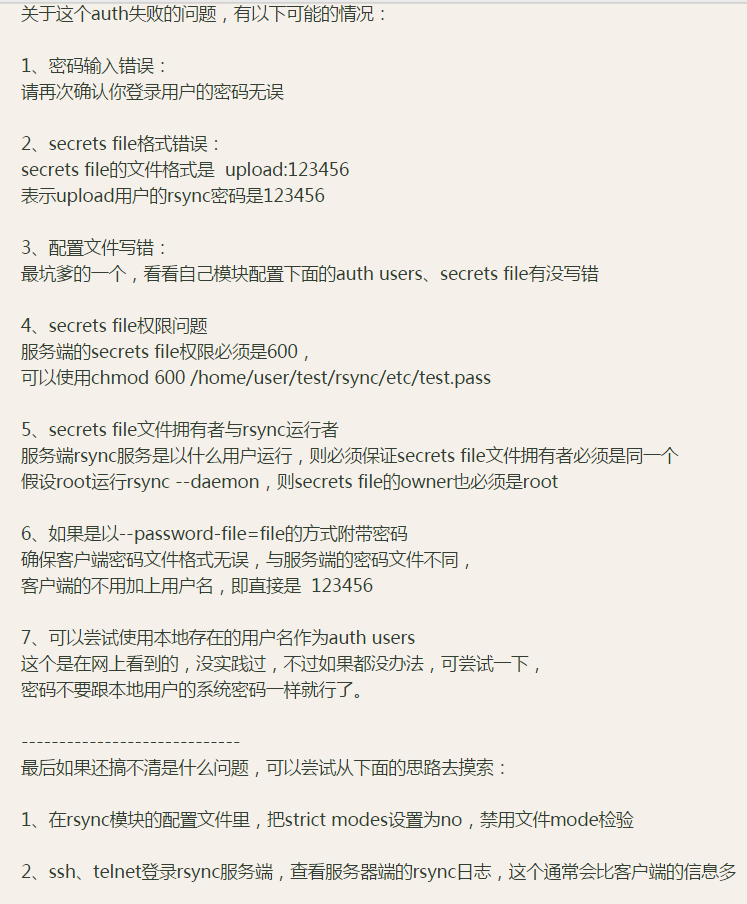
查到诸多资料,都说是认证(密码)问题,我都一一检查过,依旧无效,比如:
崩溃中,特来求助,谢谢了

相关推荐
Rsync ERROR: auth failed on module解决方法
今天在两台服务器同步备份在用户权限上纠结了很多,主要关于这个问题网上的配置方法不一,源自rsync版本不一致,这里简单总结下,方便需要的朋友
【16】linux命令/工具,systemd,文件操作,动静态库,信号,socket
apt install python3-pip --fix-missing(断开vpn,cp /etc/apt/sources.list /etc/apt/sources.list.bak,python3 -m pip install --upgrade pip,apt-get update,pip install 包名 -i http://pypi.douban.com/simple/ --trusted-host pypi.douban.com)设置时间,联网,apt-get install vim。
rsync远程同步报错:ERROR: auth failed on module www rsync error: error starting client-server protocol (cod
错误描述 [root@localhost ~]# rsync -avz --delete backuper@192.168.20.115::www /www Password: @ERROR: auth failed on module www rsync error: error starting client-server protocol (code 5) at main.c(1516) [Receiver=3.0.9] rsync服务器配置如下 [root@localhost ~]# cat /etc/rsyncd.conf # /etc/rsyncd: configuration
rsync常见错误及解决方法
rsync常见错误及解决方法rsync常见错误及解决方法rsync常见错误及解决方法
rsync 常见错误与解决方法整理
rsync是个数据同步应用 可以同时从多个机器同步数据,可以写成计划任务让他自己执行




