

111,128
社区成员
 发帖
发帖 与我相关
与我相关 我的任务
我的任务
 分享
分享
private void Button_Click_2(object sender, RoutedEventArgs e)

        {


            ObservableCollection<PersonalInfo> personalInfoList = new ObservableCollection<PersonalInfo>();//声明一个动态数据集合类的对象

            //给数据集合添加类成员

            personalInfoList.Add(new PersonalInfo("雀巢咖啡",5,10,"无"));

            personalInfoList.Add(new PersonalInfo("脉动",20,5,"无"));

            personalInfoList.Add(new PersonalInfo("三只松鼠",10,10,"无"));

            personalInfoList.Add(new PersonalInfo("康师傅方便面",15,4.5,"无"));

            personalInfoList.Add(new PersonalInfo("薯片",50,8,"无"));

            listView.ItemsSource = personalInfoList;//将数据和UI绑定在一起


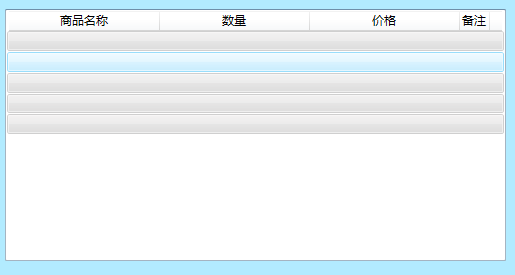
        }


using System;
using System.Collections.Generic;
using System.Linq;
using System.Text;
using System.Threading.Tasks;
using System.Collections.ObjectModel;

namespace Demo3
{
    class PersonalInfo:INotifyPropertyChanged  //实现接口
    {
        private string Goods_Name;
        private int Quantity_;
        private double Price_;
        private string Prepare_;
        //构造方法对字段初始化
        public PersonalInfo(string GoodsName, int Quantity, double Price, string Prepare)
        {
            Goods_Name = GoodsName;
            Quantity_ = Quantity;
            Price_ = Price;
            Prepare_ = Prepare;
        }
        //商品名称
        public string GOODSNAME
        {
            get { return Goods_Name; }
            set { Goods_Name = value; }
        }
        //商品数量
        public int QUANTITY
        {
            get { return Quantity_; }
            set { Quantity_ = value; }
        }
        //价格
        public double PRICE
        {
            get { return Price_; }
            set { Price_ = value; }
        }
        //备注
        public string PREPARE
        {
            get { return Prepare_; }
            set { Prepare_ = value; }
        }


    }
}
<ListView x:Name="listView" HorizontalAlignment="Left" Height="252" Margin="30,81,0,0" VerticalAlignment="Top" Width="501">
<ListView.View>
<GridView>
<GridViewColumn Header="商品名称" Width="150" DisplayMemberBinding="{Binding Path=Goods_Name}"/>
<GridViewColumn Header="数量" Width="150" DisplayMemberBinding="{Binding Path=Quantity_}"/>
<GridViewColumn Header="价格" Width="150" DisplayMemberBinding="{Binding Path=Price_}"/>
<GridViewColumn Header="备注" Width="30" DisplayMemberBinding="{Binding Path=Prepare_}"/>
</GridView>
</ListView.View>
</ListView>
<ListView>
<ListView.View>
                    <GridView>
                        <GridView.Columns>
                            <GridViewColumn Header="商品名称" Width="70" DisplayMemberBinding="{Binding Name}">
                            </GridViewColumn>
                        </GridView.Columns>
                    </GridView>
                </ListView.View>
            </ListView>


