

 .NET社区

网站发布后,拒绝访问
 墨衍会员 · AI 创作全网分发 墨衍智能分发 通过墨衍一键同步至各平台 可同步平台 CSDN微信公众号微博知乎掘金百家号博客园抖音小红书 你的文章也可以这样分发 墨衍会员 ¥399起/年,写一次发全网
我也要 关注 + 加入社区
墨衍会员 · AI 创作全网分发 墨衍智能分发 通过墨衍一键同步至各平台 可同步平台 CSDN微信公众号微博知乎掘金百家号博客园抖音小红书 你的文章也可以这样分发 墨衍会员 ¥399起/年,写一次发全网
我也要 关注 + 加入社区iis发布的,如图所示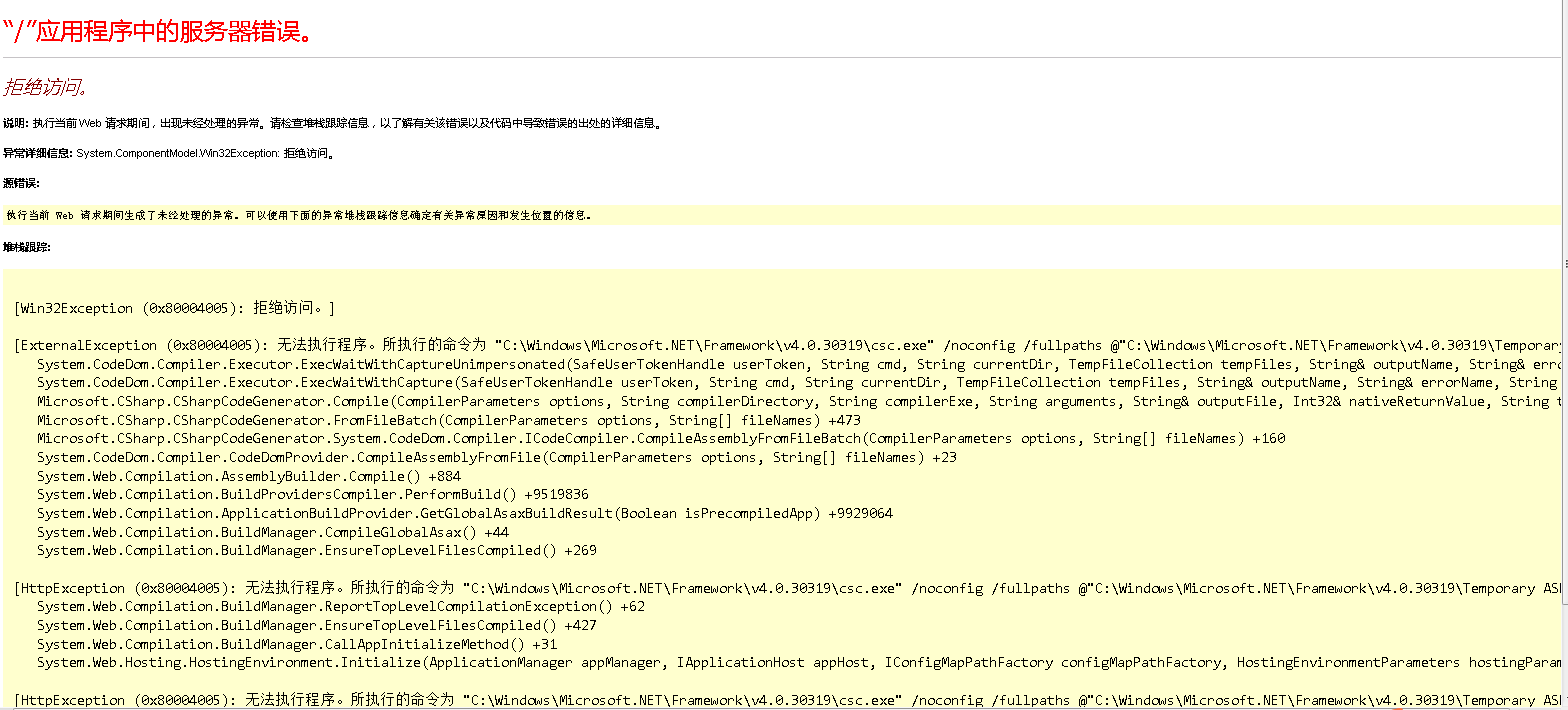
windows日志:
windows日志:
异常信息:

    异常类型: HttpException

    异常消息: 无法执行程序。所执行的命令为 "C:\Windows\Microsoft.NET\Framework\v4.0.30319\csc.exe" /noconfig /fullpaths @"C:\Windows\Microsoft.NET\Framework\v4.0.30319\Temporary ASP.NET Files\root\ef18ab43\ff78c7ef\ihruc4wb.cmdline"。

   在 System.Web.Compilation.BuildManager.ReportTopLevelCompilationException()

   在 System.Web.Compilation.BuildManager.EnsureTopLevelFilesCompiled()

   在 System.Web.Compilation.BuildManager.CallAppInitializeMethod()

   在 System.Web.Hosting.HostingEnvironment.Initialize(ApplicationManager appManager, IApplicationHost appHost, IConfigMapPathFactory configMapPathFactory, HostingEnvironmentParameters hostingParameters, PolicyLevel policyLevel, Exception appDomainCreationException)


无法执行程序。所执行的命令为 "C:\Windows\Microsoft.NET\Framework\v4.0.30319\csc.exe" /noconfig /fullpaths @"C:\Windows\Microsoft.NET\Framework\v4.0.30319\Temporary ASP.NET Files\root\ef18ab43\ff78c7ef\ihruc4wb.cmdline"。

   在 System.CodeDom.Compiler.Executor.ExecWaitWithCaptureUnimpersonated(SafeUserTokenHandle userToken, String cmd, String currentDir, TempFileCollection tempFiles, String& outputName, String& errorName, String trueCmdLine)

   在 System.CodeDom.Compiler.Executor.ExecWaitWithCapture(SafeUserTokenHandle userToken, String cmd, String currentDir, TempFileCollection tempFiles, String& outputName, String& errorName, String trueCmdLine)

   在 Microsoft.CSharp.CSharpCodeGenerator.Compile(CompilerParameters options, String compilerDirectory, String compilerExe, String arguments, String& outputFile, Int32& nativeReturnValue, String trueArgs)

   在 Microsoft.CSharp.CSharpCodeGenerator.FromFileBatch(CompilerParameters options, String[] fileNames)

   在 Microsoft.CSharp.CSharpCodeGenerator.System.CodeDom.Compiler.ICodeCompiler.CompileAssemblyFromFileBatch(CompilerParameters options, String[] fileNames)

   在 System.CodeDom.Compiler.CodeDomProvider.CompileAssemblyFromFile(CompilerParameters options, String[] fileNames)

   在 System.Web.Compilation.AssemblyBuilder.Compile()

   在 System.Web.Compilation.BuildProvidersCompiler.PerformBuild()

   在 System.Web.Compilation.ApplicationBuildProvider.GetGlobalAsaxBuildResult(Boolean isPrecompiledApp)

   在 System.Web.Compilation.BuildManager.CompileGlobalAsax()

   在 System.Web.Compilation.BuildManager.EnsureTopLevelFilesCompiled()


拒绝访问。


请求信息:

    请求 URL: http://192.168.2.7:8788/

    请求路径: /

    用户主机地址: 192.168.2.7

    用户:

    是否已经过身份验证: False

    身份验证类型:

    线程帐户名: IIS APPPOOL\MaiGaoSCMS


线程信息:

    线程 ID: 382

    线程帐户名: IIS APPPOOL\MaiGaoSCMS

    是否正在模拟: False

    堆栈跟踪:    在 System.Web.Compilation.BuildManager.ReportTopLevelCompilationException()

   在 System.Web.Compilation.BuildManager.EnsureTopLevelFilesCompiled()

   在 System.Web.Compilation.BuildManager.CallAppInitializeMethod()

   在 System.Web.Hosting.HostingEnvironment.Initialize(ApplicationManager appManager, IApplicationHost appHost, IConfigMapPathFactory configMapPathFactory, HostingEnvironmentParameters hostingParameters, PolicyLevel policyLevel, Exception appDomainCreationException)
...全文
相关推荐
网站iis大全.docx
然后,点击“操作”并选择“添加角色”,在弹出的窗口中勾选“Web服务器(IIS)”,同时添加必要的功能,如HTTP重定向和FTP发布服务。
MVC4 网站发布(整理+部分问题收集和解决方案)
MVC4网站发布过程中的问题收集和解决方案: - 如果在注册IIS服务器时遇到“拒绝访问”的错误,通常是由于系统Temp目录权限问题导致。
ASP.Net WebForm的发布(图解)
例如,***文件夹拒绝访问可能是因为权限设置不正确。
IIS7 网站发布常见报错问题解决方案汇总
在使用IIS7进行网站部署和发布的过程中,用户可能会遇到各种各样的问题和错误提示,本文对这些常见的报错问题进行了汇总,并给出了解决方案,以便用户可以顺利地完成网站发布。
IIS网站发布常见问题解决方案
在Windows Server系统中,IIS常被用来发布网站。




