

 数据库相关
数据库相关

读取excel循环语句

 墨衍会员 · AI 创作全网分发 墨衍智能分发 通过墨衍一键同步至各平台 可同步平台 CSDN微信公众号微博知乎掘金百家号博客园抖音小红书 你的文章也可以这样分发 墨衍会员 ¥399起/年,写一次发全网
我也要 关注 + 加入社区
墨衍会员 · AI 创作全网分发 墨衍智能分发 通过墨衍一键同步至各平台 可同步平台 CSDN微信公众号微博知乎掘金百家号博客园抖音小红书 你的文章也可以这样分发 墨衍会员 ¥399起/年,写一次发全网
我也要 关注 + 加入社区现要把excel数据导入表中,现有代码,可是到了读取时,循环语句没有读全。
excel数据为:
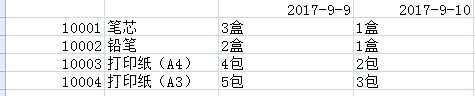
以下代码读取时,没有update到2017-09-10数据
var
iRE:Integer;
iRow,iCol :Integer;
MsExcel,MsExcelWorkBook,MsExcelWorkSheet:Variant;
i:Integer;
eicol:Integer;
eirow:Integer;
begin
Try
OpenDialog1.FileName:='*.xls';
if not OpenDialog1.Execute then
begin
Exit;
end;
if ExtractFileExt(OpenDialog1.FileName) <> '.xls' then
begin
MessageBox(0, '请选择正确的excel文件',PChar('提示'),MB_OK or MB_ICONWARNING);
Exit;
end;
MsExcel:=CreateOleObject('Excel.Application');
MsExcel.visible:=true;
MsExcelWorkBook:=MsExcel.WorkBooks.Open(OpenDialog1.FileName);
//更新排班主数据
Application.ProcessMessages;//防止进程阻塞
iRow:=2;
iCol:=1;
i:=1;
while trim(msExcel.WorkSheets['sheet1'].Cells[iCol,eicol].value) <> '' do begin
with query.Close;
query.SQL.Text := 'update wh_dict set wh_amount=:wh_ amount where wh_id= :wh_id and wh_name:=wh_name and in_date:=in_date ;
Parameters.ParamByName('wh_id').Value := Trim(msExcel.WorkSheets[1].Cells[iRow,iCol].value);
Parameters.ParamByName('wh_name').Value := Trim(msExcel.WorkSheets[1].Cells[iRow,iCol+1].value);
Parameters.ParamByName(' wh_amount').Value := Trim(msExcel.WorkSheets[1].Cells[iRow,iCol+2].value);
Parameters.ParamByName('duty_date').Value := Trim(msExcel.WorkSheets[1].Cells[i,iCol+2].value);
ExecSQL;
end;
iRow:=iRow+1;
end;
MsExcel.Quit;
Except
MessageBox(self.Handle,'数据导入失败!','系统提示',0);
MsExcel.Quit;
Exit;
end ;
MessageBox(self.Handle,'数据导入成功!','系统提示',0);
end;
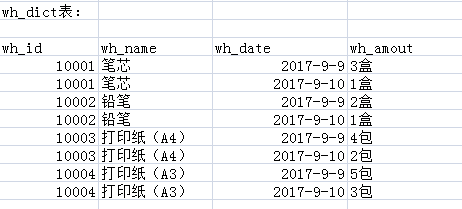
excel数据为:
以下代码读取时,没有update到2017-09-10数据
var
iRE:Integer;
iRow,iCol :Integer;
MsExcel,MsExcelWorkBook,MsExcelWorkSheet:Variant;
i:Integer;
eicol:Integer;
eirow:Integer;
begin
Try
OpenDialog1.FileName:='*.xls';
if not OpenDialog1.Execute then
begin
Exit;
end;
if ExtractFileExt(OpenDialog1.FileName) <> '.xls' then
begin
MessageBox(0, '请选择正确的excel文件',PChar('提示'),MB_OK or MB_ICONWARNING);
Exit;
end;
MsExcel:=CreateOleObject('Excel.Application');
MsExcel.visible:=true;
MsExcelWorkBook:=MsExcel.WorkBooks.Open(OpenDialog1.FileName);
//更新排班主数据
Application.ProcessMessages;//防止进程阻塞
iRow:=2;
iCol:=1;
i:=1;
while trim(msExcel.WorkSheets['sheet1'].Cells[iCol,eicol].value) <> '' do begin
with query.Close;
query.SQL.Text := 'update wh_dict set wh_amount=:wh_ amount where wh_id= :wh_id and wh_name:=wh_name and in_date:=in_date ;
Parameters.ParamByName('wh_id').Value := Trim(msExcel.WorkSheets[1].Cells[iRow,iCol].value);
Parameters.ParamByName('wh_name').Value := Trim(msExcel.WorkSheets[1].Cells[iRow,iCol+1].value);
Parameters.ParamByName(' wh_amount').Value := Trim(msExcel.WorkSheets[1].Cells[iRow,iCol+2].value);
Parameters.ParamByName('duty_date').Value := Trim(msExcel.WorkSheets[1].Cells[i,iCol+2].value);
ExecSQL;
end;
iRow:=iRow+1;
end;
MsExcel.Quit;
Except
MessageBox(self.Handle,'数据导入失败!','系统提示',0);
MsExcel.Quit;
Exit;
end ;
MessageBox(self.Handle,'数据导入成功!','系统提示',0);
end;
...全文
相关推荐
php excel reader读取excel内容存入数据库实现代码
很多新手朋友对于如何使用php-excel-reader读取excel内容存入数据库,甚是疑惑,本文将介绍详细的解决方案,需要了解的朋友可以参考下
VB读取EXCEL文件
能够读取EXCEL,并且写入。 '读取01.xls中A2到A6,5个单元格的数据 Private Sub Command1_Click() Dim ExcelApp
利用Excel批量生成单条SQL语句
这个工具就是通过配置模板,根据导入的excel生成sql,并且支持js脚本控制;生成的是单sql不是批量的,一条一条执行,避免出问题
excel导入生成insert语句
将excel导入 生成dataset,然后在随心所欲的生成各种insert,deleted,update语句。
如何操作Excel读取数据导入DB2数据库
本文将为大家介绍如何操作Excel读取数据导入DB2数据库。




