社区
SharePoint
帖子详情
SharePoint 2010 List 如何页面显示“Created By"
DINGHUI0430
2017-11-02 11:42:08
很不愿意做伸手党,事先也在WEB页面的设置翻了个遍,也研究过Designer的内容,只是能力有限,一直未能解决,所以厚颜来此
询问。
WIN 7 + SharePoint 2010
不同用户通过EXCEL的"插入”,”列表“,输入SP网站链接上传数据,但是在SP的网页面,无法显示创立者的名字,时间显示也是非
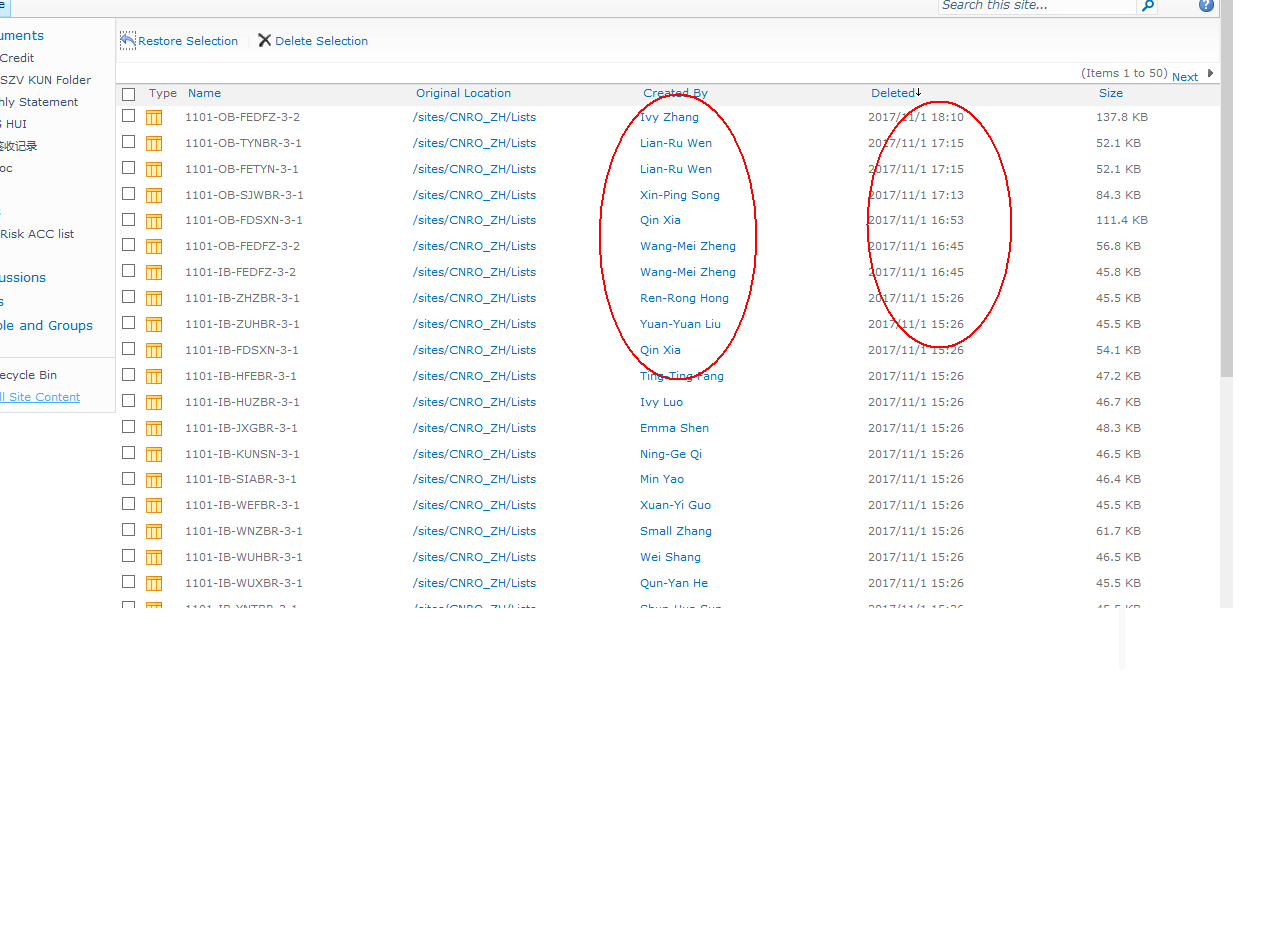
标准的. 我想要的效果,恰恰就是删除列表中后,在"Recyle Bin"显示的样子,请问如何设置,多谢
...全文
661
4
打赏
收藏
SharePoint 2010 List 如何页面显示“Created By"
很不愿意做伸手党,事先也在WEB页面的设置翻了个遍,也研究过Designer的内容,只是能力有限,一直未能解决,所以厚颜来此 询问。 WIN 7 + SharePoint 2010 不同用户通过EXCEL的"插入”,”列表“,输入SP网站链接上传数据,但是在SP的网页面,无法显示创立者的名字,时间显示也是非 标准的. 我想要的效果,恰恰就是删除列表中后,在"Recyle Bin"显示的样子,请问如何设置,多谢
复制链接
扫一扫
分享
转发到动态
举报
写回复
配置赞助广告
用AI写文章
4 条
回复
切换为时间正序
请发表友善的回复…
发表回复
打赏红包
DINGHUI0430
2017-11-07
打赏
举报
回复
多谢,多方查找未能解决,便猜到可能是代码级别的工作了,慢慢研究中..
Justin-Liu
2017-11-04
打赏
举报
回复
哦 你要显示list的createdby属性? 那估计得写代码了
https://msdn.microsoft.com/en-us/library/office/microsoft.sharepoint.splist.author.aspx
Justin-Liu
2017-11-03
打赏
举报
回复
修改当前视图,视图设置里可以设置要显示的field
DINGHUI0430
2017-11-03
打赏
举报
回复
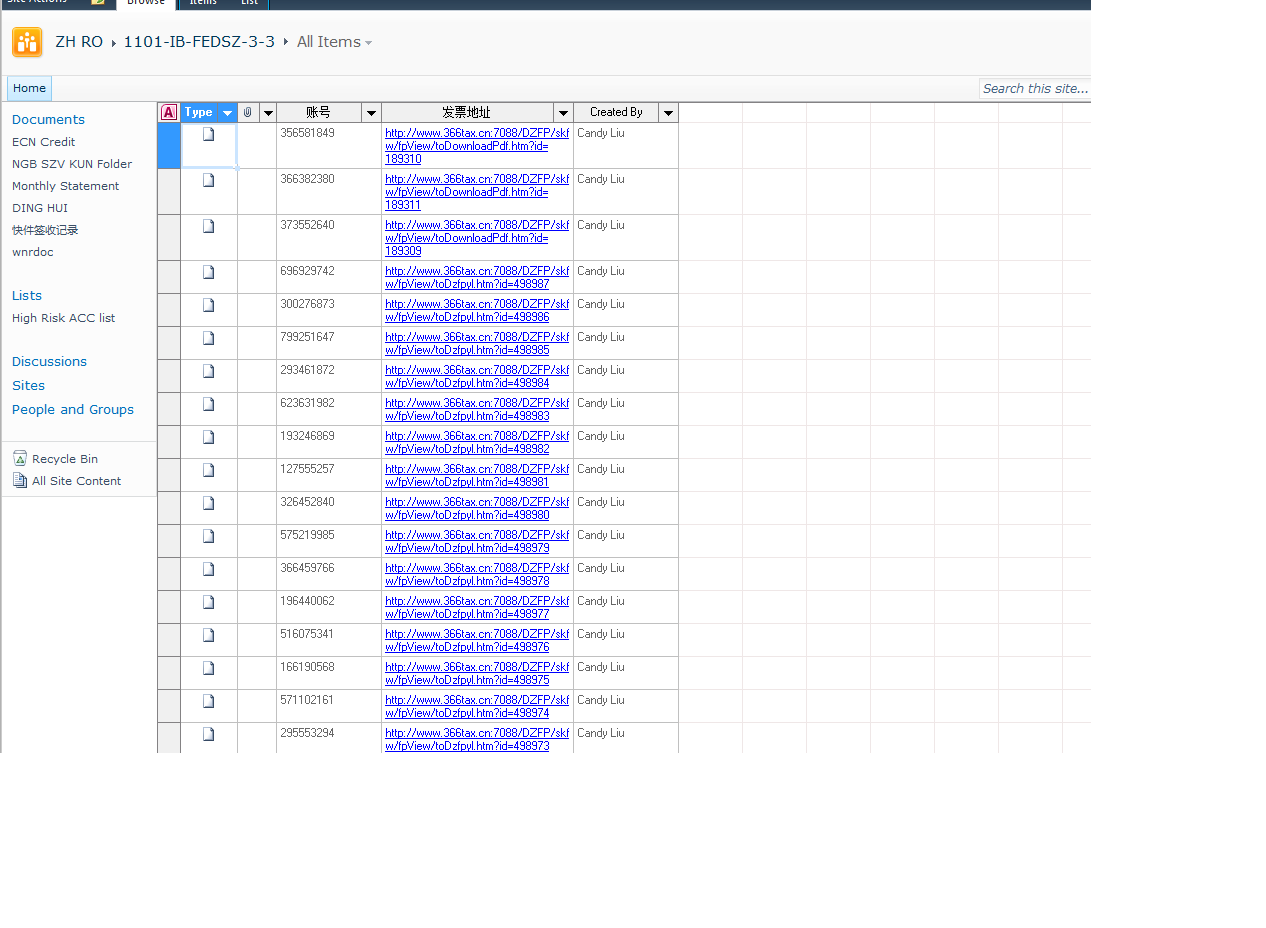
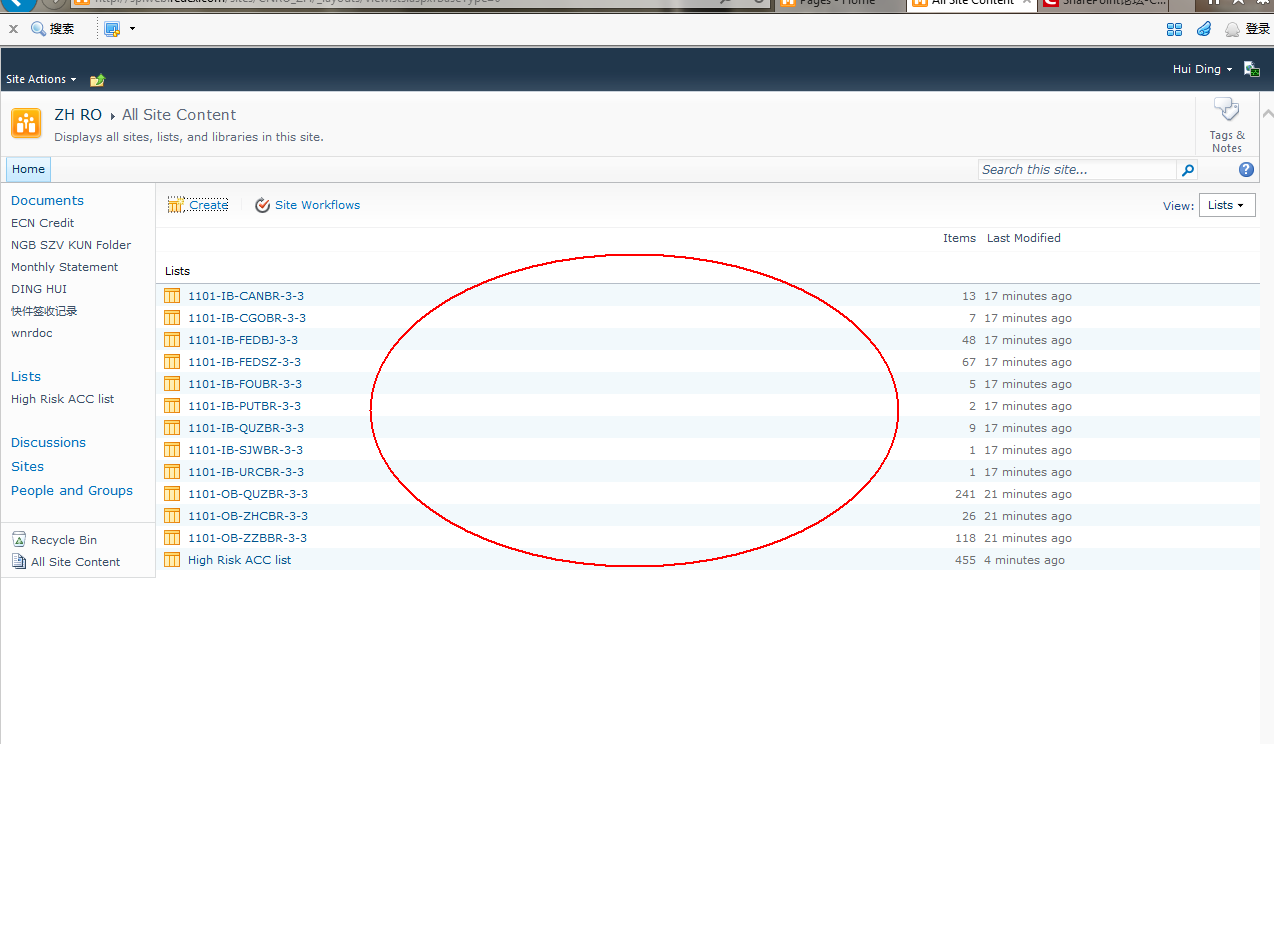
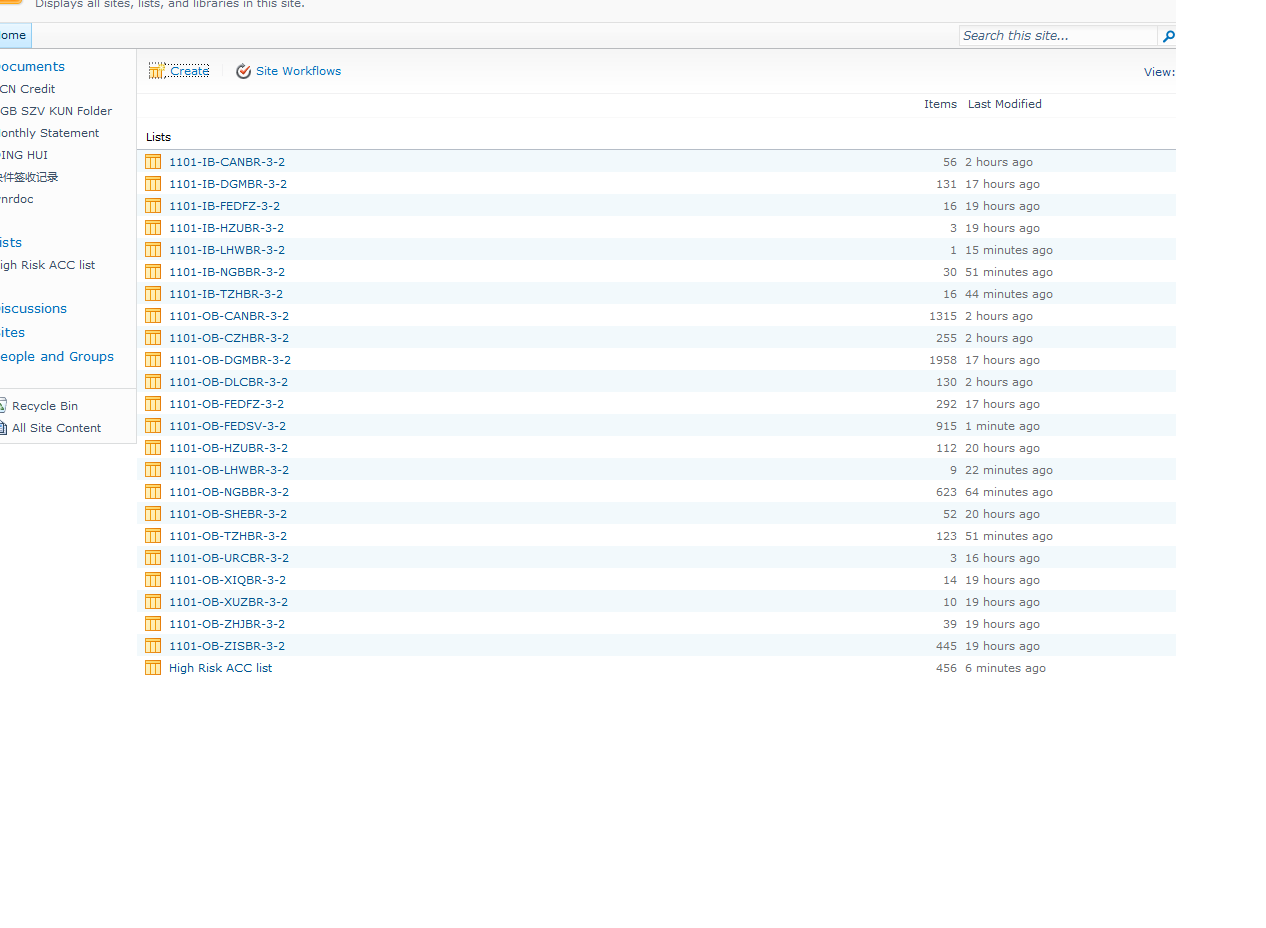
感谢赐教,不过需要进一步求教,更改视图,是针对具体某个列表的(进入表格后),在列表中加一列,显示该行记录由谁建立,我试过确实可以(如图一)。 我需要的是在列表的主页,类似于很多个列表的目录页,增加可以看到创建者的名字(如图二),请问是否有解决的方法。 我相信一定可以,因为删除到"回收站“之后,就能如此显示了.
Create
a
List
-Driven
SharePoint
Site Notification System源代码
Create
a
List
-Driven
SharePoint
Site Notification System源代码
Microsoft
SharePoint
2010
Developer Reference
Part I Getting Started 1 Introducing Microsoft
SharePoint
2010
. 3 What Is
SharePoint
? 3 Main Capabilities 4 Sites . 5 Communities 5 Content . 5 Search . 6 Insights 6 Composites 6
SharePoint
Basic Concepts 7
SharePoint
Central Administration . . . . . . . . . . . . . . . . . . . . . . . . . . . . . . . . . 7 Site Collections and Websites . 8
List
s, Libraries, Items, and Documents 10 Web Parts and Web Part Pages 12 Architectural Overview . 12 Logical and Physical Architecture 14 Service Applications . 16 The Role of Databases 17
SharePoint
Editions . 18
SharePoint
Foundation 18
SharePoint
Server Standard 19
SharePoint
Server Enterprise . . . . . . . . . . . . . . . . . . . . . . . . . . . . . . . . . . . . . 19
SharePoint
for Internet Sites . 20
SharePoint
Online . 20
SharePoint
for Developers . 20 ASP.NET Integration . 21 Server-Side Technologies 21 Client-Side Technologies 22 Download at Pin5i.Com viii Table of Contents Web Parts and UI 22 Data Provisioning 22 Event Receivers and Workflows 23 Security Infrastructure 23 Business Connectivity Services . 23 Windows PowerShell Support 24 Developer Tools . 24 Microsoft
SharePoint
Designer
2010
. 24 Microsoft Visual Studio
2010
26
SharePoint
Server Explorer 28 Solution Explorer and Feature Designer . 29 Summary . . . . . . . . . . . . . . . . . . . . . . . . . . . . . . . . . . . . . . . . . . . . . . . . . . . . . . . . . . . 29 2 Data Foundation 31
List
s of Items and Contents . 31 Site Columns 46 Content Types 47 Websites 50 Summary . . . . . . . . . . . . . . . . . . . . . . . . . . . . . . . . . . . . . . . . . . . . . . . . . . . . . . . . . . . 51 Part II Programming Microsoft
SharePoint
2010
3 Server Object Model . 55 Startup Environment 56 Objects Hierarchy 56 SPFarm, SPServer, SPService, and SPWebApplication . . . . . . . . . . . . . . . . 57 SPSite and SPWeb . . . . . . . . . . . . . . . . . . . . . . . . . . . . . . . . . . . . . . . . . . . . . . 59 SP
List
and SP
List
Item . . . . . . . . . . . . . . . . . . . . . . . . . . . . . . . . . . . . . . . . . . . 65 SPDocumentLibrary and SPFile . . . . . . . . . . . . . . . . . . . . . . . . . . . . . . . . . . . 68 SPGroup, SPUser, and Other Security Types . 69 SPControl and SPContext . . . . . . . . . . . . . . . . . . . . . . . . . . . . . . . . . . . . . . . . 71 Common and Best Practices 72 Disposing Resources . 73 Handling Exceptions . 76 Transactions . 78 AllowUnsafeUpdates and FormDigest . . . . . . . . . . . . . . . . . . . . . . . . . . . . . 78 Download at Pin5i.Com Table of Contents ix Real-Life Examples 80 Creating a New Site Collection . 80 Creating a New Website 82
List
s and Items . 83 Document Libraries and Files 92 Groups and Users 97 Summary . . . . . . . . . . . . . . . . . . . . . . . . . . . . . . . . . . . . . . . . . . . . . . . . . . . . . . . . . . 100 4 LINQ to
SharePoint
101 LINQ Overview 101 The Goal of LINQ 102 LINQ Under the Covers 104 Introducing LINQ to
SharePoint
. 106 Modeling with SPMetal.EXE 107 Querying Data . 117 Managing Data 122 Inserting a New Item 124 Deleting or Recycling an Existing Item . 125 Advanced Topics 126 Handling Concurrency Conflicts 126 Identity Management and Refresh 130 Disconnected Entities . 132 Model Extensions and Versioning 134 Summary . . . . . . . . . . . . . . . . . . . . . . . . . . . . . . . . . . . . . . . . . . . . . . . . . . . . . . . . . . 136 5 Client-Side Technologies . 137 Architectural Overview . 137
SharePoint
Client Object Model . 138 Managed Client Object Model . 139 Silverlight Client Object Model 147 ECMAScript Client Object Model . 152 Client Object Model by Examples 158
List
s and Items . 159 Document Libraries and Files 165 SOAP Services 168 The REST API 171 Querying for Data with .NET and LINQ 173 Managing Data 177 Summary . . . . . . . . . . . . . . . . . . . . . . . . . . . . . . . . . . . . . . . . . . . . . . . . . . . . . . . . . . 180 Download at Pin5i.Com x Table of Contents Part III Developing Web Parts 6 Web Part Basics 183 Web Part Architecture 183 A “Hello World” Web Part 184 Web Part Deployment 188 Real Web Parts . 192 Classic Web Parts 192 Visual Web Parts . 195 Configurable Web Parts . 197 Configurable Parameters . 198 Editor Parts . 200 Handling Display Modes 204 Custom Web Part Verbs . 205 The
SharePoint
-Specific WebPart class 207 Summary . . . . . . . . . . . . . . . . . . . . . . . . . . . . . . . . . . . . . . . . . . . . . . . . . . . . . . . . . . 208 7 Advanced Web Parts . 209 Connectable Web Parts 209 Supporting AJAX 215 Connectable Web Parts with AJAX 217 Silverlight and External Applications . 220 Asynchronous Programming 223 XSLT Rendering 226 Deployment, Security, and Versioning 233 Deployment and Versioning . 233 SafeControls and Cross-Site-Scripting SafeGuard . 236 Summary . . . . . . . . . . . . . . . . . . . . . . . . . . . . . . . . . . . . . . . . . . . . . . . . . . . . . . . . . . 238 Part IV Extending Microsoft
SharePoint
2010
8
SharePoint
Features and Solutions 241 Features and Solutions . 241 Feature Element Types . 246 Features and Solutions Deployment 248 Packaging with Visual Studio
2010
254 Upgrading Solutions and Features . 256 Feature Receivers 259 Handling FeatureUpgrading Events . 262 Summary . . . . . . . . . . . . . . . . . . . . . . . . . . . . . . . . . . . . . . . . . . . . . . . . . . . . . . . . . . 264 Download at Pin5i.Com Table of Contents xi 9 Extending the User Interface . 265 Custom Actions 265 The CustomAction Element . 265 The CustomActionGroup Element 273 The HideCustomAction Element . 275 Server-Side Custom Actions 276 Ribbons . 279 Ribbon Command . 279 Delegate Controls . 291 Custom Contents . 295 Images and Generic Content 295 Application Pages . 297 Content Pages, Web Part Pages, and Galleries 299 Status Bar and Notification Area 305 Dialog Framework . 309 Summary . . . . . . . . . . . . . . . . . . . . . . . . . . . . . . . . . . . . . . . . . . . . . . . . . . . . . . . . . . 313 10 Data Provisioning . 315 Site Columns 315 Content Types 320 Content Type IDs . 323 More about Content Types . 326 Document Content Types 328
List
Definitions . 329
List
Schema File . 329 Defining a Custom View 339 Summary . . . . . . . . . . . . . . . . . . . . . . . . . . . . . . . . . . . . . . . . . . . . . . . . . . . . . . . . . . 343 11 Developing Custom Fields 345 Fields Type Basics 345 The SPField Class . 347 Developing Custom Field Types . 349 A Basic E-Mail Field Type . 349 A Multicolumn Field Type 354 Field Rendering Control . 358 Field Rendering Templates 361 Field Rendering Using CAML 365 Field Rendering Using XSLT 367 Download at Pin5i.Com xii Table of Contents Supporting Mobile Devices . 369 Field Rendering Mobile Templates 374 Custom Field Editor 376 Custom Properties Persistence . 381 Summary . . . . . . . . . . . . . . . . . . . . . . . . . . . . . . . . . . . . . . . . . . . . . . . . . . . . . . . . . . 384 12 Event Receivers . . . . . . . . . . . . . . . . . . . . . . . . . . . . . . . . . . . . . . . . 385 Types of Receivers . 385 Item-Level Event Receivers 386
List
-Level Event Receivers 391 Web-Level Event Receivers 393 Workflow Event Receivers 394 E-Mail Event Receivers 395 Avoiding Event Loops . 396 Event Deployment and Binding 397 Event Synchronization 398 Event Security 400 Summary . . . . . . . . . . . . . . . . . . . . . . . . . . . . . . . . . . . . . . . . . . . . . . . . . . . . . . . . . . 400 13 Document Management . . . . . . . . . . . . . . . . . . . . . . . . . . . . . . . . 401 Document Sets 401 Provisioning Document Sets . 403 Handling Document Sets by Code . 410 Document ID 411 Custom Document ID Provider 414 File Conversion Services . 417 Word Automation Services . 417 Summary . . . . . . . . . . . . . . . . . . . . . . . . . . . . . . . . . . . . . . . . . . . . . . . . . . . . . . . . . . 422 14 Site Templates 423 Native Site Definitions 424 Site Definitions . 428 Site Definitions with Visual Studio 431 Custom Web Templates . 439 Site Definitions versus Web Templates 444 Summary . . . . . . . . . . . . . . . . . . . . . . . . . . . . . . . . . . . . . . . . . . . . . . . . . . . . . . . . . .444 Download at Pin5i.Com Table of Contents xiii 15 Developing Service Applications . 445 Service Application Architecture 445 Service Application Framework 449 Creating a Service Application 449 Custom Protocol Service Application 450 Solution Outline 453 Service Application . 454 Service Application Database . 456 Service 458 Service Instance 465 Administrative Pages 466 Service Application Deployment 467 Service Application Proxy 469 Service Application Consumer 473 Service Application Proxy Deployment 473 Final Thoughts . 474 Summary . . . . . . . . . . . . . . . . . . . . . . . . . . . . . . . . . . . . . . . . . . . . . . . . . . . . . . . . . . 475 Part V Developing Workflows 16
SharePoint
Workflows Architecture 479 Workflow Foundation Overview . 479 Workflow Foundation Architecture . 479 Workflow Types . 483 Workflows Definition 484 Custom Activities 486 Workflow Execution Model . 489 Workflows in
SharePoint
489 Workflow Targets and Association 491
SharePoint
2010
Custom Activities 492 Summary . . . . . . . . . . . . . . . . . . . . . . . . . . . . . . . . . . . . . . . . . . . . . . . . . . . . . . . . . . 494 17 Workflows with
SharePoint
Designer
2010
495
SharePoint
Designer
2010
Workflows 495 Workflow Designer . 496 Conditions and Actions 498 Structure of a Published Workflow 502 Download at Pin5i.Com xiv Table of Contents Designing a Workflow 502 Workflow Outline Definition . 503 Workflow Settings 507 Workflow User Experience 508 Visio
2010
Integration 510 Summary . . . . . . . . . . . . . . . . . . . . . . . . . . . . . . . . . . . . . . . . . . . . . . . . . . . . . . . . . . 513 18 Workflows with Visual Studio
2010
. 515 Workflow Modeling 515 Creating the Workflow Project . 515 Workflow Outline 519 Correlation Tokens 533 Site Workflows . 534 Summary . . . . . . . . . . . . . . . . . . . . . . . . . . . . . . . . . . . . . . . . . . . . . . . . . . . . . . . . . . 534 19 Workflow Forms . 535 Management Forms 535 Association Form 537 Initiation Form . 544 Modification Form 547 Task Forms 547 Workflow Tasks 547 Forms Deployment . 553 Summary . . . . . . . . . . . . . . . . . . . . . . . . . . . . . . . . . . . . . . . . . . . . . . . . . . . . . . . . . . 554 20 Advanced Workflows 555 Custom Actions and Conditions . 555 Dependency Properties . 555 Custom Actions for
SharePoint
Designer
2010
557 Custom Conditions for
SharePoint
Designer
2010
563 Workflow Event Receivers 565 Workflow Services . 566 Implementing the Service . 568 Workflow Service Deployment . 573 Communication Activities 575 Workflow Management by Code . 576 Workflow Server Object Model 576 Workflow Web Service . 579 Download at Pin5i.Com Table of Contents xv SPTimer Service and Workflows . 585 Summary . . . . . . . . . . . . . . . . . . . . . . . . . . . . . . . . . . . . . . . . . . . . . . . . . . . . . . . . . . 586 Part VI Security Infrastructure 21 Authentication and Authorization Infrastructure 589 Authentication Infrastructure 589 Classic Mode Authentication 590 Claims-Authentication Types . 592 Configuring FBA with SQL Membership Provider . 597 Configuring the SQL Server Database . 597 Authorization Infrastructure 603 Summary . . . . . . . . . . . . . . . . . . . . . . . . . . . . . . . . . . . . . . . . . . . . . . . . . . . . . . . . . . 606 22 Claims-Based Authentication and Federated Identities . 607 Claims-Based Authentication and WS-Federation 607 Implementing an STS with Windows Identity Foundation 611 Building a Security Token Service 611 Building a Relying Party 617
SharePoint
Trusted Identity Providers . 621 Trusting the IP/STS 622 Configuring the Target Web Application 625 Summary . . . . . . . . . . . . . . . . . . . . . . . . . . . . . . . . . . . . . . . . . . . . . . . . . . . . . . . . . . 627 23 Code Access Security and Sandboxed Solutions . 629 Code Access Security 629 Partially Trusted ASP.NET Code 631 Sandboxed Solutions Overview 639 Sandboxed Solutions Architecture . 640 Creating a Sandboxed Solution 645 Implementing a Solution Validator 647 Full-Trust Proxies . 650 Implementing a Full-Trust Proxy 651 Registering the Full-Trust Proxy 652 Consuming the Full-Trust Proxy . 654 Sandboxed Solutions and Office 365 655 Summary . . . . . . . . . . . . . . . . . . . . . . . . . . . . . . . . . . . . . . . . . . . . . . . . . . . . . . . . . . 656 Download at Pin5i.Com xvi Table of Contents Part VII Enterprise Features 24 Programming the Search Engine . 659 Search Engine Overview for Developers . 659 Customizing and Extending the User Interface . 662 Customizing the Output via XSLT 664 Developing Custom Web Parts 668 Federation Framework . 670 Implementing a Custom Federation Provider 674 Using the Search Engine by Code 678 Federated Search Object Model 678 Query Object Model 681 Query Web Service . 684 Summary . . . . . . . . . . . . . . . . . . . . . . . . . . . . . . . . . . . . . . . . . . . . . . . . . . . . . . . . . . 687 25 Business Connectivity Services 689 Overview of Business Connectivity Services . 689 Accessing a Database . 691 BDC Model File 700 Offline Capabilities 703 Accessing a WCF/SOAP Service 705 .NET Custom Model 710 Developing a Custom Model from Scratch 712 Associating Entities . 719 Programming with BCS Object Model 721 Summary . . . . . . . . . . . . . . . . . . . . . . . . . . . . . . . . . . . . . . . . . . . . . . . . . . . . . . . . . . 723 Index . 725
Microsoft
SharePoint
2010
and Windows PowerShell 2.0
Preface 1 Chapter 1: PowerShell Scripting Methods and Creating Custom Commands 7 Introduction 7 Setting up your Virtual Machine and running a test script 8 Authoring, debugging, and executing script accessing farm settings with PowerGUI and PowerShell ISE 10 Accessing advanced
SharePoint
2010
functionality with external libraries 17 Creating a custom PowerShell command (CmdLet) 22 Creating a custom PowerShell Snap-In 26 Chapter 2: Enterprise Content Deployment and Provisioning Using PowerShell 33 Introduction 33 Provisioning site hierarchy during solution deployment 34 Installing features on the site and managing existing site features 39 Creating permission levels and security groups that use them 46 Managing site templates and their availability on sites 50 Associating features to existing site templates 55 Managing
SharePoint
workflow association using PowerShell 60 Configuring site themes and user interface artifacts 65 Chapter 3: Performing Advanced
List
and Content Operations in
SharePoint
using PowerShell 73 Introduction 73 Creating
list
s of custom structures 74 Setting
SharePoint
list
item validation with PowerShell 78 Setting
list
item security 84 ii Table of Contents Setting
list
relationships 89 Customizing
list
views 94 Managing the use of content types in
list
s 99 Chapter 4: Managing External Data in
SharePoint
and Business Connectivity Services using PowerShell 105 Introduction 105 Importing a custom BCS model to
SharePoint
106 Exporting
SharePoint
BCS model and schema 111 Creating instances of external
list
s with PowerShell 116 Managing permissions on an external
list
121 Throttling items returned with external
list
s 127 Chapter 5: Managing
SharePoint
2010
Metadata and Social Features Using PowerShell 133 Introduction 133 Creating new user profiles 134 Adding and configuring new profile properties 140 Bulk provisioning data into user profile properties 145 Creating, importing, and exporting managed metadata taxonomy terms 151 Enabling social ratings on
list
s and libraries 157 Bulk tagging content and deleting tags in
SharePoint
162 Chapter 6: Managing
SharePoint
Search and FAST Search with PowerShell 169 Introduction 169 Configuring search query suggestions in your search center 170 Configuring search best bets 175 Configuring visual best bets 180 Configuring search audience targeting 186 Configuring search web parts automatically with PowerShell 191 Chapter 7: Managing
SharePoint
Site Content in Bulk using PowerShell 199 Introduction 199 Creating basic and complex content types 200 Creating and configuring document sets 205 Creating and editing publishing pages with PowerShell 211 Provisioning web parts in bulk on to
SharePoint
pages 217 Configuring web parts in bulk with PowerShell 222 Provisioning
list
rollups using Powershell 227 Chapter 8: Managing Documents and Records in
SharePoint
with PowerShell 233 iii Table of Contents Introduction 233 Provisioning documents and records center with PowerShell 234 Configuring record routing 240 Configuring a common record expiration policy 246 Creating a custom expiration policy for the record 252 Configuring content hub for content types used in records center 257 Chapter 9: Administrating Web Application and Server Administration in
SharePoint
with PowerShell 263 Introduction 263 Configuring web application settings 264 Parsing
SharePoint
logs using PowerShell 271 Managing web application throttling settings 276 Configuring sandbox solution policies 282 Managing sandbox solutions in
SharePoint
site collections 286
【
SharePoint
】
SharePoint
rest api获取
list
item权限后,可以通过PrincipalType属性来判断是User还是
SharePoint
Group
近期使用Power Automate获取
SharePoint
list
item对应的权限,由于需要将权限(user or
SharePoint
group)存储到另外一张
list
表中,在解析结果时候由于user和
SharePoint
group的结构不一样导致报错,下面将通过PrincipalType 属性来区分...
list
中
Create
d By(author)字段用法
SPFieldUser spfu = item.Fields["
Create
d By"] as SPFieldUser; SPFieldUserValue spfuv = spfu.GetFieldValue(item["Author"].ToString()) as SPFieldUserValue; int iUserID = spfuv.User.ID;
SharePoint
3,245
社区成员
4,605
社区内容
发帖
与我相关
我的任务
SharePoint
企业开发 SharePoint
复制链接
扫一扫
分享
社区描述
企业开发 SharePoint
社区管理员
加入社区
获取链接或二维码
近7日
近30日
至今
加载中
查看更多榜单
社区公告
暂无公告
试试用AI创作助手写篇文章吧
+ 用AI写文章


 发帖
发帖 与我相关
与我相关 我的任务
我的任务
 分享
分享