Pivotal Greenplum 5.1.0 正式发布

黑桃A001 2017-11-02 11:54:31
Greenplum 5.1.0介绍

Pivotal Greenplum是基于MPP架构的数据库产品,它可以满足下一代数据仓库对大规模的分析任务的需求。通过自动对数据进行分区以及多节点并行执行查询等方式,Greenplum使一个包含上百节点的数据库集群运行起来就像单机版本的传统数据库一样简单可靠,同时提供了几十倍甚至上百倍的性能提升。除了传统的SQL,Greenplum还支持MapReduce,文本索引,存储过程等很多分析工具。

Greenplum 5.1.0可以从这里下载(https://network.pivotal.io/products),文档在这里(https://gpdb.docs.pivotal.io/510/main/index.html),主页在这里(http://greenplum.org/),源代码在github(https://github.com/greenplum-db/gpdb)。

新特性支持

增强了GPORCA对短查询的性能优化

Greenplum 5.1.0 中,对不需要估计的字段跳过统计数据查询和生成,降低了优化耗时,对短查询性能提升明显。在之前的版本中,即使只需要字段的宽度(width)信息,GPORCA也会查询字段的其他统计数据。

提升了GPORCA优化器性能

Greenplum 5.1.0 新增了以下 GPORCA 性能增强特性

1. 对于大量表的关联操作生成执行计划时,GPORCA减少了参与估计的最大join组合的数目,这一改进对查询性能影响甚微,却大大降低了优化时间。在之前的版本中,GPORCA会对每一个可能出现的join组合进行估计来确定最优的方案,从而花费更长的时间来生成执行计划

2. 对于包含关联子查询(correlated subquery)并且子查询包含窗口函数的查询,GPORCA会为其生成基于join的更有效的查询计划。

GPORCA可以支持分区表子节点的索引

在Greenplum 5.1.0中,如果一个分区表的数据子节点包含了索引,GPORCA在生成针对这个数据子节点的查询计划时,会利用这个索引信息;之前的版本不会使用叶子节点的索引。

支持表与外部程序之间的COPY操作

Greenplum 5.1.0支持了Postgres 9.3中的copy to/from program功能。用户可以指定外部命令,在每个segment上并行运行,处理COPY命令的输出或者输入数据给COPY命令。

gptransfer支持了SHA-256数据校验

Greenplum 5.1.0中,gptransfer在传输数据时会根据数据的SHA265进行校验。当操作系统启用了FIPS以后,md5校验被认为是不安全的算法,因此gptransfer使用更高级的SHA265校验算法。

提升了gprecoverseg的性能

Greenplum 5.1.0中,当segment节点有大量文件时,对其进行gprecoverseg操作时,性能有大幅提升。

增加了新的外部数据引擎PXF

Greenplum 5.1.0中引进新的外部数据框架PXF(Pivotal extention framework),它部署在每个运行Segment的物理机器上,提供了对HDFS文件系统以及HIVE的支持。PXF对外部数据提供了抽象的接口,可以方便的支持各种数据源。

试验特性

除了正式支持的功能外,Greenplum 5.1.0还包含了下面几个试验特性:

Recursive CTE

CTE(Common Table Expressin)定义了一个可以在同一个查询里重复使用的临时表,可以大大简化SQL语句。Greenplum 5.1.0中CTE定义支持了recursive关键字,从而允许在CTE定义是可以递归的引用自己。

基于Resource group的资源管理

Resource group是Greenplum的下一代资源管理框架,可以用来管理并发查询的数量,以及每个查询允许使用的CPU和内存的限制。Greenplum 5.1.0默认仍使用老版本的资源管理机制,可以通修改gp_resource_manager为"group"来试用新的Resource group功能。

Pgadmin4支持

Greenplum 5.1.0 兼容了PGadmin4,用户可以通过PGAdmin4来查询浏览Greenplum表(包括AO表)以及DDL信息。

Greenplum 5.1.0的扩展组件

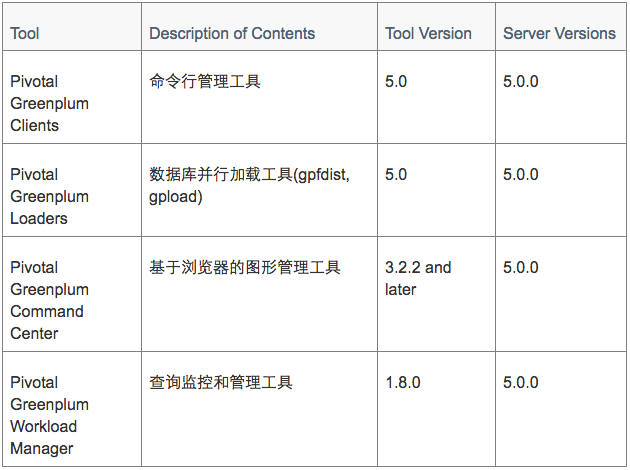
Client端工具


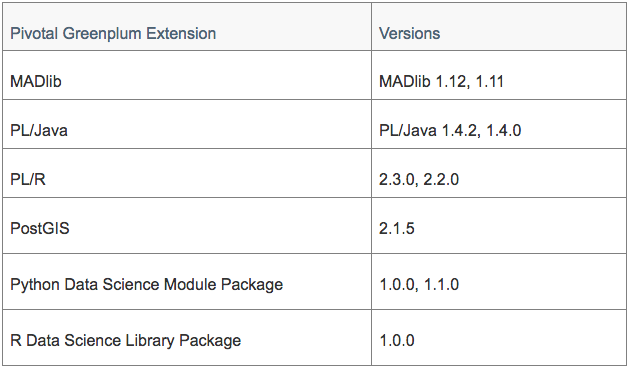
扩展模块


其他扩展

· PXF Extension Framework

Greenplum 5.1.0中引进新的外部数据框架PXF(Pivotal extention framework),它部署在每个运行Segment的物理机器上,提供了对HDFS文件系统以及HIVE的支持。PXF对外部数据提供了抽象的接口,可以方便的支持各种数据源。

· Greenplum-Spark Connector

支持Greenplum与Spark之间的高速并行数据传输。

· Pivotal GPText

Pivotal Greenplum Database 5.1.0 可以支持 GPText version 2.1.3 及以后的版本。GPText是Greenplum提供的文本搜索引擎,可以支持全文检索及文本分析功能。

Greenplum 5.1.0支持的平台

Greenplum的服务器支持如下平台

· Red Hat Enterprise Linux 64-bit 7.x
· Red Hat Enterprise Linux 64-bit 6.x
· SuSE Linux Enterprise Server 64-bit 11 SP4
· CentOS 64-bit 7.x
· CentOS 64-bit 6.x

Greenplum的java组件依赖java的如下版本

· 8.xxx
· 7.xxx

Greenplum运行时需要如下的依赖包

· OpenSSL 1.0.2l (with FIPS 2.0.16)
· cURL 7.54
· OpenLDAP 2.4.44
· Python 2.7.12

Client端工具可以支持如下平台

· Red Hat Enterprise Linux 64-bit 7.x
· Red Hat Enterprise Linux 64-bit 6.x
· SuSE Linux Enterprise Server 64-bit 11 SP4
· CentOS 64-bit 7.x
· CentOS 64-bit 6.x
· Windows
· AIX

...全文
1684 回复 打赏 收藏 转发到动态 举报
写回复
用AI写文章
回复
切换为时间正序
请发表友善的回复…
发表回复
greenplum-db-6.2.1-rhel7-x86_64.rpm Pivotal Greenplum 6.2 Release Notes This document contains pertinent release information about Pivotal Greenplum Database 6.2 releases. For previous versions of the release notes for Greenplum Database, go to Pivotal Greenplum Database Documentation. For information about Greenplum Database end of life, see Pivotal Greenplum Database end of life policy. Pivotal Greenplum 6 software is available for download from the Pivotal Greenplum page on Pivotal Network. Pivotal Greenplum 6 is based on the open source Greenplum Database project code. Important: Pivotal Support does not provide support for open source versions of Greenplum Database. Only Pivotal Greenplum Database is supported by Pivotal Support. Release 6.2.1 Release Date: 2019-12-12 Pivotal Greenplum 6.2.1 is a minor release that includes new features and resolves several issues. New Features Greenplum Database 6.2.1 includes these new features: Greenplum Database supports materialized views. Materialized views are similar to views. A materialized view enables you to save a frequently used or complex query, then access the query results in a SELECT statement as if they were a table. Materialized views persist the query results in a table-like form. Materialized view data cannot be directly updated. To refresh the materialized view data, use the REFRESH MATERIALIZED VIEW command. See Creating and Managing Materialized Views. Note: Known Issues and Limitations describes a limitation of materialized view support in Greenplum 6.2.1. The gpinitsystem utility supports the --ignore-warnings option. The option controls the value returned by gpinitsystem when warnings or an error occurs. If you specify this option, gpinitsystem returns 0 if warnings occurred during system initialization, and returns a non-zero value if a fatal error occurs. If this option is not specified, gpinitsystem returns 1 if initialization completes with warnings, and returns value of 2 or greater if a fatal error occurs. PXF version 5.10.0 is included, which introduces several new and changed features and bug fixes. See PXF Version 5.10.0 below. PXF Version 5.10.0 PXF 5.10.0 includes the following new and changed features: PXF has improved its performance when reading a large number of files from HDFS or an object store. PXF bundles newer tomcat and jackson libraries. The PXF JDBC Connector now supports pushdown of OR and NOT logical filter operators when specified in a JDBC named query or in an external table query filter condition. PXF supports writing Avro-format data to Hadoop and object stores. Refer to Reading and Writing HDFS Avro Data for more information about this feature. PXF is now certified with Hadoop 2.x and 3.1.x and Hive Server 2.x and 3.1, and bundles new and upgraded Hadoop libraries to support these versions. PXF supports Kerberos authentication to Hive Server 2.x and 3.1.x. PXF supports per-server user impersonation configuration. PXF supports concurrent access to multiple Kerberized Hadoop clusters. In previous releases of Greenplum Database, PXF supported accessing a single Hadoop cluster secured with Kerberos, and this Hadoop cluster must have been configured as the default PXF server. PXF introduces a new template file, pxf-site.xml, to specify the Kerberos and impersonation property settings for a Hadoop or JDBC server configuration. Refer to About Kerberos and User Impersonation Configuration (pxf-site.xml) for more information about this file. PXF now supports connecting to Hadoop with a configurable Hadoop user identity. PXF previously supported only proxy access to Hadoop via the gpadmin Greenplum user. PXF version 5.10.0 deprecates the following configuration properties. Note: These property settings continue to work. The PXF_USER_IMPERSONATION, PXF_PRINCIPAL, and PXF_KEYTAB settings in the pxf-env.sh file. You can use the pxf-site.xml file to configure Kerberos and impersonation settings for your new Hadoop server configurations. The pxf.impersonation.jdbc property setting in the jdbc-site.xml file. You can use the pxf.service.user.impersonation property to configure user impersonation for a new JDBC server configuration. Note: If you have previously configured a PXF JDBC server to access Kerberos-secured Hive, you must upgrade the server definition. See Upgrading PXF in Greenplum 6.x for more information. Changed Features Greenplum Database 6.2.1 includes these changed features: Greenplum Stream Server version 1.3.1 is included in the Greenplum distribution. Resolved Issues Pivotal Greenplum 6.2.1 is a minor release that resolves these issues: 29454 - gpstart During Greenplum Database start up, the gpstart utility did not report when a segment instance failed to start. The utility always displayed 0 skipped segment starts. This issue has been resolved. gpstart output was also enhanced to provide additional warnings and summary information about the number of skipped segments. For example: [WARNING]:-********

167

社区成员

发帖
与我相关
我的任务
社区描述
Greenplum相关内容分享专区
数据库数据库架构数据库开发 技术论坛(原bbs)
社区管理员
  • Greenplum社区
加入社区
  • 近7日
  • 近30日
  • 至今
社区公告
暂无公告

试试用AI创作助手写篇文章吧