

 多媒体/流媒体开发

ffmpeg+SDL 实时 解码 播放 H264裸流,解码播放正常一段时间后出现断流、花屏问题!
 墨衍会员 · AI 创作全网分发 墨衍智能分发 通过墨衍一键同步至各平台 可同步平台 CSDN微信公众号微博知乎掘金百家号博客园抖音小红书 你的文章也可以这样分发 墨衍会员 ¥399起/年,写一次发全网
我也要 关注 + 加入社区
墨衍会员 · AI 创作全网分发 墨衍智能分发 通过墨衍一键同步至各平台 可同步平台 CSDN微信公众号微博知乎掘金百家号博客园抖音小红书 你的文章也可以这样分发 墨衍会员 ¥399起/年,写一次发全网
我也要 关注 + 加入社区网络情况:局域网内推流
转存为本地文件后播放情况:ffplay播放有花屏问题,爱奇艺万能播放器无花屏
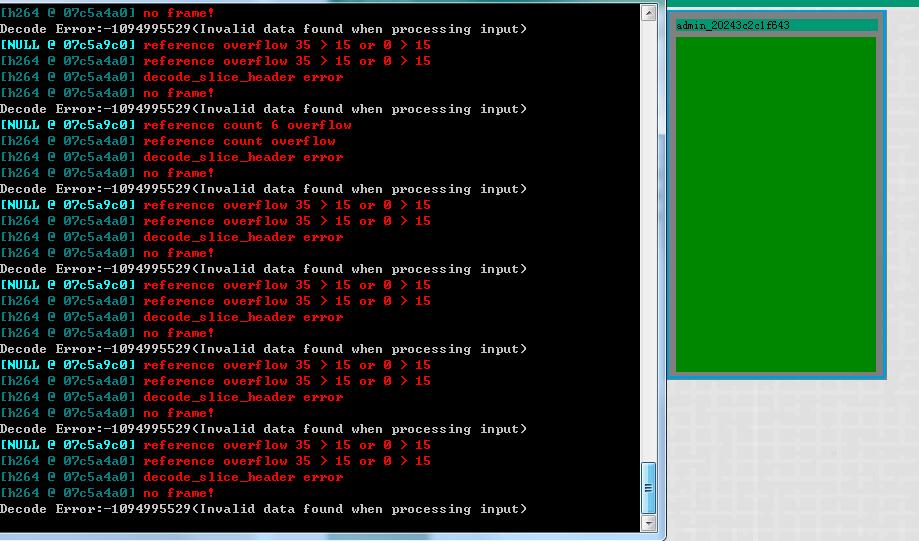
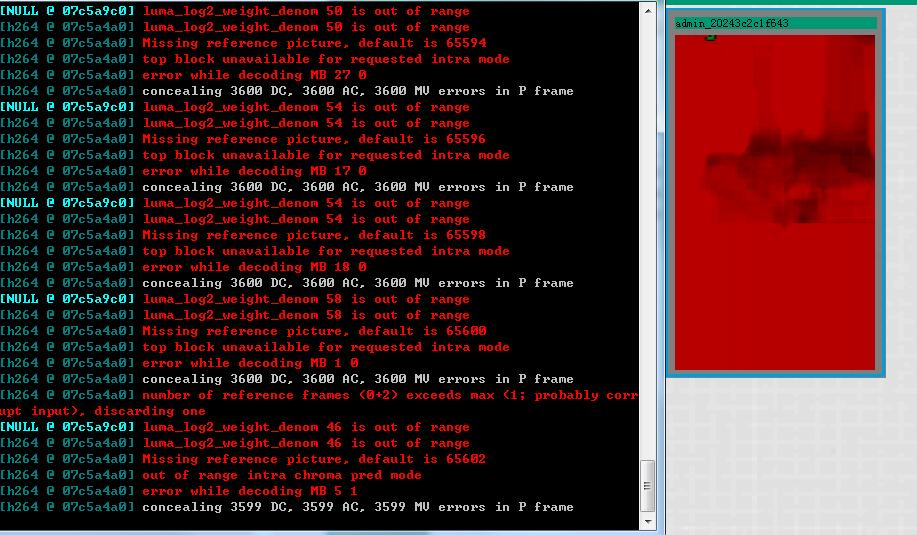
本播放器运行日志与播放情况:如图
解码源码:
转存为本地文件后播放情况:ffplay播放有花屏问题,爱奇艺万能播放器无花屏
本播放器运行日志与播放情况:如图
解码源码:
#include "Cffmpeg.h"

#include <stdio.h>

#include <windows.h>

#include <QDateTime>

#include <QDebug>

#define __STDC_CONSTANT_MACROS


#pragma comment(lib, "avutil.lib")

#pragma comment(lib, "avcodec.lib")

#pragma comment(lib, "avformat.lib")

#pragma comment(lib, "swscale.lib")

//内存对齐可能对CPU效率有影响; 具体根据CPU的存取粒度;


int Cffmpeg::interrupt_cb(void *mpeg)

{

	Cffmpeg *p_mpeg = (Cffmpeg *)mpeg;

	if ((av_gettime()/1000 - p_mpeg->dwLastFrameRealtime) > 60*1000)

	{

		qDebug() << QStringLiteral("断开连接!");

		return 1;

	}

	return 0;

}


Cffmpeg::Cffmpeg()

{

	ffmpegInit();

	QDateTime dateTime = QDateTime::currentDateTime();

	dwLastFrameRealtime = dateTime.toMSecsSinceEpoch();

}


Cffmpeg::~Cffmpeg()

{

	if (m_pDstFrame)

		av_frame_free(&m_pDstFrame);

	if (m_pImg_convert_ctx)

		sws_freeContext(m_pImg_convert_ctx);

	if (m_pCodecCtx)

		avcodec_close(m_pCodecCtx);

	if (m_pFormatCtx)

		avformat_close_input(&m_pFormatCtx);

	if (m_pCodec)

	{

		delete m_pCodec;

	}

}


int Cffmpeg::ffmpegInit()

{

	m_pFormatCtx		= NULL;

	m_pCodecCtx			= NULL;

	m_pCodec			= NULL;

	m_pDstFrame			= NULL;

	m_pImg_convert_ctx	= NULL;

	m_iVideoindex		= -1;

	isFormatCtxNull     = 0;

	m_QSfilepath.clear();

	memset(m_errBuf, 0, sizeof(m_errBuf));


	av_register_all();

	avcodec_register_all();

	avformat_network_init();

	m_pFormatCtx = avformat_alloc_context();

	m_pDstFrame = av_frame_alloc();				//申请一个AVFrame 并做一些初始化工作

	return DJJ_SUCCESS;

}


int Cffmpeg::OpenVideoFile(QString filepath, int *linksocket)

{

	int ret, i;

	QByteArray qbFilepath = filepath.toLatin1();

	char	*szFilepath = qbFilepath.data();


	m_pFormatCtx->interrupt_callback.callback = interrupt_cb;

	m_pFormatCtx->interrupt_callback.opaque = this;

	AVDictionary* options = NULL;

	av_dict_set(&options, "rtsp_transport", "tcp", 0);

	av_dict_set(&options, "bufsize", "655360", 0);

	*linksocket = avformat_open_input(&m_pFormatCtx, szFilepath, NULL, &options);

	if (0 != *linksocket)

	{

		av_strerror(*linksocket, m_errBuf, sizeof(m_errBuf));

		printf("Could not open input stream, filename: %s. Error:%d(%s)\n", szFilepath, *linksocket, m_errBuf);

		avformat_close_input(&m_pFormatCtx);

		return DJJ_FAILURE;

	}


	m_pFormatCtx->probesize = 32;

	ret = avformat_find_stream_info(m_pFormatCtx, NULL);

	if (ret < 0)

	{

		av_strerror(ret, m_errBuf, sizeof(m_errBuf));

		printf("Could not find stream information Error: %d(%s)\n", ret, m_errBuf);

		return DJJ_FAILURE;

	}


	printf("------------------------File Information-------------------------\n");

	av_dump_format(m_pFormatCtx, 0, szFilepath, 0);									//获取文件的信息到 AVFormatContext

	printf("------------------------------END--------------------------------\n");


	return DJJ_SUCCESS;

}


int Cffmpeg::SwsVideo(int *w,int *h,int dstWidth/* =0 */, int dstHeight/* =0 */, AVPixelFormat pix_fmt /* = AV_PIX_FMT_YUV420P */)

{

	int			i, videoindex, ret;

	uint8_t		*out_buffer;


	m_iVideoindex = -1;

	if (!m_pFormatCtx)

	{

		return DJJ_FAILURE;

	}

	for (i = 0; i < m_pFormatCtx->nb_streams; i++)

	{

		if (m_pFormatCtx->streams[i]->codec->codec_type == AVMEDIA_TYPE_VIDEO)

		{

			m_iVideoindex = i;

			break;

		}

	}

	if (-1 == m_iVideoindex)

	{

		printf("Can not find a video stream.\n");

		return DJJ_FAILURE;

	}


	m_pCodecCtx = m_pFormatCtx->streams[m_iVideoindex]->codec;

	m_pCodec = avcodec_find_decoder(m_pCodecCtx->codec_id);  //通过code ID查找一个已经注册的音视频编码器;

	if (m_pCodec == NULL)

	{

		printf("Codec not found!\n");


		return DJJ_FAILURE;

	}


	ret = avcodec_open2(m_pCodecCtx, m_pCodec, NULL);	//使用给定的AvCodec初始化AVCodecContext

	if (ret < 0)

	{

		av_strerror(ret, m_errBuf, sizeof(m_errBuf));

		printf("Could not open codec. Error:%d(%s)\n", ret, m_errBuf);

		avcodec_close(m_pCodecCtx);

		m_pCodecCtx = NULL;

		return DJJ_FAILURE;

	}


	out_buffer = (uint8_t *)av_malloc(avpicture_get_size(pix_fmt, m_pCodecCtx->width, m_pCodecCtx->height));//avpicture_get_size 解码之后一帧图像的大小;//av_malloc封装了malloc并做了一些安全性操作;


	avpicture_fill((AVPicture *)m_pDstFrame, out_buffer, pix_fmt, m_pCodecCtx->width, m_pCodecCtx->height);//avpicture_fill 将pFrameYUV 按照 AV_PIX_FMT_YUV420P的格式“关联”到 out_buffer, 数据转换完之后 也自动保存到了out_buffer;


	m_pImg_convert_ctx = sws_getContext(m_pCodecCtx->width,

		m_pCodecCtx->height,

		m_pCodecCtx->pix_fmt,

		(dstWidth == 0 ? m_pCodecCtx->width:dstWidth),

		(dstHeight == 0? m_pCodecCtx->height:dstHeight),

		pix_fmt,

		SWS_BICUBIC,

		NULL,

		NULL,

		NULL);//获得并初始化一个SwsContext结构体,这是一个缩放及格式转换的函数 这里的缩放比例为1:1


	*w = m_pCodecCtx->width;

	*h = m_pCodecCtx->height;


	return DJJ_SUCCESS;

}


int Cffmpeg::ReadPkt(AVPacket** pOutPkt,int count)

{

	int ret;


	if (!m_pFormatCtx)

	{

		return DJJ_FAILURE;

	}

	ret = av_read_frame(m_pFormatCtx, *pOutPkt);//从源文件容器中读取一个AVPacket数据包;  (音频可能包含多帧),这个时候为AVpacket的数据分配内存

 	if (ret >= 0)

	{

		if ((*pOutPkt)->stream_index == m_iVideoindex)	//如果是视频帧的话,进行解码

		{

			QDateTime dateTime = QDateTime::currentDateTime();

			dwLastFrameRealtime = dateTime.toMSecsSinceEpoch();

			return DJJ_SUCCESS;

		}

	}

	else

	{

		if (count < 20)//读取数据出错计数器

		{

			av_strerror(ret, m_errBuf, sizeof(m_errBuf));

			printf("Read Frame Error:%d(%s)\n", ret, m_errBuf);

			return DJJ_FAILURE;

		}

		else

		{

			isFormatCtxNull = 1;

			Sleep(3000);

			emit breakLine();

			return DJJ_FAILURE;

		}

	}

	return DJJ_FAILURE;

}


int Cffmpeg::ProcessPkt(int *count, AVPacket* pPkt, uint8_t** out, int* linesize)

{

	int ret, got_picture = 0;

	AVFrame* testFrame;

	testFrame = av_frame_alloc();


//	printf("AVPacket->pts:%d\n", pPkt->pts);

	ret = avcodec_decode_video2(m_pCodecCtx, testFrame, &got_picture, pPkt);

	if (ret < 0)

	{

		(*count)++;//解码出错计数器(日志no frame问题,不用理会)

		av_strerror(ret, m_errBuf, sizeof(m_errBuf));

		printf("Decode Error:%d(%s)\n", ret, m_errBuf);

		return DJJ_FAILURE;

	}

	(*count) = 0;//重置解码出错计数器

	if (got_picture)

	{

		sws_scale(m_pImg_convert_ctx,

			(const uint8_t* const*)testFrame->data,

			testFrame->linesize,

			0,

			m_pCodecCtx->height,

			m_pDstFrame->data,

			m_pDstFrame->linesize);//图片像素转换、拉伸函数;

		(*out) = (uint8_t*)malloc(avpicture_get_size(AV_PIX_FMT_YUV420P, m_pCodecCtx->width, m_pCodecCtx->height));

		memcpy((*out), m_pDstFrame->data[0], avpicture_get_size(AV_PIX_FMT_YUV420P, m_pCodecCtx->width, m_pCodecCtx->height));

		*linesize = m_pDstFrame->linesize[0];

	}


	av_frame_unref(testFrame);

	av_frame_free(&testFrame);


	if (got_picture)

	{

		return DJJ_SUCCESS;

	}

	else

	{

		return DJJ_FAILURE;

	}

}
...全文
相关推荐
QT+FFMPEG 拉取rtmp裸h264流,播放
QT+FFMPEG技术结合,可以实现从RTMP服务器接收裸H264流并实时播放的功能。在本文中,我们将深入探讨这个话题,讲解如何使用这两种强大的工具来完成所述的任务。
构建H264视频播放器:FFmpeg+SDL+Qt实战教程
Qt框架的核心组件包括QApplication、QWidget以及它们的继承类。QApplication负责管理GUI应用程序的控制流和主要设置,而QWidget是所有用户界面对象的基类。QWidget类提供了设置窗口标题、大小和窗口状态的功能,以及管理子窗口、菜单和其他组件的窗口部件。在Qt Creator中创建一个新项目后,我们通常会看到一个主窗口类,它继承自QMainWindow或QDialog等,这些类都是QWidget的子类。
FFMPEG实现RTSP中数据流解码 并且实时播放
然后,将转换后的帧传递给合适的播放器(如SDL或OpenGL)进行渲染。6. 实时播放:为了实现实时播放,我们需要在一个循环中持续读取、解码和显示视频帧,同时处理播放控制命令(如暂停、恢复等)。
ffmpeg解码sdl播放h264
这通常涉及到网络I/O操作和多线程处理,以便在接收数据的同时进行解码和播放。总的来说,通过FFmpeg和SDL的结合,我们可以实现H264视频的实时解码和播放。
FFmpeg解码+SDL播放
FFmpeg支持多种编码格式,如H.264、AV1、VP9等视频编码和AAC、Opus、FLAC等音频编码。解码过程通常包括解析容器格式,提取编码流,然后将编码流解码成未压缩的音频和视频帧。




