

 Android

recyclerview 列表显示的布局内容有些问题
 墨衍会员 · AI 创作全网分发 墨衍智能分发 通过墨衍一键同步至各平台 可同步平台 CSDN微信公众号微博知乎掘金百家号博客园抖音小红书 你的文章也可以这样分发 墨衍会员 ¥399起/年,写一次发全网
我也要 关注 + 加入社区
墨衍会员 · AI 创作全网分发 墨衍智能分发 通过墨衍一键同步至各平台 可同步平台 CSDN微信公众号微博知乎掘金百家号博客园抖音小红书 你的文章也可以这样分发 墨衍会员 ¥399起/年,写一次发全网
我也要 关注 + 加入社区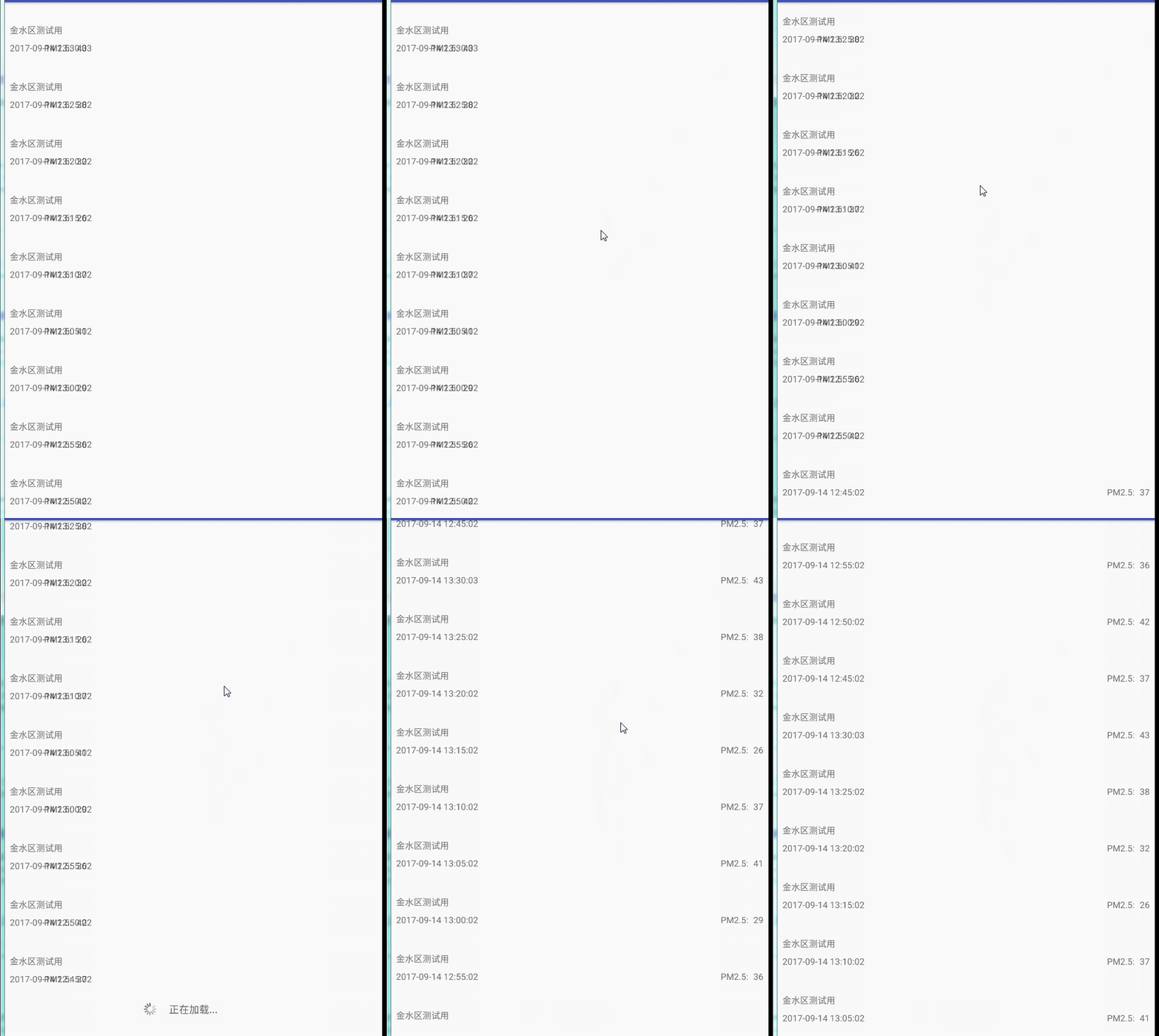
应用启动时列

子项的布局文件如下:
<?xml version="1.0" encoding="utf-8"?>
<android.support.constraint.ConstraintLayout xmlns:android="http://schemas.android.com/apk/res/android"
xmlns:app="http://schemas.android.com/apk/res-auto"
xmlns:tools="http://schemas.android.com/tools"
android:layout_width="match_parent"
android:layout_height="wrap_content"
android:orientation="vertical">
<TextView
android:id="@+id/tx_DeviceName"
android:layout_width="0dp"
android:layout_height="20dp"
android:layout_marginBottom="8dp"
android:layout_marginEnd="8dp"
android:layout_marginStart="8dp"
android:layout_marginTop="8dp"
android:text="TextView"
app:layout_constraintBottom_toBottomOf="parent"
app:layout_constraintEnd_toEndOf="parent"
app:layout_constraintStart_toStartOf="parent"
app:layout_constraintTop_toTopOf="parent" />
<TextView
android:id="@+id/tx_Time"
android:layout_width="wrap_content"
android:layout_height="wrap_content"
android:layout_marginBottom="8dp"
android:layout_marginTop="8dp"
android:text="TextView"
app:layout_constraintBottom_toBottomOf="parent"
app:layout_constraintStart_toStartOf="@+id/tx_DeviceName"
app:layout_constraintTop_toBottomOf="@+id/tx_DeviceName" />
<TextView
android:id="@+id/tx_Pm2"
android:layout_width="wrap_content"
android:layout_height="wrap_content"
android:layout_marginEnd="8dp"
android:hint="0"
android:text="TextView"
app:layout_constraintBottom_toBottomOf="@+id/tx_Time"
app:layout_constraintEnd_toEndOf="parent"
app:layout_constraintTop_toTopOf="@+id/tx_Time" />
<TextView
android:id="@+id/textView5"
android:layout_width="wrap_content"
android:layout_height="wrap_content"
android:layout_marginEnd="8dp"
android:text="PM2.5:"
app:layout_constraintBottom_toBottomOf="@+id/tx_Pm2"
app:layout_constraintEnd_toStartOf="@+id/tx_Pm2"
app:layout_constraintTop_toTopOf="@+id/tx_Pm2" />
</android.support.constraint.ConstraintLayout>
...全文
相关推荐
Recyclerview由于ViewHolder的复用显示错乱问题解决
在Android开发中,RecyclerView是一个非常重要的组件,它用于展示可滚动的数据列表,具有高效的数据复用机制。然而,由于ViewHolder的复用性,有时会导致显示错乱的问题。
Recycleview实现复杂页面三种以上布局 瀑布流多布局 scrollview嵌套recyclerView 显示不全滑动冲突
五、显示不全的问题RecyclerView显示不全通常是由于布局不当或数据加载错误造成的。常见的解决方案有:1.
RecyclerVIew实现悬浮吸顶效果
知识点三:RecyclerView的子条目布局在RecyclerView的子条目布局中,我们可以使用RelativeLayout来实现吸顶文本的显示。当列表滚动时,吸顶文本将固定在屏幕的顶部。
scrollview 嵌套recyclerview 显示不全.zip
在Android开发中,ScrollView通常用于实现可滚动的内容区域,而RecyclerView则是一个高效的列表视图,可以显示大量数据并自动管理视图复用。
CardsUI卡片式列表布局
要实现这种卡片式列表布局,开发者需要掌握以下几个关键知识点:1. **RecyclerView**:这是Android系统提供的一个高效、可滚动的视图容器,用于显示列表或网格数据。




