

 .NET Framework

win 10(小米笔记本pro15.6)无法安装vs2017
 墨衍会员 · AI 创作全网分发 墨衍智能分发 通过墨衍一键同步至各平台 可同步平台 CSDN微信公众号微博知乎掘金百家号博客园抖音小红书 你的文章也可以这样分发 墨衍会员 ¥399起/年,写一次发全网
我也要 关注 + 加入社区
墨衍会员 · AI 创作全网分发 墨衍智能分发 通过墨衍一键同步至各平台 可同步平台 CSDN微信公众号微博知乎掘金百家号博客园抖音小红书 你的文章也可以这样分发 墨衍会员 ¥399起/年,写一次发全网
我也要 关注 + 加入社区运行安装程序,出现如下弹框
然后弹框消失就没有然后了,查看日志
dd_vs_enterprise__1321550483.1513397634_decompression_log.txt:
[12/27/2017, 11:16:55] === Logging started: 2017/12/27 11:16:55 ===
[12/27/2017, 11:16:55] Executable: D:\Download\vs_enterprise__1321550483.1513397634.exe v15.5.27130.2010
[12/27/2017, 11:16:55] --- logging level: standard ---
[12/27/2017, 11:16:55] Directory 'C:\Users\huangwx\AppData\Local\Temp\6bd0381483d5dfb67d3c644c\' has been selected for file extraction
[12/27/2017, 11:16:55] Extracting files to: C:\Users\huangwx\AppData\Local\Temp\6bd0381483d5dfb67d3c644c\
[12/27/2017, 11:16:56] Extraction took 1.360 seconds
[12/27/2017, 11:16:56] Executing extracted package: 'vs_bootstrapper_d15\vs_setup_bootstrapper.exe ' with commandline ' '
[12/27/2017, 11:17:8] The entire Box execution exiting with result code: 0x0
[12/27/2017, 11:17:8] Launched extracted application exiting with result code: 0x0
[12/27/2017, 11:17:8] === Logging stopped: 2017/12/27 11:17:08 ===
dd_bootstrapper_20171227111656.log:
Beginning of the log. Start Time: 2017/12/27 11:16:56
VisualStudio Bootstrapper:2017/12/27 11:16:56: Current OptIn value is 1
VisualStudio Bootstrapper:2017/12/27 11:16:57: Commandline arguments =
VisualStudio Bootstrapper:2017/12/27 11:16:57: Parent process name = vs_enterprise__1321550483.1513397634
VisualStudio Bootstrapper:2017/12/27 11:16:57: Parent process product version = 15.5.27130.2010
VisualStudio Bootstrapper:2017/12/27 11:16:57: CampaignId = 1321550483.1513397634
VisualStudio Bootstrapper:2017/12/27 11:16:57: DownloadURL = https://aka.ms/vs/15/release/installer
VisualStudio Bootstrapper:2017/12/27 11:16:57: InstallLocation = C:\Program Files (x86)\Microsoft Visual Studio\Installer
VisualStudio Bootstrapper:2017/12/27 11:16:57: OfflineFilePath =
VisualStudio Bootstrapper:2017/12/27 11:16:57: LayoutLocation =
VisualStudio Bootstrapper:2017/12/27 11:16:57: ExecutableArguments = /finalizeInstall install --in "C:\ProgramData\Microsoft\VisualStudio\Packages\_bootstrapper\vs_setup_bootstrapper_201712271116570445.json" --locale zh-CN --activityId "544abf57-4b40-4c02-b092-6c9813483fa9" --campaign "1321550483.1513397634"
VisualStudio Bootstrapper:2017/12/27 11:16:57: OSVersion = Microsoft Windows NT 10.0.15063.0
VisualStudio Bootstrapper:2017/12/27 11:16:57: Starting to detect the existing VS and .Net...
VisualStudio Bootstrapper:2017/12/27 11:16:57: Finished detecting the existing VS and .Net
VisualStudio Bootstrapper:2017/12/27 11:17:07: Comparing client version '1.14.160.1208' to autoSelfUpdateMinVersion '1.14.160.1208'
VisualStudio Bootstrapper:2017/12/27 11:17:07: Current OptIn value is 1
VisualStudio Bootstrapper:2017/12/27 11:17:07: Starting vs setup process 'vs_installer.exe' with arguments '/finalizeInstall install --in "C:\ProgramData\Microsoft\VisualStudio\Packages\_bootstrapper\vs_setup_bootstrapper_201712271116570445.json" --locale zh-CN --activityId "544abf57-4b40-4c02-b092-6c9813483fa9" --campaign "1321550483.1513397634"'.
VisualStudio Bootstrapper:2017/12/27 11:17:07: Vs setup process C:\Program Files (x86)\Microsoft Visual Studio\Installer\vs_installer.exe started. All done.
VisualStudio Bootstrapper:2017/12/27 11:17:07: Vs setup process starting. Exiting with code 0
VisualStudio Bootstrapper:2017/12/27 11:17:07: Bootstrapper Successfully completed.
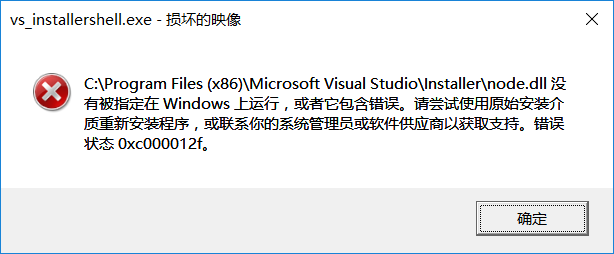
安装时有关闭360,试了离线安装也是相同问题,使用C:\Program Files (x86)\Microsoft Visual Studio\Installer\vs_installer.exe安装会提示
实在没办法了,请园友们帮忙,谢谢!
然后弹框消失就没有然后了,查看日志
dd_vs_enterprise__1321550483.1513397634_decompression_log.txt:
[12/27/2017, 11:16:55] === Logging started: 2017/12/27 11:16:55 ===
[12/27/2017, 11:16:55] Executable: D:\Download\vs_enterprise__1321550483.1513397634.exe v15.5.27130.2010
[12/27/2017, 11:16:55] --- logging level: standard ---
[12/27/2017, 11:16:55] Directory 'C:\Users\huangwx\AppData\Local\Temp\6bd0381483d5dfb67d3c644c\' has been selected for file extraction
[12/27/2017, 11:16:55] Extracting files to: C:\Users\huangwx\AppData\Local\Temp\6bd0381483d5dfb67d3c644c\
[12/27/2017, 11:16:56] Extraction took 1.360 seconds
[12/27/2017, 11:16:56] Executing extracted package: 'vs_bootstrapper_d15\vs_setup_bootstrapper.exe ' with commandline ' '
[12/27/2017, 11:17:8] The entire Box execution exiting with result code: 0x0
[12/27/2017, 11:17:8] Launched extracted application exiting with result code: 0x0
[12/27/2017, 11:17:8] === Logging stopped: 2017/12/27 11:17:08 ===
dd_bootstrapper_20171227111656.log:
Beginning of the log. Start Time: 2017/12/27 11:16:56
VisualStudio Bootstrapper:2017/12/27 11:16:56: Current OptIn value is 1
VisualStudio Bootstrapper:2017/12/27 11:16:57: Commandline arguments =
VisualStudio Bootstrapper:2017/12/27 11:16:57: Parent process name = vs_enterprise__1321550483.1513397634
VisualStudio Bootstrapper:2017/12/27 11:16:57: Parent process product version = 15.5.27130.2010
VisualStudio Bootstrapper:2017/12/27 11:16:57: CampaignId = 1321550483.1513397634
VisualStudio Bootstrapper:2017/12/27 11:16:57: DownloadURL = https://aka.ms/vs/15/release/installer
VisualStudio Bootstrapper:2017/12/27 11:16:57: InstallLocation = C:\Program Files (x86)\Microsoft Visual Studio\Installer
VisualStudio Bootstrapper:2017/12/27 11:16:57: OfflineFilePath =
VisualStudio Bootstrapper:2017/12/27 11:16:57: LayoutLocation =
VisualStudio Bootstrapper:2017/12/27 11:16:57: ExecutableArguments = /finalizeInstall install --in "C:\ProgramData\Microsoft\VisualStudio\Packages\_bootstrapper\vs_setup_bootstrapper_201712271116570445.json" --locale zh-CN --activityId "544abf57-4b40-4c02-b092-6c9813483fa9" --campaign "1321550483.1513397634"
VisualStudio Bootstrapper:2017/12/27 11:16:57: OSVersion = Microsoft Windows NT 10.0.15063.0
VisualStudio Bootstrapper:2017/12/27 11:16:57: Starting to detect the existing VS and .Net...
VisualStudio Bootstrapper:2017/12/27 11:16:57: Finished detecting the existing VS and .Net
VisualStudio Bootstrapper:2017/12/27 11:17:07: Comparing client version '1.14.160.1208' to autoSelfUpdateMinVersion '1.14.160.1208'
VisualStudio Bootstrapper:2017/12/27 11:17:07: Current OptIn value is 1
VisualStudio Bootstrapper:2017/12/27 11:17:07: Starting vs setup process 'vs_installer.exe' with arguments '/finalizeInstall install --in "C:\ProgramData\Microsoft\VisualStudio\Packages\_bootstrapper\vs_setup_bootstrapper_201712271116570445.json" --locale zh-CN --activityId "544abf57-4b40-4c02-b092-6c9813483fa9" --campaign "1321550483.1513397634"'.
VisualStudio Bootstrapper:2017/12/27 11:17:07: Vs setup process C:\Program Files (x86)\Microsoft Visual Studio\Installer\vs_installer.exe started. All done.
VisualStudio Bootstrapper:2017/12/27 11:17:07: Vs setup process starting. Exiting with code 0
VisualStudio Bootstrapper:2017/12/27 11:17:07: Bootstrapper Successfully completed.
安装时有关闭360,试了离线安装也是相同问题,使用C:\Program Files (x86)\Microsoft Visual Studio\Installer\vs_installer.exe安装会提示
实在没办法了,请园友们帮忙,谢谢!
...全文
相关推荐
小白教程:小米笔记本Air 13.3 Win10+黑苹果macOS
详细讲解小米笔记本Air13.3寸安装win10+黑苹果macos双系统,操作流程更细化,更适合小白。
win10+VS2017+Cuda10.0环境配置详解
主要介绍了win10+VS2017+Cuda10.0环境配置详解,文中通过示例代码介绍的非常详细,对大家的学习或者工作具有一定的参考学习价值,需要的朋友们下面随着小编来一起学习学习吧
小米笔记本 Pro 15 OLED 增强版win10原装出厂预装OEM系统.txt
小米笔记本 Pro 15 OLED 增强版win10原装出厂预装OEM系统 小米笔记本原装OEM系统 自带制作安装教程 微信:daderuanjian
win10系统无法创建使用小米随身WiFi怎么办?
win10系统无法创建使用小米随身WiFi怎么办?刚刚更新win10系统(9926),准备用小米随身WiFi开热点。驱动不上啊、坑!!于是捣鼓半天终于弄好了,下面分享详细的解决过程
win10+VS2017成功设置MSChart控件MSCHRT20.ocx
win10最新版、Visual Studio community 2017版本是15.9.4,NET Framework是4.7.0.056,成功设置MSChart控件。具体可以参考文件




