

 脚本语言
脚本语言

Jupyter Notebook问题~~急~在线等
 墨衍会员 · AI 创作全网分发 墨衍智能分发 通过墨衍一键同步至各平台 可同步平台 CSDN微信公众号微博知乎掘金百家号博客园抖音小红书 你的文章也可以这样分发 墨衍会员 ¥399起/年,写一次发全网
我也要 关注 + 加入社区
墨衍会员 · AI 创作全网分发 墨衍智能分发 通过墨衍一键同步至各平台 可同步平台 CSDN微信公众号微博知乎掘金百家号博客园抖音小红书 你的文章也可以这样分发 墨衍会员 ¥399起/年,写一次发全网
我也要 关注 + 加入社区问题一:Jupyter Notebook的启动地址问题
启动后,浏览器地址栏显示的地址为:http://localhost:8889/undefined/tree,而不是:http://localhost:8889/tree,如下图。

问题二:新建文档报错
新建文档直接报错,错误提示如下(应该还是地址的问题):
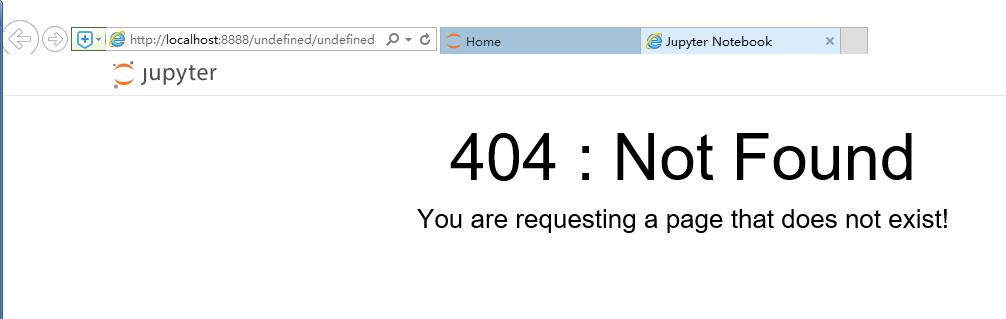
终端命令如下:
[I 10:08:43.264 NotebookApp] JupyterLab alpha preview extension loaded from D:\Anaconda3\lib\site-packages\jupyterlab
JupyterLab v0.27.0
Known labextensions:
[I 10:08:43.266 NotebookApp] Running the core application with no additional extensions or settings
[I 10:08:43.680 NotebookApp] Serving notebooks from local directory: d:\py
[I 10:08:43.681 NotebookApp] 0 active kernels
[I 10:08:43.681 NotebookApp] The Jupyter Notebook is running at: http://localhost:8888/?token=44b3235a90c7c85f5af5c2564df42c34408fb03575bf0c73
[I 10:08:43.681 NotebookApp] Use Control-C to stop this server and shut down all kernels (twice to skip confirmation).
[C 10:08:43.683 NotebookApp]
Copy/paste this URL into your browser when you connect for the first time,
to login with a token:
http://localhost:8888/?token=44b3235a90c7c85f5af5c2564df42c34408fb03575bf0c73
[I 10:08:45.579 NotebookApp] Accepting one-time-token-authenticated connection from ::1
[W 10:10:24.701 NotebookApp] 404 GET /undefined/undefined (::1) 5.01ms referer=None
[I 10:10:24.807 NotebookApp] Creating new notebook in
相关推荐
Jupyter notebook 启动闪退问题的解决
可能某次不小心改了配置文件,导致无法打开jupyter,找了很多方法,都没从根本上解决问题。 倒是发现启动的默认目录被改了,怀疑是这个问题。 然后就彻底解决了:在命令行输入 jupyter notebook –generate-config 可修改为默认路径。就可以打开了。 参考这里 补充知识:jupyter notebook 闪退打不开,报错ImportError: DLL load failed: 文件或目录损坏且无法读取。 晚上想继续完善python大作业的时候发现jupyter怎么也打不开,一直闪退,刚开始以为是默认浏览器的问题,后来在控制台上输入jupyter notebook报
解决jupyter notebook打不开无反应 浏览器未启动的问题
主要介绍了解决jupyter notebook打不开无反应 浏览器未启动的问题,具有很好的参考价值,希望对大家有所帮助。一起跟随小编过来看看吧
解决jupyter notebook 出现In[*]的问题
主要介绍了解决jupyter notebook 出现In[*]的问题,具有很好的参考价值,希望对大家有所帮助。一起跟随小编过来看看吧
快速解决jupyter notebook启动需要密码的问题
jupyter notebook安装完成之后需要密码,还有某些情况下也会出现需要输入密码的情况 解决方法如下: 1、在运行界面输入 jupyter notebook list 2、之后运行界面会输出token值,将其复制到密码栏中 补充知识:Python 遇到NameError: name ‘_name_’ is not defined这样的错误 今天练习写Python主函数的时候,遇到了NameError: name ‘name’ is not defined 这样的错误。>因为name是一个系统变量,包含了模块的名称。所以我尝试着输出 name的值,谁想出了错。怎>么找都不曾发现错误,
Jupyter notebook使用详解
本文档是本人依照jupyter notebook官网的教程而总结的,同时加入了jupyter notebook在实际项目开发中的常见用法,例如:git----jupyter notebook----github, jupyter notebook debug, jupyter notebook workspace, jupyter notebook loading and running python file, jupyter notebook running linux command, jupyter notebook using matplotlib,etc;




