


3,056
社区成员
 发帖
发帖 与我相关
与我相关 我的任务
我的任务
 分享
分享// 添加带有定位的导航控件
var navigationControl = new BMap.NavigationControl({
// 靠左上角位置
anchor: BMAP_ANCHOR_TOP_RIGHT,
// LARGE类型
type: BMAP_NAVIGATION_CONTROL_LARGE,
// 启用显示定位
enableGeolocation: true,
offset: new BMap.Size(10, 70)
});
map.addControl(navigationControl);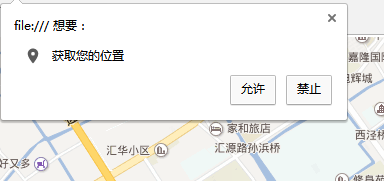

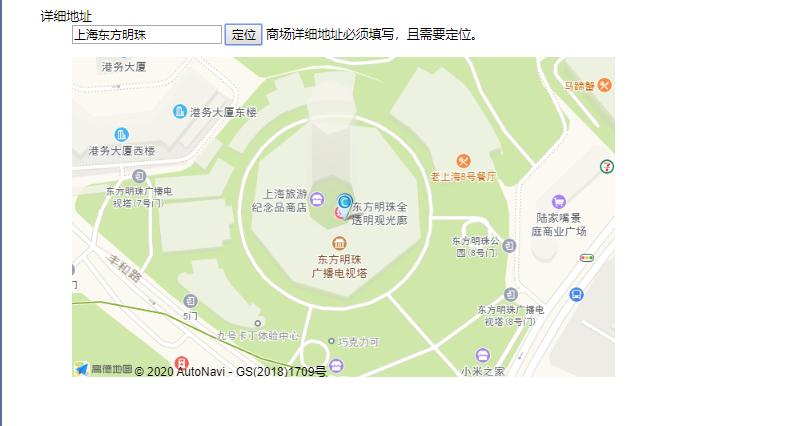 我只有这种 根据名称搜索的定位
<%@ Page Language="C#" AutoEventWireup="true" CodeBehind="WebForm1.aspx.cs" Inherits="baiduditu.WebForm1" %>
<!DOCTYPE html>
<html xmlns="http://www.w3.org/1999/xhtml">
<head runat="server">
<meta http-equiv="Content-Type" content="text/html; charset=utf-8" />
<title></title>
</head>
<body>
<form id="form1" runat="server">
<div>
<ul>
<dl>
<dt>详细地址</dt>
<dd>
<asp:TextBox ID="txt_address" runat="server" CssClass="input normal" datatype="*5-150" sucmsg=" "></asp:TextBox>
<input id="loca" type="button" class="btn btn5" onclick="javascript: geocoder()" value="定位" />
<asp:HiddenField ID="lat" runat="server" />
<asp:HiddenField ID="lng" runat="server" />
<span class="Validform_checktip">商场详细地址必须填写,且需要定位。</span></dd>
</dl>
<dl>
<dt></dt>
<dd class="mapField">
<div id="mapContainer" style="width: 678px; height: 400px;"></div>
</dd>
</dl>
</ul>
</div>
</form>
<script type="text/javascript" charset="utf-8" src="/scripts/jquery-1.11.2.min.js"></script>
<script src="http://webapi.amap.com/maps?v=1.3&key=e352fb7102396e43776007e02c1b642c"></script>
<script type="text/javascript">
var map;
//初始化地图对象,加载地图
map = new AMap.Map("mapContainer", {
<%=initMap%>
resizeEnable: true
});
var marker = '';
//为地图注册click事件获取鼠标点击出的经纬度坐标
var clickEventListener = AMap.event.addListener(map, 'click', function (e) {
var lng = e.lnglat.getLng();
var lat = e.lnglat.getLat();
console.log(marker)
if (!marker) {
marker = new AMap.Marker({
icon: "http://webapi.amap.com/images/3.png",
position: new AMap.LngLat(lng, lat)
});
marker.setMap(map); //在地图上添加点
}
else {
marker.setPosition(new AMap.LngLat(lng, lat));
}
document.getElementById("lng").value = lng;
document.getElementById("lat").value = lat;
// showTip.show('坐标提取成功', false);
});
function geocoder() {
if (!$("#txt_address").val()) {
alert("请先填写地址");
return;
}
var MGeocoder;
AMap.service(["AMap.Geocoder"], function () {
MGeocoder = new AMap.Geocoder();
MGeocoder.getLocation($("#txt_address").val(), function (status, result) {
if (status === 'complete' && result.info === 'OK') {
var lng = result.geocodes[0].location.getLng();
var lat = result.geocodes[0].location.getLat();
$("#lng").val(lng);
$("#lat").val(lat);
map.setZoomAndCenter(20, new AMap.LngLat(lng, lat));
console.info(lng)
console.log(lat)
console.log(marker)
if (!marker) {
console.log(map)
marker = new AMap.Marker({
icon: "http://webapi.amap.com/images/3.png",
position: new AMap.LngLat(lng, lat)
});
marker.setMap(map); //在地图上添加点
}
else {
marker.setPosition(new AMap.LngLat(lng, lat));
}
}
else { alert(status + " " + result.info) }
});
});
}
<%=setMarker%>
$(".amap-logo").attr("style", "display:none");
//function loca2() {
// var myGeo = new BMap.Geocoder(); //<%--新建一个地址翻译类--%>
// var dizhi = $("#txt_address").val(); //<%--组成地址--%>
// myGeo.getPoint(dizhi, function (point) { //<%--地址翻译成坐标--%>
// if (point) {
// map.centerAndZoom(point, 15); //<%--将地图中心转向坐标处--%>
// $("#lat").val(point.lat); //<%--控件赋值--%>
// $("#lng").val(point.lng); //<%--控件赋值--%>
// overLay.setPosition(point); //<%--给覆盖物赋坐标--%>
// map.addOverlay(overLay); //<%--在地图中添加覆盖物--%>
// }
//}, "上海");
// };
</script>
</body>
</html>
我只有这种 根据名称搜索的定位
<%@ Page Language="C#" AutoEventWireup="true" CodeBehind="WebForm1.aspx.cs" Inherits="baiduditu.WebForm1" %>
<!DOCTYPE html>
<html xmlns="http://www.w3.org/1999/xhtml">
<head runat="server">
<meta http-equiv="Content-Type" content="text/html; charset=utf-8" />
<title></title>
</head>
<body>
<form id="form1" runat="server">
<div>
<ul>
<dl>
<dt>详细地址</dt>
<dd>
<asp:TextBox ID="txt_address" runat="server" CssClass="input normal" datatype="*5-150" sucmsg=" "></asp:TextBox>
<input id="loca" type="button" class="btn btn5" onclick="javascript: geocoder()" value="定位" />
<asp:HiddenField ID="lat" runat="server" />
<asp:HiddenField ID="lng" runat="server" />
<span class="Validform_checktip">商场详细地址必须填写,且需要定位。</span></dd>
</dl>
<dl>
<dt></dt>
<dd class="mapField">
<div id="mapContainer" style="width: 678px; height: 400px;"></div>
</dd>
</dl>
</ul>
</div>
</form>
<script type="text/javascript" charset="utf-8" src="/scripts/jquery-1.11.2.min.js"></script>
<script src="http://webapi.amap.com/maps?v=1.3&key=e352fb7102396e43776007e02c1b642c"></script>
<script type="text/javascript">
var map;
//初始化地图对象,加载地图
map = new AMap.Map("mapContainer", {
<%=initMap%>
resizeEnable: true
});
var marker = '';
//为地图注册click事件获取鼠标点击出的经纬度坐标
var clickEventListener = AMap.event.addListener(map, 'click', function (e) {
var lng = e.lnglat.getLng();
var lat = e.lnglat.getLat();
console.log(marker)
if (!marker) {
marker = new AMap.Marker({
icon: "http://webapi.amap.com/images/3.png",
position: new AMap.LngLat(lng, lat)
});
marker.setMap(map); //在地图上添加点
}
else {
marker.setPosition(new AMap.LngLat(lng, lat));
}
document.getElementById("lng").value = lng;
document.getElementById("lat").value = lat;
// showTip.show('坐标提取成功', false);
});
function geocoder() {
if (!$("#txt_address").val()) {
alert("请先填写地址");
return;
}
var MGeocoder;
AMap.service(["AMap.Geocoder"], function () {
MGeocoder = new AMap.Geocoder();
MGeocoder.getLocation($("#txt_address").val(), function (status, result) {
if (status === 'complete' && result.info === 'OK') {
var lng = result.geocodes[0].location.getLng();
var lat = result.geocodes[0].location.getLat();
$("#lng").val(lng);
$("#lat").val(lat);
map.setZoomAndCenter(20, new AMap.LngLat(lng, lat));
console.info(lng)
console.log(lat)
console.log(marker)
if (!marker) {
console.log(map)
marker = new AMap.Marker({
icon: "http://webapi.amap.com/images/3.png",
position: new AMap.LngLat(lng, lat)
});
marker.setMap(map); //在地图上添加点
}
else {
marker.setPosition(new AMap.LngLat(lng, lat));
}
}
else { alert(status + " " + result.info) }
});
});
}
<%=setMarker%>
$(".amap-logo").attr("style", "display:none");
//function loca2() {
// var myGeo = new BMap.Geocoder(); //<%--新建一个地址翻译类--%>
// var dizhi = $("#txt_address").val(); //<%--组成地址--%>
// myGeo.getPoint(dizhi, function (point) { //<%--地址翻译成坐标--%>
// if (point) {
// map.centerAndZoom(point, 15); //<%--将地图中心转向坐标处--%>
// $("#lat").val(point.lat); //<%--控件赋值--%>
// $("#lng").val(point.lng); //<%--控件赋值--%>
// overLay.setPosition(point); //<%--给覆盖物赋坐标--%>
// map.addOverlay(overLay); //<%--在地图中添加覆盖物--%>
// }
//}, "上海");
// };
</script>
</body>
</html>


