C#

combobox没有显示选项

 墨衍会员 · AI 创作全网分发 墨衍智能分发 通过墨衍一键同步至各平台 可同步平台 CSDN微信公众号微博知乎掘金百家号博客园抖音小红书 你的文章也可以这样分发 墨衍会员 ¥399起/年,写一次发全网
我也要 关注 + 加入社区
我在vsto里生成了一个任务窗格,窗格里有个combobox控件,不管在哪初始化combobox的items都没有下拉框也没有选项
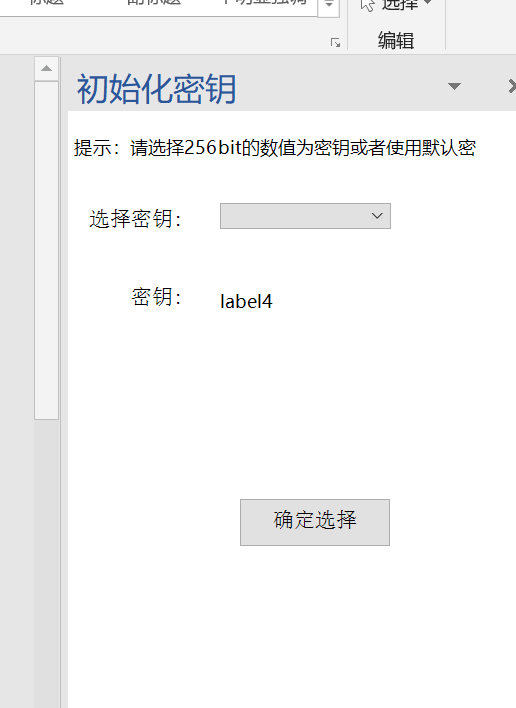
初始化的时候代码如下
Microsoft.Office.Tools.CustomTaskPane ctp1;
UserControl1 uc1;
private void ThisAddIn_Startup(object sender, System.EventArgs e)
{
uc1 = new UserControl1();
ctp1 = Globals.ThisAddIn.CustomTaskPanes.Add(uc1, "初始化密钥");
ctp1.Visible = true;
//MessageBox.Show("加载成功!");
}
这是一个ThisAddIn.cs里的
下面是UserControl1.cs里的
public partial class UserControl1 : UserControl
{
public UserControl1()
{
InitializeComponent();
}
private void UserControl1_load(object sender, EventArgs e)
{
this.comboBox1.Items.Add("默认密钥");
this.comboBox1.Items.Add("自定义密钥");
this.comboBox1.SelectedIndex = 0;
}
...全文
相关推荐
在easyui-combobox多选模式下加入选择所有选项
NULL 博文链接:https://wusuobuai.iteye.com/blog/1848724
ComboBox 控件的用法教程
ComboBox 控件和ListBox 控件在功能上很相似,很多情况下,这两个控件是可以互换使用的,但是还是有某种特定的环境下只适合使用一种控件的情况。下面通过本文给大家介绍下ComboBox 控件的用法教程,一起看看吧
Combobox控件某些项不能选的例子
VS2008编写的Combobox控件下拉列表中某些项不可选呈现灰色背景,可以选择的项正常背景
C#(WinForm) ComboBox和ListBox添加项及设置默认选择项
主要介绍了C#(WinForm) ComboBox和ListBox添加项及设置默认选择项的的相关资料,需要的朋友可以参考下
iphone UITableView中使用combobox的实例
iphone UITableView中使用combobox的实例,实现简单方便,但蛮好用的。