FTPClient 连接ftp服务器成功后 上传 下载异常

暴走大棒槌 2019-07-10 10:49:00
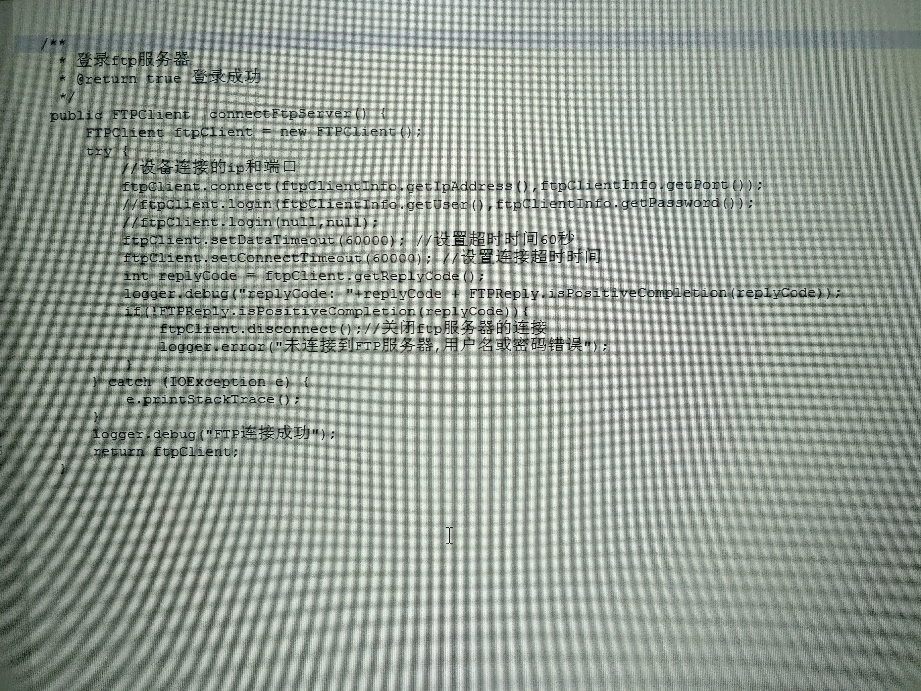
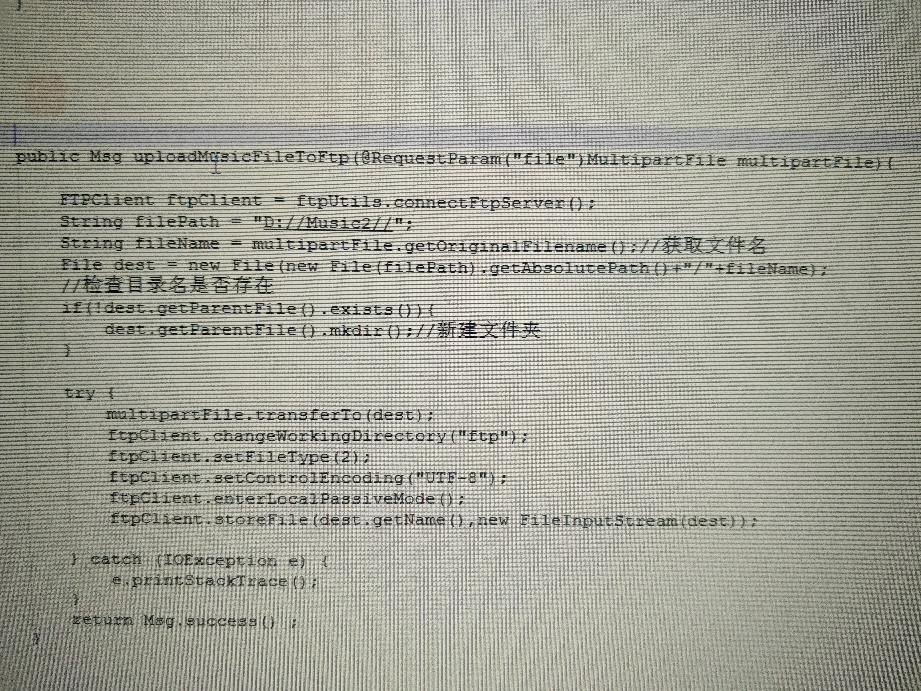
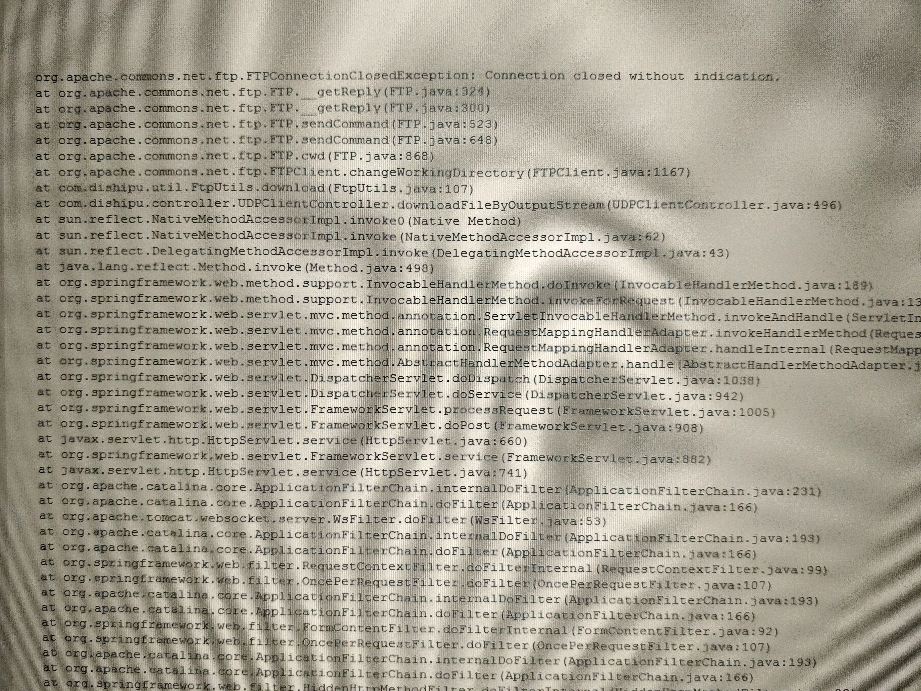
匿名用户登陆服务器,用第三方工具xftp可以正常上传下载文件 ,但用FTPClient连接成功后 相关上传下载方法会出现一样的异常 connection closed without indication 比如上传的时候 setfiletype方法和storefile方法 下载的时候 changeworkingdirectory方法和 listfiles方法 图片里面是相关代码和异常信息。
...全文
521 10 打赏 收藏 转发到动态 举报
写回复
用AI写文章
10 条回复
切换为时间正序
请发表友善的回复…
发表回复
guishuanglin 2019-07-10
  • 打赏
  • 举报
回复
兄弟这完全没法看啊....搞个记事本 copy出来也行啊.
暴走大棒槌 2019-07-10
  • 打赏
  • 举报
回复
网页端放大后可能好点
暴走大棒槌 2019-07-10
  • 打赏
  • 举报
回复
引用 1 楼 James灬Gosling的回复:
在哪个公司啊,没有外网吗
上传和 下载的时候 地址我填的是/ 根目录 都会异常
戎码一生灬 2019-07-10
  • 打赏
  • 举报
回复
干扰线太厉害了,看的我头晕眼花的
暴走大棒槌 2019-07-10
  • 打赏
  • 举报
回复
引用 1 楼 James灬Gosling的回复:
在哪个公司啊,没有外网吗
呃 没有外网 图片模糊麻烦将就看下吧。。
戎码一生灬 2019-07-10
  • 打赏
  • 举报
回复
在哪个公司啊,没有外网吗
暴走大棒槌 2019-07-10
  • 打赏
  • 举报
回复
引用 9 楼 ITjavaman的回复:
我能想到的点一个是权限问题,另外一个是路径问题,登录的账号是否具备对应的权限,路径的话,如果是linux系统,路径符跟windows是有区别的,可以用file.separator
权限的话 匿名用户 第三方工具xftp可以正常上传下载 路径的话 我这边只是移到根目录 代码中写到就 /
ITjavaman 2019-07-10
  • 打赏
  • 举报
回复
我能想到的点一个是权限问题,另外一个是路径问题,登录的账号是否具备对应的权限,路径的话,如果是linux系统,路径符跟windows是有区别的,可以用file.separator
暴走大棒槌 2019-07-10
  • 打赏
  • 举报
回复
代码已经发出来了 麻烦各位帮看下 问题现也比较急了
暴走大棒槌 2019-07-10
  • 打赏
  • 举报
回复
[code=java] /** * 登录ftp服务器 * @return true 登录成功 */ public FTPClient connectFtpServer() { FTPClient ftpClient = new FTPClient(); try { //设备连接的ip和端口 ftpClient.connect(ftpClientInfo.getIpAddress(),ftpClientInfo.getPort()); //ftpClient.login(ftpClientInfo.getUser(),ftpClientInfo.getPassword()); //ftpClient.login(null,null); ftpClient.setDataTimeout(60000); //设置超时时间60秒 ftpClient.setConnectTimeout(60000); //设置连接超时时间 int replyCode = ftpClient.getReplyCode(); logger.debug("replyCode: "+replyCode + FTPReply.isPositiveCompletion(replyCode)); if(!FTPReply.isPositiveCompletion(replyCode)){ ftpClient.disconnect();//关闭ftp服务器的连接 logger.error("未连接到FTP服务器,用户名或密码错误"); } } catch (IOException e) { e.printStackTrace(); } logger.debug("FTP连接成功"); return ftpClient; } /** * 文件下载 * @param filename 要下载的文件名 */ public void download(HttpServletResponse response,String filename){ FTPClient ftpClient = null; try { //设置编码格式 可以下载中文 /*FTPClientConfig config = new FTPClientConfig(FTPClientConfig.SYST_NT); config.setServerLanguageCode("zh"); String ftpPath = new String("/ftp/".getBytes("GBK"),"iso-8859-1"); */ ftpClient = connectFtpServer(); ftpClient.setControlEncoding("UTF-8"); //GBK utf-8 ftpClient.setFileType(FTP.BINARY_FILE_TYPE); ftpClient.enterLocalPassiveMode();//设置被动模式,文件传输端口设置 boolean flag = ftpClient.changeWorkingDirectory("/");//转移到ftp服务器目录 if(!flag){ logger.debug("没有找到"); return ; } FTPFile[] ftpFiles = ftpClient.listFiles(); if(ftpFiles !=null){ for (FTPFile ftpFile : ftpFiles){ logger.debug("远程文件名" + ftpFile.getName()); if (ftpFile.equals(filename)){ InputStream in = ftpClient.retrieveFileStream(ftpFile.getName()); logger.debug(in.toString()); int len ; byte[] buff = new byte[1024*1024]; response.reset(); response.setContentType("application/octet-stream"); //Name the file response.addHeader("Content-Disposition", "attachment; filename=\"" + filename + "\""); OutputStream out = response.getOutputStream(); //响应输出字节流 while((len=in.read(buff))!=-1){ logger.debug("以字节流形式写出OutPutStream"); out.write(buff, 0, len); out.flush(); } in.close(); out.close(); } } } } catch (IOException e) { e.printStackTrace(); }finally { if (ftpClient.isConnected()){ try { ftpClient.disconnect(); } catch (IOException e) { logger.error(e.getMessage()); } } } } public Msg uploadMusicFileToFtp(@RequestParam("file")MultipartFile multipartFile){ FTPClient ftpClient = ftpUtils.connectFtpServer(); String filePath = "D://Music2//"; String fileName = multipartFile.getOriginalFilename();//获取文件名 File dest = new File(new File(filePath).getAbsolutePath()+"/"+fileName); //检查目录名是否存在 if(!dest.getParentFile().exists()){ dest.getParentFile().mkdir();//新建文件夹 } try { multipartFile.transferTo(dest); ftpClient.changeWorkingDirectory("ftp"); ftpClient.setFileType(2);[b][/b] ftpClient.setControlEncoding("UTF-8"); ftpClient.enterLocalPassiveMode(); ftpClient.storeFile(dest.getName(),new FileInputStream(dest)); } catch (IOException e) { e.printStackTrace(); } return Msg.success() ; } org.apache.commons.net.ftp.FTPConnectionClosedException: Connection closed without indication. at org.apache.commons.net.ftp.FTP.__getReply(FTP.java:324) at org.apache.commons.net.ftp.FTP.__getReply(FTP.java:300) at org.apache.commons.net.ftp.FTP.sendCommand(FTP.java:523) at org.apache.commons.net.ftp.FTP.sendCommand(FTP.java:648) at org.apache.commons.net.ftp.FTP.cwd(FTP.java:868) at org.apache.commons.net.ftp.FTPClient.changeWorkingDirectory(FTPClient.java:1167) at com.dishipu.util.FtpUtils.download(FtpUtils.java:107)

51,411

社区成员

发帖
与我相关
我的任务
社区描述
Java相关技术讨论
javaspring bootspring cloud 技术论坛(原bbs)
社区管理员
  • Java相关社区
  • 小虚竹
  • 谙忆
加入社区
  • 近7日
  • 近30日
  • 至今
社区公告
暂无公告

试试用AI创作助手写篇文章吧