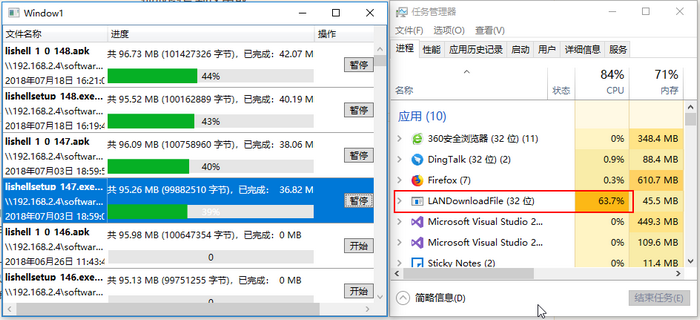
如图,WPF的DataGrid中添加了DataGridTemplateColumn,用于展示远程服务器的文件,点开始按钮后开始获取文件并下载到本地。
每个下载任务中采用异步Task,过程中发现开启单个或多个下载任务时都会占用CPU很高,如何优化?
后台:
public ObservableCollection<FileInfo> fileInfoCollection = new ObservableCollection<FileInfo>();
public void StartDownLoad(string sourceFilePath, string localFilePath, int fileIndex)
{
if (!fileInfoCollection[fileIndex].IsStart)
{
Task.Run( async () => { await DwonLoadFile(sourceFilePath, localFilePath, fileIndex); });
}
}
private async Task DwonLoadFile(string sourceFilePath, string localFilePath, int fileIndex)
{
if (!File.Exists(sourceFilePath))
return;
WebRequest request = WebRequest.Create(sourceFilePath);
WebResponse response = await request.GetResponseAsync();
Stream netStream = response.GetResponseStream();
Stream fileStream = new FileStream(localFilePath, FileMode.OpenOrCreate, FileAccess.ReadWrite, FileShare.ReadWrite);
fileStream.Position = 0;
byte[] read = new byte[1024];
long progressBarValue = 0;
int realReadLen = await netStream.ReadAsync(read, 0, read.Length);
Thread thread = new Thread(new ThreadStart(async delegate
{
while (realReadLen > 0 && !fileInfoCollection[fileIndex].IsStopped)
{
if (fileInfoCollection[fileIndex].IsSuspend == false)
{
await fileStream.WriteAsync(read, 0, realReadLen);
progressBarValue += realReadLen;
double len = double.Parse((progressBarValue / 1024.00 / 1024.00).ToString("F2"));
fileInfoCollection[fileIndex].CompletePercentage = Math.Ceiling(((double)progressBarValue / (double)netStream.Length) * 100) + "%";
fileInfoCollection[fileIndex].CompletedProgress = len;
fileInfoCollection[fileIndex].ProgressBarValue = progressBarValue;
realReadLen = await netStream.ReadAsync(read, 0, read.Length);
continue;
}
Thread.Sleep(1);
}
netStream.Close();
fileStream.Close();
}));
thread.IsBackground = true;
thread.Start();
}
前台:
private void SuspendOrStartBtn_Click(object sender, RoutedEventArgs e)
{
FileInfo item = ((Button)sender).DataContext as FileInfo;
int index = FileDataGrid.Items.IndexOf(item);
//开始任务
if (fileManager.fileInfoCollection[index].IsSuspend==true)
{
fileManager.StartDownLoad(item.SourceFileFullName, @"D:\" + item.SourceFileName, index);
fileManager.fileInfoCollection[index].IsStart = true;
fileManager.fileInfoCollection[index].IsSuspend = false;
SetPauseResumeButtonText(index);
}
else//暂停任务
{
fileManager.fileInfoCollection[index].IsSuspend = true;
SetPauseResumeButtonText(index);
}
}


 发帖
发帖 与我相关
与我相关 我的任务
我的任务
 分享
分享
