鼠标固定的WPF窗体的中心并跟随移动,修改了DPI之后鼠标不能显示在中心位置了

weixin_38051598 2017-12-27 08:32:05
各位专家,大家好!
我有一个wpf的窗体,大小为: Width="130" Height="130";为了使鼠标在窗体中心,并且窗体能跟随鼠标移动,所以我设置如下属性:
  this.Top = p.Y - 65;
  this.Left = p.X - 65;
p为我通过API函数获取当前屏幕的鼠标位置,API函数:
  [DllImport("user32.dll", CharSet = CharSet.Auto)]
  public static extern bool GetCursorPos(out POINT pt);
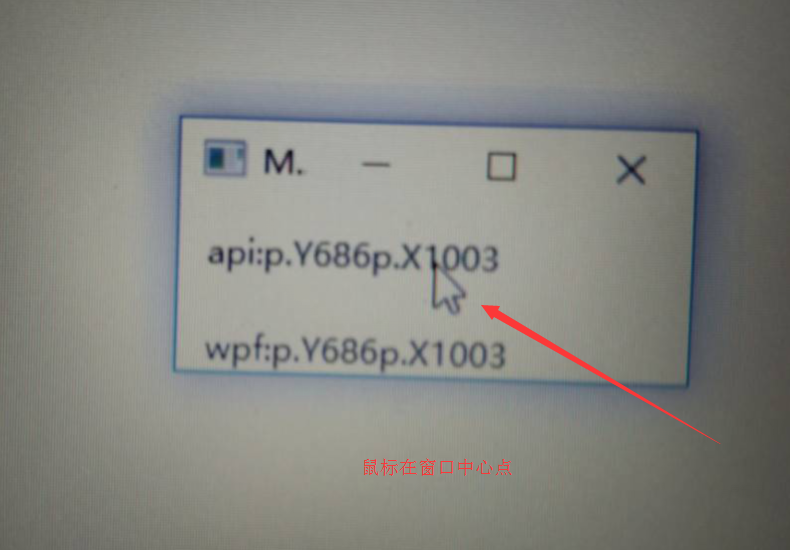
以上方法在DPI为默认的96DPI下是可以正常运行和显示的,如上图,但是当DPI改变之后,就变成如下图片所示情况了:
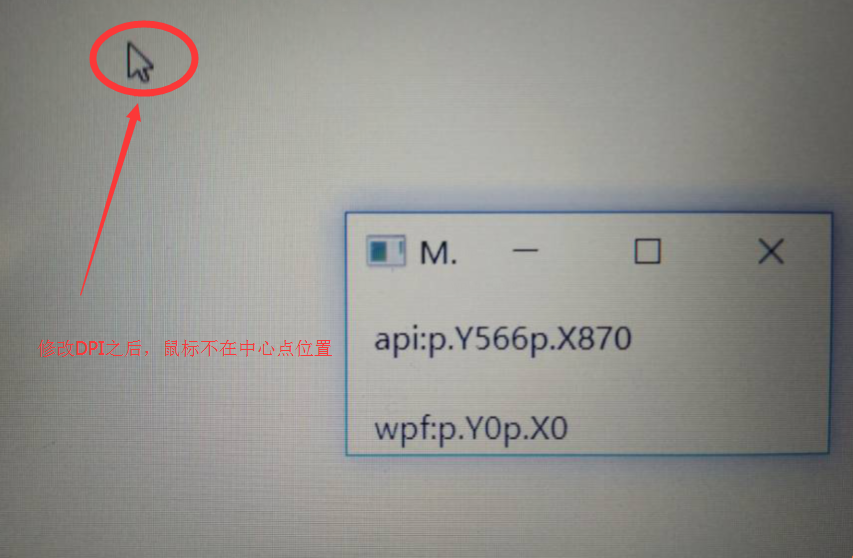


个人觉得通过api获取当前鼠标的位置应该是没有问题,问题出在65这个固定值上,所以是否有方法获取当前DPI并换算当前的65这个值。
...全文
35 5 打赏 收藏 转发到动态 举报
写回复
用AI写文章
5 条回复
切换为时间正序
请发表友善的回复…
发表回复
weixin_38120550 2017-12-29
  • 打赏
  • 举报
回复
@Bob Ding非常感谢您的回答
weixin_38114194 2017-12-29
  • 打赏
  • 举报
回复
Hi,
>>所以其实是在改变DPI之后,GetCursorPos这个函数获取的坐标点位置就已经是不正确的了。
尝试使用下面方法将GetCursorPos获取的像素值转化成WPF的单位。
[DllImport("User32.dll")] static extern IntPtr GetDC(IntPtr hwnd); [DllImport("gdi32.dll")] static extern int GetDeviceCaps(IntPtr hdc, int nIndex); [DllImport("user32.dll")] static extern bool ReleaseDC(IntPtr hWnd, IntPtr hDC); private Point ConvertPixelsToUnits(int x, int y) { // get the system DPI IntPtr dDC = GetDC(IntPtr.Zero); // Get desktop DC int dpi = GetDeviceCaps(dDC, 88); bool rv = ReleaseDC(IntPtr.Zero, dDC); // WPF's physical unit size is calculated by taking the // "Device-Independant Unit Size" (always 1/96) // and scaling it by the system DPI double physicalUnitSize = (1d / 96d) * (double)dpi; Point wpfUnits = new Point(physicalUnitSize * (double)x, physicalUnitSize * (double)y); return wpfUnits; }

参考:https://stackoverflow.com/questions/3981509/how-to-get-mouse-position-related-to-desktop-in-wpf
希望有帮助!
Sincerely,
Bob
weixin_38071599 2017-12-29
  • 打赏
  • 举报
回复
Hi,
>>所以其实是在改变DPI之后,GetCursorPos这个函数获取的坐标点位置就已经是不正确的了。
尝试使用下面方法将GetCursorPos获取的像素值转化成WPF的单位。
[DllImport("User32.dll")] static extern IntPtr GetDC(IntPtr hwnd); [DllImport("gdi32.dll")] static extern int GetDeviceCaps(IntPtr hdc, int nIndex); [DllImport("user32.dll")] static extern bool ReleaseDC(IntPtr hWnd, IntPtr hDC); private Point ConvertPixelsToUnits(int x, int y) { // get the system DPI IntPtr dDC = GetDC(IntPtr.Zero); // Get desktop DC int dpi = GetDeviceCaps(dDC, 88); bool rv = ReleaseDC(IntPtr.Zero, dDC); // WPF's physical unit size is calculated by taking the // "Device-Independant Unit Size" (always 1/96) // and scaling it by the system DPI double physicalUnitSize = (1d / 96d) * (double)dpi; Point wpfUnits = new Point(physicalUnitSize * (double)x, physicalUnitSize * (double)y); return wpfUnits; }

参考:https://stackoverflow.com/questions/3981509/how-to-get-mouse-position-related-to-desktop-in-wpf
希望有帮助!
Sincerely,
Bob
weixin_38087753 2017-12-28
  • 打赏
  • 举报
回复
Hi,
据我所知,WPF的坐标单位以1/96英寸为一个逻辑像素单位。
所以你可以尝试按照下面这个工具将65这个值转换成当前dpi的值。
物理尺寸 = 1/96 * 当前dpi * 65

Sincerely,
Bob
weixin_38088844 2017-12-28
  • 打赏
  • 举报
回复
@Bob Ding非常感谢您的回答,我根据您的计算方式去测试了这个程序,还是不能正确显示。
通过设置
 this.Top = p.Y ;
 this.Left = p.X ;
同样不能正确显示,得到效果跟之前的一样。随着鼠标往右下角移动,偏差越来越大。
所以其实是在改变DPI之后,GetCursorPos这个函数获取的坐标点位置就已经是不正确的了。

476

社区成员

发帖
与我相关
我的任务
社区描述
其他技术讨论专区
其他 技术论坛(原bbs)
社区管理员
  • 其他技术讨论专区社区
加入社区
  • 近7日
  • 近30日
  • 至今
社区公告
暂无公告

试试用AI创作助手写篇文章吧
