

 脚本语言
脚本语言

Python3.7的pymssql问题
 墨衍会员 · AI 创作全网分发 墨衍智能分发 通过墨衍一键同步至各平台 可同步平台 CSDN微信公众号微博知乎掘金百家号博客园抖音小红书 你的文章也可以这样分发 墨衍会员 ¥399起/年,写一次发全网
我也要 关注 + 加入社区
墨衍会员 · AI 创作全网分发 墨衍智能分发 通过墨衍一键同步至各平台 可同步平台 CSDN微信公众号微博知乎掘金百家号博客园抖音小红书 你的文章也可以这样分发 墨衍会员 ¥399起/年,写一次发全网
我也要 关注 + 加入社区我安装的是64位的Python,也是在官网上安装了64位的pymssql,但是在import时还是会报错,运行后错误信息如下,求指导 :
:
D:\workspace\javaworkspace\SpiderStuding\src\Douban\DB.py:1: DeprecationWarning: Using or importing the ABCs from 'collections' instead of from 'collections.abc' is deprecated, and in 3.8 it will stop working
import pymssql
Traceback (most recent call last):
File "src\pymssql.pyx", line 636, in pymssql.connect
File "src\_mssql.pyx", line 1957, in _mssql.connect
File "src\_mssql.pyx", line 676, in _mssql.MSSQLConnection.__init__
File "src\_mssql.pyx", line 1683, in _mssql.maybe_raise_MSSQLDatabaseException
_mssql.MSSQLDatabaseException: (20009, b'DB-Lib error message 20009, severity 9:\nUnable to connect: Adaptive Server is unavailable or does not exist (LENOVEN-PC\\SQLEXPRESS)\n')
During handling of the above exception, another exception occurred:
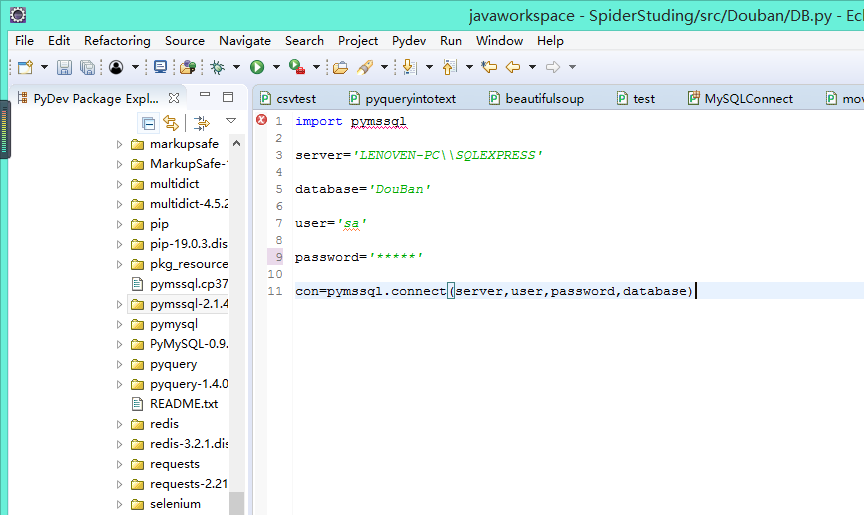
:D:\workspace\javaworkspace\SpiderStuding\src\Douban\DB.py:1: DeprecationWarning: Using or importing the ABCs from 'collections' instead of from 'collections.abc' is deprecated, and in 3.8 it will stop working
import pymssql
Traceback (most recent call last):
File "src\pymssql.pyx", line 636, in pymssql.connect
File "src\_mssql.pyx", line 1957, in _mssql.connect
File "src\_mssql.pyx", line 676, in _mssql.MSSQLConnection.__init__
File "src\_mssql.pyx", line 1683, in _mssql.maybe_raise_MSSQLDatabaseException
_mssql.MSSQLDatabaseException: (20009, b'DB-Lib error message 20009, severity 9:\nUnable to connect: Adaptive Server is unavailable or does not exist (LENOVEN-PC\\SQLEXPRESS)\n')
During handling of the above exception, another exception occurred:
...全文
相关推荐
python3.7版本win64 pymssql下载和安装
安装方法:以管理员身份运行cmd,然后输入C:\WINDOWS\system32>pip install F:\pymssql-2.1.4.dev5-cp37-cp37m-win_amd64.whl
python3.7 使用pymssql往sqlserver插入数据的方法
主要介绍了python3.7 使用pymssql往sqlserver插入数据的方法,代码很简单,感兴趣的朋友跟随小编一起看看吧
pymssql.whl文件包及安装说明
python连接sqlserver数据库的pymssql模块,有的时候直接pip安装失败,可以考虑下载该whl文件手动安装。亲测可用,分享给大家。
Windows安装pymssql[代码]
本文介绍了在Windows系统下安装pymssql的两种方法。第一种方法是通过Pycharm安装,但由于库版本不兼容Python3.6以上版本,导致安装失败。第二种方法是使用pip安装,需要从特定网站下载对应版本的whl文件,如pymssql‑2.1.4.dev5‑cp37‑cp37m‑win_amd64.whl,并在文件所在目录执行pip安装命令。作者还提供了可用的资源下载链接,帮助用户顺利完成安装。
Windows系统下使用的pymssql python3.6
,Windows系统下使用的pymssql python3.6




