社区
其他技术讨论专区
帖子详情
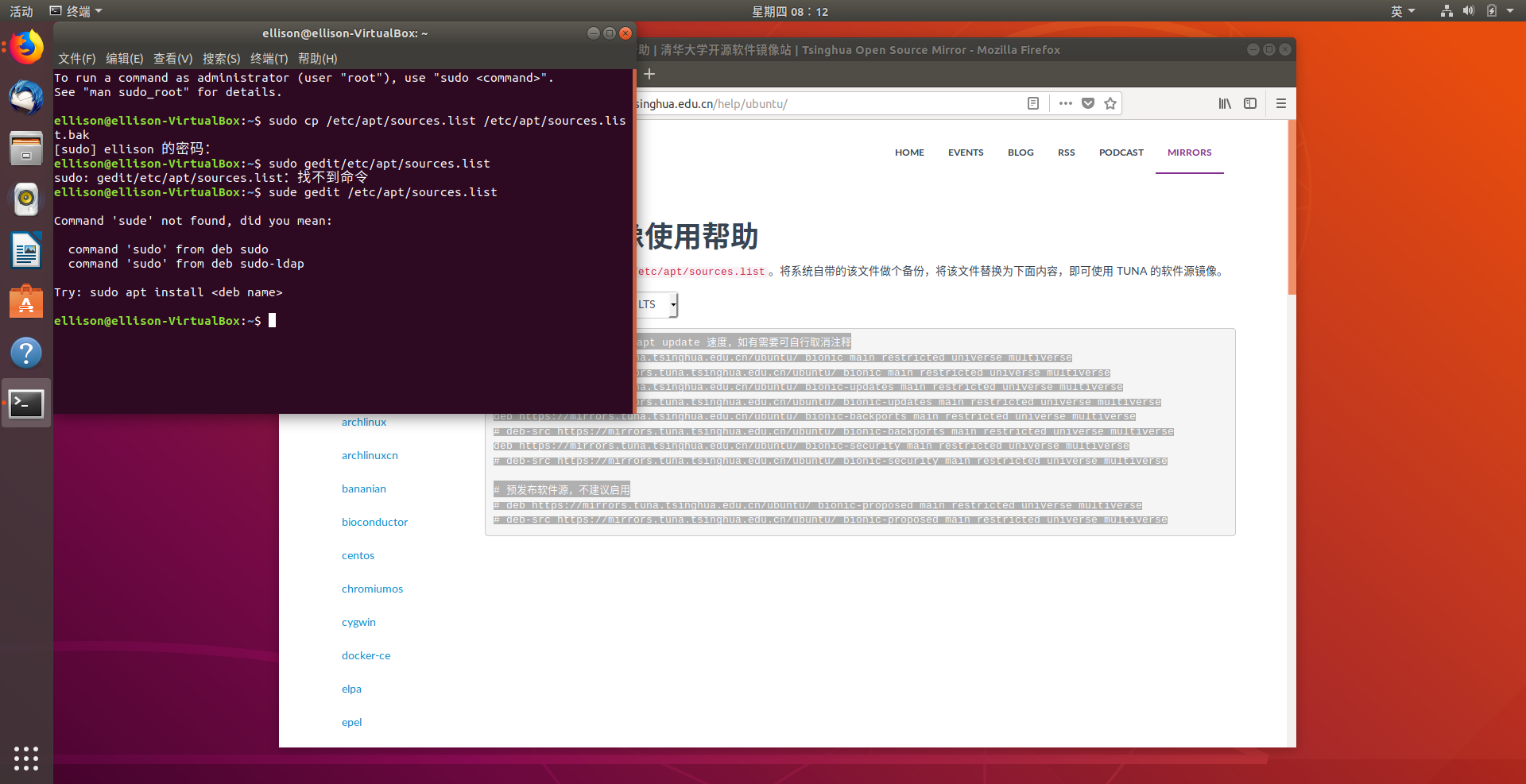
sudo gedit /etc/apt/sources.list找不到命令
weixin_38052002
2018-07-05 08:17:40
安装好Ubuntu后按照教程配置,但输入sudo gedit /etc/apt/sources.list后出现这种情况
...全文
549
3
打赏
收藏
sudo gedit /etc/apt/sources.list找不到命令
安装好Ubuntu后按照教程配置,但输入sudo gedit /etc/apt/sources.list后出现这种情况
复制链接
扫一扫
分享
举报
写回复
配置赞助广告
用AI写文章
3 条
回复
切换为时间正序
请发表友善的回复…
发表回复
打赏红包
sudo
g
edit
/etc/
apt
/
source
s.
list
:
找
不到
命令
Ubuntu18.04安装ROS Melodic时候提示
sudo
g
edit
/etc/
apt
/
source
s.
list
:
找
不到
命令
安装方法https://zhuanlan.zhihu.com/p/84821192 问题解决办法
sudo
g
edit
/etc/
apt
/
source
s.
list
g
edit
和/
命令
之间要有空格
Ubuntu没有/etc/
apt
/
source
s.
list
文件的解决办法
描述 今天打算配置源文件,发现
source
s.
list
文件莫名其妙的没了,当时心态就崩啦,后来上网
找
到了解决办法,也不麻烦; 方法 用g
edit
编辑
source
s.
list
sudo
g
edit
/etc/
apt
/
source
s.
list
https://developer.aliyun.com/mirror/ubuntu 在阿里云镜像中
找
到与自己Ubuntu版本对应的,复制粘贴到
source
s.
list
更新镜像源,更新仓库信息
sudo
apt
-get update # 更新源
sudo
执行
sudo
apt
-get update失败的解决方案
Ubuntu的操作系统安装包,好多
命令
都需要下载安装,比如ifconfig、tree等
命令
。终端会提示:
sudo
apt
install <
命令
名称>,见下图: 解决方案:输入:
sudo
apt
install tree
命令
进行安装,又会出现以下问题: E:无法定位软件包tree这个问题,需要按照以下步骤来解决: 输入:
sudo
apt
-get install 问题又来了,
sudo
apt
-get update连接失败,错误如下图:
找
不到
可以更新的源,更新失败了,真是一.
ubuntukylin出现
apt
update
命令
错误的问题解决
W: 无法下载 http://archive.ubuntukylin.com:10006/ubuntukylin/dists/trusty/InRelease 无法连接上 archive.ubuntukylin.com:10006 (124.126.103.228)。错误:5 http://archive.ubuntukylin.com:10006/ubuntukylin trusty InRelease。2. 更新源列表:
sudo
apt
update &&
sudo
apt
upgrade。
18.04
source
s.
list
只读的没法修改,解决办法
一直提示没有权限 使用
sudo
vim /etc/
apt
/
source
s.
list
,依然无法编辑。vim提示查看的是只读文件。输入
sudo
密码,依然只读。 使用
sudo
g
edit
/etc/
apt
/
source
s.
list
后,可以编辑,编辑习惯更符合日常使用。赞! ...
其他技术讨论专区
479
社区成员
790,917
社区内容
发帖
与我相关
我的任务
其他技术讨论专区
其他技术讨论专区
复制链接
扫一扫
分享
社区描述
其他技术讨论专区
其他
技术论坛(原bbs)
社区管理员
加入社区
获取链接或二维码
近7日
近30日
至今
加载中
查看更多榜单
社区公告
暂无公告
试试用AI创作助手写篇文章吧
+ 用AI写文章


 发帖
发帖 与我相关
与我相关 我的任务
我的任务
 分享
分享