我写的瀑布流显示图片
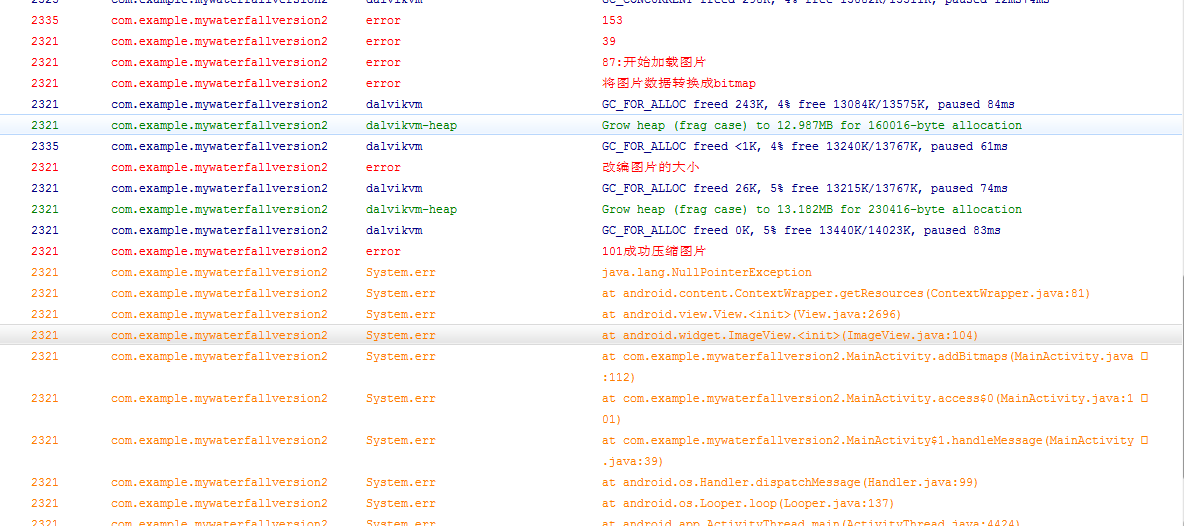
每次执行到Log.e("error","101成功压缩图片")这句就没办法执行了,下面是我的代码和
001
package com.example.mywaterfallversion2;
002
003
import android.app.Activity;
004
import android.content.Context;
005
import android.graphics.Bitmap;
006
import android.graphics.BitmapFactory;
007
import android.os.Bundle;
008
import android.os.Handler;
009
import android.os.Message;
010
import android.util.Log;
011
import android.view.MotionEvent;
012
import android.view.View;
013
import android.view.View.OnTouchListener;
014
import android.widget.ImageView;
015
import android.widget.LinearLayout;
016
import android.widget.ScrollView;
017
018
public class MainActivity extends Activity implements Runnable{
019
Context context = this;
020
private final int NUM_OF_PIC = 30; //每次请求获取的图片数量
021
private LinearLayout linearLayout1 = null;
022
private LinearLayout linearLayout2 = null;
023
private LinearLayout linearLayout3 = null;
024
private View scrollView = null;
025
public static int USE_LINEAR_INTERVAL = 0;
026
public static int linearlayoutWidth;
027
private byte[][] picBytes = new byte[NUM_OF_PIC][];
028
private int numOfPic = 0;//已加载的图片数量
029
private int index = 0;
030
public static int requestTime = 0;
031
private PictureArrayOfBytes picArray ;
032
033
private Handler mHandler = new Handler(){
034
public void handleMessage(Message msg) {
035
switch (msg.what) {
036
case 1:
037
try {
038
Log.e("error","39");
039
addBitmaps();
040
Log.e("error","41");
041
} catch (Exception e) {
042
// TODO Auto-generated catch block
043
e.printStackTrace();
044
}
045
break;
046
}
047
};
048
};
049
050
051
052
@Override
053
protected void onCreate(Bundle savedInstanceState) {
054
super.onCreate(savedInstanceState);
055
setContentView(R.layout.main);
056
linearLayout1 = (LinearLayout)findViewById(R.id.main_linearlayout1);
057
linearLayout2 = (LinearLayout)findViewById(R.id.main_linearlayout2);
058
linearLayout3 = (LinearLayout)findViewById(R.id.main_linearlayout3);
059
linearlayoutWidth = (int)(getWindowManager().getDefaultDisplay().getWidth()/3);
060
Log.e("error","creat: " + String.valueOf(linearlayoutWidth));
061
062
scrollView = findViewById(R.id.scroll);
063
Log.e("error","61");
064
final Thread thread = new Thread(new MainActivity());
065
Log.e("error","65");
066
thread.start();
067
Log.e("error","67");
068
069
scrollView.setOnTouchListener(new OnTouchListener() {
070
@Override
071
public boolean onTouch(View v, MotionEvent event) {
072
switch (event.getAction()) {
073
case MotionEvent.ACTION_DOWN :
074
break;
075
case MotionEvent.ACTION_MOVE :
076
index++;
077
break;
078
default :
079
break;
080
}
081
if (event.getAction() == MotionEvent.ACTION_UP && index > 0) {
082
index = 0;
083
View view = ((ScrollView) v).getChildAt(0);
084
if (view.getMeasuredHeight() <= v.getScrollY() + v.getHeight()) {
085
//加载数据代码
086
//每次加载30张图片,一共加载5次
087
if (numOfPic >= NUM_OF_PIC){
088
numOfPic = 0;
089
thread.start();
090
}
091
}
092
}
093
return false;
094
}
095
});
096
Log.e("error","90");
097
}
098
099
100
101
private void addBitmaps() throws Exception{
102
Log.e("error","87:开始加载图片");
103
104
105
for (int i = 0; i < NUM_OF_PIC; i++){
106
Log.e("error","将图片数据转换成bitmap");
107
108
Bitmap bitmap = BitmapFactory.decodeByteArray(picBytes[i], 0, picBytes[i].length);
109
Log.e("error","改编图片的大小");
110
Bitmap bitmap2 = BitmapZoom.bitmapZoomByWidth(bitmap, 240); //压缩图片大小
111
Log.e("error","101成功压缩图片");
112
ImageView imageView = new ImageView(context);
113
Log.e("error","103");
114
imageView.setImageBitmap(bitmap);
115
Log.e("error","105");
116
//根据图片的大小,为图片挖坑
117
LinearLayout.LayoutParams layoutParams = newLinearLayout.LayoutParams(bitmap2.getWidth(), bitmap2.getHeight());
118
//将坑和图片对象联系起来
119
Log.e("error","109");
120
imageView.setLayoutParams(layoutParams);
121
Log.e("error","111");
122
//按照顺序加载图片
123
switch (USE_LINEAR_INTERVAL)
124
{
125
case 0:
126
linearLayout1.addView(imageView);
127
numOfPic++;
128
break;
129
case 1:
130
linearLayout2.addView(imageView);
131
numOfPic++;
132
break;
133
case 2:
134
linearLayout3.addView(imageView);
135
numOfPic++;
136
break;
137
default:
138
break;
139
}
140
USE_LINEAR_INTERVAL++;
141
USE_LINEAR_INTERVAL= USE_LINEAR_INTERVAL%3;
142
}
143
}
144
@Override
145
public void run() {
146
// TODO Auto-generated method stub
147
try {
148
requestTime++;
149
picArray = new PictureArrayOfBytes(requestTime);
150
picBytes = picArray.getPicByteArray();
151
Message message = new Message();
152
message.what = 1;
153
Log.e("error","153");
154
mHandler.sendMessage(message);
155
} catch (Exception e) {
156
// TODO Auto-generated catch block
157
e.printStackTrace();
158
}
159
}
160
161
}
logcat截图:


 发帖
发帖 与我相关
与我相关 我的任务
我的任务
 分享
分享