

 HTML5
HTML5

vue 趋势图组件动态渲染问题
 墨衍会员 · AI 创作全网分发 墨衍智能分发 通过墨衍一键同步至各平台 可同步平台 CSDN微信公众号微博知乎掘金百家号博客园抖音小红书 你的文章也可以这样分发 墨衍会员 ¥399起/年,写一次发全网
我也要 关注 + 加入社区
墨衍会员 · AI 创作全网分发 墨衍智能分发 通过墨衍一键同步至各平台 可同步平台 CSDN微信公众号微博知乎掘金百家号博客园抖音小红书 你的文章也可以这样分发 墨衍会员 ¥399起/年,写一次发全网
我也要 关注 + 加入社区写了一个趋势图组件但是在页面上写该标签渲染不出来了 大佬帮我看看是怎么回事吗
这是在home页面上的标签
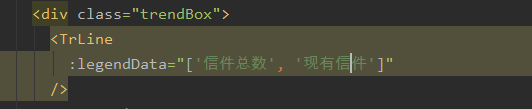
这是趋势图文件代码
这是在home页面上的标签
这是趋势图文件代码
<template>

  <!--为echarts准备一个具备大小的容器dom-->

  <div id="main" style="width: 600px;height: 400px;"></div>

</template>

<script>

  import echarts from 'echarts'

  import { defineComponent} from '@vue/composition-api'

  export default defineComponent({

    name: '',

    props:{

      legendData: Array,

      firstList: Array,

      firstColor: String,

      secondColor: String,

      secondList: Array,

    },

    data() {

      return {

        charts: '',

        /*	opinion: ["1", "3", "3", "4", "5"],*/

        opinionData: ["3", "2", "4", "4", "5"],

        Datas: ["2", "2", "4", "5", "4"]

      }

    },

    methods: {

      drawLine(id) {

        this.charts = echarts.init(document.getElementById(id))

        this.charts.setOption({

          tooltip: {

            trigger: 'axis'

          },

          legend: {

            data: legendData

          },

          grid: {

            left: '3%',

            right: '4%',

            bottom: '3%',

            containLabel: true

          },


          toolbox: {

            feature: {

              saveAsImage: {}

            }

          },

          xAxis: {

            type: 'category',

            boundaryGap: false,

            data: ["1","2","3","4","5"]


          },

          yAxis: {

            type: 'value'

          },


          series: [

            {

            name: legendData[0],

            type: 'line',

            stack: '总量',

            data: this.opinionData

          },

            {

              name: legendData[1],

              type: 'line',

              stack: '总量',

              // itemStyle: {

              //   normal: {

              //     color: secondColor,

              //     lineStyle: {

              //       color: secondColor

              //     }

              //   }

              // },

              data: this.Datas

            }

          ]

        })

      }

    },

    //调用

    mounted() {

      this.$nextTick(function() {

        this.drawLine('main')

      })

    }

  })

</script>

<style scoped>

  * {

    margin: 0;

    padding: 0;

    list-style: none;

  }

</style>
...全文
相关推荐
Flask+Vue 仓储物资管理系统
基于Flask+Vue的仓储物资管理系统。主要功能包括:商品管理、供应商管理、客户管理、仓库管理、商品出入库以及退货、数据统计与分析、管理员管理等。
SpringBoot+Vue无人超市管理系统[可运行源码]
本系统基于SpringBoot和Vue技术栈,设计并实现了一套完整的无人超市管理系统,旨在解决传统无人超市在数据管理、用户交互和系统扩展性方面的不足。系统采用前后端分离架构,后端基于SpringBoot框架提供RESTful API接口,支持高并发和分布式部署;前端采用Vue.js结合Element UI组件库,构建响应式用户界面。功能涵盖用户管理、商品管理、订单管理、库存管理及数据统计分析,实现从商品上架到用户结算的全流程自动化管理。数据库使用MySQL,通过JPA实现对象关系映射,确保数据一致性和安全性。关键技术包括Spring Security权限控制、Redis缓存优化、WebSocket实时通信以及支付宝/微信支付接口集成。该系统为无人超市的智能化运营提供了完整解决方案,具有较高的实用价值和推广意义。
xz-sales-tools xz-sales-tools
xz_sales_tools xz_sales_tools
Healthcare-21
Healthcare-21
qushitu.rar_qushitu_趋势图_趋势图控件
趋势图控件,我以前做组太软件编的,可以参考下。




