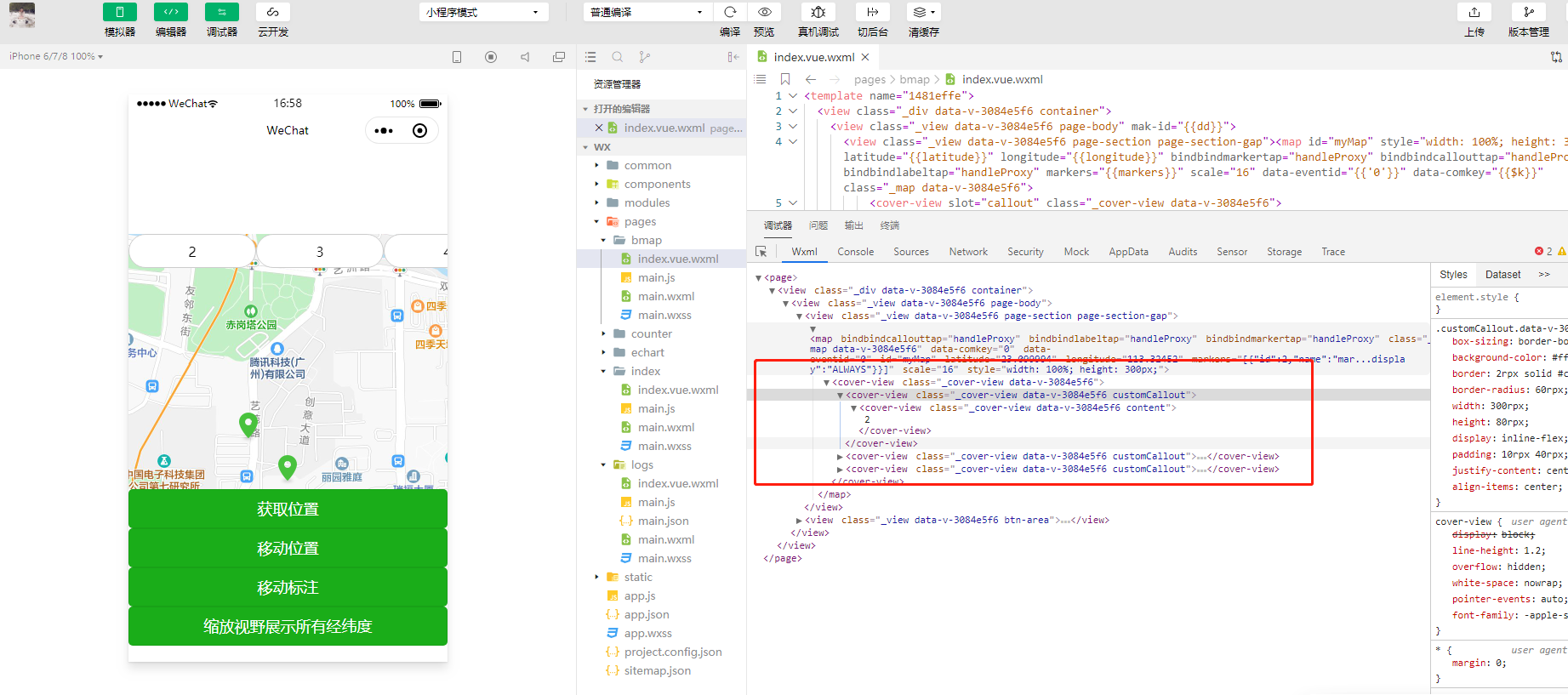
mpvue开发小程序使用微信map组件marker-id无法绑定问题

#麻辣小龙虾# 2020-08-17 03:20:13
最近在使用mpvue开发小程序的时候开发map地图组件,是想在地图上实现自定义覆盖物,发现一个坑,就是在使用map组件的时候,一直都无法绑定maker-id,用原生的可以,但是用mp-vue编写的时候发现一直编译不出来绑定的值。

自己写的代码如下:


<template>
<div class="container">
<view class="page-body" :mak-id="dd">
<view class="page-section page-section-gap">
<map
id="myMap"
style="width: 100%; height: 300px;"
:latitude="latitude"
:longitude="longitude"
@bindmarkertap="markertap"
@bindcallouttap="callouttap"
@bindlabeltap="labeltap"
:markers="markers"
scale="16"
>
<cover-view slot="callout">
<block v-for="v in markers" :key="v.id">
<cover-view class="customCallout" :marker-id="v.id">
<!-- <cover-image class="icon" src="/image/voice.png"></cover-image> -->
<cover-view class="content">
{{v.name}}--{{v.id}}
</cover-view>
</cover-view>
</block>
</cover-view>
</map>
</view>
<view class="btn-area">
<button @click="getCenterLocation" class="page-body-button" type="primary">获取位置</button>
<button @click="moveToLocation" class="page-body-button" type="primary">移动位置</button>
<button @click="translateMarker" class="page-body-button" type="primary">移动标注</button>
<button @click="includePoints" class="page-body-button" type="primary">缩放视野展示所有经纬度</button>
</view>
</view>
</div>
</template>

<script>
// var bmap = require('bmap-wx')
// let wxMarkerData = []
export default {
data () {
return {
dd: 222,
latitude: 23.099994,
longitude: 113.324520,
markers: [],
covers: [{
latitude: 23.099994,
longitude: 113.344520,
iconPath: '/static/images/location.png'
}, {
latitude: 23.099994,
longitude: 113.304520,
iconPath: '/static/images/location.png'
}]
}
},
components: {
},
onReady: function (e) {
this.mapCtx = wx.createMapContext('myMap')
this.markers = [{
id: 2,
name: 'marker2',
latitude: 23.097994,
longitude: 113.323520,
iconPath: '/static/images/location.png',
customCallout: {
anchorY: 0,
anchorX: 0,
display: 'ALWAYS'
}
}, {
id: 3,
name: 'marker3',
latitude: 23.096994,
longitude: 113.324520,
iconPath: '/static/images/location.png',
customCallout: {
anchorY: 10,
anchorX: 0,
display: 'ALWAYS'
}
}, {
id: 4,
name: 'marker4',
latitude: 23.095994,
longitude: 113.325520,
iconPath: '/static/images/location.png',
customCallout: {
anchorY: 0,
anchorX: 20,
display: 'ALWAYS'
}
}]
},
methods: {
markertap () {},
callouttap () {},
bindlabeltap () {},
getCenterLocation: function () {
this.mapCtx.getCenterLocation({
success: function (res) {
console.log(res.longitude)
console.log(res.latitude)
}
})
},
moveToLocation: function () {
this.mapCtx.moveToLocation()
},
translateMarker: function () {
this.mapCtx.translateMarker({
markerId: 1,
autoRotate: true,
duration: 1000,
destination: {
latitude: 23.10229,
longitude: 113.3345211
},
animationEnd () {
console.log('animation end')
}
})
},
includePoints: function () {
this.mapCtx.includePoints({
padding: [10],
points: [{
latitude: 23.10229,
longitude: 113.3345211
}, {
latitude: 23.00229,
longitude: 113.3345211
}]
})
}
}
}
</script>

<style scoped>
.page-body {
width:100%;
}
#map {
width: 100%;
height: 600px;
border:1px solid #ccc;
}
.customCallout {
box-sizing: border-box;
background-color: #fff;
border: 1px solid #ccc;
border-radius: 30px;
width: 150px;
height: 40px;
display: inline-flex;
padding: 5px 20px;
justify-content: center;
align-items: center;
}
.page-body {
width:100%;
}
</style>
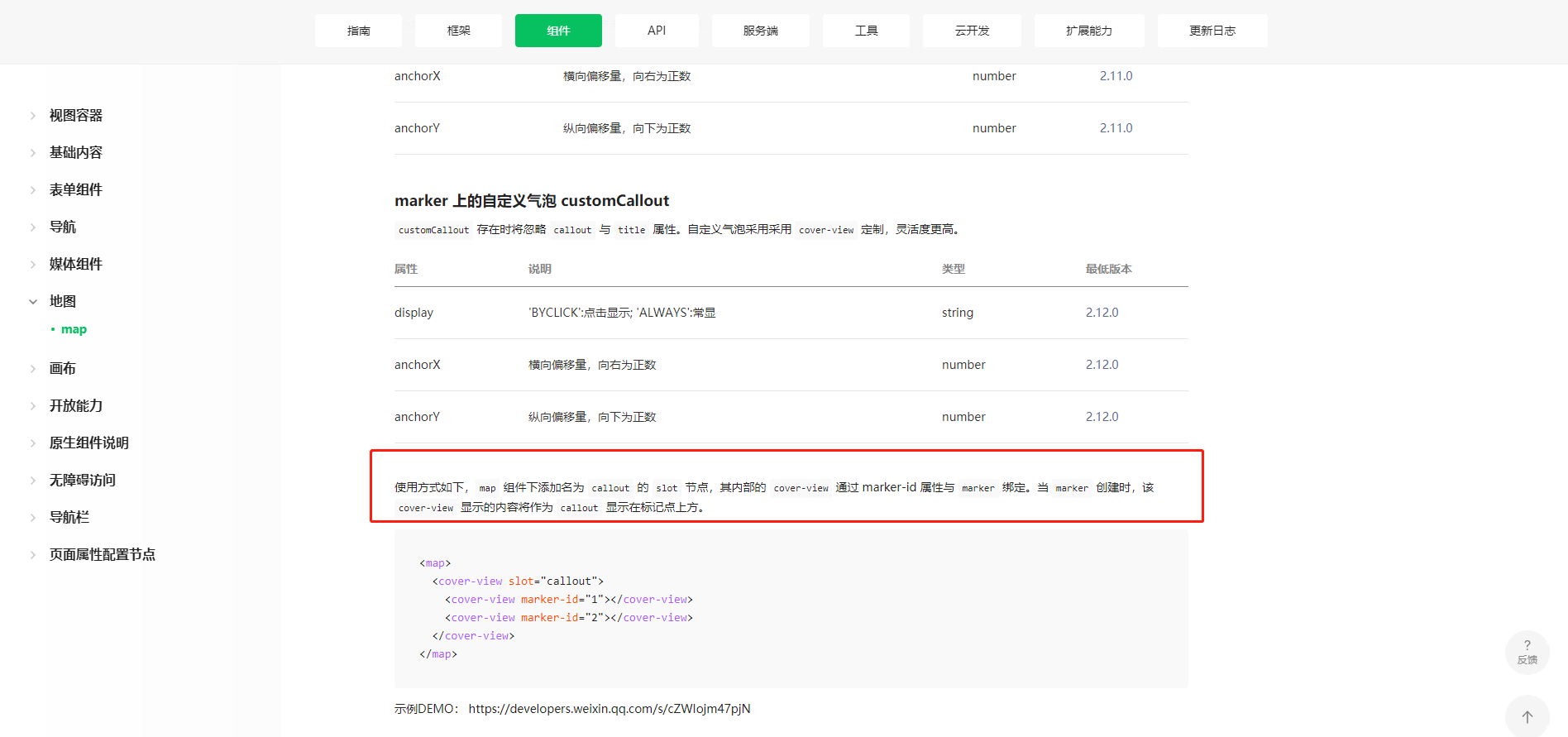

这个是微信官方原声的文档说明:

https://developers.weixin.qq.com/miniprogram/dev/component/map.html


...全文
10356 6 打赏 收藏 转发到动态 举报
写回复
用AI写文章
6 条回复
切换为时间正序
请发表友善的回复…
发表回复
#麻辣小龙虾# 2020-10-25
  • 打赏
  • 举报
回复
引用 5 楼 孔小弟Jasen 的回复:
我用另外一种格式实现了自己的需求
咋实现的?我也想知道。
#麻辣小龙虾# 2020-10-21
  • 打赏
  • 举报
回复
引用 3 楼 孔小弟Jasen 的回复:
解决了吗?老哥。我taro也遇到了
没有兄弟,这哥真的坑爹~!
孔小弟Jasen 2020-10-21
  • 打赏
  • 举报
回复
我用另外一种格式实现了自己的需求
孔小弟Jasen 2020-10-20
  • 打赏
  • 举报
回复
解决了吗?老哥。我taro也遇到了
#麻辣小龙虾# 2020-09-24
  • 打赏
  • 举报
回复
自己顶起来
#麻辣小龙虾# 2020-08-17
  • 打赏
  • 举报
回复
编译出来的结果就是没有maker-id
引用 楼主 #麻辣小龙虾# 的回复:
最近在使用mpvue开发小程序的时候开发map地图组件,是想在地图上实现自定义覆盖物,发现一个坑,就是在使用map组件的时候,一直都无法绑定maker-id,用原生的可以,但是用mp-vue编写的时候发现一直编译不出来绑定的值。 自己写的代码如下:

<template>
  <div class="container">
    <view class="page-body" :mak-id="dd">
      <view class="page-section page-section-gap">
       <map
        id="myMap"
        style="width: 100%; height: 300px;"
        :latitude="latitude"
        :longitude="longitude"
        @bindmarkertap="markertap"
        @bindcallouttap="callouttap"
        @bindlabeltap="labeltap"
        :markers="markers"
        scale="16"
      >
      <cover-view slot="callout">
        <block v-for="v in markers" :key="v.id">
          <cover-view class="customCallout" :marker-id="v.id">
            <!-- <cover-image class="icon" src="/image/voice.png"></cover-image> -->
            <cover-view class="content">
              {{v.name}}--{{v.id}}
            </cover-view>
          </cover-view>
        </block>
      </cover-view>
    </map>
      </view>
      <view class="btn-area">
        <button @click="getCenterLocation" class="page-body-button" type="primary">获取位置</button>
        <button @click="moveToLocation" class="page-body-button" type="primary">移动位置</button>
        <button @click="translateMarker" class="page-body-button" type="primary">移动标注</button>
        <button @click="includePoints" class="page-body-button" type="primary">缩放视野展示所有经纬度</button>
      </view>
    </view>
  </div>
</template>

<script>
// var bmap = require('bmap-wx')
// let wxMarkerData = []
export default {
  data () {
    return {
      dd: 222,
      latitude: 23.099994,
      longitude: 113.324520,
      markers: [],
      covers: [{
        latitude: 23.099994,
        longitude: 113.344520,
        iconPath: '/static/images/location.png'
      }, {
        latitude: 23.099994,
        longitude: 113.304520,
        iconPath: '/static/images/location.png'
      }]
    }
  },
  components: {
  },
  onReady: function (e) {
    this.mapCtx = wx.createMapContext('myMap')
    this.markers = [{
      id: 2,
      name: 'marker2',
      latitude: 23.097994,
      longitude: 113.323520,
      iconPath: '/static/images/location.png',
      customCallout: {
        anchorY: 0,
        anchorX: 0,
        display: 'ALWAYS'
      }
    }, {
      id: 3,
      name: 'marker3',
      latitude: 23.096994,
      longitude: 113.324520,
      iconPath: '/static/images/location.png',
      customCallout: {
        anchorY: 10,
        anchorX: 0,
        display: 'ALWAYS'
      }
    }, {
      id: 4,
      name: 'marker4',
      latitude: 23.095994,
      longitude: 113.325520,
      iconPath: '/static/images/location.png',
      customCallout: {
        anchorY: 0,
        anchorX: 20,
        display: 'ALWAYS'
      }
    }]
  },
  methods: {
    markertap () {},
    callouttap () {},
    bindlabeltap () {},
    getCenterLocation: function () {
      this.mapCtx.getCenterLocation({
        success: function (res) {
          console.log(res.longitude)
          console.log(res.latitude)
        }
      })
    },
    moveToLocation: function () {
      this.mapCtx.moveToLocation()
    },
    translateMarker: function () {
      this.mapCtx.translateMarker({
        markerId: 1,
        autoRotate: true,
        duration: 1000,
        destination: {
          latitude: 23.10229,
          longitude: 113.3345211
        },
        animationEnd () {
          console.log('animation end')
        }
      })
    },
    includePoints: function () {
      this.mapCtx.includePoints({
        padding: [10],
        points: [{
          latitude: 23.10229,
          longitude: 113.3345211
        }, {
          latitude: 23.00229,
          longitude: 113.3345211
        }]
      })
    }
  }
}
</script>

<style scoped>
.page-body {
  width:100%;
}
#map {
  width: 100%;
  height: 600px;
  border:1px solid #ccc;
}
.customCallout {
  box-sizing: border-box;
  background-color: #fff; 
  border: 1px solid #ccc;
  border-radius: 30px;
  width: 150px;
  height: 40px;
  display: inline-flex;
  padding: 5px 20px;
  justify-content: center;
  align-items: center;
}
.page-body {
  width:100%;
}
</style>
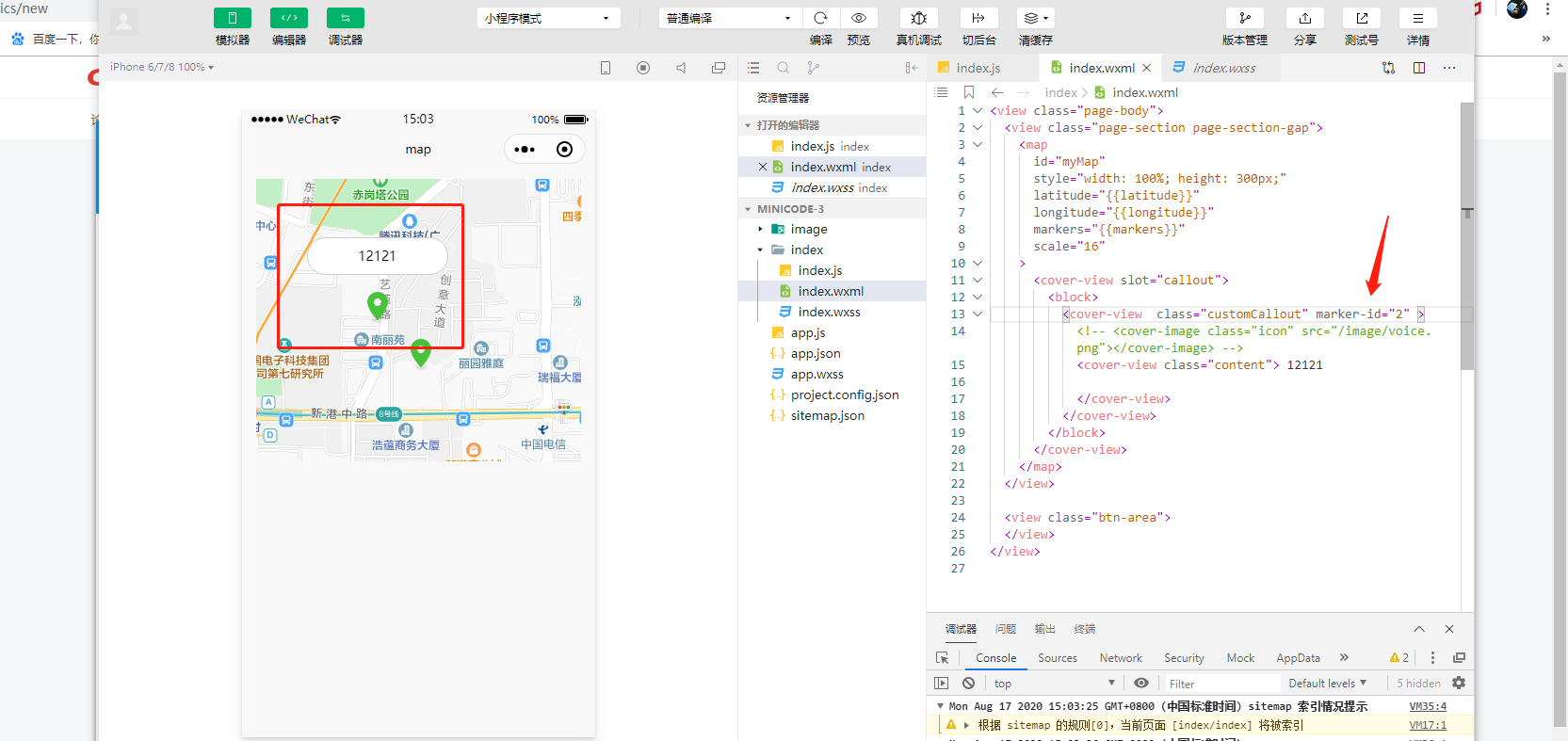
这个是微信官方原声的文档说明: https://developers.weixin.qq.com/miniprogram/dev/component/map.html
我们把同一标的(昆仑万维,现价 43.20 元,2026-07-31 收盘)交给三套系统,各出一份独立分析: **C 报告(CoordClaw 基于管理学多智能体系统)**——投研级。它由五个角色构成:周婷整合撰写、李静出基本面、王芳出技术面、赵明出风险、陈默做 PM 终审。最终产物是一份 38 项分级风险清单(P0×4 / P1×12 / P2×12 / P3×6 / 尾部×4)、双源交叉验证的财务数据(EM/Sina 差异 <0.01%)、严格的口径纪律,以及一份原样保留的"待核实"清单。结论冷冰冰:高风险,不建议参与。 **D 报告(DeepSeek)**——信息整理级。它把"4+3 AGI 战略"、天工 AI、Opera 浏览器、StarMaker 拆得很漂亮,核心财务数据(营收 81.98 亿、归母 -15.93 亿)也没算错。但整篇没有技术面、没有量化风控,更关键的是——它完全没提实控人已减持 75%、质押状态未知、净现金仅 15.19 亿且续航只有 1.26~1.81 年这些要命的负面。这是典型的"选择性呈现"。 **K 报告(Kimi)**——以对比评估的方式呈现。它搭起"数据准确性 / 分析维度 / 结论合理性"的三维框架,把几份材料放在一起对照,给出各自的强弱判定。它的维度意识比 D 报告更自觉,但作为一份独立分析,它对"评估方法本身的信度"交待不足,部分引用的核对也不够彻底。 结果两家的结论高度一致。C 报告(多智能体)被评投研级、居首;D 报告(DeepSeek 自己写的)被评信息整理级、居中;K 报告(Kimi 自己那份)维度较全但核验深度有限,排在两者之间。DeepSeek 的那份评估把 C 给了五星、D 三星、K 四星;Kimi 的那份评估也独立地把最高分给了 C。
问题现象 - 同一张 TF 卡/SD 卡在其他电脑上能正常识别,插到本机却只"响一声",资源管理器里不显示盘符; - 磁盘管理里能看到磁盘,但显示为灰色 / RAW / 无盘符; - 插入 U 盘、读卡器后偶尔能显示,重启或更换卡片后又消失; - 使用 diskpart、mountvol 等命令时系统卡住无响应。 ## 问题根源 经排查,这类问题通常不是 TF 卡损坏,而是 Windows 存储子系统与本机读卡器/驱动之间的兼容性故障,主要包括: 1. **盘符未分配** —— 卷已被系统识别,但没有挂载点,因此资源管理器不显示; 2. **USB 幽灵设备残留** —— 系统里残留 `Disconnected` 状态的 USBSTOR 设备记录,阻塞新设备枚举; 3. **USB 选择性暂停(Selective Suspend)** —— Windows 空闲时给读卡器断电,导致识别不稳定; 4. **automount 被关闭或失效** —— 新插入的卷无法自动分配盘符; 5. **存储堆栈挂起** —— 残留的 diskpart 进程锁死存储服务。 ## 解决方案(一键永久修复) 本项目是一个 **Codex Skill + 一键安装器**,自动完成以下修复: - 启用系统自动挂载(automount enable / scrub) - 清理 Disconnected 幽灵 USB 设备 - 永久禁用 USB 选择性暂停(防读卡器被断电) - 自动为所有无盘符的可移动卷分配盘符 - 注册**开机守护任务**:每次开机自动执行以上修复,彻底告别手动操作 ## 使用方法 ```powershell # 在其他电脑上(Windows 10/11): # 1. 下载本项目 # 2. 右键 install.bat → 以管理员身份运行(或直接双击后点"是")

87,988

社区成员

发帖
与我相关
我的任务
社区描述
Web 开发 JavaScript
社区管理员
  • JavaScript
  • 无·法
加入社区
  • 近7日
  • 近30日
  • 至今
社区公告
暂无公告

试试用AI创作助手写篇文章吧
