

 JavaScript

nodes使用sqlite3,报错Cannot enlarge memory arrays. Either (1) compile with -s TOTAL
 墨衍会员 · AI 创作全网分发 墨衍智能分发 通过墨衍一键同步至各平台 可同步平台 CSDN微信公众号微博知乎掘金百家号博客园抖音小红书 你的文章也可以这样分发 墨衍会员 ¥399起/年,写一次发全网
我也要 关注 + 加入社区
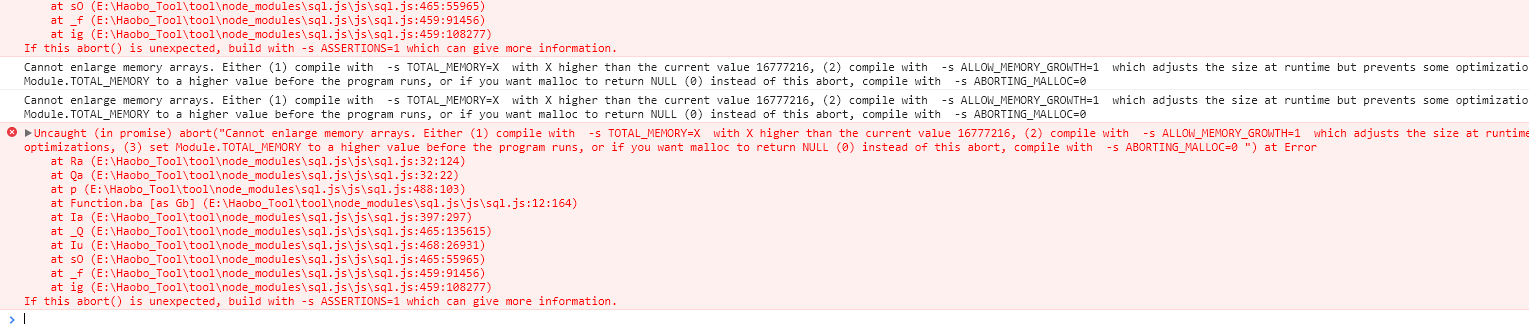
报错信息
Cannot enlarge memory arrays. Either (1) compile with -s TOTAL_MEMORY=X with X higher than the current value 16777216, (2) compile with -s ALLOW_MEMORY_GROWTH=1 which adjusts the size at runtime but prevents some optimizations, (3) set Module.TOTAL_MEMORY to a higher value before the program runs, or if you want malloc to return NULL (0) instead of this abort, compile with -s ABORTING_MALLOC=0
我使用了基于sqlite3的sqlite-sync,一个页面同时操作了几个查询吧,就报错这个了,求问怎么解决呢
相关推荐
cassandra-benchmark
cassandra-benchmark
Algorithms in C++, Parts 1-4: Fundamentals, Data Structures, Sorting, Searching
Algorithms in C++, Parts 1-4: Fundamentals, Data Structures, Sorting, Searching(3rd Edition)英文版
Julia High performance.pdf
Julia High performance.pdf
SQLMemTable for Delphi / C++ Builder
SQLMemTable for Delphi / C++ Builder: README============================================Please read this file carefully (especially the INSTALLATION chapter) before installing the program to your computer.Contents-------- Program information Company information Description Specification Features and Benefits Installation Purchasing / Registration Copyright and licenses Warranty and guarantee Technical support Important note Other products recommended to useProgram information-------------------Program Name: SQLMemTableLicense Types: Personal (for personal use, without source code) Com (for 1 developer, without source code) Pro (for 1 developer, with source code) Team4 (for 4 developers, with source code) Team8 (for 8 developers, with source code) Enterprise (Enterprise License - for entire company, with source code)Program Version: 1.00Program Release Date: 07/15/2003Program Purpose: SQLMemTable is a compact, fast and powerful in-memory table with SQL support. Target Environment: Delphi 4, 5, 6, 7 and C++ Builder 4, 5, 6.Company information-------------------Company Name: AidAim SoftwareContact E-mail Address: support@aidaim.comContact WWW URL: http://www.aidaim.comDescription-----------SQLMemTable is a compact in-memory table with SQL support for Delphi and C++ Builder. SQLMemTable does not require BDE and provides all the TTable‘s functionssuch as Master/Detail relationship, Filtering, Searching, Sorting, Key, Range, BLOB fields, and has some advanced features such as BLOB data compression, multi-indexes and table restructuring, shareable in memory capabilities. It is fully compatible with all standard DB controls, supports calculated and lookup fields as well as internationalization/localization and Unicode, provides data importing from and exporting to any dataset, includes SQLConsole utility with source code, comprehensive help and demos.SQLMemTable provides the following services: - SQL support - Master / detail relationship - Creating, renaming, emptying, deleting and restructuring tables - Creating, editing, deleting, navigating and searching for records - Creating and deleting multiple indexes - Calculated and lookup fields - Filtering support - Using BLOB fields with data compression ability - Importing from and exporting to any dataset in fast and easy way - Internationalization/Localization and Unicode supportSQLMemTable does not require BDE or any external drivers and has small footprint. Its search performance is excellent and data access speed is extremely fast.Specification-------------Data types: ftAutoInc, ftInteger, ftSmallInt, ftFloat, ftDateTime, ftDate, ftTime, ftBLOB, ftMemo, ftGraphic, ftString (any fixed length string), ftCurrency, ftWord, ftBoolean, ftLargeInt, ftFmtMemo, ftBytes, ftWideString.Advanced data types: aftExtended, aftWideMemoMaximum records quantity: up to 2^31 (over 2 billions). Maximum fields per table: 2^31 (over 2 billions). Maximum indexes per table: 2^31 (over 2 billions). Maximum index fields per index: 2^31 (over 2 billions). Maximum field name‘s length: 255 characters.Maximum index name‘s length: 255 characters.BLOB fields block size: > 1 byte, default 100 Kb. BLOB compression: ZLib, BZip, PPM Search operators: <,>,=,<>,<=,>=, like, not like, is null, is not null, and, or, not, (). Features and Benefits---------------------Compactness. - Short compiled code with approximate size 300 Kb, no external drivers (such as BDE) required. - Small memory consumption by SQLMemTable database engine. - Fast BLOB data compression. Your large data fields will need less memory. SQLMemTable can compress data on the fly. The compression routines used in the SQLMemTable are much faster than most of popular archivers like PKZip, WinRar, Arj. High performance. - Fast search by B-tree indexes. At the moment SQLMemTable is one of the fastest existing in-memory tables for Delphi and C++ Builder. - High-speed memory operations performance is achieved by means of using specially optimized memory manager and tuned algorithms. - Quick operations with strings. SQLMemTable compares strings up to 3 times faster than standard Delphi string routines. High performance is achieved by using a special library written in Assembler and an advanced sorting algorithm. - Advanced SQL optimizer often makes query execution several times faster by choosing the best execution plans. Functionality. - A subset of SQL‘92 including DDL operators is supported by TSQLMemQuery component. With SQLMemTable you can create SQL scripts for creating tables, inserting, editing and deleting records, retrieving data by SELECT command. - Advanced search engine. SQLMemTable supports ‘LIKE‘ operator with wildcards ‘%‘ and ‘_‘, as well as ‘IS NULL‘ and ‘IS NOT NULL‘ in filters and queries. - Full multiple index support, i.e. numerous fields in a table may comprise an index. SQLMemTable provides descending and ascending indexes, case-sensitive and insensitive indexes for string fields. - Shareable in-memory tables. SQLMemTable supports simultaneous access to a table by multiple TSQLMemTable components within a single application. - Default values support. - Record-level constraints, i.e. constraints that must be met when editing the data. Compatibility. - SQLMemTable supports most of TTable field data types, including BLOB fields, moreover it allows to create string and wide string fields of any fixed length. - SQLMemTable is fully compatible with standard DB-aware visual controls such as QuickReport, DBGrid, DBNavigator, DBImage, DBMemo, DBRichEdit, as well as with third party vendor‘s products supporting TDataset descendant components - FastReport, DBFlyTreeView and others. - Calculated and lookup fields can be used in the same way as TTable. - Most of TTable functions are supported including Key and Range methods. Convenience. - Table restructuring is being performed in the easiest way keeping all the existing data. - Data importing from and exporting to any dataset is supported. SQLMemTable provides you with the simplest way to import and export tables using ImportTable and ExportTable methods. - Internationalization / localization support. All text search and sorting functions use current system locale, so localizing your program with SQLMemTable is a very simple task. - Unicode support. All the text operations work with multi-byte encoding using ftWideString. - Comprehensive help. SQLMemTable comes with full documentation presented in SQLMemTable Developer‘s Guide and SQLMemTable Reference. Installation------------1) Make sure that all copies of Delphi (or C++ Builder) are currently closed and not running on the target system. Also, if you are replacing an existing version of SQLMemTable, please remove all files and the package of the prior version before running the new setup program.2) Unpack zip archive containing SQLMemTable into any directory. 3) Run the INSTALL.EXE from this directory.4) Follow on-screen instructions of step-by-step setup wizard to install SQLMemTable.5) If after the installation SQLMemTable components don‘t appear in Components Palette of the IDE, please follow the next instructions: * From the IDE, select ‘Component | Install Packages...‘. * Click the ‘Add‘ button. * In the ..SQLMemTableLibDelphi# (or ..SQLMemTableLibC++ Builder#) directory, select the dclSQLMemTableD#.BPL (or dclSQLMemTableB#.BPL) file. * Click the ‘OK‘ button to close the dialog. * Finally, select ‘Tools | Environment Options‘ from the main menu. From this dialog, select the ‘Library‘ tab and insure that the ..SQLMemTableLibDelphi# (or ..SQLMemTableLibC++ Builder#) directory is included in the ‘Library Path‘ line.Purchasing / Registration-------------------------Visit our site http://www.aidaim.com to purchase or register the product.Copyright and license---------------------See "license.txt" file.Warranty and guarantee----------------------See "license.txt" file.Technical support-----------------Before you contact us, please do the following: - Make sure you have performed all the required steps correctly. - Look at the Help files and Demos: it may already contain an answer to your question. A lot of people ask us something like "how do I:", though the complete information is there. - Visit our Internet site at http://www.aidaim.com. It‘s a good chance that you‘ll find the newer version of our product there.If the problem persists, please, inform us about the following: - SQLMemTable version. - Where did you obtain SQLMemTable (http or ftp site). - Compiler information: Delphi or C++ Builder, Version, Edition, Service Pack - Environmental information: your OS and Service Pack - Description of your problem (as much information as possible to retrieve the problem). - Attach a test project where the problem could be reproduced (it helps us to solve your issue as soon as possible)Typically AidAim Software Support Team answer messages in 24 hours, but depending on singularity and difficulty of your question it may take a bit longer.Should you have any ideas on improving the existing functions of this product after you have downloaded and used it, be easy to e-mail us. All registered users who buy this product may also send their offers to add new possibilities and/or to change the product‘s functions.We consider any ideas and we may take them into account while creating new versions of our products.Other products AidAim Software recommended-------------------------------------------All the products in this chapter are fully compatible with SQLMemTable and recommended to work with our product. AidAim Software had tested all these products released by our partner companies for complete compatibility with SQLMemTable. In its turn, all the partner companies have carried out similar testing of the compatibilityof SQLMemTable with their own products. All the companies whose products present here are technology partners of AidAim Software. It means that both partner companies guarantee the correct joint work of the products. In case of encountering bugs in the time of joint work and owing to it, the partners incur the obligation to resolve such problems for their clients for FREE. FastReport Software -------------------Advanced report generators for Delphi and Kylix.Web Site: http://www.fast-report.comFastReport VCL--------------FastReport VCL is reporting tool component for Borland Delphi 2-6 and Borland C++Builder 3-5. It consists of report engine, designer and preview. Some FastReport possibilities are really unique. The generator allows you to create tables, queries and databases in run-time. Built-in dialog designer allows you creation of dialog forms (they can be used for asking some parameters before printing a report). You also able to use built-in Pascal-like interpreter to do rather complex data processing. In spite of power of FastReport, its code is quite small. Probably FastReport is leader in correlation of functionality/size. The FastReport kernel (without designer) adds to your program the small footprint (less than QR3), but its functionality is like in ReportBuilder‘s one.FastReport CLX edition----------------------FastReport CLX edition is powerfull of FastReport for Borland Delphi 6 and Borland Kylix 1-2 for Linux. It use new CLX-library. Do you want to create reports for Linux as well as for Windows? Use FastReport CLX edition!FastReport VCL 2.3 lite-----------------------FreeWare version of FastReport. Imca Systems DevTeam --------------------Imca Systems DevTeam - Flexible and powerful Delphi/C++ Builder/ActiveX trees, grids and editors.Web Site: http://www.9rays.netDBFlyTreeView Suite-------------------Add grid and treeview functionality with a single component. DBFlyTreeView is a fully customizable, data-bound grid and tree view component that allows you to add huge arrays of nodes. OLE drag-and-drop is supported and the component is customizable at both design-time and runtime. DBFlyTreeView supports custom colors, fonts, and alignment for each cell, and you can even create scrollable background wallpapers without creating huge bitmaps.Included: RapidTree, FlyTreeView, PropertiesTree, DBFlyTreeView controls.DBFlyTreeViewPro Suite----------------------Enable your Delphi and C++Builder applications to display and browse hierarchical, table, and list data. DBFlyTreeViewPro Suite is a set of VCL components that are a direct descendent from FlyTreeViewPro. It supports more than 40 types of in place editors plus your custom format. It is data-aware and allows you to draw any array of cells directly to a printer, Metafile, or Bitmap canvas.Included: RapidTree, IsPlugeditor, FlyTreeViewPro, PropertiesTreePro, DBFlyTreeViewPro controls.
【深度学习预测】项目介绍 Python实现基于BO-Transformer-LSTM贝叶斯优化算法(BO)优化Transformer-LSTM模型进行多变量时间序列预测(含模型描述及部分示例代码)
内容概要:本文详细介绍了一个基于BO-Transformer-LSTM的多变量时间序列预测项目,通过结合Transformer的全局自注意力机制与LSTM的局部时序建模能力,构建了适用于复杂业务场景的深度学习预测模型。模型输入采用多变量滑动窗口结构,并引入正弦余弦位置编码以保留时间顺序信息;Transformer编码器提取变量间长距离依赖关系,LSTM进一步捕捉动态演化特征,最终通过回归层输出预测值。为优化模型性能,采用贝叶斯优化算法(基于Tree-structured Parzen Estimator)自动搜索最优超参数组合,包括嵌入维度、注意力头数、学习率、窗口长度等,显著提升了调参效率与模型泛化能力。项目还设计了包含周期性、趋势性、均值回归、突发事件和异方差噪声的五因素模拟数据生成机制,确保数据贴近真实业务场景,并建立了从数据预处理、模型训练、验证评估到结果恢复的完整技术链路。; 适合人群:具备一定机器学习与深度学习基础,熟悉PyTorch框架,从事时间序列预测相关研究或工程应用的研发人员、数据科学家及研究生。; 使用场景及目标:①应用于能源负荷预测、设备状态监测、金融风控、供应链需求预测等多变量时间序列预测任务;②解决传统模型在长时依赖、非线性关系和高维特征下的预测瓶颈;③实现高效超参数优化,提升模型调优自动化水平与部署可行性。; 阅读建议:本文含核心模型结构与部分示例代码,建议结合完整项目代码(如GitHub或博客资源)进行复现实践,重点关注数据生成逻辑、模型前向传播流程及贝叶斯优化集成方式,同时可通过调整网络结构或优化策略进一步拓展至多步预测、概率输出与可视化分析等高级功能。




