

 C++ 语言

各位大佬,为什么VS2019控制台不能输出键盘键入的汉字呀,vscode也是这种情况,该怎么处理呢?
 墨衍会员 · AI 创作全网分发 墨衍智能分发 通过墨衍一键同步至各平台 可同步平台 CSDN微信公众号微博知乎掘金百家号博客园抖音小红书 你的文章也可以这样分发 墨衍会员 ¥399起/年,写一次发全网
我也要 关注 + 加入社区
墨衍会员 · AI 创作全网分发 墨衍智能分发 通过墨衍一键同步至各平台 可同步平台 CSDN微信公众号微博知乎掘金百家号博客园抖音小红书 你的文章也可以这样分发 墨衍会员 ¥399起/年,写一次发全网
我也要 关注 + 加入社区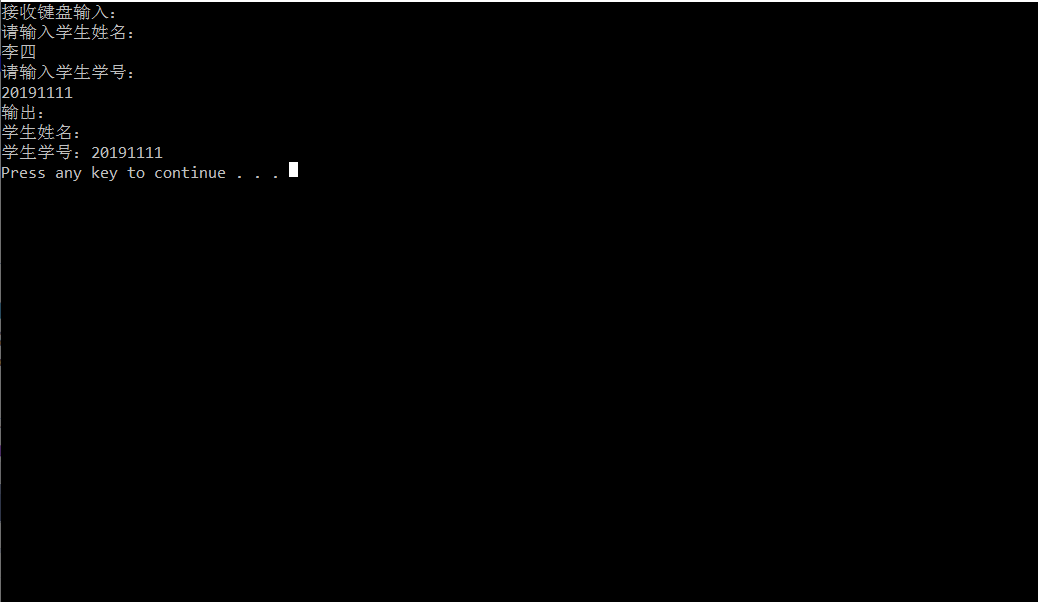
相关推荐
VSCode使用VS2017编译器
感觉VSCode不错,用来研究下,VSCode使用VS2017编译器的配置。
Claude Code配置卡住?三步拆解VS Code+Node.js+API密钥协同流程
Claude Code并非官方独立软件,而是基于Anthropic API构建的VS Code智能编程扩展,其核心依赖Node.js运行时、VS Code编辑器环境与API密钥认证机制。理解这一技术栈构成是解决‘配置卡住’问题的前提:Node.js提供执行引擎,VS Code承载扩展生命周期,API密钥实现身份可信授权。该组合广泛应用于AI辅助编程、代码补全与错误诊断等开发场景,尤其适合需要本地可控、低延迟响应的工程化实践。本文聚焦真实部署链路中的环境协同、路径校验与信任链构建,直击Windows/macO
智谱GLM-4.7-Flash免费API实战:2000万Token高效接入指南
大语言模型API是现代AI应用的基础设施,其核心在于模型能力、调用成本与响应延迟的三角平衡。GLM-4.7-Flash作为智谱推出的轻量级推理模型,通过结构精简与引擎优化,在保持92%+代码生成准确率的同时,将P95延迟压至320ms以内,并显著降低Token消耗——这使其成为开发者验证原型、构建VS Code插件或部署轻量生产服务的理想选择。结合ZCode平台提供的2000万Token免费额度,用户可低成本完成高并发场景下的真实链路跑通,覆盖代码补全、文档摘要、会议纪要生成等典型任务。本文聚焦GLM-4.
VS2019使用快捷键将代码对齐的方法
1、选中需要对齐的行 2、CTRL+K 3、CTRL+F 对齐前: 对齐后: 补充:VS中代码对齐等快捷键 在VS2008中,选定代码后,按Ctrl+K+F组合键,可以自动进行代码对齐。 注意:要先按下Ctrl和K,再按下F,因为Ctrl+F是查找的快捷键。 也可以先按下Ctrl+K,再按下Ctrl+F。 另外,可以在“工具->选项->文本编辑器->C/C++->制表符”选项卡中设置缩进选项。 英文版本的路径为:Tools->Options->Text Editor->C/C++->Tabs 注释选定代码:Ctrl+K+C 取消注释选定的代码:Ctrl+K+U 将选定行代码变为小写字母
帮VS2019 找回丢失的 SDK问题
缘起 前一段时间,有网友遇到一个奇怪的问题,说他机器上的 vs2019 编译 C++ 工程报错。我当时一听就有两个怀疑: 1.工程设置不对。 2.vs2019 没装好。 因为新建一个最简单的工程,编译也报一样的错误,所以可以排除工程设置的问题了。那只有可能是 vs2019 的问题了。但是具体是哪里的问题呢? 他按照错误提示搜索到了如下链接: https://developercommunity.visualstudio.com/content/problem/761788/msb8036-the-windows-sdk-version-100183620-was-not.html 据链接里的提




