AWS












secureCRT连接时出现key exchange failed
 墨衍会员 · AI 创作全网分发 墨衍智能分发 通过墨衍一键同步至各平台 可同步平台 CSDN微信公众号微博知乎掘金百家号博客园抖音小红书 你的文章也可以这样分发 墨衍会员 ¥399起/年,写一次发全网
我也要 关注 + 加入社区
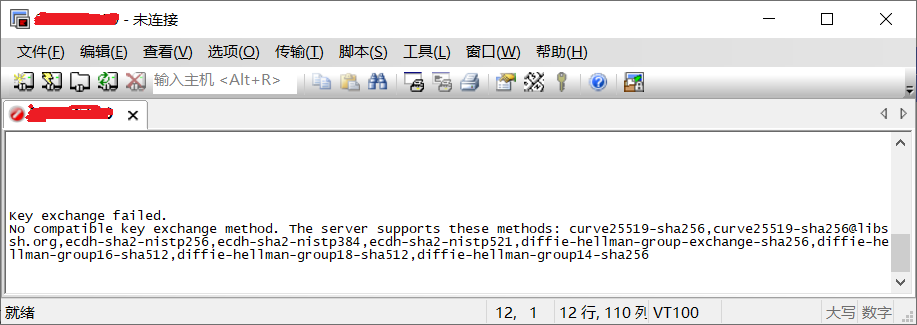
我在会话选项中已经把密钥交换算法都勾选上了,如下图:

相关推荐
SecureCRT green version no installation required
代码下载地址: https://pan.quark.cn/s/a4b39357ea24 SecureCRT ========= SecureCRT
SecureCRT SSH连接报错Key exchange failed
SecureCRT连接服务器时报错,报错信息为:Key exchange failed. No compatible key exchange method. The server supports these methods: curve25519-sha256,curve25519-sha256@libssh.org,ecdh-sha2-nistp256,ecdh-sha2-nistp384,ecdh-sha2-nistp521,diffie-hellman-group-exchange-sha256,
SecureCRT连接失败:深入解析Key Exchange不兼容问题及解决方案
本文深入解析了SecureCRT连接时出现“Key exchange failed”错误的根本原因,即客户端与服务器密钥交换算法不兼容。文章提供了两种核心解决方案:通过修改客户端ssh_config文件或服务器端sshd_config文件中的KexAlgorithms配置来修复。重点推荐在保证安全的前提下修改服务器配置,并给出了详细的步骤与安全加固建议,帮助运维人员彻底解决此兼容性问题。
SecureCRT连接Ubuntu 22.04报错?手把手教你解决Key exchange failed问题(附最新KexAlgorithms配置)
本文详细解析了SecureCRT连接Ubuntu 22.04时出现的Key exchange failed错误,提供了从诊断到解决的全方位方案。通过升级SecureCRT或修改sshd_config中的KexAlgorithms配置,有效解决密钥交换不兼容问题,同时兼顾安全性与连接稳定性。
Key exchange failed.No compatible key exchange method.
使用远程工具secureCRT(版本:Version 7.0.0 (x64 build 326) )连接Linux(Ubuntu-22.04)系统出现的问题