

 VFP
VFP

关于USB控制开关的使用问题
 墨衍会员 · AI 创作全网分发 墨衍智能分发 通过墨衍一键同步至各平台 可同步平台 CSDN微信公众号微博知乎掘金百家号博客园抖音小红书 你的文章也可以这样分发 墨衍会员 ¥399起/年,写一次发全网
我也要 关注 + 加入社区
墨衍会员 · AI 创作全网分发 墨衍智能分发 通过墨衍一键同步至各平台 可同步平台 CSDN微信公众号微博知乎掘金百家号博客园抖音小红书 你的文章也可以这样分发 墨衍会员 ¥399起/年,写一次发全网
我也要 关注 + 加入社区想做一个电源控制程序(制作环境:64位WIN10+VFP9),随从网上选购了一个USB控制开关,
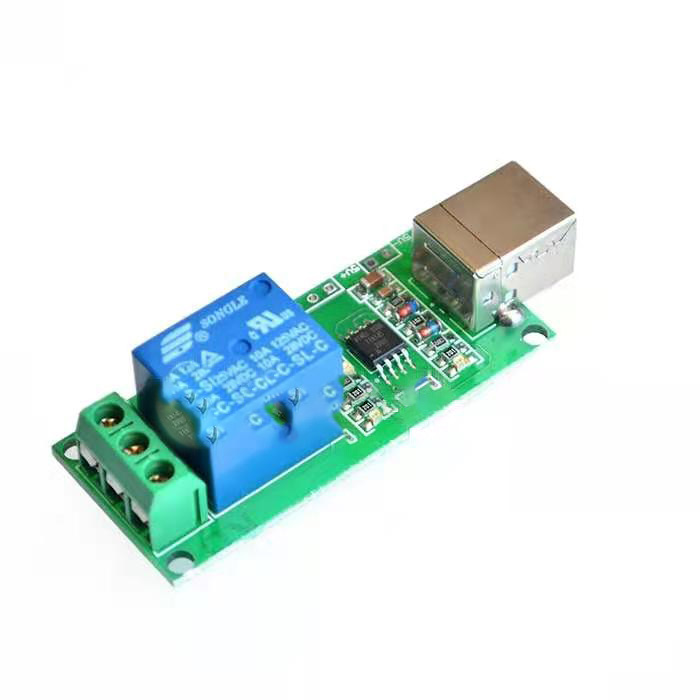
这开关由于太过简陋,说明只有
一,How to use in Vistual Studio.
1. Creat a new C++ Porject
2. In stdfax.h file, add this code:
#include "usb_relay_device.h"
#pragma comment(lib, "usb_relay_device.lib")
3. Copy the usb_relay_device.dll file into the dir that generate your applicaiton. Like the Release or Debug dir
二、The way to use funcation:
1. call usb_relay_init() to init the lib.
2. call usb_relay_device_enumerate() to get all the device pluged into pc
3. call usb_relay_device_open() open the device you need
4. other operation funcation:
call sb_relay_device_open_one_relay_channel() to open one way relay
call usb_relay_device_open_all_relay_channel() to open all relays
call usb_relay_device_close_one_relay_channel()to close one way relay
call usb_relay_device_close_all_relay_channel()to close all relays
和一个C++做的小示例程序
开始制作,按照说明,这个开关确实简单,但在VFP中使用也相当方便,初始化,查找设备,打开设备,发送开关信号,关闭设备,很快就做好了程序,开关功能顺利实现。
但在反复测试中发现一个问题:发送开的命令时,随机的会有一次失效,开不了,频率不高,关没有问题。
如果一次没开了,再来一次又好了,一直弄不明白是啥原因,也解决不了这个问题。
盼各位能帮帮忙,谢谢了!
这开关由于太过简陋,说明只有
一,How to use in Vistual Studio.
1. Creat a new C++ Porject
2. In stdfax.h file, add this code:
#include "usb_relay_device.h"
#pragma comment(lib, "usb_relay_device.lib")
3. Copy the usb_relay_device.dll file into the dir that generate your applicaiton. Like the Release or Debug dir
二、The way to use funcation:
1. call usb_relay_init() to init the lib.
2. call usb_relay_device_enumerate() to get all the device pluged into pc
3. call usb_relay_device_open() open the device you need
4. other operation funcation:
call sb_relay_device_open_one_relay_channel() to open one way relay
call usb_relay_device_open_all_relay_channel() to open all relays
call usb_relay_device_close_one_relay_channel()to close one way relay
call usb_relay_device_close_all_relay_channel()to close all relays
和一个C++做的小示例程序
开始制作,按照说明,这个开关确实简单,但在VFP中使用也相当方便,初始化,查找设备,打开设备,发送开关信号,关闭设备,很快就做好了程序,开关功能顺利实现。
但在反复测试中发现一个问题:发送开的命令时,随机的会有一次失效,开不了,频率不高,关没有问题。
如果一次没开了,再来一次又好了,一直弄不明白是啥原因,也解决不了这个问题。
盼各位能帮帮忙,谢谢了!
...全文
相关推荐
单键USB脚踏开关.zip
单键USB脚踏开关"这个压缩包子文件名表明里面的内容可能是一个安装程序、配置工具或者详细的使用指南,帮助用户了解如何设置和使用单键USB脚踏开关。
解决Linux USB设备突然无法使用的问题
Linux USB设备突然无法使用的排查方法
自制USB控制开关电源插座
为了解决这个问题,我们可以使用USB控制电源插座,该插座可以在电脑关机时自动关闭整个插座的电源。
LCUS+USB继电器开关使用说明.zip
- 遵守防静电措施,避免损坏USB接口或内部电路。6. **故障排查**: - 如果继电器无法正常工作,检查USB连接、电源、驱动程序及VB代码是否正确。 - 使用设备上的指示灯或日志信息来诊断问题。
USB设备开关
在企业环境中,为了防止员工私自使用U盘传播病毒、非法拷贝数据或浪费工作时间,管理员通常会采用这样的工具来限制USB存储设备的使用。这款USB设备开关就是为了解决这一问题而设计的。




