


51,411
社区成员
 发帖
发帖 与我相关
与我相关 我的任务
我的任务
 分享
分享在使用Mybatis将 读取到的txt文件中的数据插入到Mysql数据库中的时候,不知道该如何把从txt文件读取出来的数据,传递给实体类对象,进而插入到数据库中。
txt文件内容如下:(三列数据对应了数据库的字段)
11,张三,12
12,李四,13
13,王五,18
14,赵六,19
Mapper.xml文件中的配置:
   <insert id="insertData"  parameterType="com.abc.pojo.User">
       insert into test01 (id,name,age) values(#{id},#{name},#{age});
    </insert>
可以成功读取txt文件并打印出来,代码如下:
    @Test
        public void testReadFile() throws IOException {
            String fileName = "d:\\111.txt";
            File file = new File(fileName);
            BufferedReader reader = new BufferedReader(new InputStreamReader(new FileInputStream(file)));
            String str = null;

            while ((str = reader.readLine())!=null){

                System.out.println(str);

            }

        }
现在问题是,从txt读取出文件,把值赋给了String对象的str,str的值怎么样才能传递给实体类User对象? 望大神指教~谢谢!

package com.xxx;

import java.io.File;
import java.nio.charset.StandardCharsets;
import java.util.List;

import org.junit.Test;

import cn.hutool.core.io.FileUtil;
import lombok.Builder;
import lombok.Data;
import lombok.ToString;

public class Test03 {
    @Data
    @Builder
    @ToString
    public static class Man {
        private Integer id;
        private String name;
        private Integer age;
    }

    @Test
    public void insert() {
        File file = new File("C:\\Users\\admin\\Desktop\\人物.txt");
        List<String> manList = FileUtil.readLines(file, StandardCharsets.UTF_8);
        manList.forEach(v -> {
            String[] manFromFile = v.split(",");
            Man man = Man.builder().id(Integer.parseInt(manFromFile[0])).name(manFromFile[1])
                .age(Integer.parseInt(manFromFile[2])).build();
            // 执行插数据库
            // insertData(man);
        });
    }
}

已经解决了。再重新创建一个txt文件,重新手工输入txt文件内容。在读取就可以了。可能还是之前的txt文件中的内容存在问题导致。
debug了一下,发现在执行user.setId(Integer.parseInt(dd[0]))的时候报错,进一步debug,发现
“11”这个字符串解析成了[-1, -2, 49, 0, 49, 0],如下图,这是个啥原因啊? 无缘无故多出几个字符?
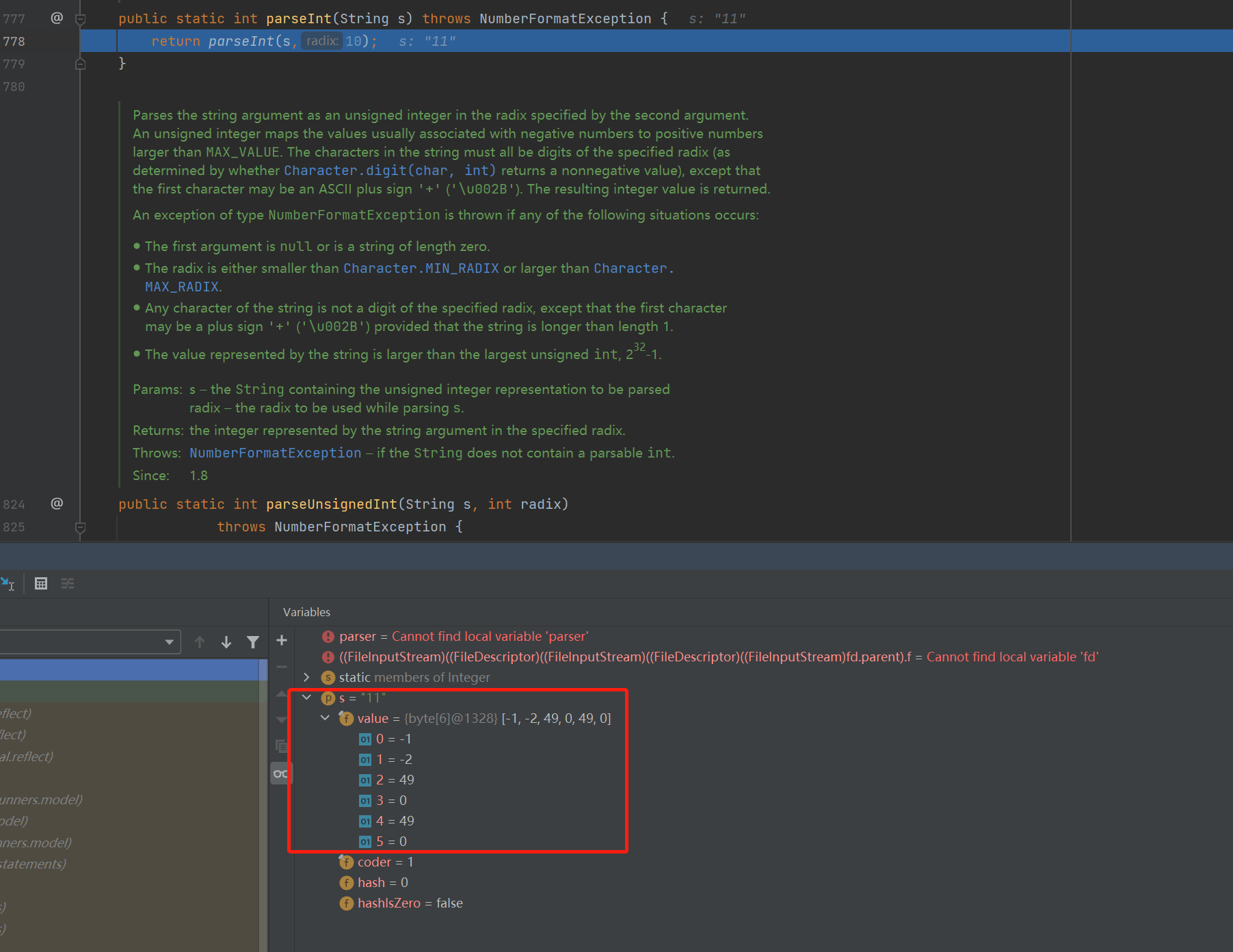
如果从文件读取,则会报错:不知道为啥报错,字符串“11”的数值的长度也没有超过10位呀。
java.lang.NumberFormatException: For input string: "11"
at java.base/java.lang.NumberFormatException.forInputString(NumberFormatException.java:67)
at java.base/java.lang.Integer.parseInt(Integer.java:660)
at java.base/java.lang.Integer.parseInt(Integer.java:778)
at TestReadFile.testReadFile(TestReadFile.java:52)
at java.base/jdk.internal.reflect.NativeMethodAccessorImpl.invoke0(Native Method)
at java.base/jdk.internal.reflect.NativeMethodAccessorImpl.invoke(NativeMethodAccessorImpl.java:78)
at java.base/jdk.internal.reflect.DelegatingMethodAccessorImpl.invoke(DelegatingMethodAccessorImpl.java:43)
at java.base/java.lang.reflect.Method.invoke(Method.java:567)
at org.junit.runners.model.FrameworkMethod$1.runReflectiveCall(FrameworkMethod.java:50)
at org.junit.internal.runners.model.ReflectiveCallable.run(ReflectiveCallable.java:12)
at org.junit.runners.model.FrameworkMethod.invokeExplosively(FrameworkMethod.java:47)
at org.junit.internal.runners.statements.InvokeMethod.evaluate(InvokeMethod.java:17)
at org.junit.runners.ParentRunner.runLeaf(ParentRunner.java:325)
at org.junit.runners.BlockJUnit4ClassRunner.runChild(BlockJUnit4ClassRunner.java:78)
at org.junit.runners.BlockJUnit4ClassRunner.runChild(BlockJUnit4ClassRunner.java:57)
at org.junit.runners.ParentRunner$3.run(ParentRunner.java:290)
at org.junit.runners.ParentRunner$1.schedule(ParentRunner.java:71)
at org.junit.runners.ParentRunner.runChildren(ParentRunner.java:288)
at org.junit.runners.ParentRunner.access$000(ParentRunner.java:58)
at org.junit.runners.ParentRunner$2.evaluate(ParentRunner.java:268)
at org.junit.runners.ParentRunner.run(ParentRunner.java:363)
at org.junit.runner.JUnitCore.run(JUnitCore.java:137)
at com.intellij.junit4.JUnit4IdeaTestRunner.startRunnerWithArgs(JUnit4IdeaTestRunner.java:69)
at com.intellij.rt.junit.IdeaTestRunner$Repeater.startRunnerWithArgs(IdeaTestRunner.java:33)
at com.intellij.rt.junit.JUnitStarter.prepareStreamsAndStart(JUnitStarter.java:221)
at com.intellij.rt.junit.JUnitStarter.main(JUnitStarter.java:54)
代码如下:
        @Test
        public void testReadFile() throws IOException {
            //读取文件内容
            String fileName = "d:\\111.txt";
            File file = new File(fileName);
            BufferedReader reader = new BufferedReader(new InputStreamReader(new FileInputStream(file)));
            String str = null;

            while ((str = reader.readLine()) != null) {
                User user = new User();
                String[] dd = str.split(",");

                user.setId(Integer.parseInt(dd[0]));
                user.setName(dd[1]);
                user.setAge(Integer.parseInt(dd[2]));

                System.out.println(user);
            }

            reader.close();
        }
但是不从文件读取,直接制定String对象str的值,name可以正常打印User的值:
    @org.junit.Test
    public  void  test01() throws IOException {

        String str = "11,张三,12";

        User user = new User();
        String[] d = str.split(",");
        user.setId(Integer.parseInt(d[0]));
        user.setName(d[1]);
        user.setAge(Integer.parseInt(d[2]));

        System.out.println(user);
    }
打印结果为:
User{id=11, name='张三', age=12}


