

37,741
社区成员
 发帖
发帖 与我相关
与我相关 我的任务
我的任务
 分享
分享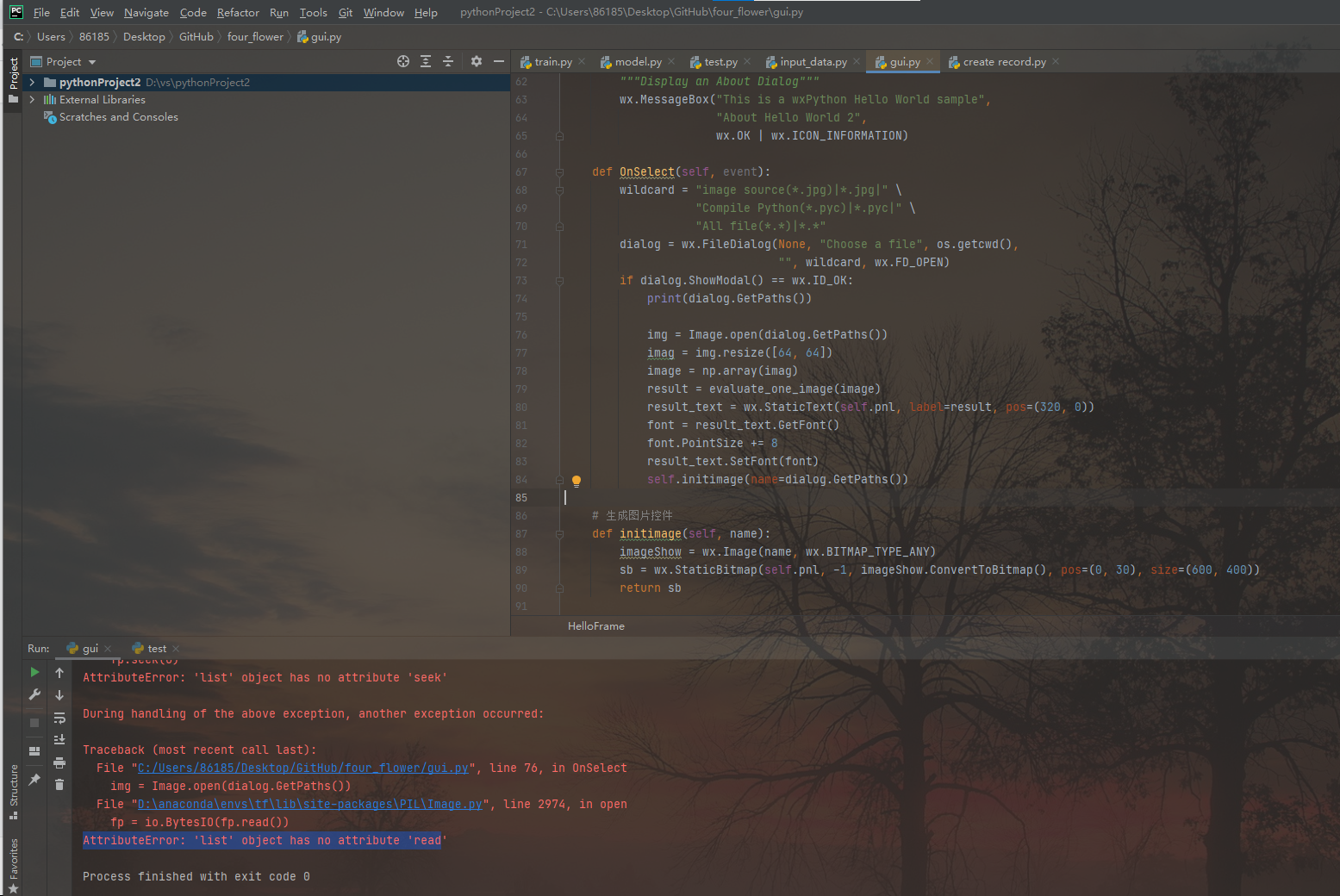
import wx
from test import evaluate_one_image
from PIL import Image
import numpy as np
import tensorflow as tf
import matplotlib.pyplot as plt
import os


class HelloFrame(wx.Frame):

    def __init__(self, *args, **kw):
        super(HelloFrame, self).__init__(*args, **kw)

        pnl = wx.Panel(self)

        self.pnl = pnl
        st = wx.StaticText(pnl, label="花朵识别", pos=(200, 0))
        font = st.GetFont()
        font.PointSize += 10
        font = font.Bold()
        st.SetFont(font)

        # 选择图像文件按钮
        btn = wx.Button(pnl, -1, "select")
        btn.Bind(wx.EVT_BUTTON, self.OnSelect)

        self.makeMenuBar()

        self.CreateStatusBar()
        self.SetStatusText("Welcome to flower world")

    def makeMenuBar(self):
        fileMenu = wx.Menu()
        helloItem = fileMenu.Append(-1, "&Hello...\tCtrl-H",
                                    "Help string shown in status bar for this menu item")
        fileMenu.AppendSeparator()

        exitItem = fileMenu.Append(wx.ID_EXIT)
        helpMenu = wx.Menu()
        aboutItem = helpMenu.Append(wx.ID_ABOUT)

        menuBar = wx.MenuBar()
        menuBar.Append(fileMenu, "&File")
        menuBar.Append(helpMenu, "Help")

        self.SetMenuBar(menuBar)

        self.Bind(wx.EVT_MENU, self.OnHello, helloItem)
        self.Bind(wx.EVT_MENU, self.OnExit, exitItem)
        self.Bind(wx.EVT_MENU, self.OnAbout, aboutItem)

    def OnExit(self, event):
        self.Close(True)

    def OnHello(self, event):
        wx.MessageBox("Hello again from wxPython")

    def OnAbout(self, event):
        """Display an About Dialog"""
        wx.MessageBox("This is a wxPython Hello World sample",
                      "About Hello World 2",
                      wx.OK | wx.ICON_INFORMATION)

    def OnSelect(self, event):
        wildcard = "image source(*.jpg)|*.jpg|" \
                   "Compile Python(*.pyc)|*.pyc|" \
                   "All file(*.*)|*.*"
        dialog = wx.FileDialog(None, "Choose a file", os.getcwd(),
                               "", wildcard, wx.FD_OPEN)
        if dialog.ShowModal() == wx.ID_OK:
            print(dialog.GetPaths())

            img = Image.open(dialog.GetPaths())
            imag = img.resize([64, 64])
            image = np.array(imag)
            result = evaluate_one_image(image)
            result_text = wx.StaticText(self.pnl, label=result, pos=(320, 0))
            font = result_text.GetFont()
            font.PointSize += 8
            result_text.SetFont(font)
            self.initimage(name=dialog.GetPaths())

    # 生成图片控件
    def initimage(self, name):
        imageShow = wx.Image(name, wx.BITMAP_TYPE_ANY)
        sb = wx.StaticBitmap(self.pnl, -1, imageShow.ConvertToBitmap(), pos=(0, 30), size=(600, 400))
        return sb


if __name__ == '__main__':
    app = wx.App()
    frm = HelloFrame(None, title='flower world', size=(1000, 600))
    frm.Show()
    app.MainLoop()
D:\anaconda\envs\tf\python.exe C:/Users/86185/Desktop/GitHub/four_flower/gui.py
['C:\\Users\\86185\\Desktop\\GitHub\\玫瑰花.jpg']
Traceback (most recent call last):
File "D:\anaconda\envs\tf\lib\site-packages\PIL\Image.py", line 2972, in open
fp.seek(0)
AttributeError: 'list' object has no attribute 'seek'
During handling of the above exception, another exception occurred:
Traceback (most recent call last):
File "C:/Users/86185/Desktop/GitHub/four_flower/gui.py", line 76, in OnSelect
img = Image.open(dialog.GetPaths())
File "D:\anaconda\envs\tf\lib\site-packages\PIL\Image.py", line 2974, in open
fp = io.BytesIO(fp.read())
AttributeError: 'list' object has no attribute 'read'
Process finished with exit code 0

从你的错误AttributeError: 'list' object has no attribute 'read',以及错误相关代码是:img = Image.open(dialog.GetPaths())
可以看出:
你用dialog.GetPaths()返回了一个list列表,传入了Image.open(),所以报错:
因为Image.open()希望传入的是 (单个的)图片文件的文件路径
比如PIL Image的例子:
from PIL import Image
with Image.open("hopper.jpg") as im:
    im.rotate(45).show()
所以,此处问题就变成了:
如何改代码,确保你传入的代码是单个图片文件的路径?
别人让你把 dialog.GetPaths()改为dialog.GetPaths()[0]
-》这只能:让弹框选中的多个文件,只返回第一个
-》会导致(1)其他选中的文件,被忽略掉 (2)第一个选中的文件,你自己要确保是图片文件。后续代码才不会报错。
-》你后续的报错:tensorflow.python.framework.errors_impl.FailedPreconditionError: Attempting to use uninitialized value local4/weights [[node local4/weights/read (defined at C:\Users\86185\Desktop\GitHub\four_flower\model.py:67) ]]
我暂不确定是否就是,非图片导致的相关问题。
但是你既然(代码中)要处理(单个)图片,那就最好,只允许用户选择图片,且是单个图片文件
所以代码应该改为:
wx.FileDialog — wxPython Phoenix 4.1.2a1 documentation
中的
GetPath
Returns the full path (directory and filename) of the selected file.
而不是:
GetPaths
Returns a list of the full paths of the files chosen. This function
即:
把 dialog.GetPaths() 改为 dialog.GetPath()
以及为了确保,选择的图片文件(而不是其他类型文件),那么文件过滤条件,就应该只保留图片的
即,把
wildcard = "image source(*.jpg)|*.jpg|" \
                   "Compile Python(*.pyc)|*.pyc|" \
                   "All file(*.*)|*.*"
改为:
wildcard = "image source(*.jpg)|*.jpg|"
注:如果要支持其他如png等格式,你自己再加对应过滤条件。
总结:
改动:
dialog.GetPaths() 改为 dialog.GetPath():只选择单个文件wildcard改为:wildcard = "image source(*.jpg)|*.jpg|":确保只显示、列出、选择(jpg)图片文件(而不包括其他非图片类文件)估计就不会报错了。
如果还有错,应该也是其他方面的错误了。

76行
试试改成 img = Image.open(dialog.GetPaths()[0])


