

 福州大学-软件工程EE308-2021秋

Lab 7 Demand Analysis and Prototype Design
 墨衍会员 · AI 创作全网分发 墨衍智能分发 通过墨衍一键同步至各平台 可同步平台 CSDN微信公众号微博知乎掘金百家号博客园抖音小红书 你的文章也可以这样分发 墨衍会员 ¥399起/年,写一次发全网
我也要 关注 + 加入社区
墨衍会员 · AI 创作全网分发 墨衍智能分发 通过墨衍一键同步至各平台 可同步平台 CSDN微信公众号微博知乎掘金百家号博客园抖音小红书 你的文章也可以这样分发 墨衍会员 ¥399起/年,写一次发全网
我也要 关注 + 加入社区Lab 7 Demand Analysis and Prototype Design
目录
part 1.Write Software requirements specification(40)
part 4.Team collaboration record (10)
Task Deadline: 2021-11-08
- Due to the delay of the 10th course, the homework was handed in a week late.(The original deadline is 2021-11-01)
Task Submit
- Every member in group submits the only one CSDN link to Moodle.(one group only write one CSDN )
- CSDN article should contain the file link of part1, the link of part2 and the records of part4.(see the catalog)
Task Needs
part 1.Write Software requirements specification(40)
- Refer to "Software Demand Specification" national standard specification text.
- Recommend online documentation, such as YuQue, Tencent document, etc., for better Teamwork.
- Both the front and back ends should be described.
- Demand document includes parts:
- iterative record table
- introduction
- project logo
- mind mapping
- class diagram
- interface prototype
- function description
- acceptance criteria
part 2.Prototype design(30)
- Dedicated prototype model design tool must be used, such as Axure or Modao.
- Draw the prototype of the front end mini program. The back end's prototype can be omitted.
- Prototype interactions, text descriptions, rule description should be necessary.
- UI should be beautiful.
part 3. Write Blog (20)
- For the convenience of other teachers and teaching assistants, please add a format description at the beginning of the assignment:
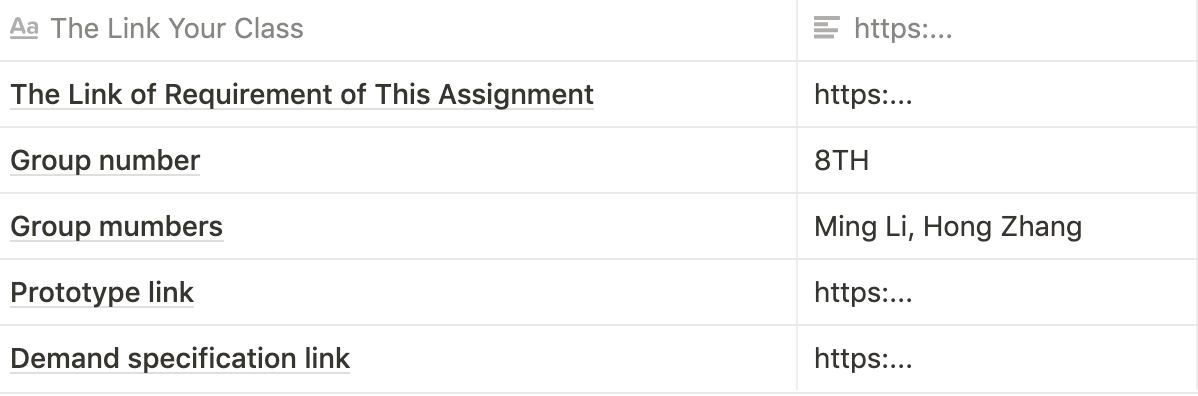
The code is as follows:
|The Link Your Class|<concrete link>|
|-- |-- |
|The Link of Requirement of This Assignment|<concrete link>|
|Group number | |
|Group mumbers | |
|Prototype link | |
|Demand specification link | |
- Record the project PSP of the operation, including actual time consumption and participants.
- Simple introduction project(a brief introduction and the product structure drawing)
- Other Details
- What are the main difficulties in advancing the project?
- What do you have to do for this issue?
- How do you solve it?
- What gains you have?
- Team collaboration record(part4), such as meeting pictures,specification / prototype iterative record table.
part 4.Team collaboration record (10)
- this part can be added to your team Blog
Tips
- Picture used software drawing tool is more professional, drawing as simple as possible.
- The content of Blog should be as rich as possible, using the map, table enhances the visual effect of the article.
- Please pay attention to the consistency problem.TAs will check whether the requirement analysis corresponds to the plan given last week.
相关推荐
EE308 Lab7 Demand Analysis and Prototype Design
Lab 7 Demand Analysis and Prototype DesignFormat DescriptionPSPIntroduction of productOther DetailsMain difficultiesWhat do you have to do for this issue?How do you solve it?What gains you have?Team collaboration recordMeeting picturesspecification / proto
chrome-headless-shell-win32-159.0.8132.0(Canary).zip
chrome-headless-shell-win32-159.0.8132.0(Canary).zip
惠普150 联想1821 1831 1831W定影清零,转印带清零
惠普150 联想1821 1831 1831W定影清零,转印带清零,报错不打印,通过清零软件可以清除。内附使用说明。
【电液伺服执行器与PI控制器】带有PI控制器的电液伺服执行器的模拟研究(Simulink仿真实现)
内容概要:本文围绕带有PI控制器的电液伺服执行器开展模拟研究,利用Simulink工具构建系统仿真模型,深入分析PI控制器在电液伺服系统中的控制性能与动态响应特性。研究内容涵盖系统建模、PI控制参数整定、仿真结果分析等关键环节,重点探讨PI控制器对系统稳定性、响应速度及抗干扰能力的优化作用,并通过仿真验证控制策略的有效性与实用性; 适合人群:具备自动控制原理、液压传动基础知识及Simulink仿真能力的自动化、机械电子、控制工程等相关专业的高校学生、研究生及工程技术人员; 使用场景及目标:①用于自动控制类课程的教学实验或课程设计,帮助学生深入理解电液伺服系统的工作原理与典型控制方法;②应用于工业高精度执行机构的控制器设计,为实际工程中的系统优化提供理论支撑与仿真验证手段; 阅读建议:文中提供的Simulink模型与仿真流程具备良好的可复现性,建议读者结合具体工况调整PI参数,进一步探究PID或其他先进控制算法的改进效果,以深化对控制系统设计的理解与应用能力。
FYZN PcbDesigner.App.1.0.18.12-win10.rar
打开与保存 常用格式直接读写:打开、编辑、保存 .PcbDoc(含设计规则、层叠等信息)也能打开看结构 原理图文档:打开 / 新建 .SchDoc,和 PCB 文档一起在左侧项目树里管理,双击节点即可重开 另存为通用 ASCII:原理图与 PCB 都能导出为 ASCII 格式,方便文本比对、脚本处理,或交给别的流程 底图参考:需要对着图描的时候,可以给每个图层各放一张参考底图,与文件分开存 JSON,迁移工程时能一起带走 最近文件:最近打开的文件列表里可以直接右键「打开文件位置」 win10版本




