

 福州大学-软件工程EE308-2021秋

EE308 lab11
 墨衍会员 · AI 创作全网分发 墨衍智能分发 通过墨衍一键同步至各平台 可同步平台 CSDN微信公众号微博知乎掘金百家号博客园抖音小红书 你的文章也可以这样分发 墨衍会员 ¥399起/年,写一次发全网
我也要 关注 + 加入社区
墨衍会员 · AI 创作全网分发 墨衍智能分发 通过墨衍一键同步至各平台 可同步平台 CSDN微信公众号微博知乎掘金百家号博客园抖音小红书 你的文章也可以这样分发 墨衍会员 ¥399起/年,写一次发全网
我也要 关注 + 加入社区|
The Link Your Class
| |
|
The Link of Requirement of This Assignment | LAB 11 Software Testing-CSDN社区 |
|
The Aim of This Assignment |
Software Testing |
|
MU STU ID and FZU STU ID |
19105886-831902204 |
Preparation
Learn related knowledge about Junit Test for Java and Unittest for python. You can finish the following assignment or test Your Project.
Task
- Here are Junit Test task and Unittest task for choose. If you are good at Java , we suggest you choose the first one, if you are good at Python, then, the latter one.
- Follow the requests and tips, complete the test task .
Requirements
- You should be familiar with Junit Test or Unittest and the usage of these tools.Such as ‘assert, suite, timeout’, check problems for detail.
- Fix the missing codes according to requirement for every problem.
Tips:
@Parameters:Add this annotation to every method if it provide data. By the way, these methods must be static, return a Collection and receive no parameter.
P.S.: You must assign value for every field in the class no matter used or unused!
In Junit, you can use @RunWith and @parameter to pass parameters.
@RunWith:When a class annotated by @RunWith or when a class extends a base class which annotated by @RunWith,then Junit will run test through a runner pointed by the annotation.
The following is the code I use to test:
Junit Test
-
Junit assert
-
Related Knowledge: you can check the expected result and the real result of the method you test with the help of org.junit.Assert.
-
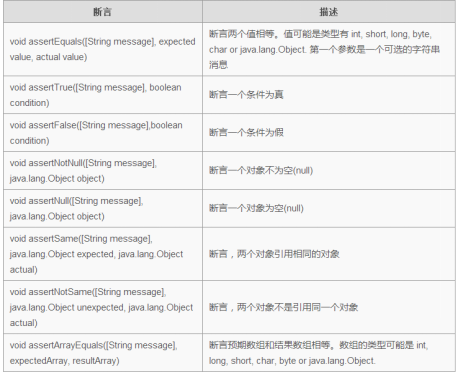
1.Junit assert
import static org.junit.Assert.*;
import org.junit.Test;
public class AssertionsTest {
	String obj1 = "junit";
	String obj2 = "junit";
	String obj3 = "test";
	String obj4 = "test";
	String obj5 = null;
	int var1 = 1;
	int var2 = 2;
	int[] arithmetic1 = { 1, 2, 3 };
	int[] arithmetic2 = { 1, 2, 3 };
	@Test
    public void test() {
	    // add assert test code between Begin and End, no other change allowed
	    /***********************Begin**************************/
        assertTrue(var1 < var2);
        assertFalse(obj4==obj5);
        assertEquals(obj1,obj2);
        assertSame(obj1,obj2);
        assertNotSame(obj1,obj3);
        assertArrayEquals(arithmetic1,arithmetic2);
        assertNotNull(obj1);
        assertNull(obj5);
        //assertTrue(var1 < var2); for example
	    /************************End***************************/
        }
}
import org.junit.Test;
public class TestTimeOut
{
    // Fix timeout assert in Test function below. Test fail if running 1000ms longer
    /***********************Begin**************************/
    @Test(timeout=1000)
    public void test()
     {
        int i = 0;
    	while(true)
        {
        	break;
        }
    }
    /************************End***************************/
}
.Junit parameterized test
Related knowledge:Junit parameterized test allows you test the same test with different parameters. Learning Junit parameterized test with five steps bellow.
- Annotate test class with @RunWith(Parameterized.class).
- Build a static method annotated by @Parameters, which retrun a set or an array of Objects as test data.
- Build a public construct method, which receives a parameter equals with test data.
- Build instance variable for every colum of test data.
- Build your test case with the instance as test data source.
In Junit, you can use @RunWith and @parameter to pass parameters. @RunWith:When a class annotated by @RunWith or when a class extends a base class which annotated by @RunWith,then Junit will run test through a runner pointed by the annotation.@Parameters:Add this annotation to every method if it provide data. By the way, these methods must be static, return a Collection and receive no parameter
import static org.junit.Assert.assertEquals; // static import
import java.util.Arrays;
import java.util.Collection;
import org.junit.Test;
import org.junit.runner.RunWith;
import org.junit.runners.Parameterized;
import org.junit.runners.Parameterized.Parameters;
import step1.Calculator;
/**
 * JUnit4 parameterized test
 */
@RunWith(Parameterized.class)
public class ParameterTest {
    private int input11;
    private int input22;
    private int expected;
    public ParameterTest(int input11, int input22, int expected){
        this.input11 = input11;
        this.input22 = input22;
        this.expected = expected;
    }
    @Parameters
    public static Collection prepareData(){
        /**
         *the type of the two-dimension array must be Object.
         *data in the two-dimension array is ready of test sub() in Calculator
         * every element in the two-dimension array should corresponds to position of parameters in construct method ParameterTest
         *let the third element equals the first subtract the second element according to parameters’ postion
         *fix missing codes under ‘Begin’ and above ‘End’,pass 4 groups of parameters to test sub method in Calculator is right or not
         *tip:only two lines of codes
         */
                    /*********************************Begin********************************************/
        Object[][] ages={{2,2,0},{0,1,-1},{0,1,-1},{3,1,2}};
		return Arrays.asList(ages);
        /**********************************End********************************************/
    }
    @Test
    public void testSub(){
        Calculator cal = new Calculator();
        assertEquals(cal.sub(input11, input22), expected);
    }
}
// Calculator.java Junit Parameterized Test
/**
 * Mathematical Calculation  subtract
 */
public class Calculator {
    public int sub(int a, int b) {
        return a - b;
    }
}
5.Junit Suite Test
Related knowledge:Suite Test means test a couple of test cases together. Precisely speaking, Using @RunWith and @Suite.
import static org.junit.Assert.*;
import org.junit.Test;
import org.junit.runner.RunWith;
import org.junit.runners.Suite;
import step3.Calculate;
import step3.CalculateTest;
import step3.Car;
import step3.CarTest;

/*
add two lines of annotations. Implement Suite Test of CalculateTest and CarTest
Suite Test codes must next to Class SuiteTest, no shift allowed!
*/
//**************************************************************
@RunWith(Suite.class)
@Suite.SuiteClasses({ CalculateTest.class, CarTest.class})
public class SuiteTest {
    @Test
    public void testPrint() {
        System.out.println("The result of CalculateTest");
assertEquals(24, result);
System.out.println("The result of CarTest");
assertEquals(4, result);
    }
}

//Calculate.java
public class Calculate {
    public int add(int a, int b) {
        return a + b;
    }
}

//CalculateTest.java
public class CalculateTest {
    Calculate calculate;
    @Before
    public void setUp() throws Exception {
        calculate = new Calculate();
    }
    @Test
    public void testAdd() {
        int result = calculate.add(12, 12);
        assertEquals(24, result);
}
}

//CarTest.java
public class CarTest {
    Car car;
    @Before
    public void setUp() throws Exception {
        car = new Car();
    }
    @Test
    public void testGetWheels() {
        int result = car.getWheels();
        assertEquals(4, result);
    }
}

//Car.java
public class Car {
    public int getWheels() {
        return 4;
    }
}
相关推荐
EE-308 LAB4 final version.7z
这是本次实验的压缩包
EE308-Lab11-Software Testing
unittest for Python
弱电网下光伏并网逆变器序阻抗建模仿真复现扫频法【序阻抗判断稳定性】
内容概要:本文聚焦于弱电网条件下光伏并网逆变器的序阻抗建模与稳定性分析,系统阐述了基于扫频法的阻抗特性仿真与复现方法。通过构建正负序阻抗模型,深入剖析逆变器在弱电网环境中的动态响应特性,结合锁相环、电流环等关键控制环节对系统阻抗的影响机制,采用序阻抗稳定性判据评估多机并网或复杂电网条件下的系统稳定裕度。研究在Simulink平台中实现激励信号注入、频率响应采集与阻抗曲线绘制,为高比例新能源接入背景下并网系统的稳定性分析提供了可靠的仿真手段与理论支撑,尤其适用于SCI级别论文成果的复现与拓展验证。; 适合人群:电力电子、新能源并网技术及相关领域的硕士/博士研究生、科研人员,以及从事光伏逆变器、微电网稳定控制开发的工程技术人员。; 使用场景及目标:①掌握扫频法在电力电子装置阻抗建模中的具体实施流程;②理解并应用基于序阻抗的稳定性判据进行系统稳定边界分析;③用于高水平学术论文(如SCI期刊)中阻抗建模与稳定性分析部分的仿真复现与方法验证; 阅读建议:建议读者结合文中所述方法与提供的参考文献,自主搭建Simulink仿真模型,逐步完成扰动信号设计、数据采集、傅里叶分析及阻抗拟合全过程,深入探究控制参数变化对系统阻抗特性和稳定性的具体影响,强化理论与实践的融合能力。
三相并网逆变器虚拟阻抗+统一有源阻尼策略SVPWM+SPWM调制仿真
内容概要:本文档系统性地介绍了三相并网逆变器的核心控制技术及其在复杂电网环境下的仿真应用,重点涵盖虚拟阻抗与统一有源阻尼策略在SVPWM和SPWM调制方式下的实现方法,旨在提升逆变器的稳定性与电能质量。内容包括无功功率扰动孤岛检测、中点电位平衡控制、低电压穿越(LVRT)、模型预测控制(MPC)、正负序分离、电网前馈控制等关键技术,并扩展至风储联合调频、微电网下垂控制、虚拟同步发电机(VSG)、构网型逆变器等多种典型电力系统应用场景。所有技术均配有基于Simulink/Matlab平台的完整仿真模型、参考文献及说明文档,强调理论分析与仿真实践的深度融合,突出科研中“借力”与创新思维的重要性。; 适合人群:电气工程、自动化、新能源等相关专业的研究生、科研人员及从事电力电子与可再生能源系统开发的工程师;具备MATLAB/Simulink仿真基础和电力系统专业知识的技术人员。; 使用场景及目标:①开展三相并网逆变器控制策略的研究与优化设计;②复现高水平学术论文中的控制算法;③完成毕业课题、科研项目或工程仿真验证;④掌握虚拟阻抗、有源阻尼、SVPWM/SPWM调制、MPC、VSG等核心技术的建模与实现方法;⑤支撑微电网、构网型变流器等前沿方向的科研攻关。; 阅读建议:建议按照资源目录结构化学习,优先选择与自身研究方向契合的内容模块,结合提供的仿真模型、参考文献和说明材料进行实操演练,注重从理论推导到仿真实现的全过程理解,充分利用共享网盘资源深化技术掌握,提升科研效率与创新能力。
chromedriver-win32-159.0.8133.0(Canary).zip
chromedriver-win32-159.0.8133.0(Canary).zip




