福州大学-软件工程EE308-2021秋

EE308 LAB9
 墨衍会员 · AI 创作全网分发 墨衍智能分发 通过墨衍一键同步至各平台 可同步平台 CSDN微信公众号微博知乎掘金百家号博客园抖音小红书 你的文章也可以这样分发 墨衍会员 ¥399起/年,写一次发全网
我也要 关注 + 加入社区
| The Link Your Class | https://bbs.csdn.net/forums/MUEE308FZ | |
| The Link of Requirement of This Assignment |
| |
| The Aim of This Assignment |
| |
| MU STU ID and FZU STU ID | 19105681 831901211 |
(i) List some actors that interact with this system. Explain the relevance of each actor.
Host: The person responsible for introducing and selling products
Customer: the person who wants to buy the product.
Merchant: one responsible for supplying goods
Administrator: the person responsible for checking whether there is any illegal behavior in the broadcasting room
II. Prepare a use case diagram for this system.
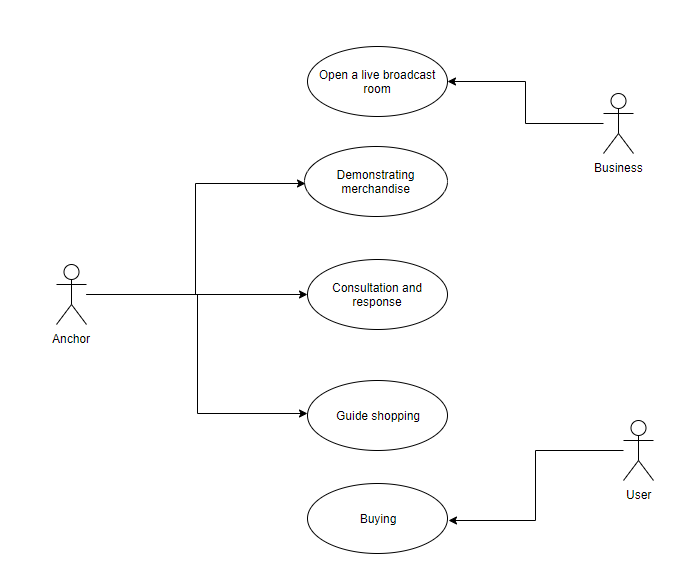
III. Prepare a normal scenario for each use case. (i.e. describe each use case in words)
1.Users bind their own identity information, log in the account to enter the studio. Here he can buy items in the shopping cart according to the recommended items of the anchor. At the same time, he can see the detailed logistics of the goods. On the payment interface, users can select payment methods such as wechat and Alipay and fill in their address information. Then you can place your order successfully. Upon arrival, if he is not satisfied, he can choose to return or exchange the goods.
2.The job of customer service is to reply some customer information on the platform, help customers better understand the product information, and deal with some after-sales services, such as helping customers to return or replace goods.
3.After gogging in to the system, anchors can open their own live broadcast studio, introduce their products in the live broadcast studio and recommend consumers to buy them.
IV.Prepare sequence diagrams or activity diagrams for primary scenarios. By the way, each scenario can be described by a sequence diagram or an activity diagram, but both diagrams must be used in this question.
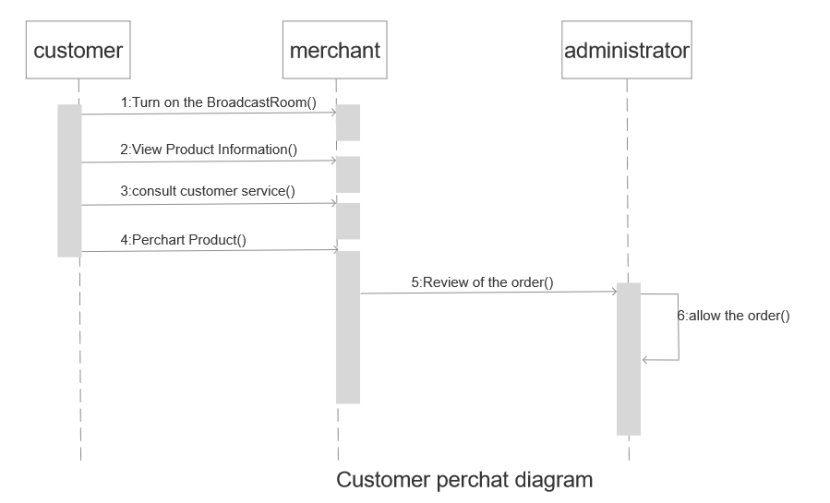
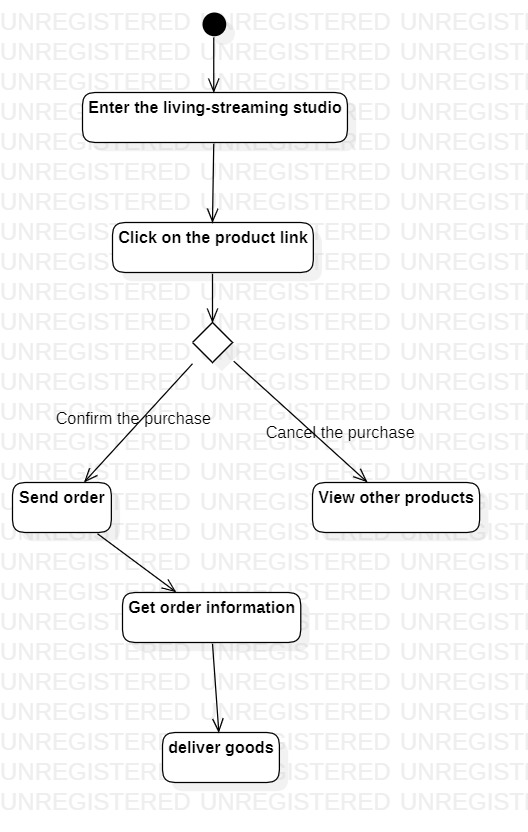
(v) Prepare a class diagram for this system. Explain which principles of object-oriented are applied in your design.
Your Answer:
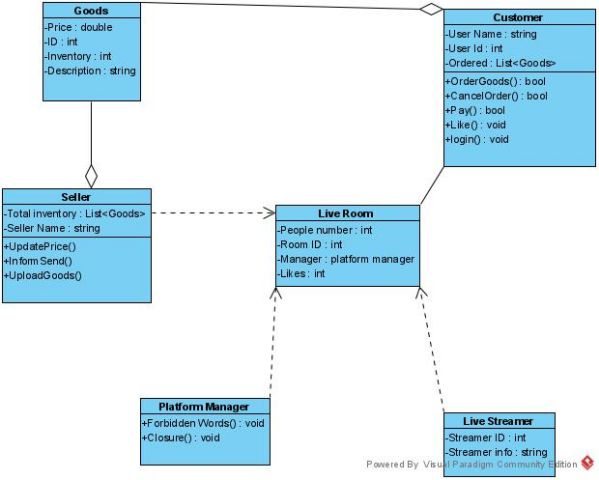
(6) Prepare state diagrams for primary classes.
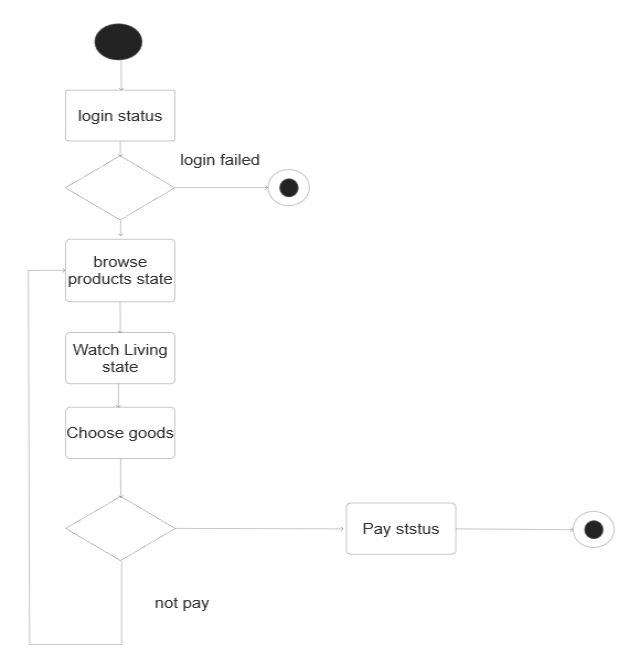
(vii) Write the skeleton code corresponding to the class diagram in C++, Java, Python, or C#.
public class Live {
class Customer{
String Name;
}
public boolean Login(String Name,String Password) {
return true;
}
public void AskCustomer() {
}
}
public void Discount() {
}
public void Buy() {
}
}
class NormalCustomer extends Customer{
public void Buy() {
}
public void TipStreamer() {
}
}
class NetworkAnchor{
String name;
int LiveNumber;
public void LiveStream() {
}
}
class CustomerService{
String name;
public void HelpCustomer() {
}
}
class Goods{
String GoodsName;
int Price;
int GoodsID;
}
class Administer{
String password;
public boolean Login(String Name,String Password) {
return true;
}
public void checkGoods() {
}
public void AddNewGoods(String GoodsName,int Price) {
}
public void RemoveGoods(String GoodsName) {
}
}
class LoginRegisterSystem{
int SequenceNumber;
boolean CheckUserName(String Name) {
return true;
}
}
}
相关推荐
EE-308 LAB4 final version.7z
这是本次实验的压缩包
EE308-Lab8-AlphaSprint-Day7
EE308-Lab8-AlphaSprint-Day7Feedback From Members1. Beichen, ZhouModulePersonal SummaryCode & Results2. Yuwei, JiangModulePersonal SummaryCode & Results3. Yifan, ZhuModulePersonal Summary4. Yifan, ShenModulePersonal SummaryCode & Results5. Shenk
【十万字拆解】从零开始实现GPT-2(完整版)
本文是一篇 14 万字、从零硬核实现 GPT 的保姆级指南。内容全面覆盖四个阶段:①从最基础的 Bigram 语言模型切入,跑通数据处理与训练闭环;②仿照 Transformer 架构,深度研究 Multi-Head Attention、残差网络、LayerNorm 及 Dropout 的底层数学与代码实现;③从零构建BPE 分词器,对齐 GPT-2 规范;④从头搭建 GPT-1/2 工业级预训练流程,包含混合精度、梯度累积等十余项硬件级工程调优,并在 AutoDL 算力平台上从0开始训练!适合所有层次!
【信息科学与工程学】【物理/化学科学和工程技术】知识体系073——电学基础04
。
好用免费猴PDM查阅器v1.7
# 好用免费猴PDM查阅器 一个用 Python 写的 **PowerDesigner `.pdm` 模型阅读器**:不用装 PowerDesigner,双击就能把 `.pdm` 里的表、字段、主键、索引、外键、注释全部摊开看,任意内容可直接复制,并一键导出 Excel / HTML / Markdown / 建表 DDL。 - **v1.7**:彻底修掉「再点表就覆盖已打开的 sheet」——已打开的表单独记成一份标签列表,和左侧「选中」不再共用状态,**筛选框找表后再点,永远是新开一个标签、绝不动已有的**;已打开的表在清单里显示为**绿色**,再点它是「切回那个标签」,`Ctrl`+单击才关掉 - **v1.6**:左侧清单**点一下就打开**(不用再按 Ctrl / Shift);启动默认进「标签页切换」;标签页开着 5 张以上时切「并排分屏」会自动弹窗让你挑要保留的 4 张 - **v1.5**:两种多表视图 ——「并排分屏」(≤4 栏,窄栏也显示全部列,Shift+滚轮 / 中键拖动可横向滚动)+「标签页切换」(像 Excel sheet 一样一个表一个标签,最多 12 个,看另一张表时其余自动隐藏);exe 图标改用 Windows 原生多尺寸设置,标题栏/任务栏不再被拉伸糊掉 - **v1.4**:多表分屏 —— 左侧按住 Ctrl / Shift 多选表,右侧每张表开一个独立面板并排展示(最多 4 个,各栏自动等宽),超了会弹窗让你自己挑;exe 换成新的像素猴子图标 - **v1.3**:打开过的文件会被记住,下次启动自动载入同一批模型并回到上次查看的表,不用每次重新选 - **v1.2**:新增程序内复制(任意表格框选 → Ctrl+C / 右键复制,支持 Tab 分隔与 Markdown) - 单文件实现,`pdm_viewer.py` 一个文件