


571
社区成员
 发帖
发帖 与我相关
与我相关 我的任务
我的任务
 分享
分享一、分布式编译概述
大型项目中,文件十分多,编译往往需要耗费几十分钟甚至多个小时,对于开发人员来说是难以忍受的的。为了加快编译速度,分布式编译就应运而生。分布式编译的主要思想将原来编译过程从串行改为并行,借助分布式协作的思想,运用多台机器同时编译一个项目,将项目中没有依赖关系的工程通过网络划分给多台机器编译,编译完后再进行整合,从而能够有效的把编译时间缩短到可接受的范围。
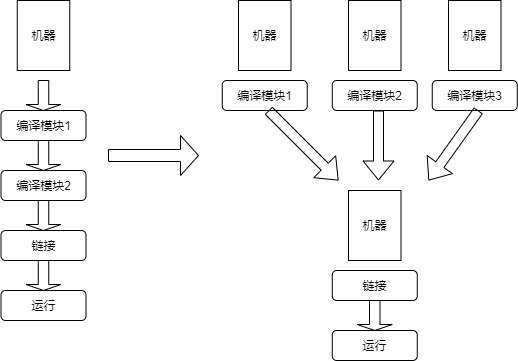
但是需要注意的是,分布式编译一般借助并发来加大编译吞吐量,而无法减少单个文件的编译时间,所以,对于无法并发编译的工程,除非命中缓存,否则分布式编译通常不能加快编译,反而可能有负面效果。
当前支持分布式编译的软件有许多,如Distcc、IncrediBuild、Ccache等。本文主要介绍Yadcc,它是由腾讯开源的工业级分布式 C++ 编译系统,用于支撑腾讯广告的日常开发及流水线,相比已有的同类解决方案,Yadcc针对实际的工业生产环境做了性能、可靠性、易用性等方面优化。
二、Yadcc基本概述
2.1、Yadcc基本原理
2.2 Yadcc相比其他分布式编译软件的改进之处以及特点
加入了中心调度节点,所有请求均由调度节点统一分配,低负载时可允许客户端尽可能提交更多的任务,集群满载时可阻塞新请求避免过载。
编译机与中心调度器定期心跳,调度器自动建立起编译器列表。中心的调度节点也避免了需要客户机感知编译集群的列表的需要,降低运维成本。
分布式编译缓存:大仓库开发模式下不同人之间可以共享缓存,避免不必要的重复编译。同时本地守护进程处会维护缓存的布隆过滤器,避免无意义的缓存查询引发不必要的网络延迟。
高效的哈希、压缩算法:Yadcc使用zstd进行压缩、blake3做密码学哈希、xxHash做普通哈希。这些算法相对于传统的gzip、sha256、murmur等有非常大的性能优势。如GCC使用-fdirectives-only预处理大约100MB/s的输出,如果使用大约400MB/s的SHA,就会有20%的CPU浪费在哈希上。
默认启用-fdirectives-only并静默重试,有效提升预处理速度。
预获取编译机以及批量获取编译机:在监测到有编译任务之后,会提前预取一个编译机,这类似于在做性能优化时常用的预取优化。同时,如果有多个任务堆积也会批量获取编译机。
使用本地守护进程控制并发度。每个编译节点都会和本地守护进程通信,将“不可分布式”的任务(如链接)的本地并发度控制在一个合理的范围内。当本地编译任务过多时需要排队等待,防止本地负载过大,耗尽内存。
yadcc集群中,各个机器即可以提交编译任务请求,也会在空闲时贡献一部分CPU来编译网络上的任务。
支持多版本编译器,可以指定特定版本编译器编译。同时通过编译器哈希区分版本,这允许编译集群中存在多个不同版本的编译器。(如腾讯的广告集群中同时存在GCC7/8/9/10)。
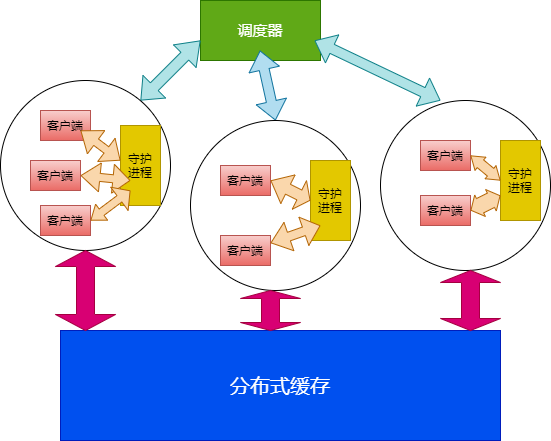
2.3 整体设计
调度器:统揽全局,负责任务分发;
编译缓存:全局共享,防止重复编译,提升速度;
守护进程:同时包含如下两种角色,具体是哪种取决于实际部署,一台机器可能同时身兼两种职责,也可能只作为客户机或只作为编译机。
客户端本地守护进程,用于控制本地并发度、查询缓存、获取编译机、提交任务等;
编译机守护进程,用于接受网络上的任务,执行编译。
客户端:伪装成编译器,截获编译任务并通过yadcc分发出去进行分布式编译。
2.4、Yadcc的不足之处
yadcc的外界负载过高)导致分发上去的任务编译缓慢,成为关键路径拖慢整体编译。三、Yadcc的部署和测评
3.1 系统要求
yadcc需要 GCC 8 及以上版本的编译器,基于yadcc进行分布式编译时可以支持其他更低版本编译器。3.2 开始使用
1、首先克隆yadcc到本地,需要git submodule update拉取flare,由于flare代码仓库需要git-lfs支持,因此还需要安装git-lfs
git clone https://github.com/Tencent/yadcc
cd yadcc
git submodule init
git submodule update .
2、由于Yadcc自带了必要的第三方库,因此通常不需要额外安装依赖,直接编译yadcc
./blade build yadcc/...
3、用一台机器启动调度器服务,更多命令参数可参考调度器文档
./yadcc-scheduler --acceptable_tokens=some_fancy_token
4、可在一台机器上选择开启共享缓存服务,加速编译。更多命令参数可参考缓存服务器文档
./yadcc-cache --acceptable_tokens=some_fancy_token
5、启动守护进程,位于yadcc/daemon/yadcc-daemon,不需要root权限,更多命令参数可参考守护进程文档
./yadcc-daemon --scheduler_uri=flare://ip-port-of-scheduler --cache_server_uri=flare://ip-port-of-cache-server --token=some_fancy_token
6、整合构建系统。可选择软链接的方式,也可选择环境变量的方式。
1、创建目录~/.yadcc/bin、~/.yadcc/symlinks。
2、复制build64_release/yadcc/client/yadcc至~/.yadcc/bin。
3、创建软链接~/.yadcc/symlinks/{c++,g++,gcc}至~/.yadcc/bin/yadcc。
4、将~/.yadcc/symlinks加入PATH的头部。
执行完毕上述操作之后which gcc应当输出类似于~/.yadcc/bin/yadcc的结果。执行g++后调用的将是yadcc,并且有特殊逻辑来使得yadcc的行为“看起来像”一个真实的GCC编译器。
部分构建系统(如blade / cmake等)在监测到用户覆盖了CXX / CC / LD变量时,会使用用户指定的命令行来编译,如
CXX='/path/to/yadcc g++' CC='/path/to/yadcc gcc' LD='/path/to/yadcc g++' ./blade build //path/to:target -j500
3.3 测评
(数据来自性能对比)
任务:编译源代码llvm-project-11.0.0.tar.xz
本地结果:
[6124/6124] Linking CXX executable bin/opt

real	47m51.414s
user	356m17.391s
sys	    23m25.461s
分布式编译结果(分布式256并发,本地4并发):
[6124/6124] Linking CXX executable bin/clang-check

real	3m11.292s
user	16m48.304s
sys	    4m24.946s
可以看到速度有很大提升。
四、yadcc源代码分析
4.1 yadcc源代码布局
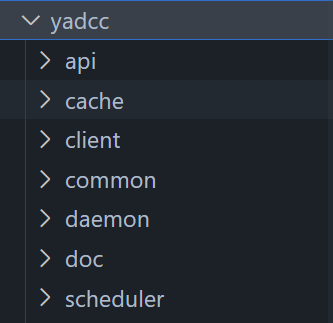
cache文件夹保存共享缓存代码,client文件夹保存客户端代码,common文件夹保存通用代码,daemon文件夹保存本地守护进程代码,schedule文件夹保存中心调度器代码。
4.2 中心调度器分析
调度器具备全局视图,负责将各个编译任务关联到一台编译机。用一个结构体TaskAllocation表示编译任务与编译节点的关联。
struct TaskAllocation {

  std::uint64_t task_id;

  // IP:port of the servant.
  std::string servant_location;
};
调度器定期收到各编译系统的心跳,确定它们的存活,以及建立编译器列表,该逻辑在以下函数中实现。
void SchedulerServiceImpl::Heartbeat(const HeartbeatRequest& request,
                                    HeartbeatResponse* response,
                                    flare::RpcServerController* controller)
收到心跳,构建起编译节点类,即ServantPersonality 类。设置好servant的各种属性,如版本、负载、位置、优先级等。
 // 收到心跳,构建编译节点
  ServantPersonality servant;
  servant.version = request.version();
  servant.observed_location = observed_location;
  servant.reported_location = reported_location;
  servant.current_load = request.current_load();
  servant.num_processors = request.num_processors();
  if (servant.num_processors == 0) {
    // Older daemon does not report number of processors present, so fake a
    // value here.
    servant.num_processors = request.capacity();
  }
  servant.total_memory_in_bytes = request.total_memory_in_bytes();
  servant.memory_available_in_bytes = request.memory_available_in_bytes();
  servant.priority = request.servant_priority();
  if (servant.priority == SERVANT_PRIORITY_UNKNOWN ||
      !ServantPriority_IsValid(servant.priority) /* How come? */) {
    // Older servant. Default to "user" then.
    servant.priority = SERVANT_PRIORITY_USER;
  }
  servant.max_tasks = request.capacity();
  servant.not_accepting_task_reason = request.not_accepting_task_reason();
  if (observed_location != reported_location) {
    servant.max_tasks = 0;
    servant.not_accepting_task_reason = NOT_ACCEPTING_TASK_REASON_BEHIND_NAT;
  }
  for (auto&& e : request.env_descs()) {
    servant.environments.push_back(e);
  }

  if (expires_in == 0ns) {
    servant.max_tasks = 0;
  }
在调度器中标记该servant为存活,后续可以发送编译任务。
  TaskDispatcher::Instance()->KeepServantAlive(servant, expires_in);

  // All tokens that are possibly alive should be accepted by the servants.
  for (auto&& e : DetermineActiveServingDaemonTokens()) {
    response->add_acceptable_tokens(e);
  }
调度器等待编译任务到来,然后调度给各个编译系统,逻辑在下列函数中实现。
std::optional<TaskAllocation> TaskDispatcher::WaitForStartingNewTask(
    const TaskPersonality& personality, std::chrono::nanoseconds expires_in,
    std::chrono::nanoseconds timeout, bool prefetching)
首先判断有没有可用的servant,yadcc的调度算法策略如下:
优先考虑专有编译机。专有编译机负载不超过50%时任务始终分配至专有编译机。
除非没有其他机器,尽量避免将负载分配至提交任务的机器:这允许提交任务的机器有更多的CPU资源进行预处理。
为避免某些机器自身已有负载过高而导致新分配的编译任务执行过慢,调度算法会考虑参与编译任务的机器负载。如果机器空闲CPU少于机器本身所能接受的最大任务数,则以较小值作为“实际能接受的最大任务数”。
在剩余可选机器中尽量保证各个机器的编译负载(任务数/实际能接受的最大任务数)均衡。
std::unique_lock lk(allocation_lock_);
  std::vector<ServantDesc*> servants_eligible;
  if (!allocation_cv_.wait_for(lk, timeout, [&] {
        servants_eligible = UnsafeEnumerateEligibleServants(personality);
        return !servants_eligible.empty();
      })) {
    return std::nullopt;
  }
找到一个可用的servant后,分配一个task给它,并建立起task与servant之间的关联
  auto task_id = tasks_.next_task_id.fetch_add(1, std::memory_order_relaxed);
  FLARE_CHECK_EQ(tasks_.tasks.count(task_id), 0);
  auto&& task = tasks_.tasks[task_id];
  task.task_id = task_id;
  task.personality = personality;
  task.belonging_servant = flare::RefPtr(flare::ref_ptr, pick);
  task.started_at = flare::ReadCoarseSteadyClock();
  task.expires_at = flare::ReadCoarseSteadyClock() + expires_in;
  task.is_prefetch = prefetching;

  return TaskAllocation{
      .task_id = task_id,
      .servant_location = pick->personality.observed_location};
4.3 守护进程代码分析
守护进程会启动其他yadcc服务程序,并且在后台监听各种网络请求。如编译任务请求将会提交给本地守护进程再由守护进程请求调用调度器处理。如果守护进程收到终止信号,则会安全结束所有服务。
int main(int argc, char** argv) {
  return flare::Start(argc, argv, yadcc::daemon::DaemonStart);
}
int DaemonStart(int argc, char** argv) {
  ...

  // Initialize the singletons early..
  cloud::InitializeSystemInfo();
  (void)cloud::CompilerRegistry::Instance();
  (void)cloud::DistributedCacheWriter::Instance();
  (void)local::DistributedCacheReader::Instance();
  (void)local::DistributedTaskDispatcher::Instance();
  (void)local::LocalTaskMonitor::Instance();

  ...

  local_daemon->ListenOn(  // Or perhaps we can use a UNIX socket?
      flare::EndpointFromIpv4("127.0.0.1", FLAGS_local_port));
  auto serving_daemon = std::make_unique<flare::Server>();
  cloud::DaemonServiceImpl daemon_svc(
      flare::Format("{}:{}", GetPrivateNetworkAddress(), FLAGS_serving_port));
  // FIXME: What about IPv6?
  serving_daemon->AddProtocol("flare");
  serving_daemon->AddService(&daemon_svc);
  serving_daemon->AddHttpFilter(MakeInspectAuthFilter());
  serving_daemon->ListenOn(
      flare::EndpointFromIpv4("0.0.0.0", FLAGS_serving_port));

  // Start our server.
  server_group.AddServer(std::move(local_daemon));
  server_group.AddServer(std::move(serving_daemon));
  server_group.Start();

  // Wait until asked to quit.
  flare::WaitForQuitSignal();

  // Stop accessing new requests.
  server_group.Stop();
   // Flush running tasks.
  cloud::ExecutionEngine::Instance()->Stop();
  cloud::DistributedCacheWriter::Instance()->Stop();
  local::DistributedTaskDispatcher::Instance()->Stop();
  local::DistributedCacheReader::Instance()->Stop();
  daemon_svc.Stop();

  cloud::ExecutionEngine::Instance()->Join();
  cloud::DistributedCacheWriter::Instance()->Join();
  local::DistributedTaskDispatcher::Instance()->Join();
  local::DistributedCacheReader::Instance()->Join();
  cloud::ShutdownSystemInfo();
  daemon_svc.Join();

  server_group.Join();

  quick_exit(0);  // BUG: For the moment we don't exit cleanly.
  return 0;
}
4.4 缓存服务源代码分析
yadcc将缓存服务设计成L1、L2两层。
L1缓存基于内存,缓存热点数据,并采用一定淘汰策略保持大小可控。
L2缓存为了便于系统今后方便扩展,适应更多存储方案,yadcc抽象了底层存储引擎实现。当以后需要其他存储方案时,可以快速实现一套底层存储方案,并通过修改配置选择对应的存储方案,并不需要修改核心逻辑。
缓存接口主要实现了Get和Put方法:
// Get all of the keys the cache will hold.
  virtual std::vector<std::string> GetKeys() const = 0;

  // Try get the entry of the key, if cache hit.
  virtual std::optional<flare::NoncontiguousBuffer> TryGet(
      const std::string& key) const = 0;

  // Put an entry of the key into cache.
  virtual void Put(const std::string& key,
                   const flare::NoncontiguousBuffer& bytes) = 0;
4.5 common源代码分析
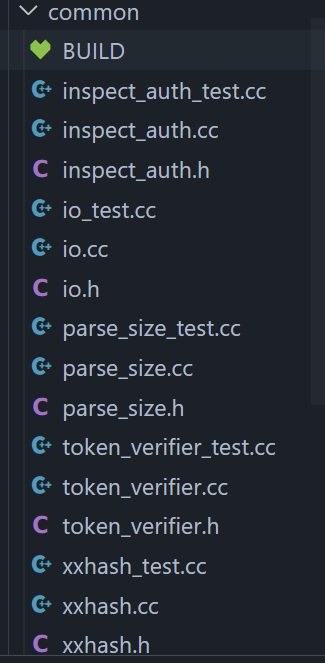
common文件夹内主要包含了网络请求、token封装、具体逻辑处理、哈希函数实现等代码。
4.6 client源代码分析
客户端主要负责调用编译器进行预处理并压缩,并将预处理的结果及其他一些信息(如源代码的BLAKE3哈希)传递给守护进程进行处理。
客户端调用守护进程
DaemonResponse DaemonCall(const std::string& api,
                          const std::vector<std::string>& headers,
                          const std::string& body,
                          std::chrono::nanoseconds timeout) {
  std::array<char, kMaxHeaderSize> stack_buffer;
  std::unique_ptr<char[]> dyn_buffer;
  auto&& [header, size] =
      WritePostHeader(api, headers, body.size(), &stack_buffer, &dyn_buffer);

  auto fd = OpenConnectionTo(GetOptionDaemonPort());
  if (fd == -1) {
    return DaemonResponse{.status = ERROR_FAILED_TO_CONNECT};
  }
  SetNonblocking(fd);

  // Write header & body.
  auto abs_timeout = ReadCoarseSteadyClock() + timeout;
  if (!TimedWrite(fd, header, size, abs_timeout) ||
      !TimedWrite(fd, body.data(), body.size(), abs_timeout)) {
    PCHECK(close(fd) == 0);
    return DaemonResponse{.status = ERROR_FAILED_TO_WRITE};
  }

  // Read response.

  auto result = ReadDaemonResponse(fd, abs_timeout);
  PCHECK(close(fd) == 0);
  return result;
}
编译文件参数类,表示编译文件的各种命令行参数
class CompilerArgs {
 public:
  using OptionArgs = Span<const char*>;

  // Parse compiler args. It's your responsibility to make sure `argv` is not
  // modified after this class is instantiated.
  CompilerArgs(int argc, const char** argv);

  // Get compiler binary name.
  const char* GetCompiler() const noexcept { return compiler_.c_str(); }

  // Override compiler binary name (or path).
  void SetCompiler(std::string path) noexcept { compiler_ = std::move(path); }

  const std::vector<const char*>& GetFilenames() const noexcept {
    return filenames_;
  }
主要逻辑代码
int Entry(int argc, const char** argv);
首先构建编译命令类,设置需要用的编译器版本
auto not_using_symlink = EndsWith(argv[0], "yadcc");
  auto bias = not_using_symlink ? 2 : 1;
  CompilerArgs args(argc - bias, argv + bias);

  if (not_using_symlink && argv[1][0] == '/') {
    // Respect user's choice if absolute path is specified.
    args.SetCompiler(argv[1]);
  } else {
    // Otherwise we need to determine absolute path of the compiler ourselves.
    args.SetCompiler(FindExecutableInPath(
        GetBaseName(argv[bias - 1]), [](auto&& canonical_path) {
          // We need the *real* compiler, not some wrapper. Otherwise the
          // compiler's digest will be wrong, and no matching compiler will be
          // found in the cluster.
          //
          // Besides, I don't expect them to be beneficial (if not harmful) to
          // us.
          return !EndsWith(canonical_path, "ccache") &&
                 !EndsWith(canonical_path, "distcc") &&
                 !EndsWith(canonical_path, "icecc");
        }));
  }
  LOG_TRACE("Using compiler: {}", args.GetCompiler());
判断是否需要发送到编译集群编译
bool IsCompilerInvocationDistributable(const CompilerArgs& args);
判断是否是轻量级任务,如果是,可以直接在本地编译完成,无需分布式编译
bool IsLightweightTask(const CompilerArgs& args);
预处理编译文件
auto rewritten = RewriteFile(args);
开始通过网络提交任务到集群,因为网络是不稳定的,所以设定最大重启次数。
   int retries_left = 5;
   while (true) {
    auto&& [ec, output, err, bytes] =
        // Preprocessed source is **moved** to `CompileOnCloud` so that it can
        // be freed there as soon as it's sent to our delegate daemon. This is
        // necessary to reduce our memory footprint. The preprocessed source
        // code is likely to be large (several megabytes, even after
        // compression.)
        CompileOnCloud(args, std::move(*rewritten));

    // Most likely an error related to our compilation cloud, instead of a
    // "real" compilation error.
    if (ec < 0 || ec == 127 /* Failed to start compiler at remote side. */) {
      // CAUTION: Do NOT leak `quota` out of the `if` below, or you risk
      // deadlocking (e.g., with `RewriteFile` below).
      if (auto quota = TryAcquireTaskQuota(false, 10s)) {
        LOG_INFO(
            "Failed on the cloud with [{}]. Failing back to local machine.",
            ec);
        // Local machine is free, failback to local compilation.
        return passthrough(quota);
      }

      // Local machine is busy then, if we haven't run out of retry budget yet,
      // try submitting this task to the compilation cloud again.
      if (retries_left--) {
        LOG_TRACE("Failed on the cloud with [{}], retrying.", ec);

        // `rewritten` was `move`d away when we call `CompileOnCloud`,
        // regenerate it.
        rewritten = RewriteFile(args);
        if (rewritten) {
          // Retry then.
          continue;
        }  // On-disk file changed? Rewrite failed this time. Fall-through then.
      }
    }
若达到最大重启次数,仍未成功
if (ec != 0) {
      LOG_DEBUG("Failed on the cloud with (stdout): {}", output);
      LOG_DEBUG("Failed on the cloud with (stderr): {}", err);
      if (ec == 1) {  // Most likely an error raised by GCC (source code itself
                      // is broken?). We don't print an error in this case.
        LOG_TRACE(
            "The compilation failed on the cloud with error [{}], retrying "
            "locally: {}",
            ec, args.Rebuild());
      } else {
        LOG_WARN("Unexpected exit code #{}. Retrying the compilation locally.",
                 ec);
      }
      return passthrough_acquiring_quota();
    }
客户端从main函数启动,调用Entry()函数
int main(int argc, const char** argv) {
  // Keep diagnostics language consistent across the compilation cluster.
  setenv("LC_ALL", "en_US.utf8", true);

  // Initialize logging first.
  yadcc::client::min_log_level = yadcc::client::GetOptionLogLevel();

  // Why do you call us then?
  if (argc == 1) {
    LOG_INFO("No compilation is requested. Leaving.");
    return 0;
  }

  // Let's rock.
  LOG_TRACE("Started");
  auto rc = yadcc::client::Entry(argc, argv);
  LOG_TRACE("Exited.");
  return rc;
}
五、参考
作者:NP299

